Year-to-Date Dollar Volume

About this chart

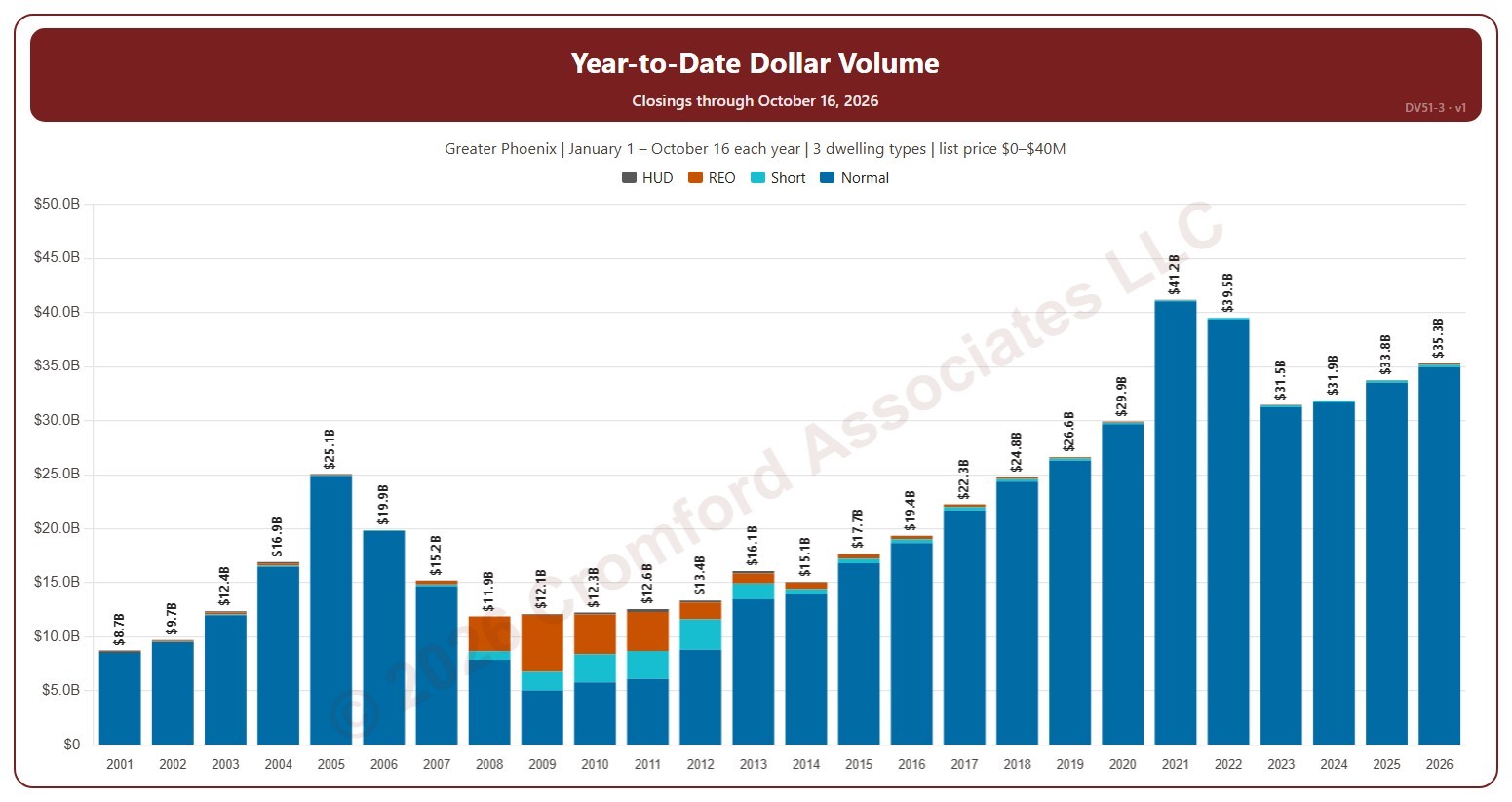
This chart compares the dollar volume of closings year to date: every year is cut to 1 January – the day of the latest closing, so this year so far can be read against the same days of earlier years. Dollar volume is the total of the sale prices of the homes that closed on ARMLS, each bar split by transaction type (normal, short sale, lender-owned, HUD).

It opens on 2001 to date; drag the handles of the date slider under the chart to choose the years shown, as far back as 2001. Use the Month box to count only some months of the year. The chart is updated every day.

It opens on the Greater Phoenix area: the counties, cities, and ZIP codes that make it up are ticked to start with. Tick or untick any of them to change the area, including counties beyond Greater Phoenix. Narrow it further with the Dwelling Type, Transaction Type, and New / Resale boxes and the list price, home size, and year built sliders.

Hover over a bar to see each transaction type and the year-to-date total.
Median Sales Price and Estimated Monthly Payment by Region

About this chart

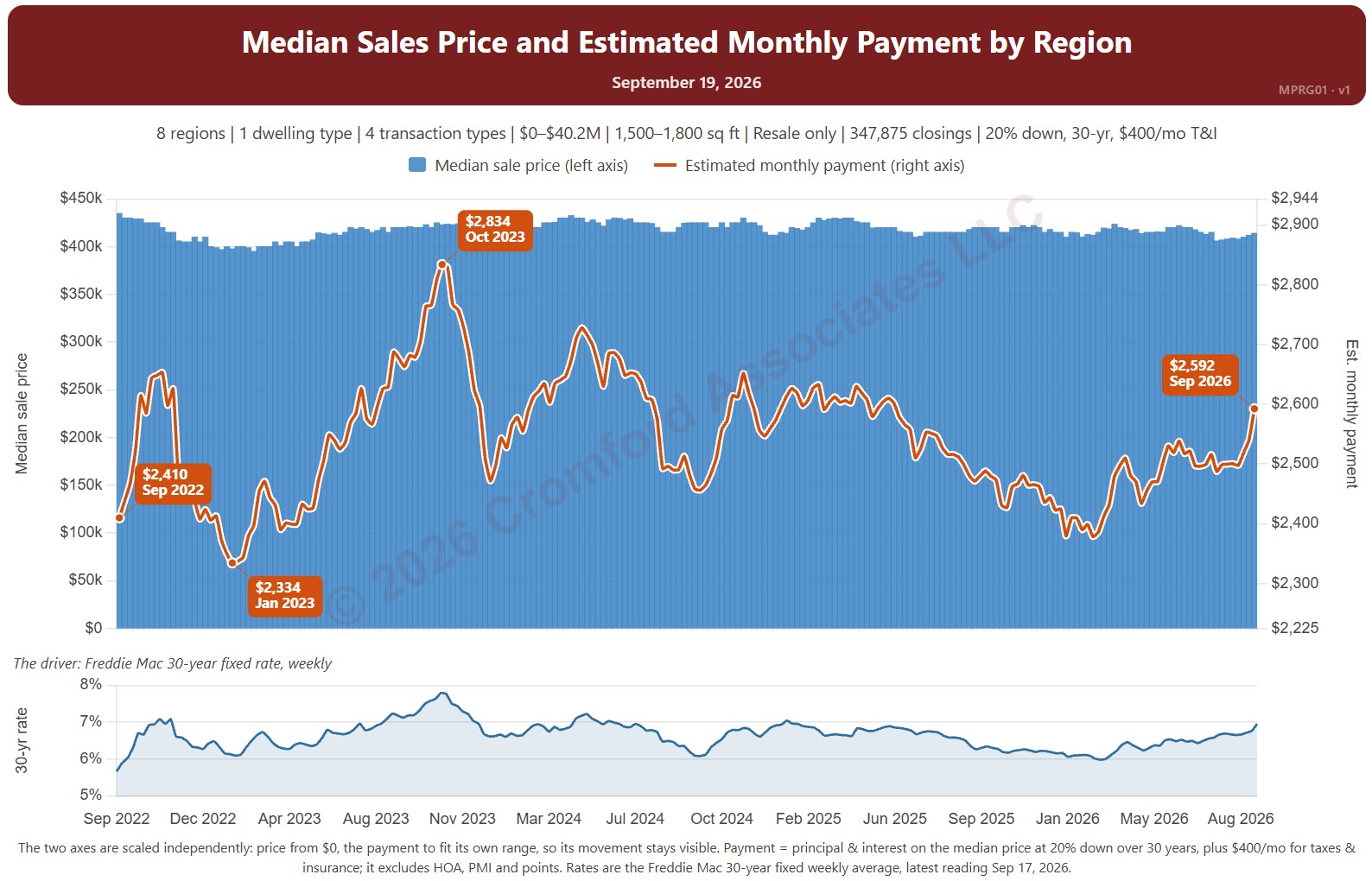
This chart sets the median sales price beside the estimated monthly payment needed to buy a home at that price, measured every week, with the 30-year fixed mortgage rate (Freddie Mac Primary Mortgage Market Survey®) in the panel below. It shows how affordability changes as both prices and rates move.

The default view is single-family resale homes of every size over the last four years. The payment assumes 20% down, a 30-year loan, and taxes and insurance of 1.2% of the sales price a year. The Payment panel changes the assumptions, and Reset assumptions puts them back.

It opens with every region included. Use the Region panel to focus on one region or compare a combination of them. Narrow it with the Dwelling Type, Transaction Type, and New / Resale boxes and the sales price and home size sliders. The 1 yr, 3 yr, 5 yr, 10 yr, and Full range buttons set the stretch of history shown.

Hover over the chart to see the figures for that week.

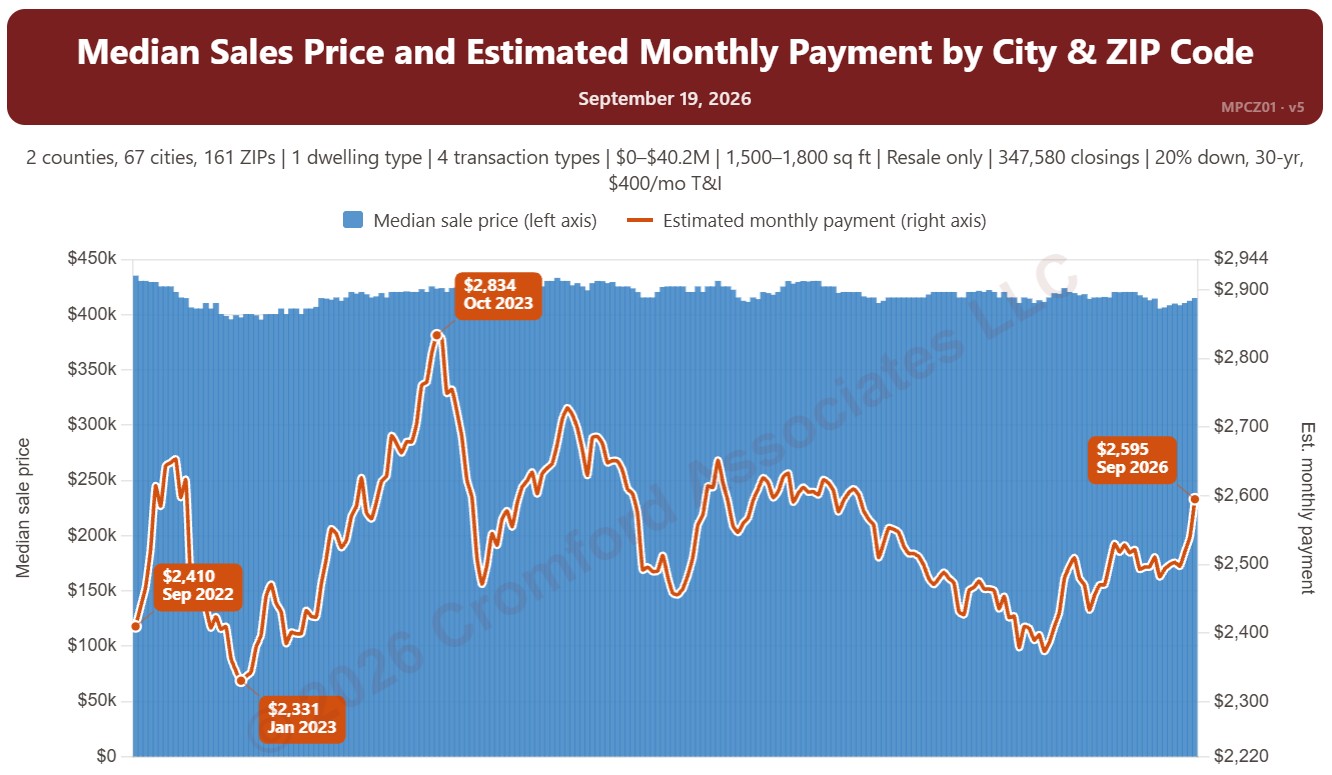
Median Sales Price and Estimated Monthly Payment by City and ZIP Code

About this chart

This chart sets the median sales price beside the estimated monthly payment needed to buy a home at that price, measured every week, with the 30-year fixed mortgage rate (Freddie Mac Primary Mortgage Market Survey®) in the panel below. It shows how affordability changes as both prices and rates move.

The default view is single-family resale homes of every size over the last four years. The payment assumes 20% down, a 30-year loan, and taxes and insurance of 1.2% of the sales price a year. The Payment panel changes the assumptions, and Reset assumptions puts them back.

It opens on Maricopa and Pinal Counties with every city and ZIP code included. Use the County, City, and ZIP panels to focus on any area, from a whole county down to a single ZIP code. Narrow it with the Dwelling Type, Transaction Type, and New / Resale boxes and the sales price and home size sliders. The 1 yr, 3 yr, 5 yr, 10 yr, and Full range buttons set the stretch of history shown.

Hover over the chart to see the figures for that week.

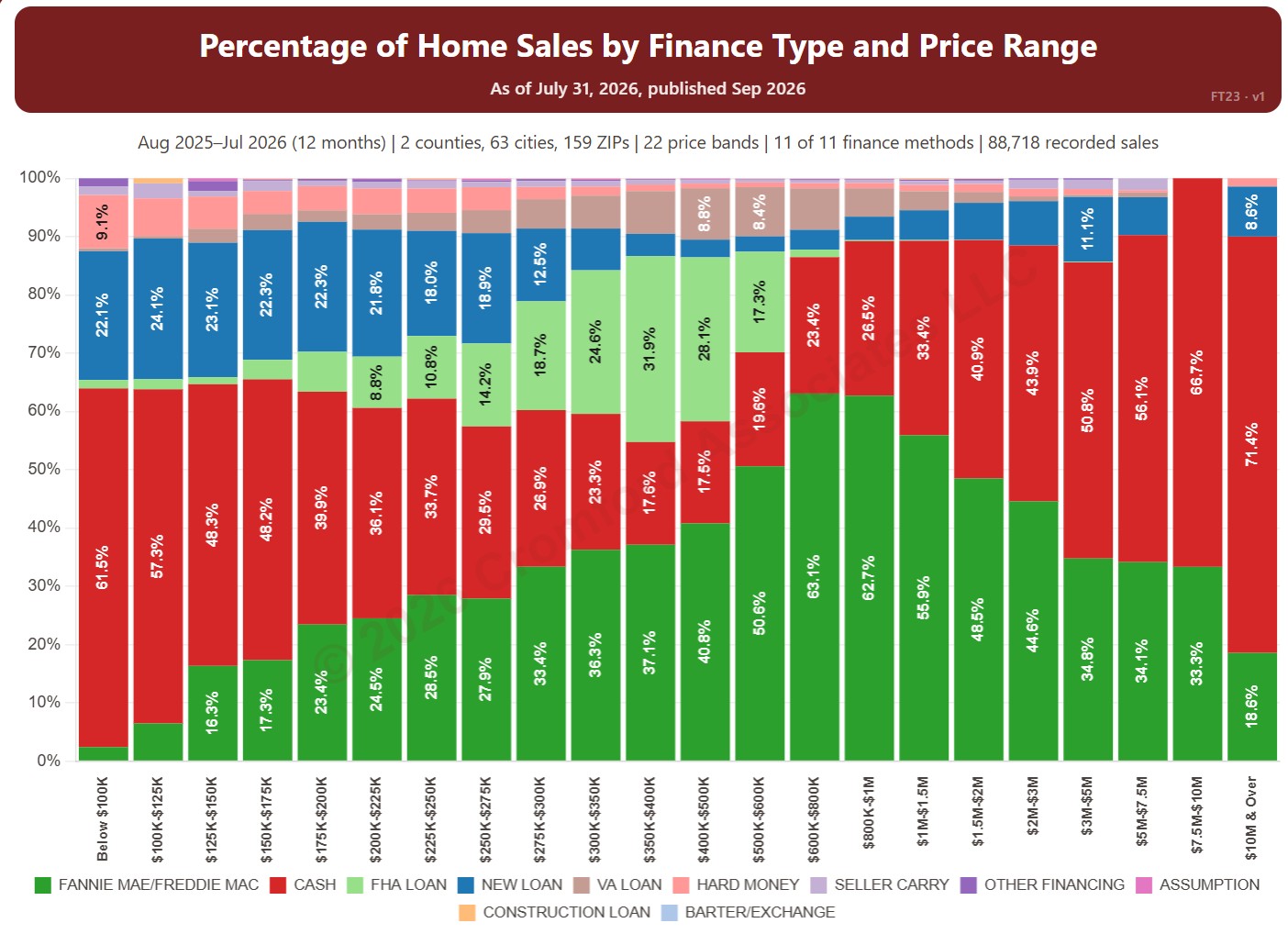
Percentage of Home Sales by Finance Type and Price Range

About this chart

This chart shows how homes were paid for in each of 22 price bands, from below $100K to $10M and over, from residential deeds recorded by Maricopa and Pinal Counties. Each bar adds up to 100% and is split by finance method, such as cash, Fannie Mae / Freddie Mac, FHA, and VA, so you can see how the way buyers pay changes with price.

It opens on the last 12 months of records; use the Recording Month slider to choose the months covered. It opens on Maricopa and Pinal Counties with everything included; narrow it with the County, City, and ZIP panels and the Property Type, 55+ Communities, Finance Method, Transaction Type, and Price Range boxes.

Hover over a bar to see each share for that price band.

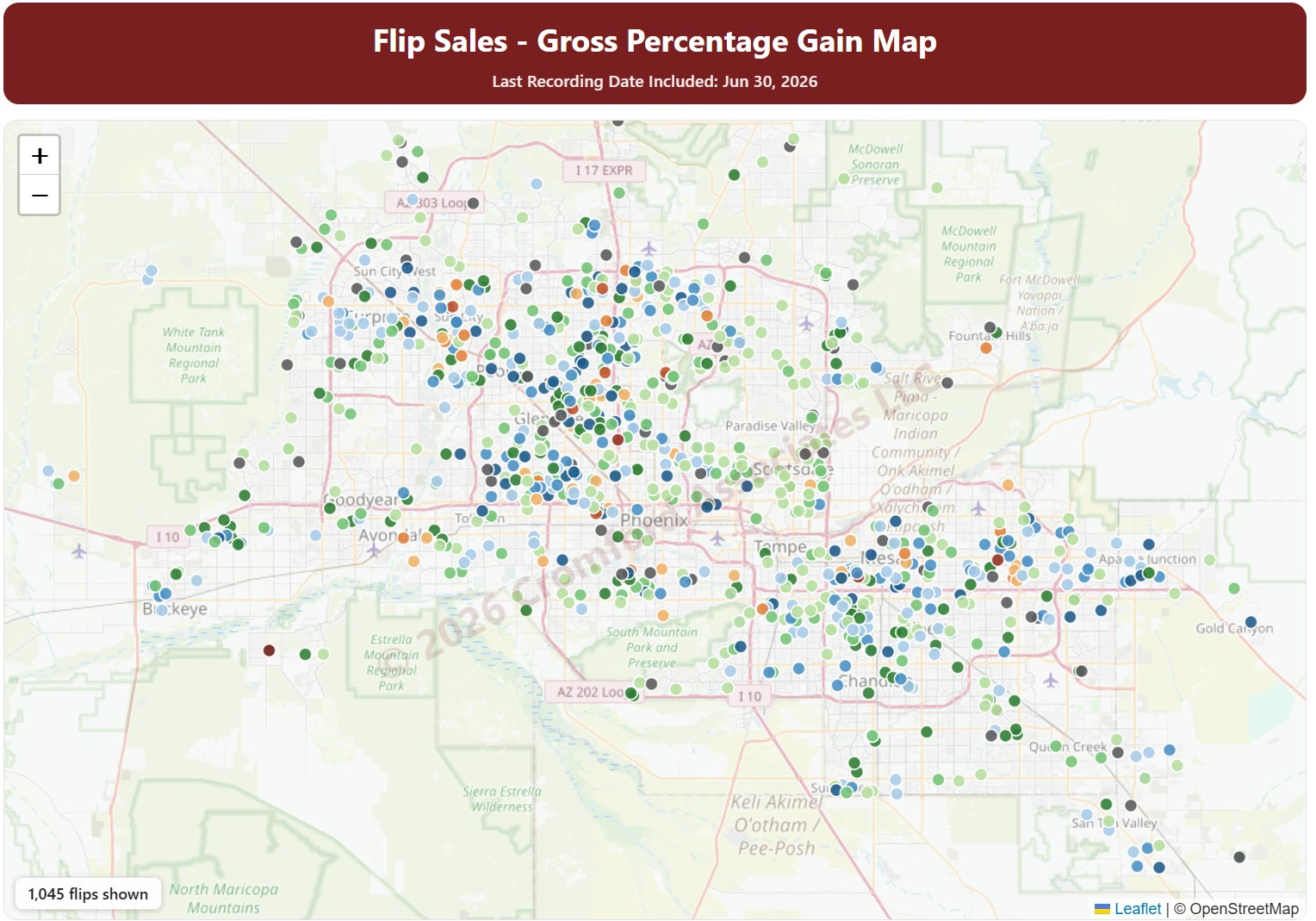
Flip Sales – Gross Percentage Gain Map

About this chart

This map shows fix-and-flip resales in Maricopa and Pinal Counties: homes bought, usually renovated, and resold by an investor. Each dot is one flip, colored by the gross percentage gain between the purchase price and the resale price.

Purchases by Opendoor and OfferPad are left out by default; tick them under Buyers to include them. Use the County, City, and ZIP Code panels and the Property Type, hold days, profit, and sales price filters to narrow the flips shown.

The Last Month, Last 3 Months, Last 6 Months, and Full range buttons, and the arrows, set the dates covered.

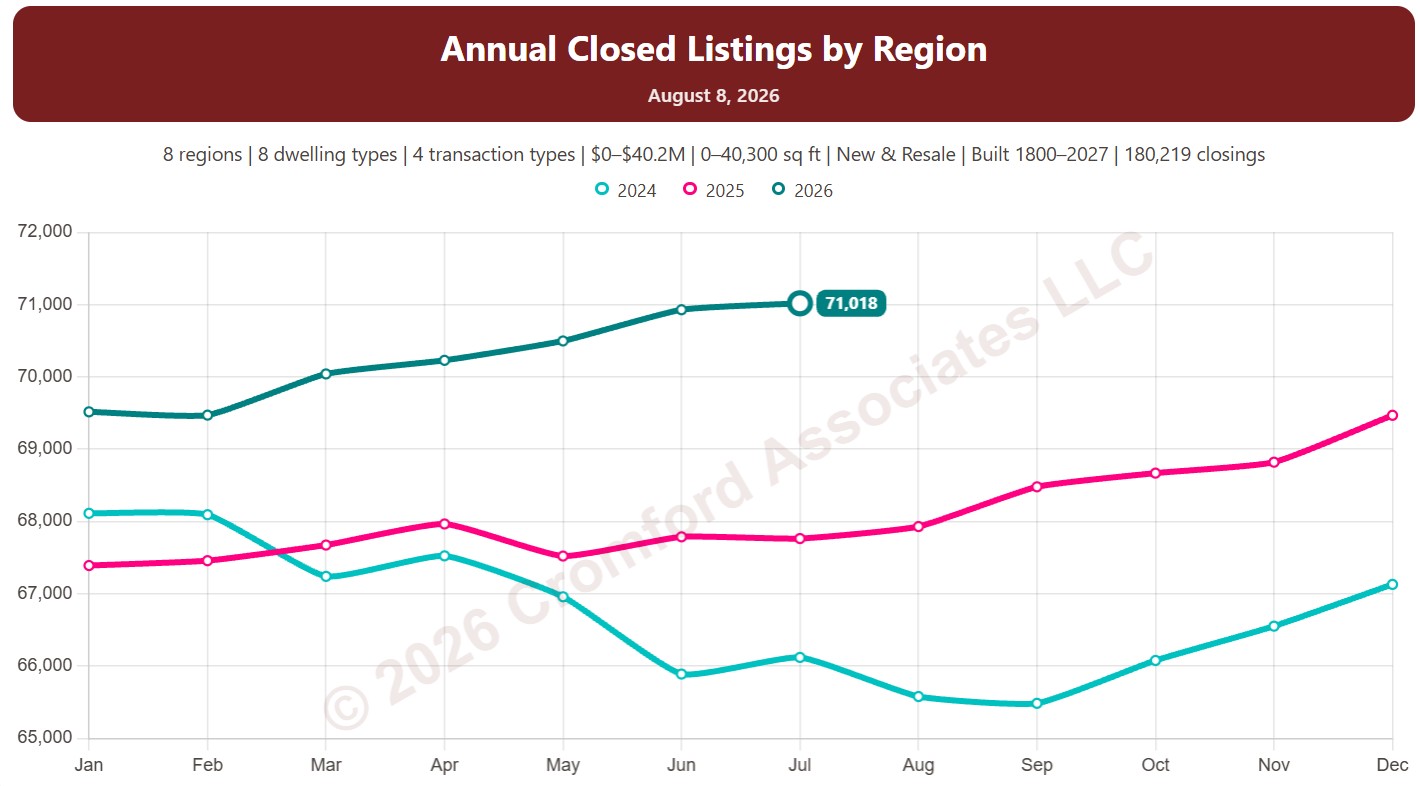
Annual Closed Listings by Region

About this chart

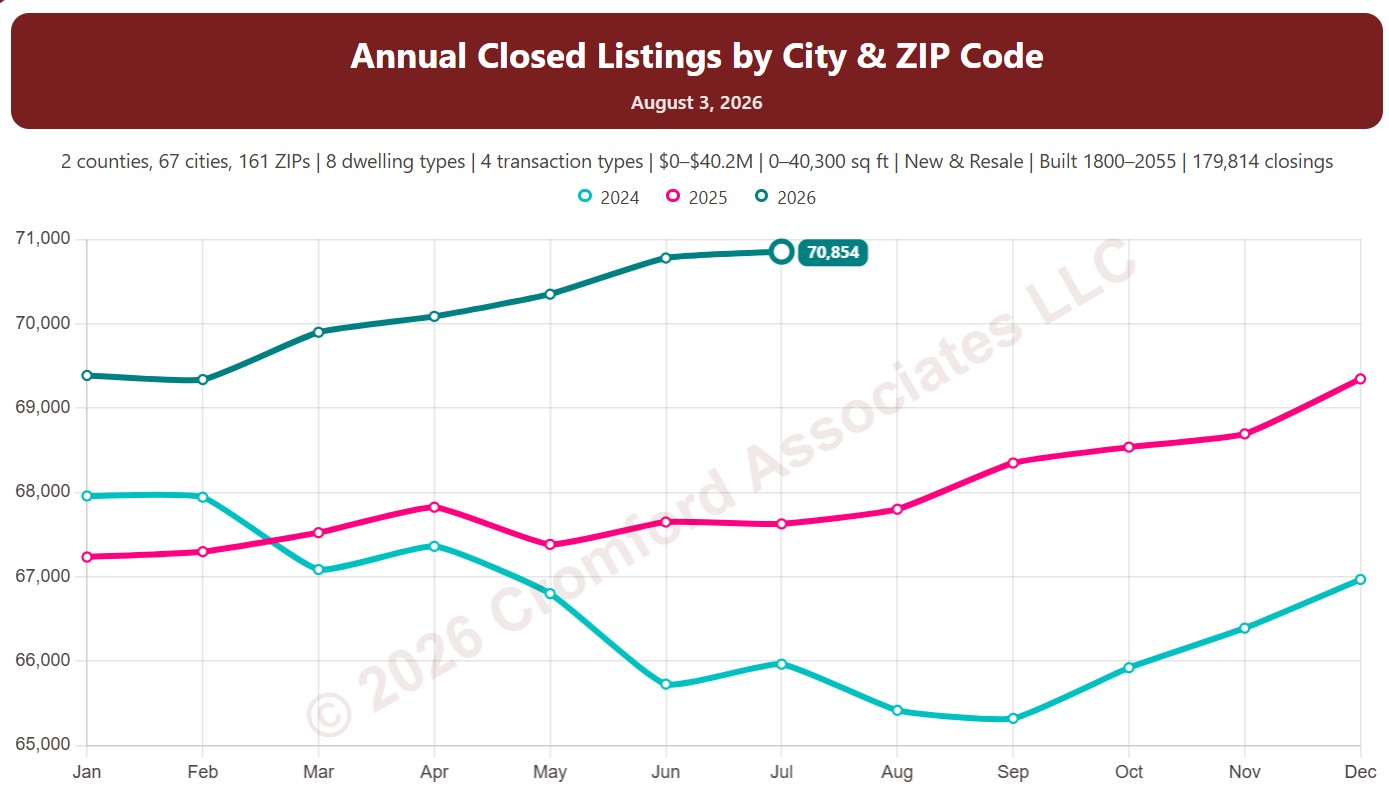
This chart counts the homes that closed through ARMLS over the last 12 months, measured on the 1st of every month, which smooths out the seasonal swings.

Each year has its own line, laid out by month of the year, so you can compare this year with earlier years at the same point in the season. It opens on the last three years; tick any year back to 2001 in the Year panel.

It opens with every region included. Use the Region panel to focus on one region or compare a combination of them. Narrow it with the Dwelling Type, Transaction Type, and New / Resale boxes and the sales price, home size, and year built sliders.

Hover over a line to see the exact figure for that month.

Annual Closed Sales by City and ZIP Code

About this chart

This chart counts the homes that closed through ARMLS over the last 12 months, measured on the 1st of every month, which smooths out the seasonal swings.

Each year has its own line, laid out by month of the year, so you can compare this year with earlier years at the same point in the season. It opens on the last three years; tick any year back to 2001 in the Year panel.

It opens on Maricopa and Pinal Counties with every city and ZIP code included. Use the County, City, and ZIP panels to focus on any area, from a whole county down to a single ZIP code. Narrow it with the Dwelling Type, Transaction Type, and New / Resale boxes and the sales price, home size, and year built sliders.

Hover over a line to see the exact figure for that month.

Median List Price per Square Foot by Region

About this chart

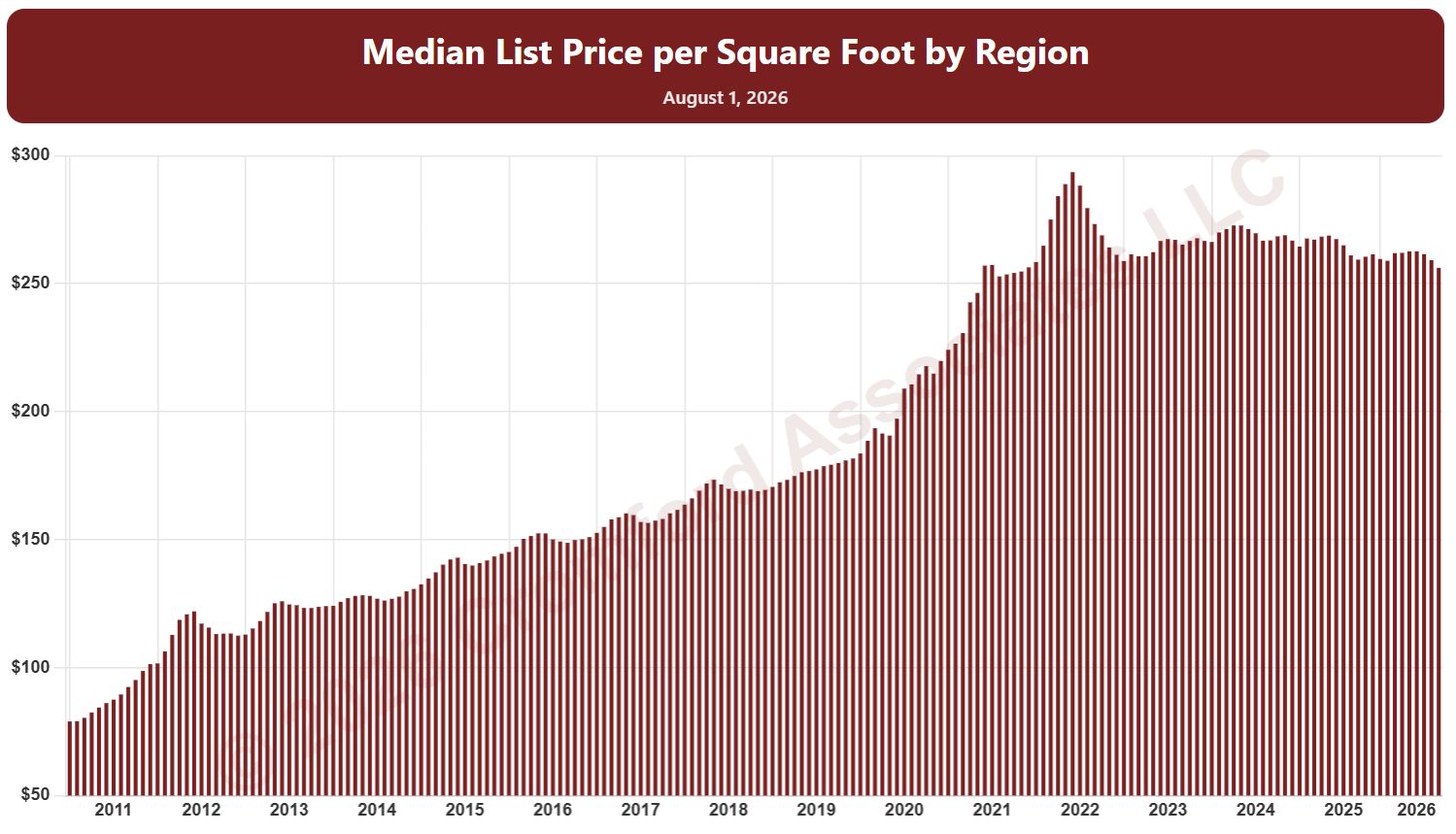
This chart shows the median list price per square foot of homes listed on ARMLS, measured on the 1st of every month since January 2011, as one bar per month. It shows what sellers are asking.

By default it covers Active listings. Tick Coming Soon, Pending, UCB / CCBS, or Temp Off Market in the List Status panel to look at those listings instead or as well.

It opens with every region included. Use the Region panel to focus on one region or compare a combination of them. Narrow it with the Dwelling Type, Transaction Type, List Status, and New / Resale boxes and the list price, home size, and year built sliders. The Inflation (CPI) option restates prices in today’s dollars using national or Phoenix inflation. Use the date slider, or Full range, to choose the stretch of history shown.

Hover over a bar to see the exact figure for that month.

Median List Price per Square Foot by City and ZIP Code

About this chart

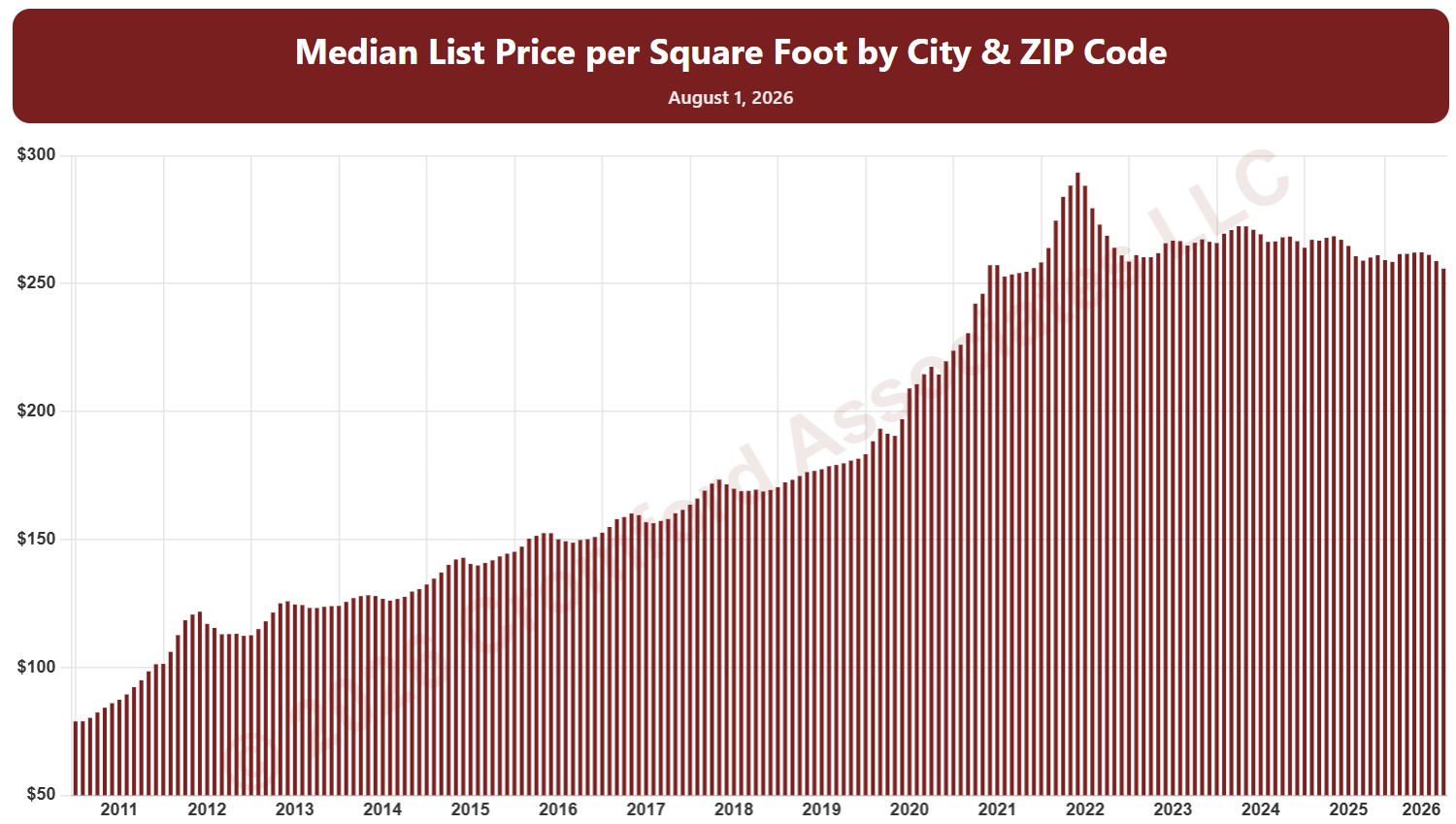
This chart shows the median list price per square foot of homes listed on ARMLS, measured on the 1st of every month since January 2011, as one bar per month. It shows what sellers are asking.

By default it covers Active listings. Tick Coming Soon, Pending, UCB / CCBS, or Temp Off Market in the List Status panel to look at those listings instead or as well.

It opens on Maricopa and Pinal Counties with every city and ZIP code included. Use the County, City, and ZIP panels to focus on any area, from a whole county down to a single ZIP code. Narrow it with the Dwelling Type, Transaction Type, List Status, and New / Resale boxes and the list price, home size, and year built sliders. The Inflation (CPI) option restates prices in today’s dollars using national or Phoenix inflation. Use the date slider, or Full range, to choose the stretch of history shown.

Hover over a bar to see the exact figure for that month.

Average List Price per Square Foot by City and ZIP Code

About this chart

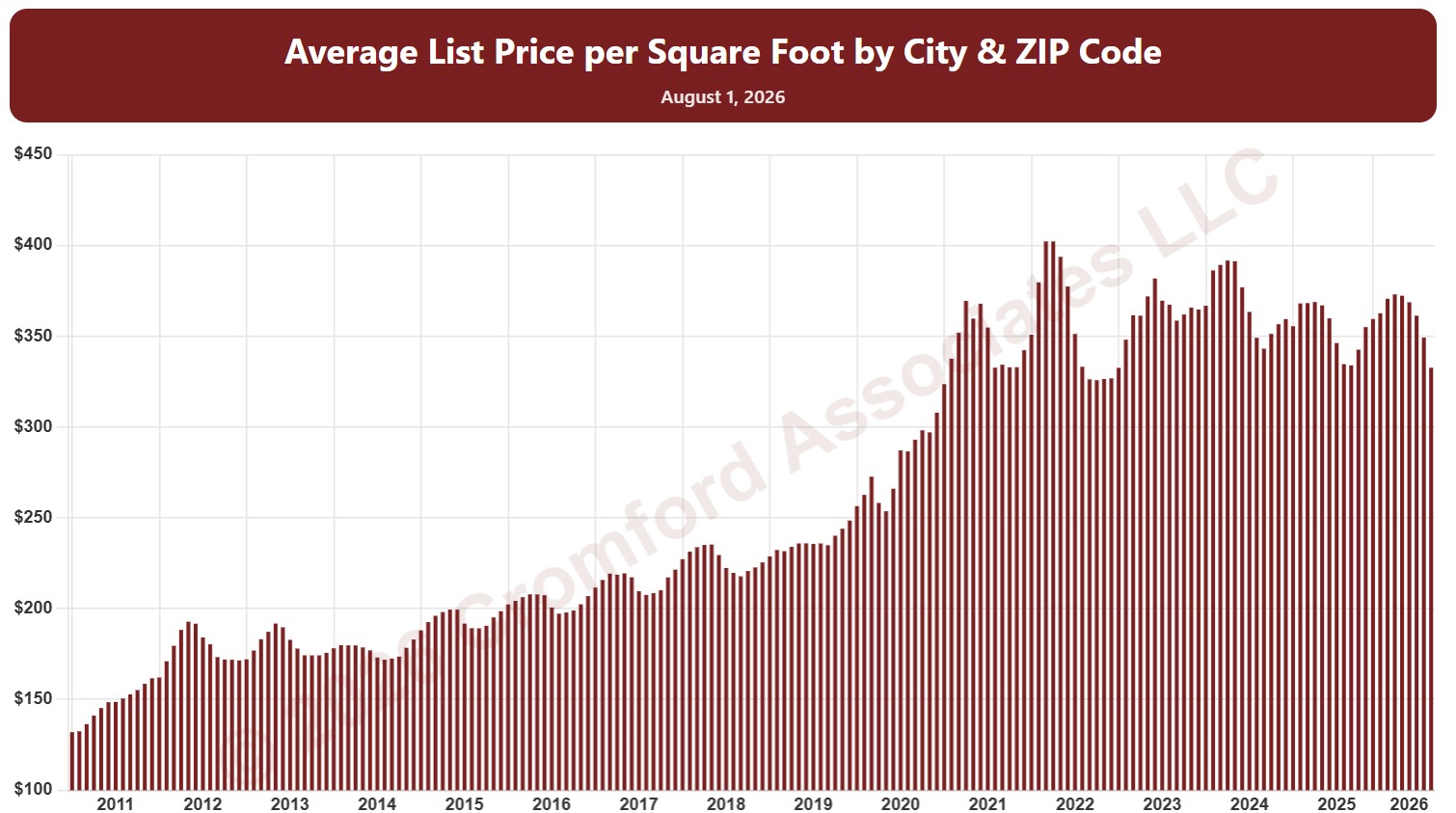
This chart shows the average list price per square foot of homes listed on ARMLS, measured on the 1st of every month since January 2011, as one bar per month. It shows what sellers are asking.

By default it covers Active listings. Tick Coming Soon, Pending, UCB / CCBS, or Temp Off Market in the List Status panel to look at those listings instead or as well.

It opens on Maricopa and Pinal Counties with every city and ZIP code included. Use the County, City, and ZIP panels to focus on any area, from a whole county down to a single ZIP code. Narrow it with the Dwelling Type, Transaction Type, List Status, and New / Resale boxes and the list price, home size, and year built sliders. The Inflation (CPI) option restates prices in today’s dollars using national or Phoenix inflation. Use the date slider, or Full range, to choose the stretch of history shown.

Hover over a bar to see the exact figure for that month.