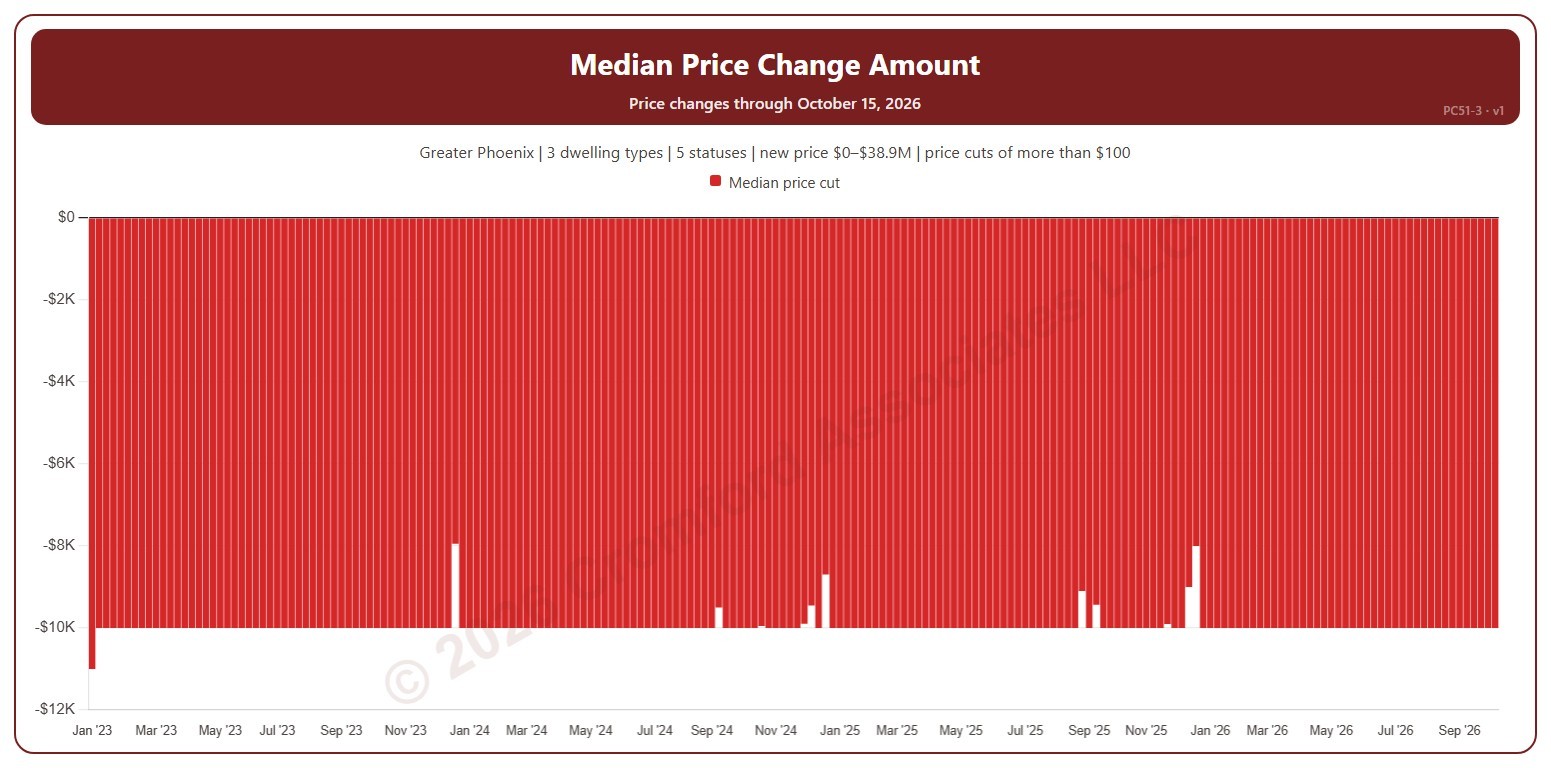
Median Price Change Amount

About this chart

This chart shows the median amount of the list price changes each week: the middle change when they are lined up from smallest to largest. Price cuts show below zero. It counts changes to a listing’s list price on ARMLS, using the new price for the price filter. A change counts only when it is more than the amount in the Price Change panel ($100 to start with). Use the Price Change panel to show price cuts (the opening view), price increases, or both.

Weeks run Sunday to Saturday. It opens on January three years back to date; drag the handles of the date slider under the chart to choose the weeks shown, as far back as January 2013. The newest week is the week so far. The chart is updated every week.

It opens on the Greater Phoenix area: the counties, cities, and ZIP codes that make it up are ticked to start with. Tick or untick any of them to change the area, including counties beyond Greater Phoenix. Narrow it further with the Dwelling Type, List Status, Transaction Type, and New / Resale boxes and the new list price, home size, and year built sliders.

Hover over a bar to see the median change.
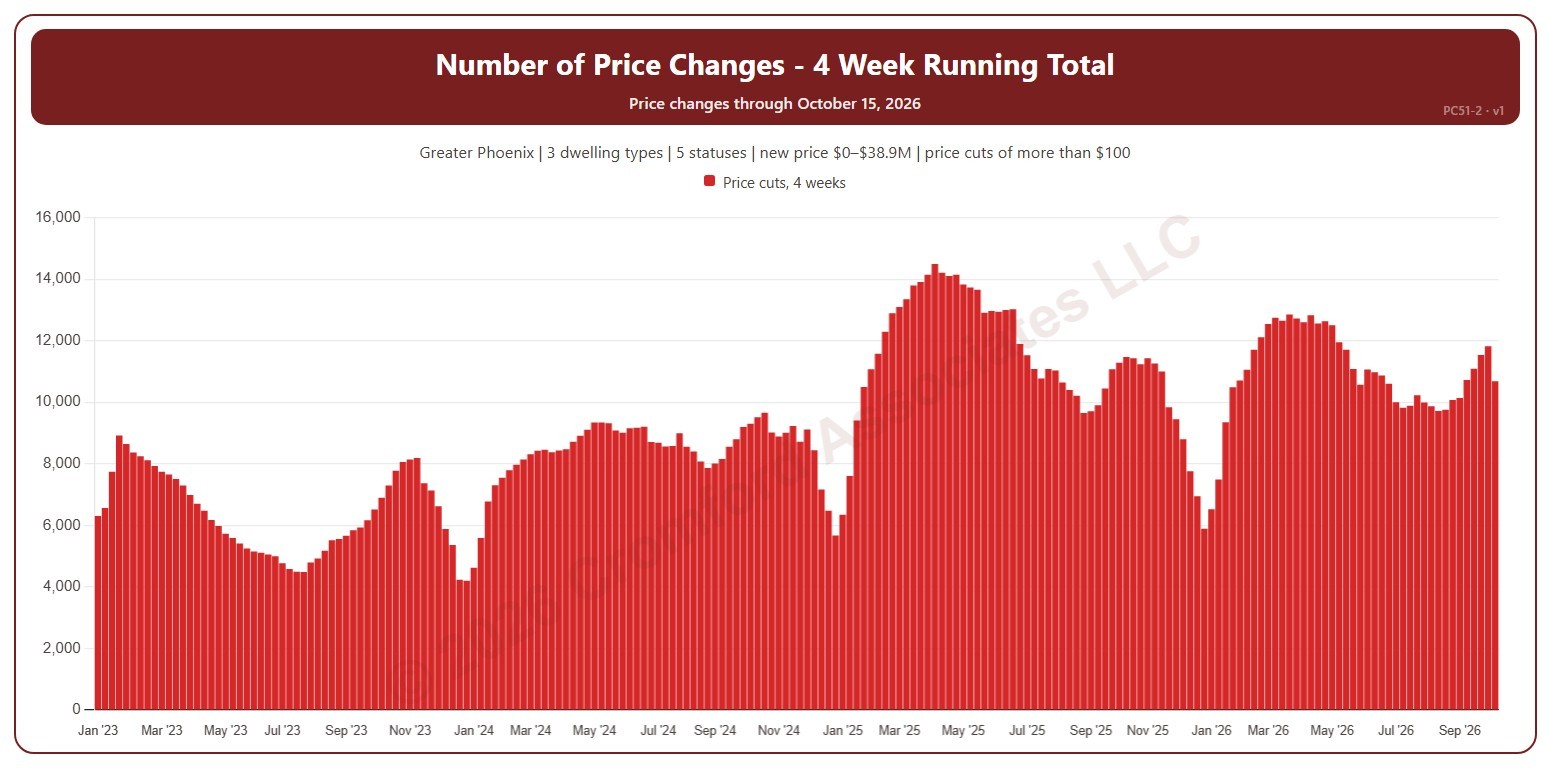
Number of Price Changes – 4 Week Running Total

About this chart

This chart shows the number of list price changes in the four weeks ending each week, which smooths out week-to-week swings. It counts changes to a listing’s list price on ARMLS, using the new price for the price filter. A change counts only when it is more than the amount in the Price Change panel ($100 to start with). Use the Price Change panel to show price cuts (the opening view), price increases, or both.

Weeks run Sunday to Saturday. It opens on January three years back to date; drag the handles of the date slider under the chart to choose the weeks shown, as far back as January 2013. The newest week is the week so far. The chart is updated every week.

It opens on the Greater Phoenix area: the counties, cities, and ZIP codes that make it up are ticked to start with. Tick or untick any of them to change the area, including counties beyond Greater Phoenix. Narrow it further with the Dwelling Type, List Status, Transaction Type, and New / Resale boxes and the new list price, home size, and year built sliders.

Hover over a bar to see the four-week total.

Number of Price Changes per Week

About this chart

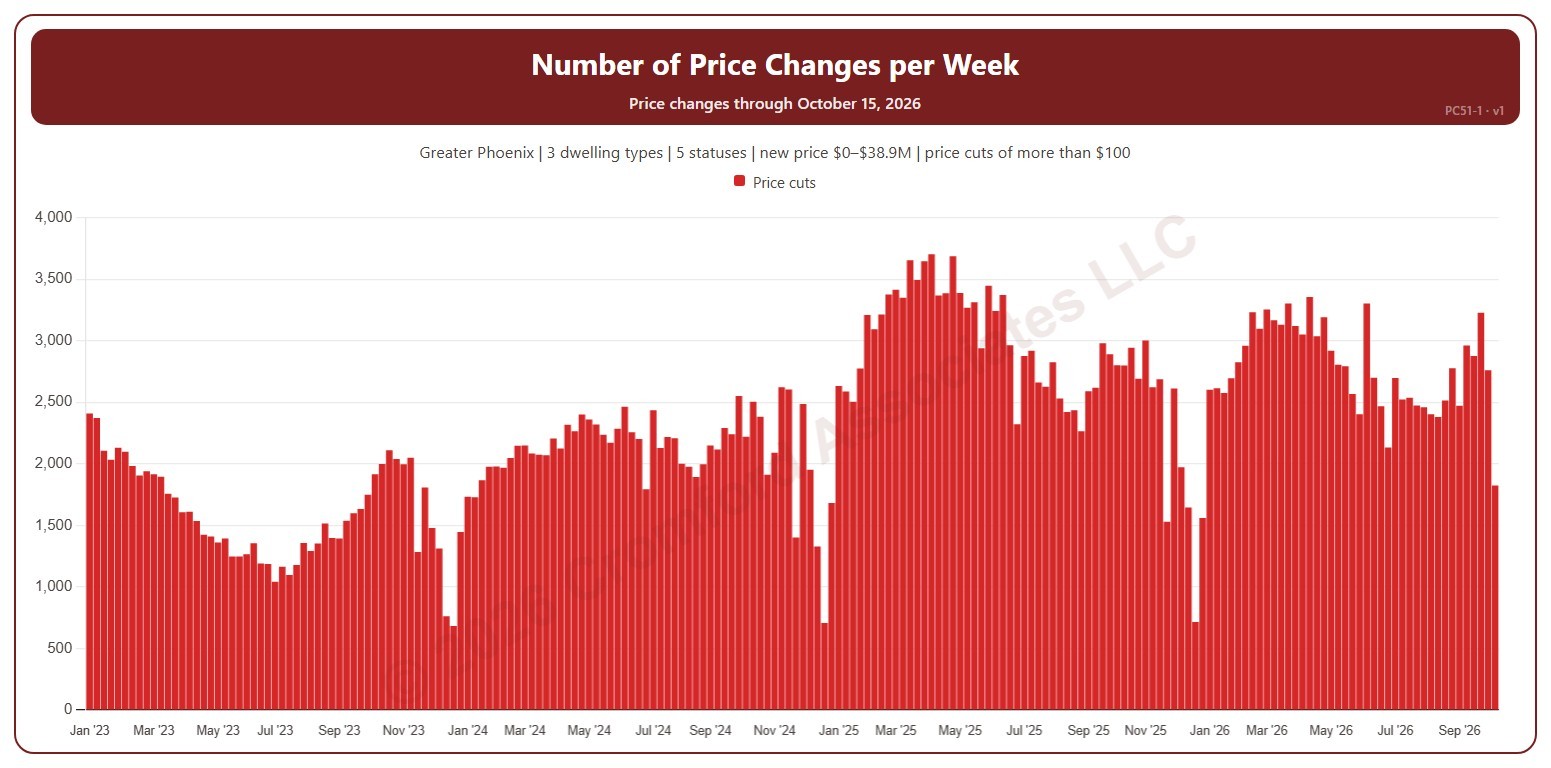
This chart shows the number of list price changes each week. It counts changes to a listing’s list price on ARMLS, using the new price for the price filter. A change counts only when it is more than the amount in the Price Change panel ($100 to start with). Use the Price Change panel to show price cuts (the opening view), price increases, or both.

Weeks run Sunday to Saturday. It opens on January three years back to date; drag the handles of the date slider under the chart to choose the weeks shown, as far back as January 2013. The newest week is the week so far. The chart is updated every week.

It opens on the Greater Phoenix area: the counties, cities, and ZIP codes that make it up are ticked to start with. Tick or untick any of them to change the area, including counties beyond Greater Phoenix. Narrow it further with the Dwelling Type, List Status, Transaction Type, and New / Resale boxes and the new list price, home size, and year built sliders.

Hover over a bar to see the week’s dates and the count.

Average Sales Price History Map

About this chart

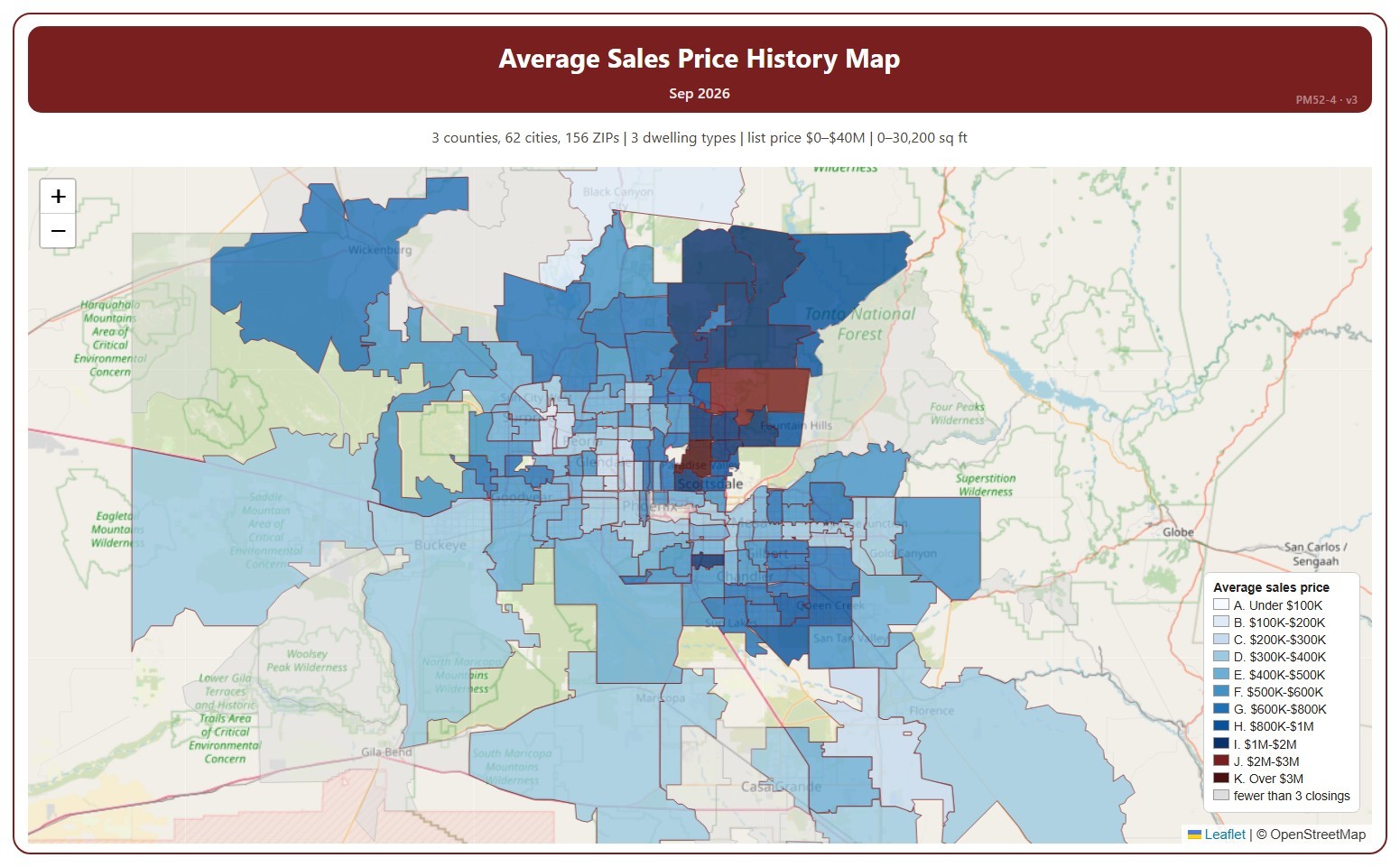
This map shades each ZIP code by the average sale price of the homes that closed in one month, in price ranges from under $100K to over $3M.

It opens on the latest complete month. Use the Month panel, or its arrows, to step back through earlier months as far as 2008. ZIP codes with fewer than 3 closings in the month are shown in grey.

It opens on the Greater Phoenix area: the counties, cities, and ZIP codes that make it up are ticked to start with. Tick or untick any of them to change the area, including counties beyond Greater Phoenix. Narrow it further with the Dwelling Type, Transaction Type, and New / Resale boxes and the list price, home size, and year built sliders.

Hover over a ZIP code to see its average price and number of closings.

Year-over-Year Percentage Change in Monthly Average Sales Price

About this chart

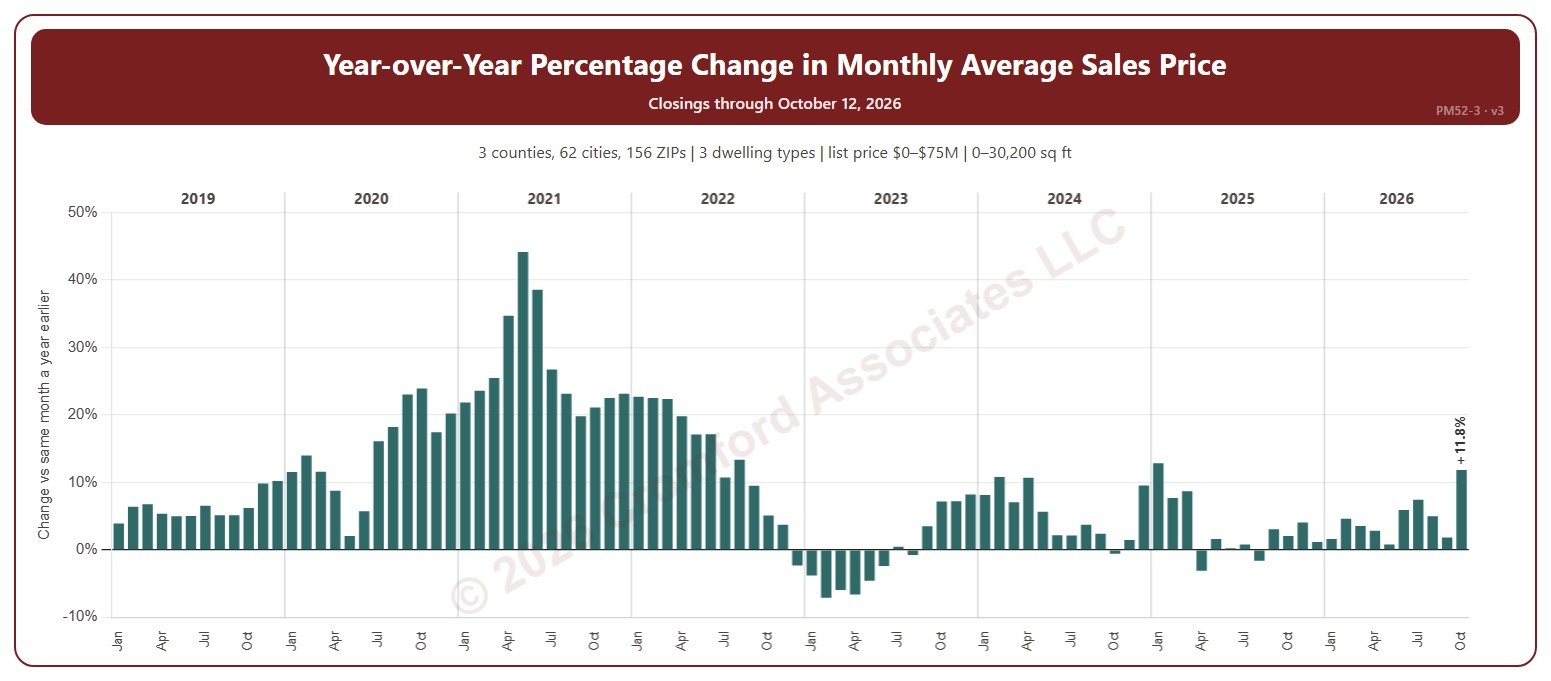
This chart shows the year-over-year change in the average sale price: each month compared with the same month a year earlier, as a percentage. Above zero, prices are higher than a year ago; below zero, lower.

It opens on January 2019 to date; drag the handles of the date slider under the chart to choose the months shown. It goes back to January 2009. The list price slider runs up to $75 million. The newest month is the month so far.

It opens on the Greater Phoenix area: the counties, cities, and ZIP codes that make it up are ticked to start with. Tick or untick any of them to change the area, including counties beyond Greater Phoenix. Narrow it further with the Dwelling Type, Transaction Type, and New / Resale boxes and the list price, home size, and year built sliders.

Hover over a bar to see both months’ average prices and the number of closings.

Monthly Average Sales Price

About this chart

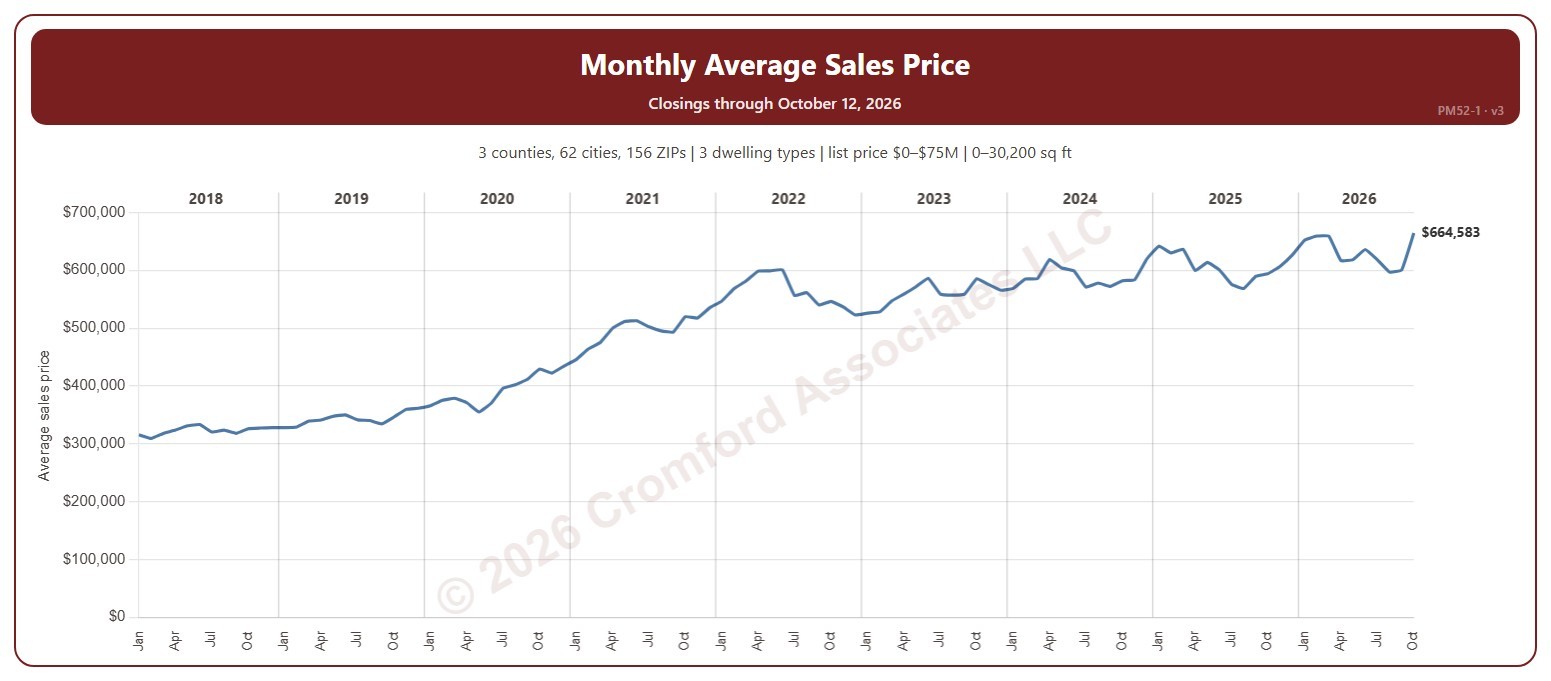
This chart shows the average sale price of the homes that closed each month on ARMLS.

It opens on January 2018 to date; drag the handles of the date slider under the chart to choose the months shown. It goes back to January 2008. The list price slider runs up to $75 million. The newest month is the month so far.

It opens on the Greater Phoenix area: the counties, cities, and ZIP codes that make it up are ticked to start with. Tick or untick any of them to change the area, including counties beyond Greater Phoenix. Narrow it further with the Dwelling Type, Transaction Type, and New / Resale boxes and the list price, home size, and year built sliders.

Hover over the chart to see the figures for that month.

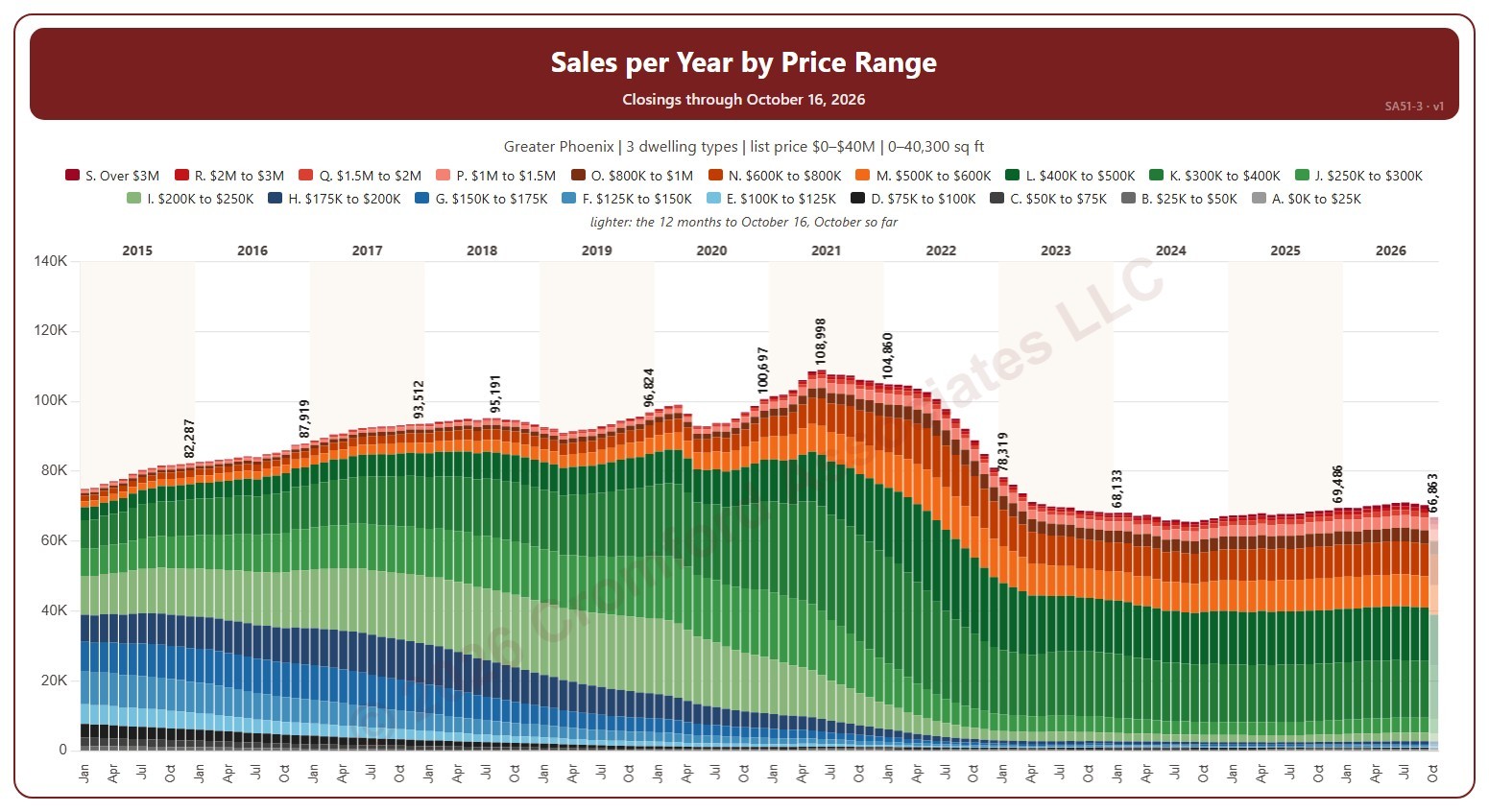
Sales per Year by Price Range

About this chart

This chart shows the annual sales rate, each bar split into 19 list price ranges. Each bar is the number of homes that closed on ARMLS in the 12 months ending that month: the annual sales rate, which moves smoothly because each month adds one month and drops the one a year before.

It opens on January 2015 to date; drag the handles of the date slider under the chart to choose the months shown, as far back as December 2000. The newest bar covers the 12 months to the latest closing, part-way through the month, so it reads low and is drawn lighter. The chart is updated every day. Click a price range in the legend to hide or show it.

It opens on the Greater Phoenix area: the counties, cities, and ZIP codes that make it up are ticked to start with. Tick or untick any of them to change the area, including counties beyond Greater Phoenix. Narrow it further with the Dwelling Type, Transaction Type, and New / Resale boxes and the list price, home size, and year built sliders.

Hover over a bar to see each price range and the total for the 12 months.

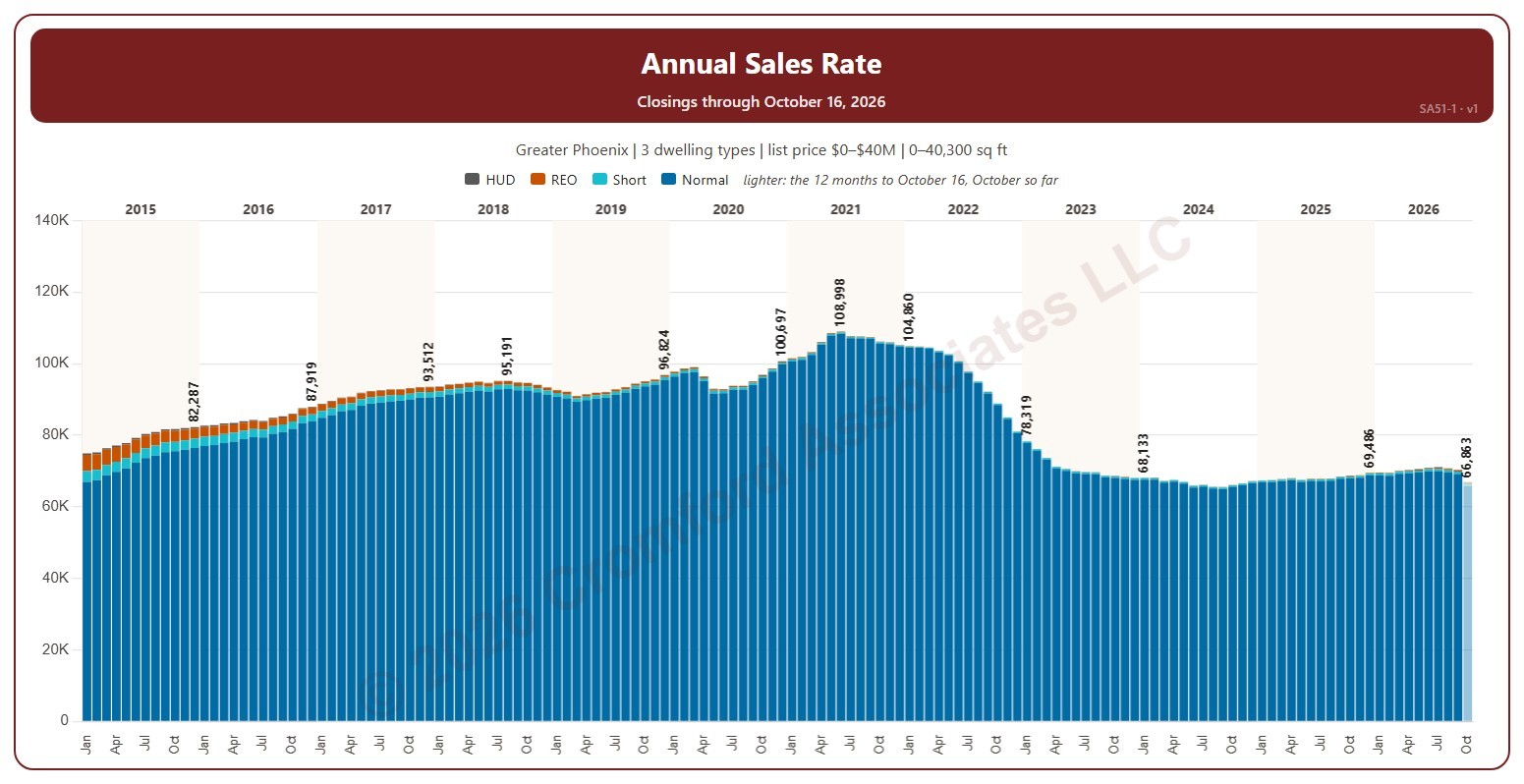
Annual Sales Rate

About this chart

This chart shows the annual sales rate, each bar split by transaction type (normal, short sale, lender-owned, HUD). Each bar is the number of homes that closed on ARMLS in the 12 months ending that month: the annual sales rate, which moves smoothly because each month adds one month and drops the one a year before.

It opens on January 2015 to date; drag the handles of the date slider under the chart to choose the months shown, as far back as December 2000. The newest bar covers the 12 months to the latest closing, part-way through the month, so it reads low and is drawn lighter. The chart is updated every day.

It opens on the Greater Phoenix area: the counties, cities, and ZIP codes that make it up are ticked to start with. Tick or untick any of them to change the area, including counties beyond Greater Phoenix. Narrow it further with the Dwelling Type, Transaction Type, and New / Resale boxes and the list price, home size, and year built sliders.

Hover over a bar to see each transaction type and the total for the 12 months.

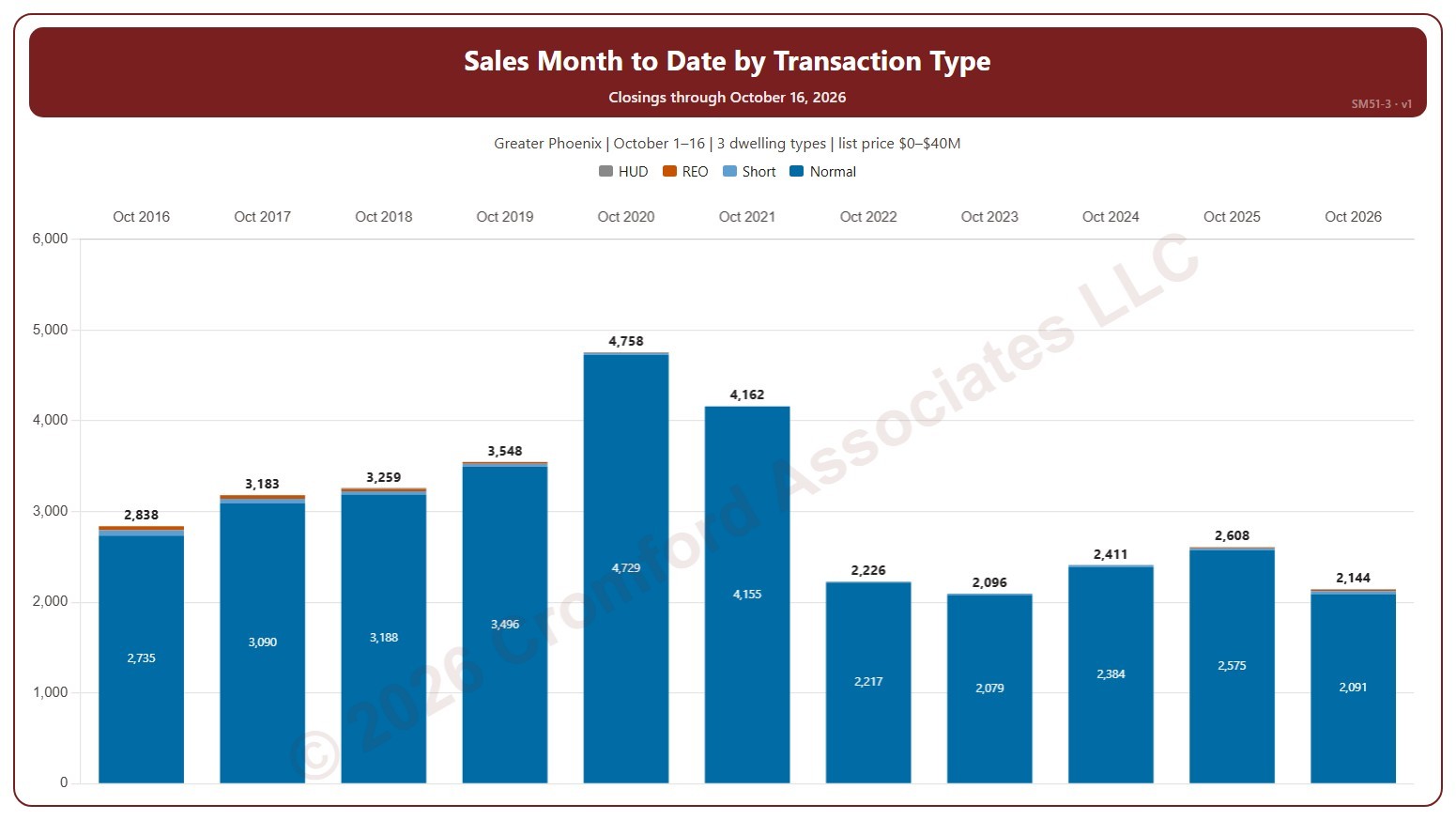
Sales Month to Date by Transaction Type

About this chart

This chart shows sales month to date, each bar split by transaction type (normal, short sale, lender-owned, HUD). Each bar counts the homes that closed on ARMLS in the same month, from the same first day to the same last day, in each year, so this month so far can be read against the same days of earlier years.

It opens on the current month, from the 1st to the day of the latest closing, in every year. Use the Month list and the Days boxes above the chart to compare any month and any run of days, and Month to date to return; if the days run past the latest closing, this year’s bar is drawn lighter. Tick years in the Year box (it opens on the latest 11). The chart is updated every day.

It opens on the Greater Phoenix area: the counties, cities, and ZIP codes that make it up are ticked to start with. Tick or untick any of them to change the area, including counties beyond Greater Phoenix. Narrow it further with the Dwelling Type, Transaction Type, and New / Resale boxes and the list price, home size, and year built sliders.

Hover over a bar to see each transaction type and the total for the days chosen.

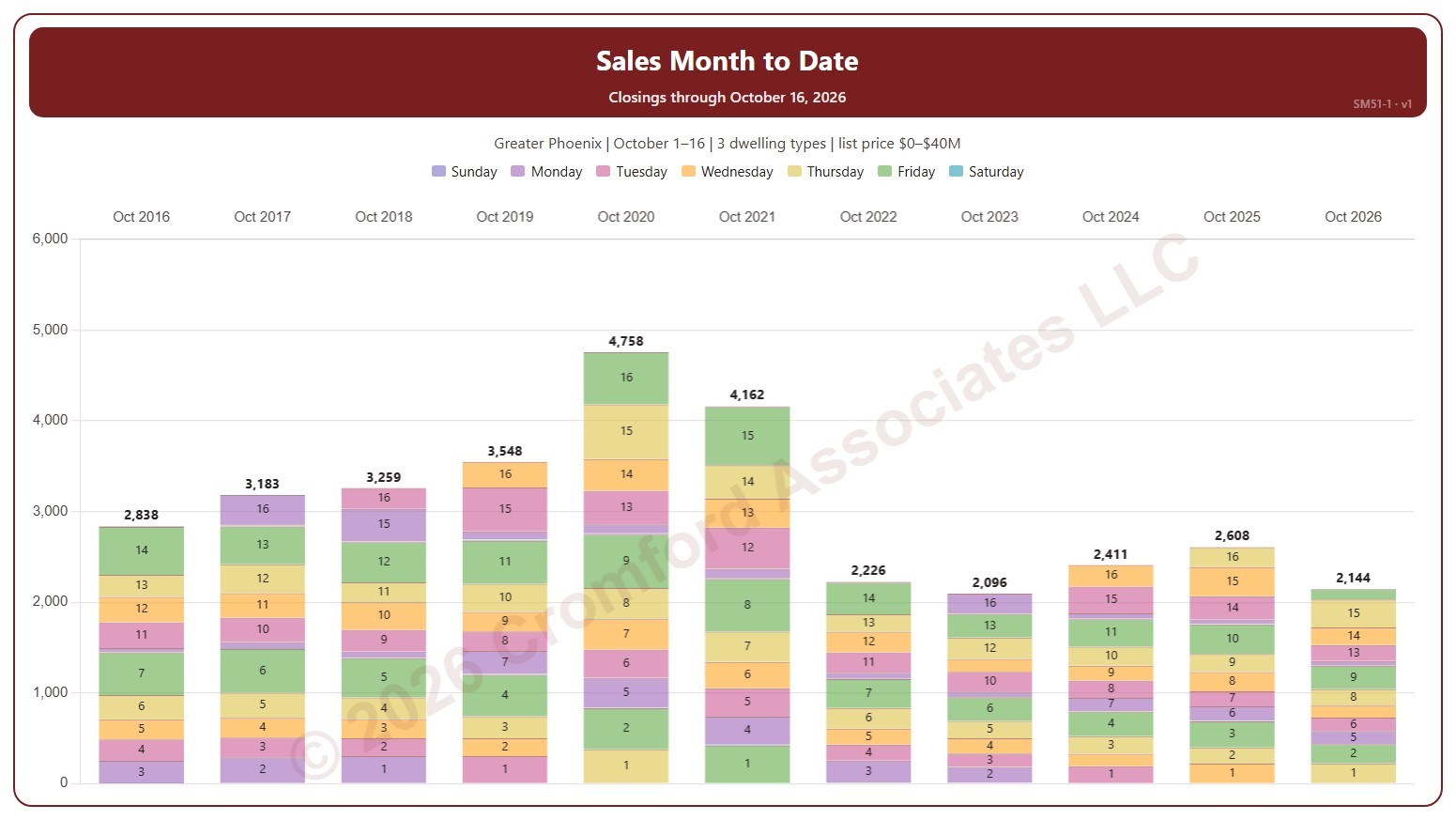
Sales Month to Date

About this chart

This chart shows sales month to date, each bar split into its days, colored by the day of the week and labeled with the day of the month. Each bar counts the homes that closed on ARMLS in the same month, from the same first day to the same last day, in each year, so this month so far can be read against the same days of earlier years.

It opens on the current month, from the 1st to the day of the latest closing, in every year. Use the Month list and the Days boxes above the chart to compare any month and any run of days, and Month to date to return; if the days run past the latest closing, this year’s bar is drawn lighter. Tick years in the Year box (it opens on the latest 11). The chart is updated every day.

It opens on the Greater Phoenix area: the counties, cities, and ZIP codes that make it up are ticked to start with. Tick or untick any of them to change the area, including counties beyond Greater Phoenix. Narrow it further with the Dwelling Type, Transaction Type, and New / Resale boxes and the list price, home size, and year built sliders.

Hover over a day to see its closings and the total for the days chosen.