Price Changes, Days at the Final Price and Sale Price by Region

About this chart

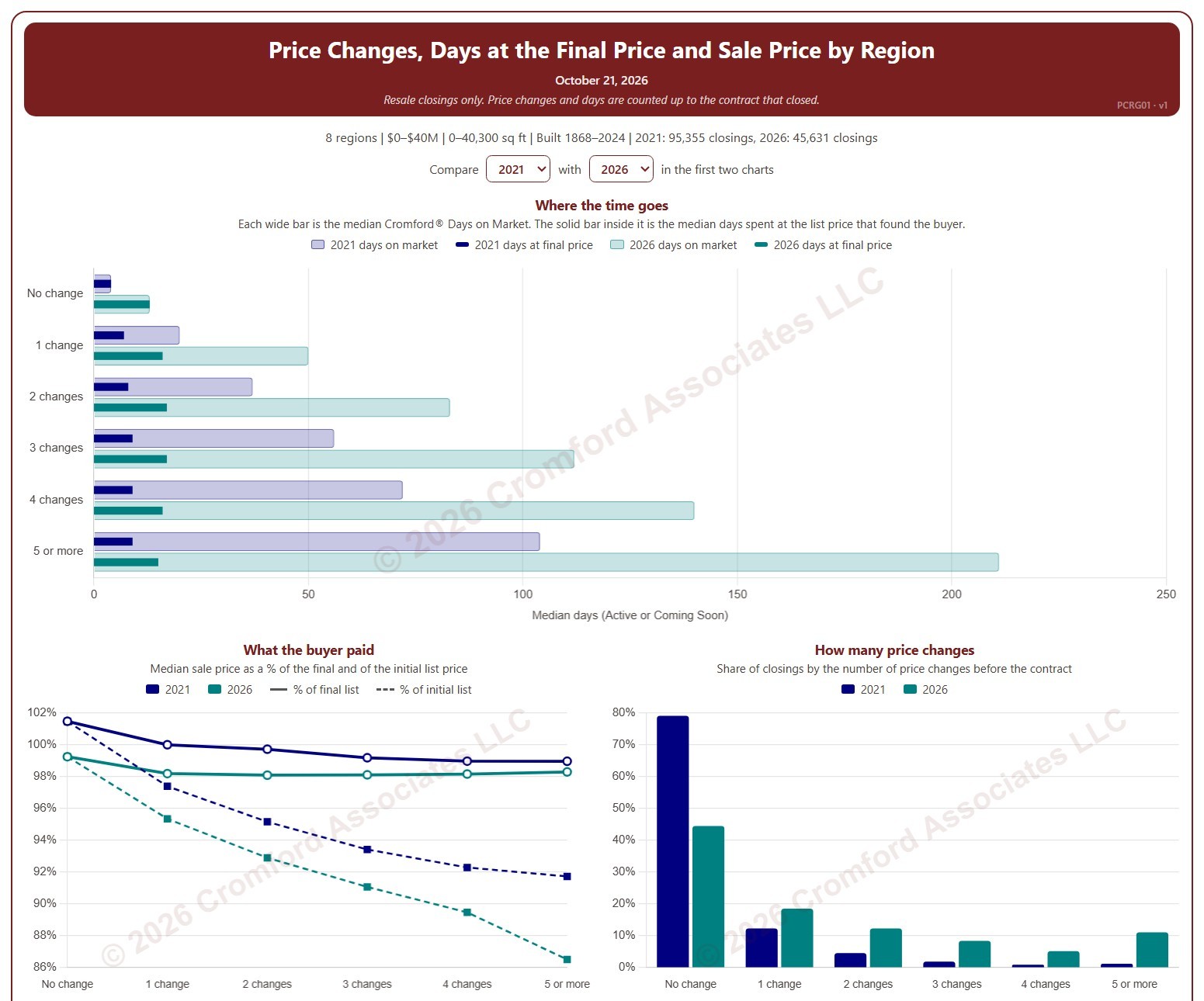
This chart shows how many times homes changed their list price before going under contract, and what that meant for how long they took to sell and the price they sold for, by region. Each closed resale is grouped by the number of list price changes before the contract that closed, from none to five or more. Price increases and price cuts both count as a change.

The top chart compares two figures for each group. The wide bar is the median Cromford® Days on Market. The solid bar inside it is the median number of days the home spent at its final list price, the price that found the buyer. However long a home was on the market, the time it spent at the price that sold it is usually much shorter.

The top two charts compare any two years from 2020 on, picked with the selectors above them. The lower left chart shows the median sale price as a percentage of the final list price (solid line) and of the initial list price (dashed line). The lower right chart shows the share of closings in each group for the years ticked in the Year panel.

The map shades every ZIP code with its region’s figure for one year at a time, chosen with the year selector above it, so each region reads as one block. A few ZIP codes lie in two regions; they are striped in both regions’ shades and their closings count in both. Regions not ticked in the Region panel are faded. Click a ZIP code to show its region alone in the charts.

Days count while the home was Active or Coming Soon, up to the contract that closed. A contract that fell through does not reset the count. New construction is excluded. Years are by closing date, and the current year is year to date. The chart opens on 2021 and the current year in the Greater Phoenix regions, with manufactured and modular homes left out.
Office Listing Success Rate

About this chart

This chart compares how often each brokerage office’s listings sell. It covers listings added to ARMLS in the last 12 months, and the success rate is the share of them that closed rather than expired or being cancelled. Each listing is credited to its listing office.

A listing counts once it has closed, expired, or been cancelled. Listings that are still active, under contract, or temporarily off the market are not counted yet, so the most recent months contribute fewer listings than earlier ones. An office needs at least 50 such listings in the selection to appear.

Narrow the comparison with the County, Region, City, Dwelling Type, and Price Range controls; the City list follows the county you pick, and you can tick any combination of the 16 price ranges. New Construction lets you include or exclude homes built this year or in the previous two. The tiles show the totals and the overall success rate for the selection, as a yardstick for each office.

The bar chart shows the top 10, 25, 50, or 100 offices, ranked by success rate and then by the number of listings. The table below lists every office that qualifies; search it by office name or ID, and click a column heading to sort by it. Many brokerages have several offices with the same name, so the table shows each office with its ARMLS office ID.

Offices that list new homes for a builder, or homes for an iBuyer or an institutional investor, are listing their own client’s inventory and tend to show unusually high success rates for that reason.

Agent Listing Success Rate

About this chart

This chart compares how often each listing agent’s listings sell. It covers listings added to ARMLS in the last 12 months, and the success rate is the share of them that closed rather than expired or being cancelled. Each listing is credited to its listing agent.

A listing counts once it has closed, expired, or been cancelled. Listings that are still active, under contract, or temporarily off the market are not counted yet, so the most recent months contribute fewer listings than earlier ones. An agent needs at least 10 such listings in the selection to appear.

Narrow the comparison with the County, Region, City, Dwelling Type, and Price Range controls; the City list follows the county you pick, and you can tick any combination of the 16 price ranges. New Construction lets you include or exclude homes built this year or in the previous two. The tiles show the totals and the overall success rate for the selection, as a yardstick for each agent.

The bar chart shows the top 10, 25, 50, or 100 agents, ranked by success rate and then by the number of listings. The table below lists every agent that qualifies, with the office they listed through most often. Search it by name, agent ID, or office, and click a column heading to sort by it.

A high rate on a handful of listings means less than the same rate on many, so read the success rate together with the number of listings.

Monthly Trustee’s Deeds by Region

About this chart

This chart counts the Trustee’s Deeds recorded each month: the deed recorded after a foreclosure auction. Each bar is split by what happened at the auction: the home reverted to the lender (beneficiary), sold to a third party, or the outcome was not recorded.

Records run from 2002. Vacant land and commercial property are left out by default.

Use the Region panel to focus on one region or a combination of them. Narrow it with the Outcome and Property Type boxes and the sale price, loan amount, home size, and year built sliders. Use the date slider, or Full range, to choose the stretch of history shown.

Hover over a bar to see the counts for that month.

Median Sales Price and Estimated Monthly Payment by Region

About this chart

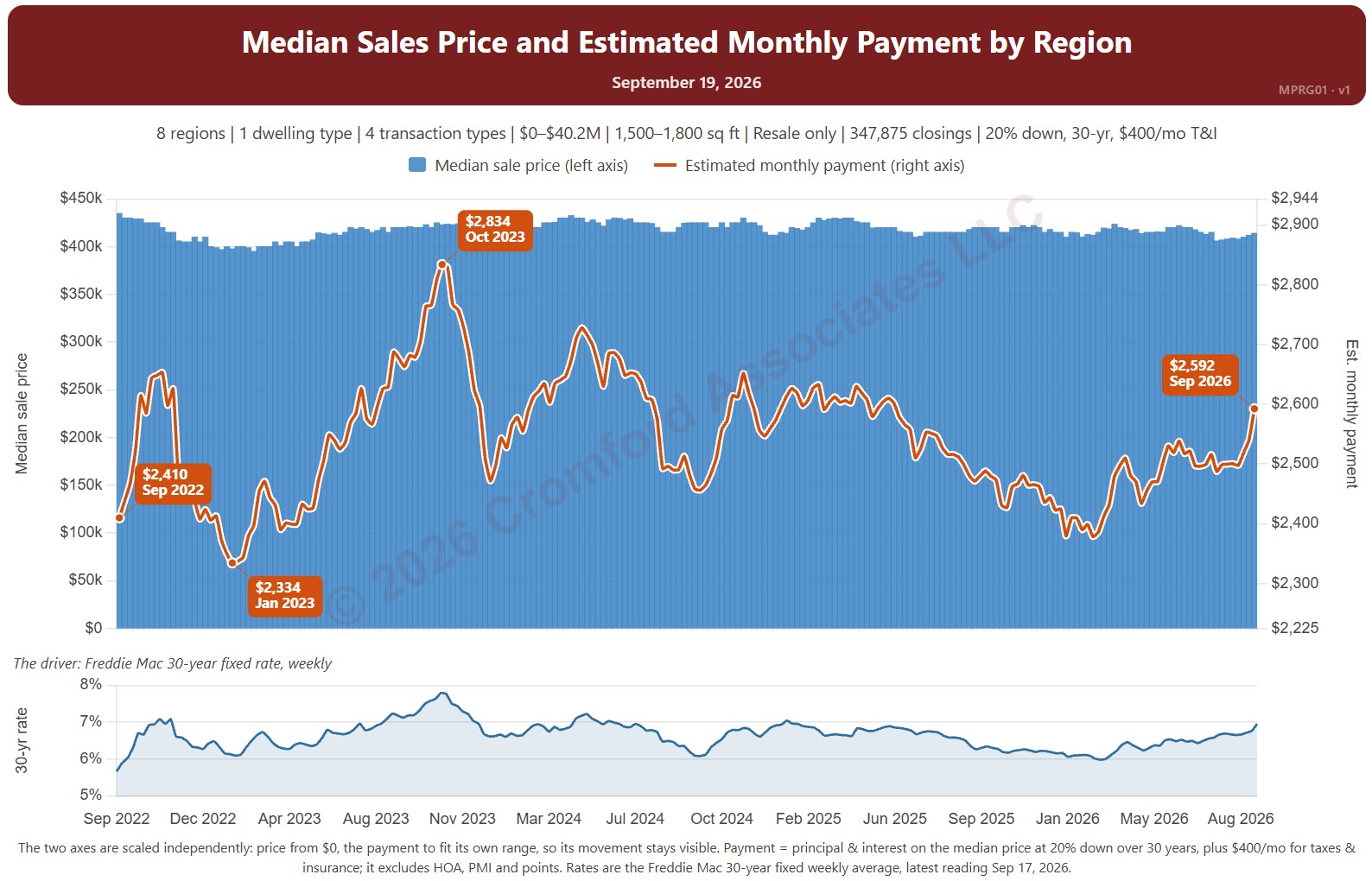
This chart sets the median sales price beside the estimated monthly payment needed to buy a home at that price, measured every week, with the 30-year fixed mortgage rate (Freddie Mac Primary Mortgage Market Survey®) in the panel below. It shows how affordability changes as both prices and rates move.

The default view is single-family resale homes of every size over the last four years. The payment assumes 20% down, a 30-year loan, and taxes and insurance of 1.2% of the sales price a year. The Payment panel changes the assumptions, and Reset assumptions puts them back.

It opens with every region included. Use the Region panel to focus on one region or compare a combination of them. Narrow it with the Dwelling Type, Transaction Type, and New / Resale boxes and the sales price and home size sliders. The 1 yr, 3 yr, 5 yr, 10 yr, and Full range buttons set the stretch of history shown.

Hover over the chart to see the figures for that week.

Notices of Trustee Sale by Region

About this chart

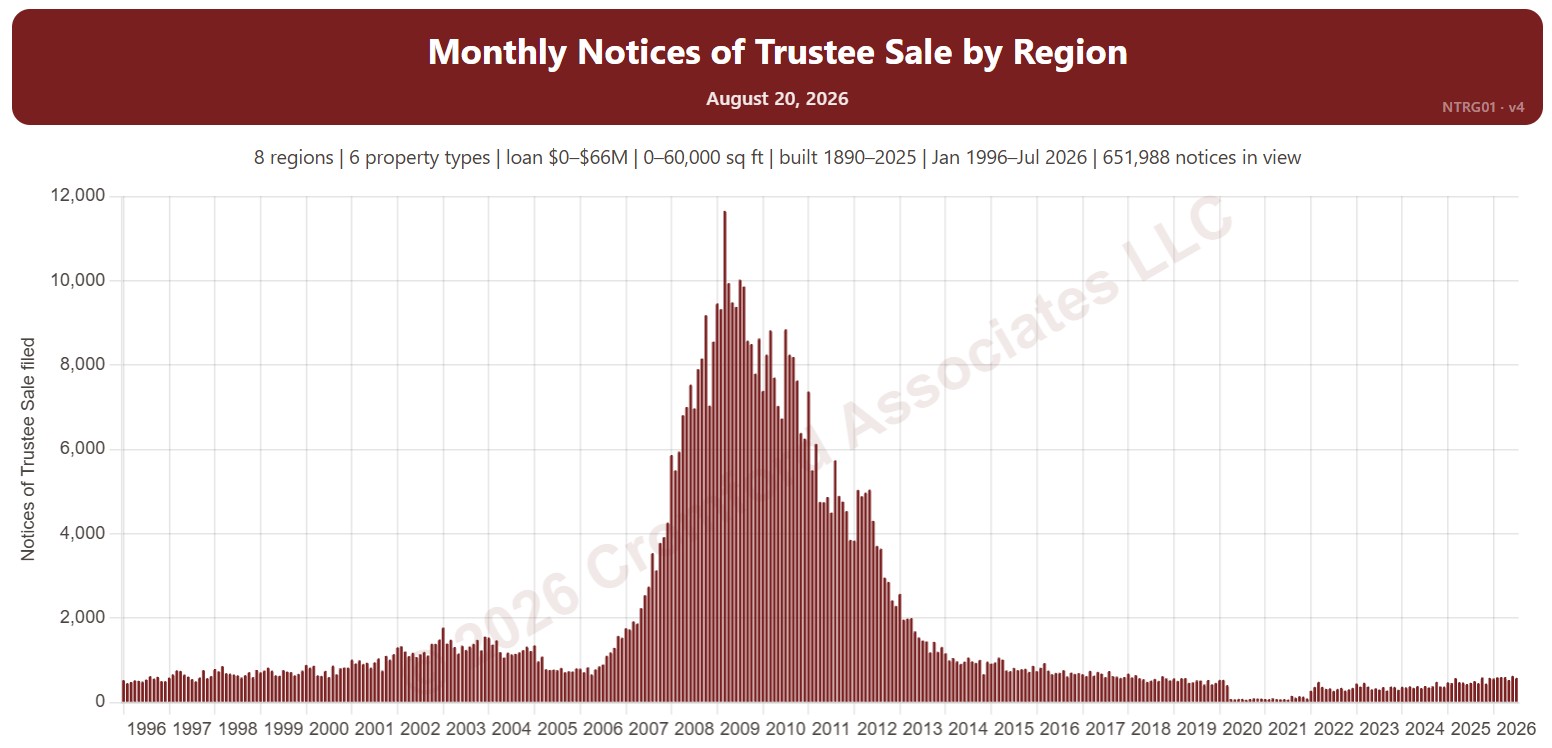
This chart counts the Notices of Trustee Sale recorded each month: the document a lender records when it starts to foreclose on a home. Many are later canceled, for example when the owner sells or catches up on payments, so this is an early sign of distress rather than a count of foreclosures.

Records run from 1996. Vacant land and commercial property are left out by default.

Use the Region panel to focus on one region or a combination of them. Narrow it with the Property Type box and the loan amount, home size, and year built sliders. Use the date slider, or Full range, to choose the stretch of history shown.

Hover over a bar to see the count for that month.

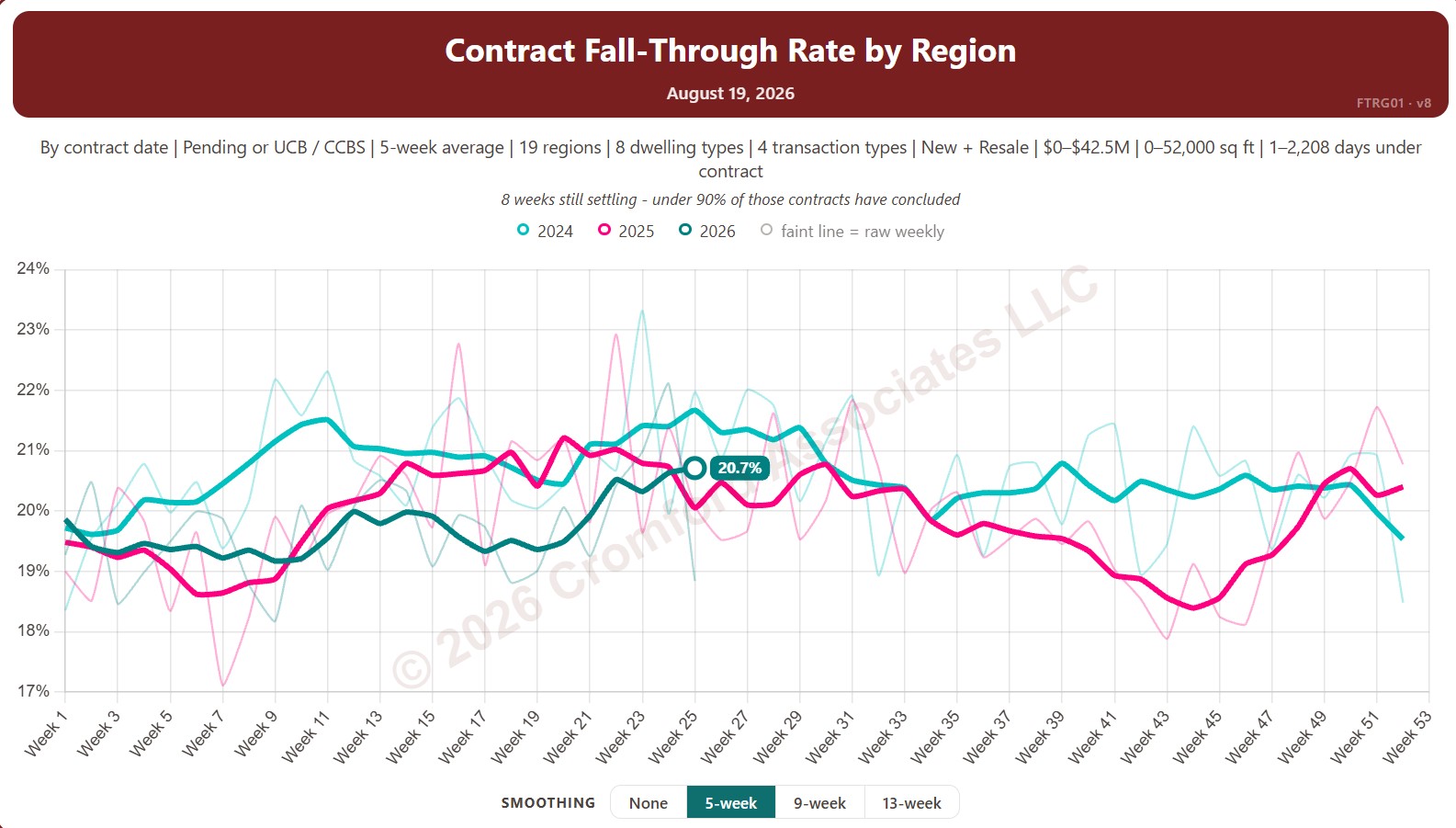
Contract Fall-Through Rate by Region

About this chart

This chart shows the contract fall-through rate, measured every week: the share of accepted contracts that ended without the home closing, for example because financing or an inspection failed. The lines show a 5-week average to smooth out week-to-week noise.

By default contracts are counted by the date they were accepted and include Pending and UCB / CCBS contracts. Rate Basis switches to the date each contract ended, and Listing Status can limit it to Pending contracts only.

Each year has its own line, laid out by week of the year, so you can compare this year with earlier years at the same point in the season. It opens on the last three years; tick any year back to 2011 in the Year panel.

It opens with every region included. Use the Region panel to focus on one region or compare a combination of them. Narrow it with the Dwelling Type, Transaction Type, and New / Resale boxes and the list price, home size, and days under contract sliders.

Hover over a line to see the exact figure for that week.

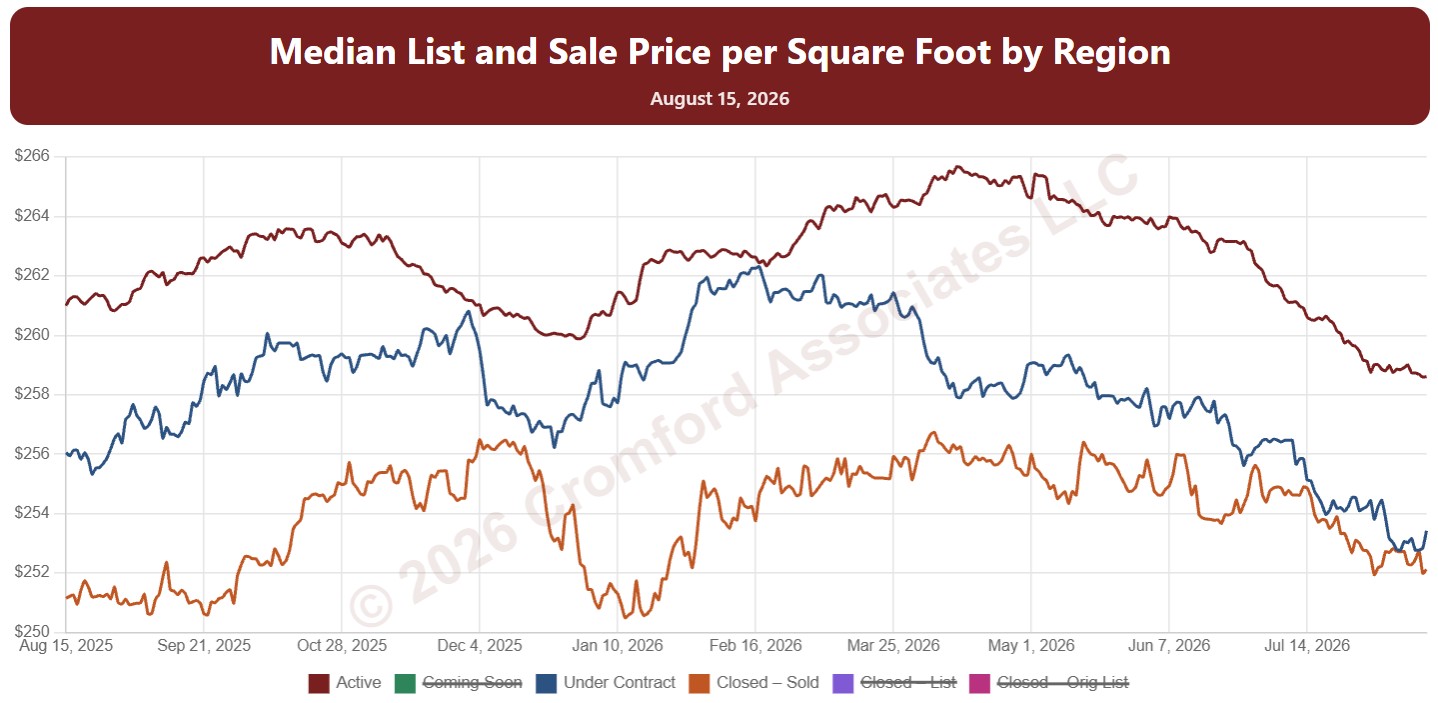
Median List Price per Square Foot by Region

About this chart

This chart shows median price per square foot every day over the last 12 months, with one line each for Active, Coming Soon, and Under Contract listings (their list prices) and three for homes that closed: the sale price, the final list price, and the original list price.

Reading the lines together shows the gap between what sellers ask and what buyers pay, and how much prices were cut along the way.

It opens with every region included. Use the Region panel to focus on one region or compare a combination of them. Narrow it with the Dwelling Type, Transaction Type, and New / Resale boxes and the list price, home size, and year built sliders.

Hover over the chart to see each figure for that day.

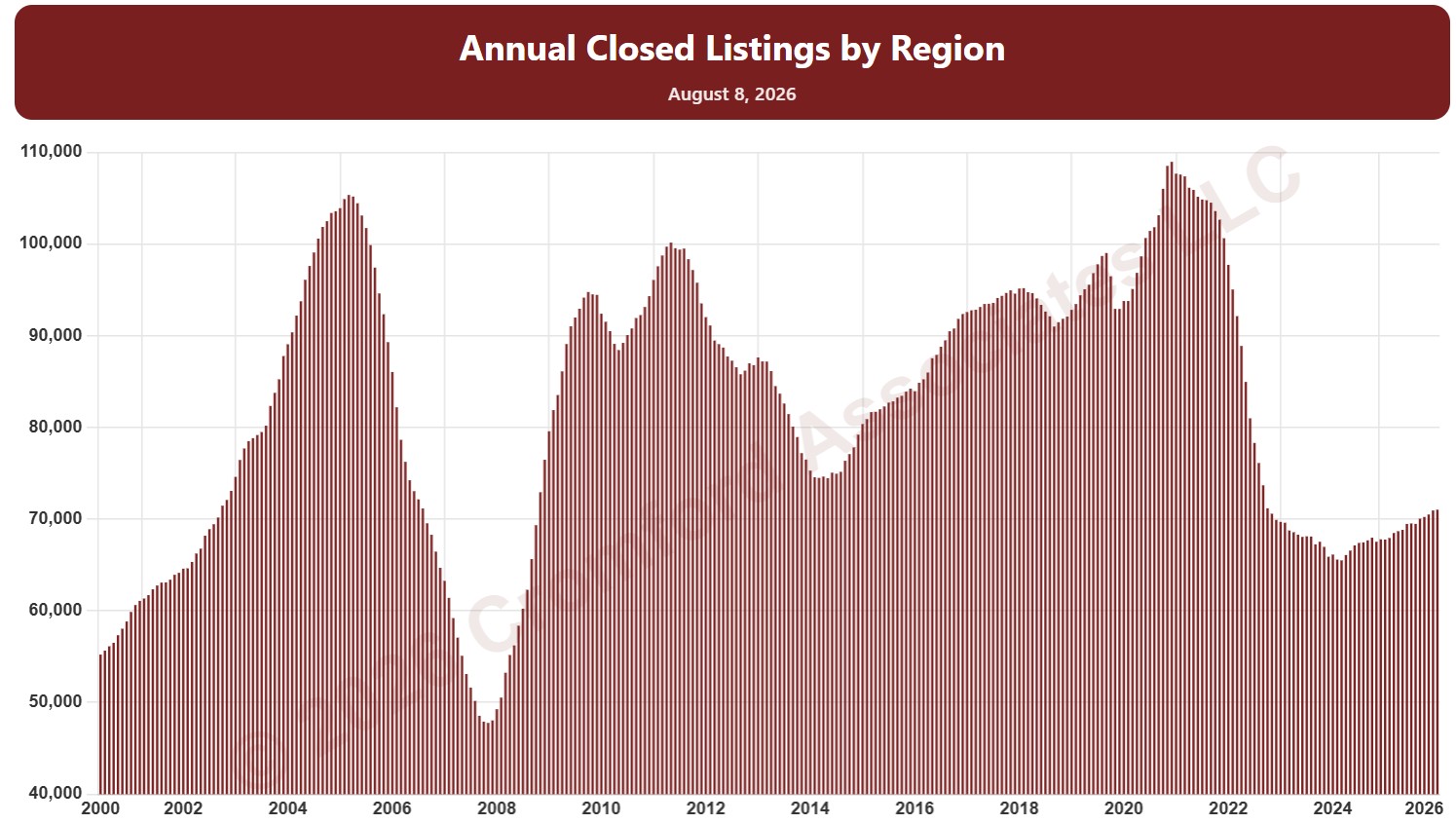
Annual Closed Listings by Region

About this chart

This chart counts the homes that closed through ARMLS over the last 12 months, measured on the 1st of every month, as one continuous series of bars back to 2000. It is the same measure as SARG11 laid out as a single timeline instead of one line per year.

It opens with every region included. Use the Region panel to focus on one region or compare a combination of them. Narrow it with the Dwelling Type, Transaction Type, and New / Resale boxes and the sales price, home size, and year built sliders. Use the date slider, or Full range, to choose the stretch of history shown.

Hover over a bar to see the exact figure for that month.

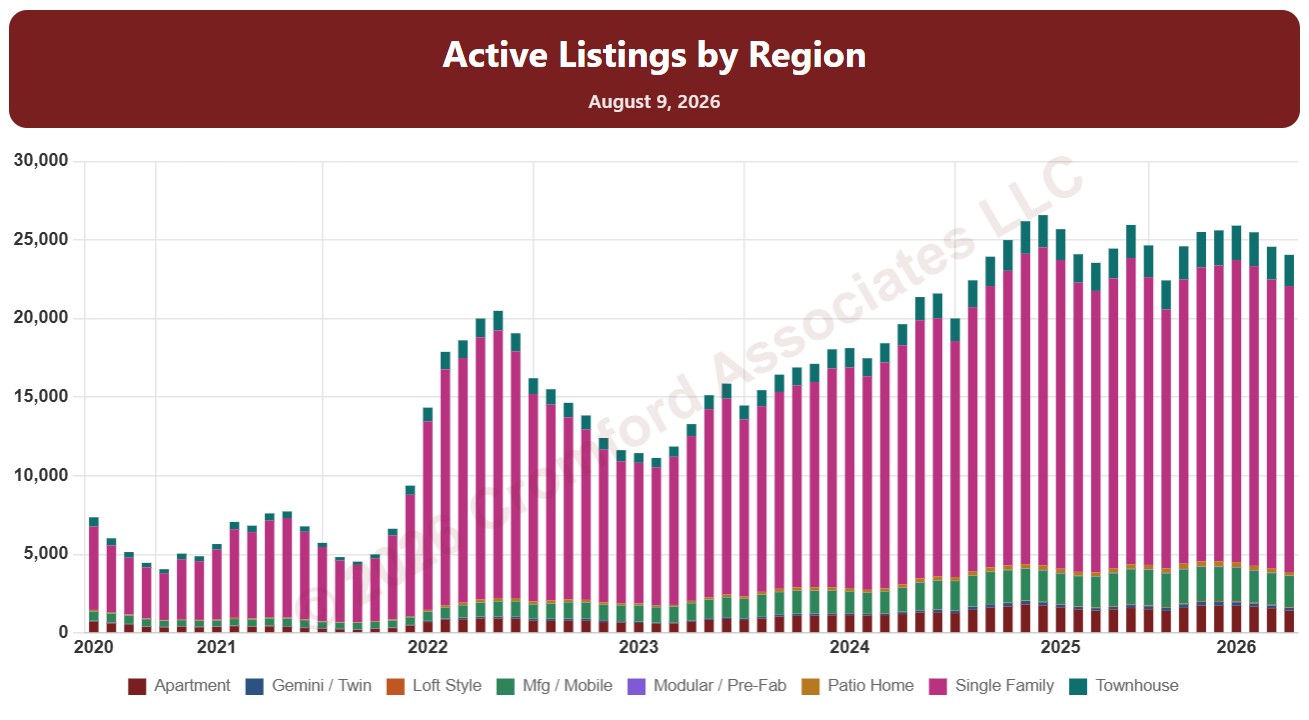
Active Listings by Region

About this chart

This chart counts the homes listed for sale on ARMLS on the 1st of every month since January 2011, as stacked bars.

By default it counts Active listings. Tick Coming Soon, UCB / CCBS (under contract but still accepting back-up offers), or Temp Off Market in the List Status panel to add them to the stack. A drop-down chooses what the bars are split by: list status, dwelling type, transaction type, or new / resale.

It opens with every region included. Use the Region panel to focus on one region or compare a combination of them. Narrow it with the Dwelling Type, List Status, Transaction Type, and New / Resale boxes and the list price, home size, year built, and days on market sliders. Use the date slider, or Full range, to choose the stretch of history shown.

Hover over a bar to see the counts for that month.