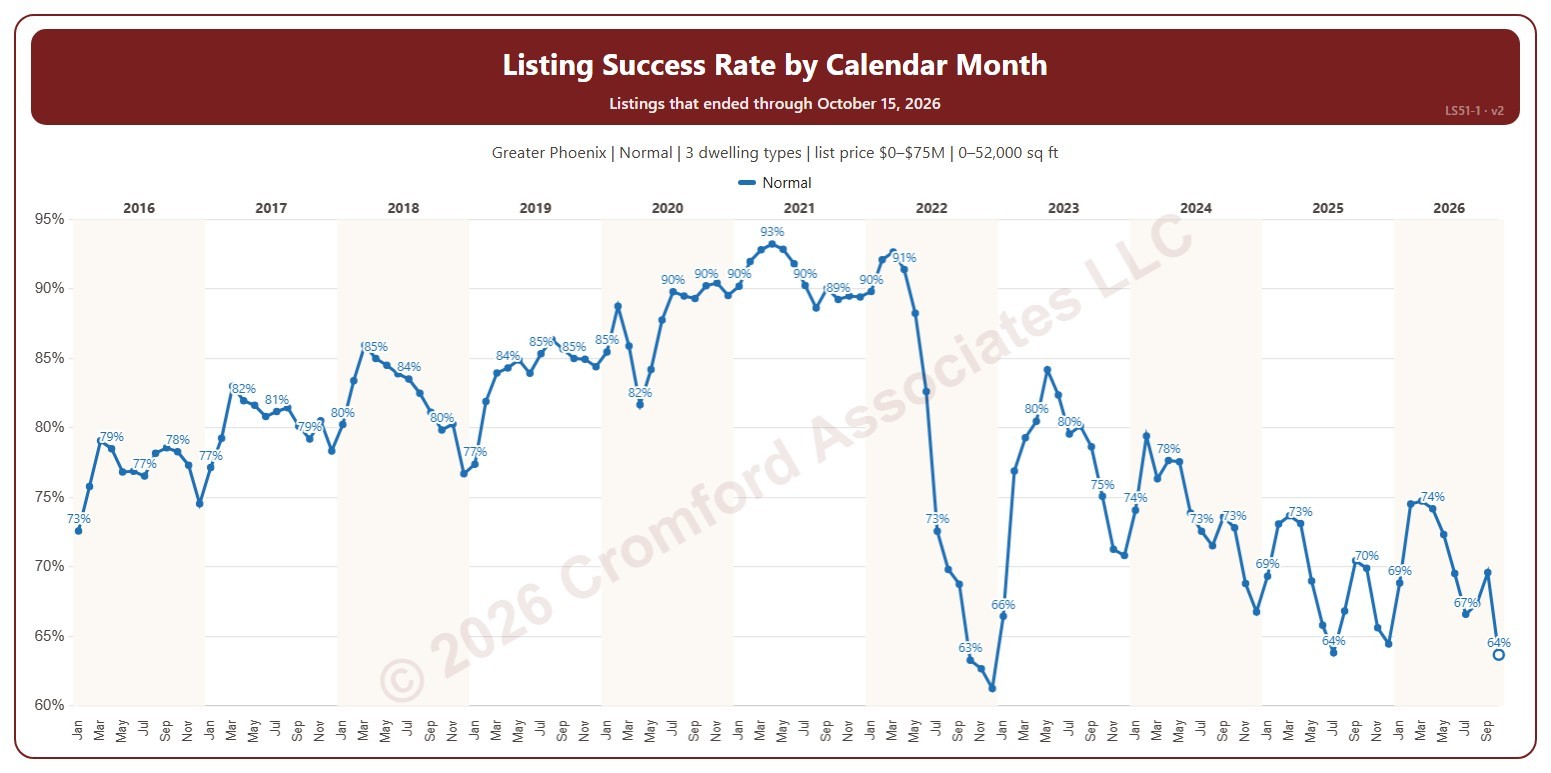
Listing Success Rate by Calendar Month

About this chart

This chart shows the listing success rate each month. The listing success rate is the share of listings that closed, out of all the listings that ended: closed, expired, or cancelled. Each listing counts once, in the month (or window) its listing ended: the closing date for a closing, the expiration for an expired listing, the cancellation for a cancelled one. Tick more transaction types to see a line for each.

It opens on January 2016 to date; drag the handles of the date slider under the chart to choose the months shown, as far back as January 2004. The newest month is the month so far, shown as a hollow point. The chart is updated every day.

It opens on the Greater Phoenix area: the counties, cities, and ZIP codes that make it up are ticked to start with. Tick or untick any of them to change the area, including counties beyond Greater Phoenix. It opens on normal sales; tick other transaction types to add them. Narrow it further with the Dwelling Type and New / Resale boxes and the list price, home size, and year built sliders.

Hover over the line to see the rate and how many listings closed out of all that ended.
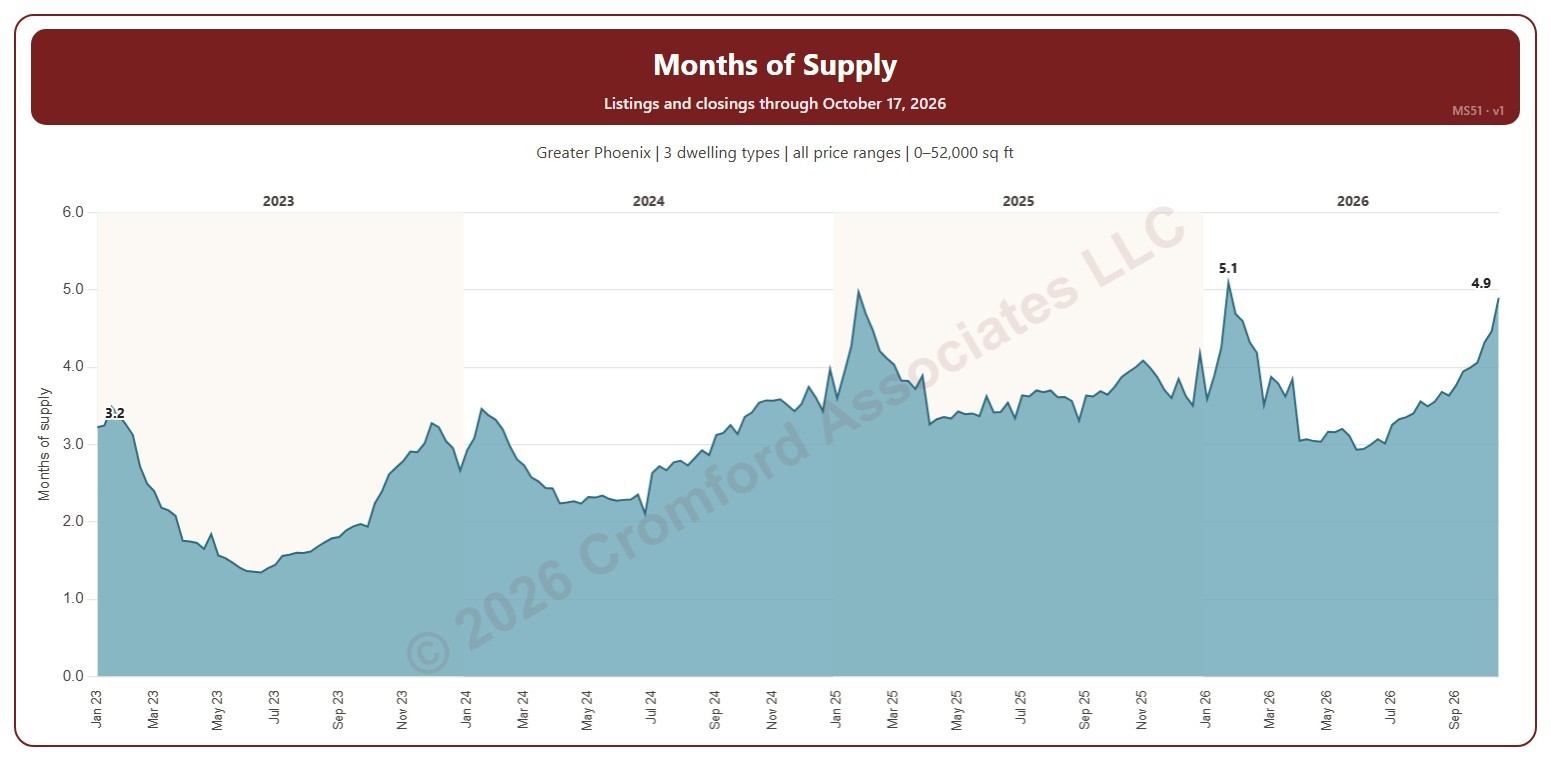
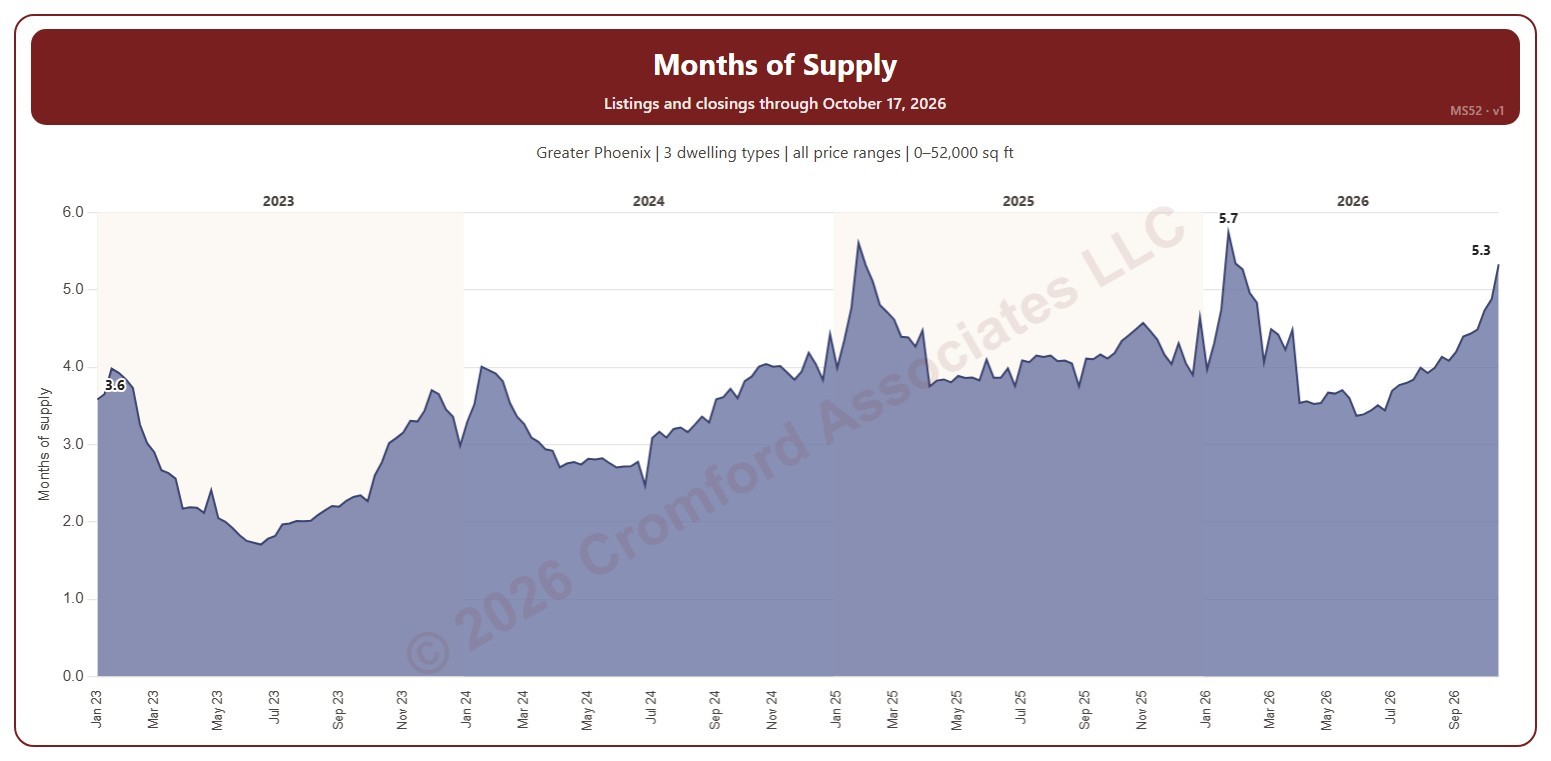
Months of Supply – Excluding UCB and CCBS Listings

About this chart

This chart shows months of supply each Saturday: the active listings on ARMLS that day divided by the homes that closed in the month up to the day before, so it says how many months the listings for sale would last at the current pace of sales. Listings under contract that are still taking backup offers (UCB / CCBS) are not counted as supply.

It opens on January three years back to date; drag the handles of the date slider under the chart to choose the weeks shown, as far back as January 2011. The chart is updated every day.

It opens on the Greater Phoenix area: the counties, cities, and ZIP codes that make it up are ticked to start with. Tick or untick any of them to change the area, including counties beyond Greater Phoenix. Narrow it further with the Price Range boxes, the Dwelling Type, Transaction Type, and New / Resale boxes, and the home size and year built sliders; the listings and the closings are narrowed the same way (a listing by its list price that day, a closing by its list price).

Hover over the chart to see the week’s months of supply, the active listings, and the closings in its month.

Months of Supply – including UCB/CCBS Listings

About this chart

This chart shows months of supply each Saturday: the listings on ARMLS that day that are active or under contract but still taking backup offers (UCB / CCBS), divided by the homes that closed in the month up to the day before, so it says how many months that supply would last at the current pace of sales. MS51 is the same measure without the UCB / CCBS listings.

It opens on January three years back to date; drag the handles of the date slider under the chart to choose the weeks shown, as far back as January 2011. The chart is updated every day.

It opens on the Greater Phoenix area: the counties, cities, and ZIP codes that make it up are ticked to start with. Tick or untick any of them to change the area, including counties beyond Greater Phoenix. Narrow it further with the Price Range boxes, the Dwelling Type, Transaction Type, and New / Resale boxes, and the home size and year built sliders; the listings and the closings are narrowed the same way (a listing by its list price that day, a closing by its list price).

Hover over the chart to see the week’s months of supply, the listings, and the closings in its month.

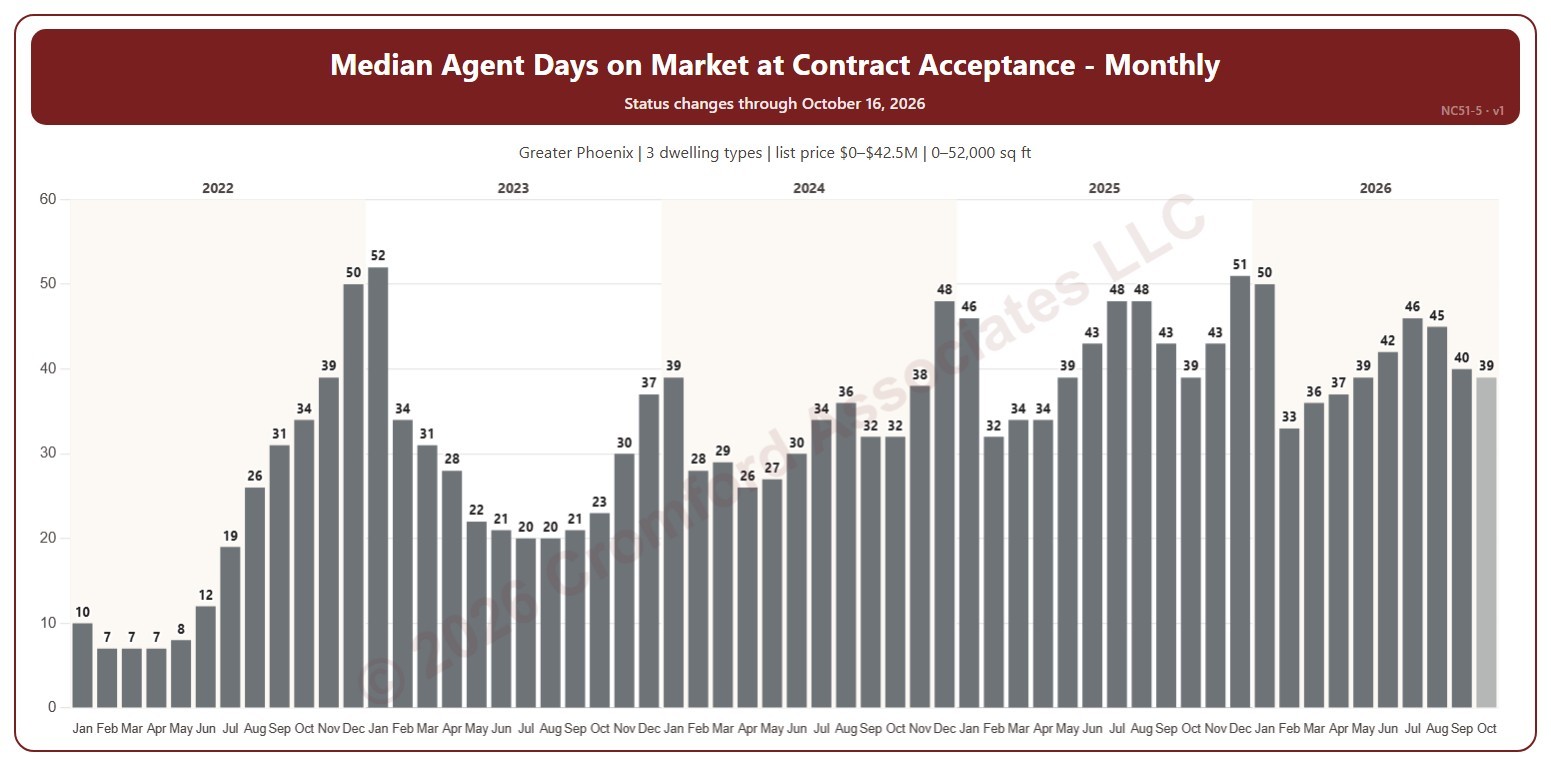
Median Agent Days on Market at Contract Acceptance

About this chart

This chart shows the median agent days on market of the listings whose contracts were accepted each month, every month labeled. Agent days on market is the number of days the listing had been on the market under its current listing agreement on the day before its contract was accepted; the median is the middle figure, half longer and half shorter.

It opens on January four years back to date; drag the handles of the date slider under the chart to choose the months shown, as far back as 2014. The chart is updated every week.

It opens on the Greater Phoenix area: the counties, cities, and ZIP codes that make it up are ticked to start with. Tick or untick any of them to change the area, including counties beyond Greater Phoenix. Narrow it further with the Dwelling Type, Transaction Type, and New / Resale boxes and the list price, home size, and year built sliders.

Hover over a bar to see the median and the number of contracts accepted.

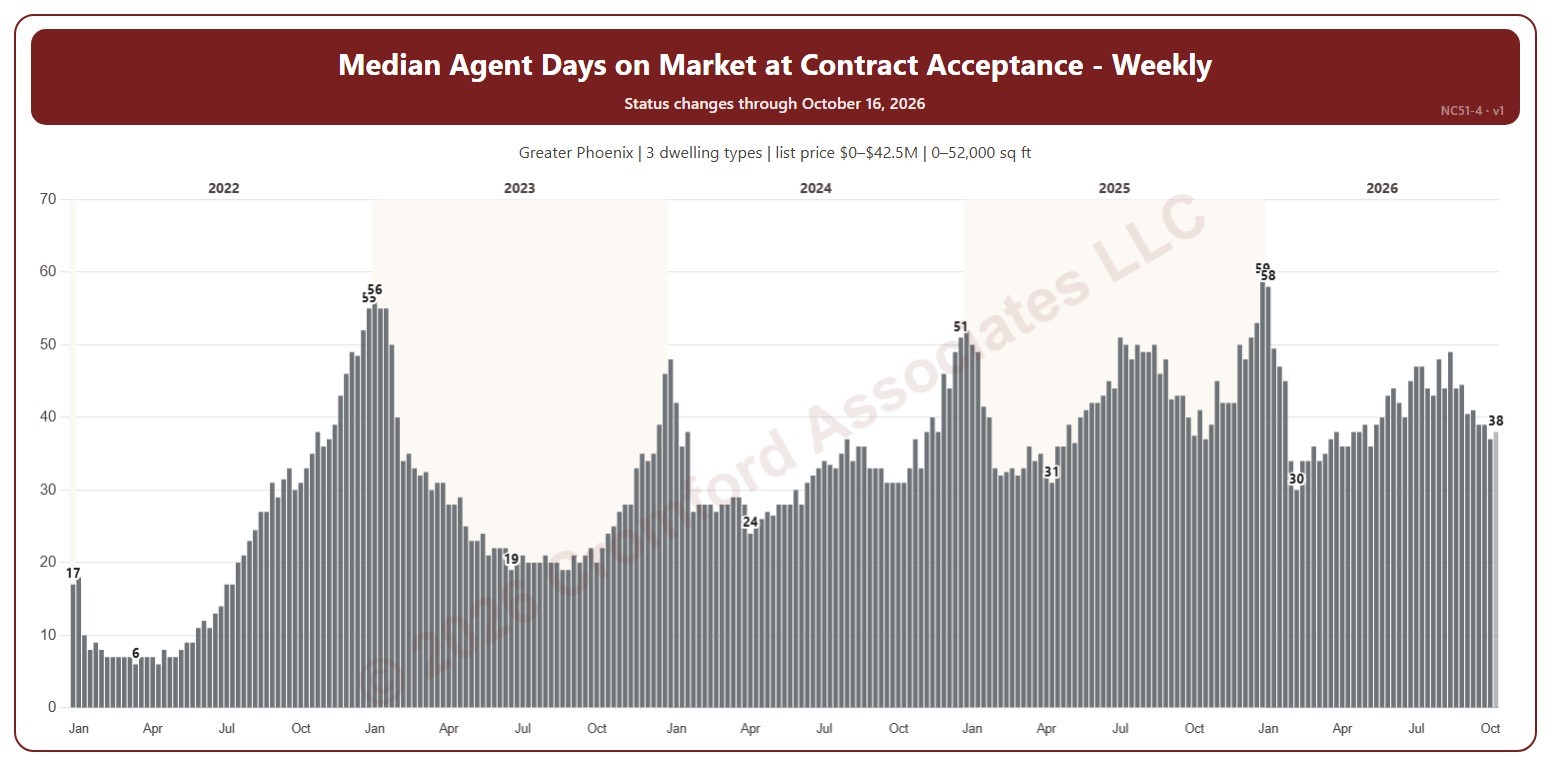
Median Agent Days on Market at Contract Acceptance

About this chart

This chart shows the median agent days on market of the listings whose contracts were accepted each week, with each year’s highest and lowest weeks labeled. Agent days on market is the number of days the listing had been on the market under its current listing agreement on the day before its contract was accepted; the median is the middle figure, half longer and half shorter.

Weeks run Sunday to Saturday. It opens on January four years back to date; drag the handles of the date slider under the chart to choose the weeks shown, as far back as 2014. The chart is updated every week.

It opens on the Greater Phoenix area: the counties, cities, and ZIP codes that make it up are ticked to start with. Tick or untick any of them to change the area, including counties beyond Greater Phoenix. Narrow it further with the Dwelling Type, Transaction Type, and New / Resale boxes and the list price, home size, and year built sliders.

Hover over a bar to see the median and the number of contracts accepted.

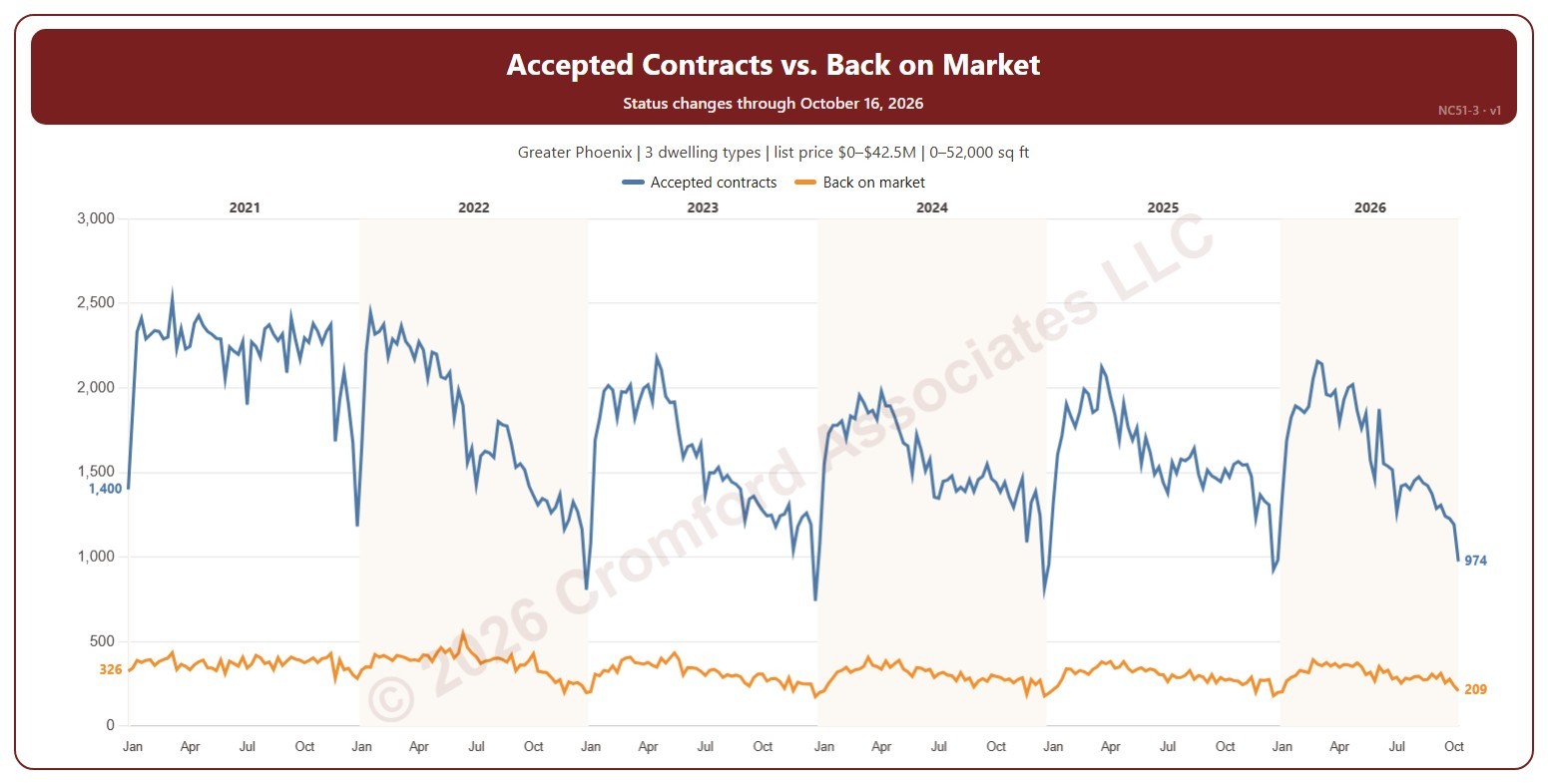
Accepted Contracts vs. Back on Market

About this chart

This chart compares, each week, the number of contracts accepted with the number of listings that came back on the market from pending or UCB / CCBS (contracts that fell through or were suspended). An accepted contract is a listing on ARMLS that went from active (or temporarily off the market) to pending or UCB / CCBS, counted on the day the change appeared.

Weeks run Sunday to Saturday. It opens on January five years back to date; drag the handles of the date slider under the chart to choose the weeks shown, as far back as 2014. The chart is updated every week.

It opens on the Greater Phoenix area: the counties, cities, and ZIP codes that make it up are ticked to start with. Tick or untick any of them to change the area, including counties beyond Greater Phoenix. Narrow it further with the Dwelling Type, Transaction Type, and New / Resale boxes and the list price, home size, and year built sliders.

Hover over the chart to see both counts for that week.

Accepted Contracts Weekly by Year

About this chart

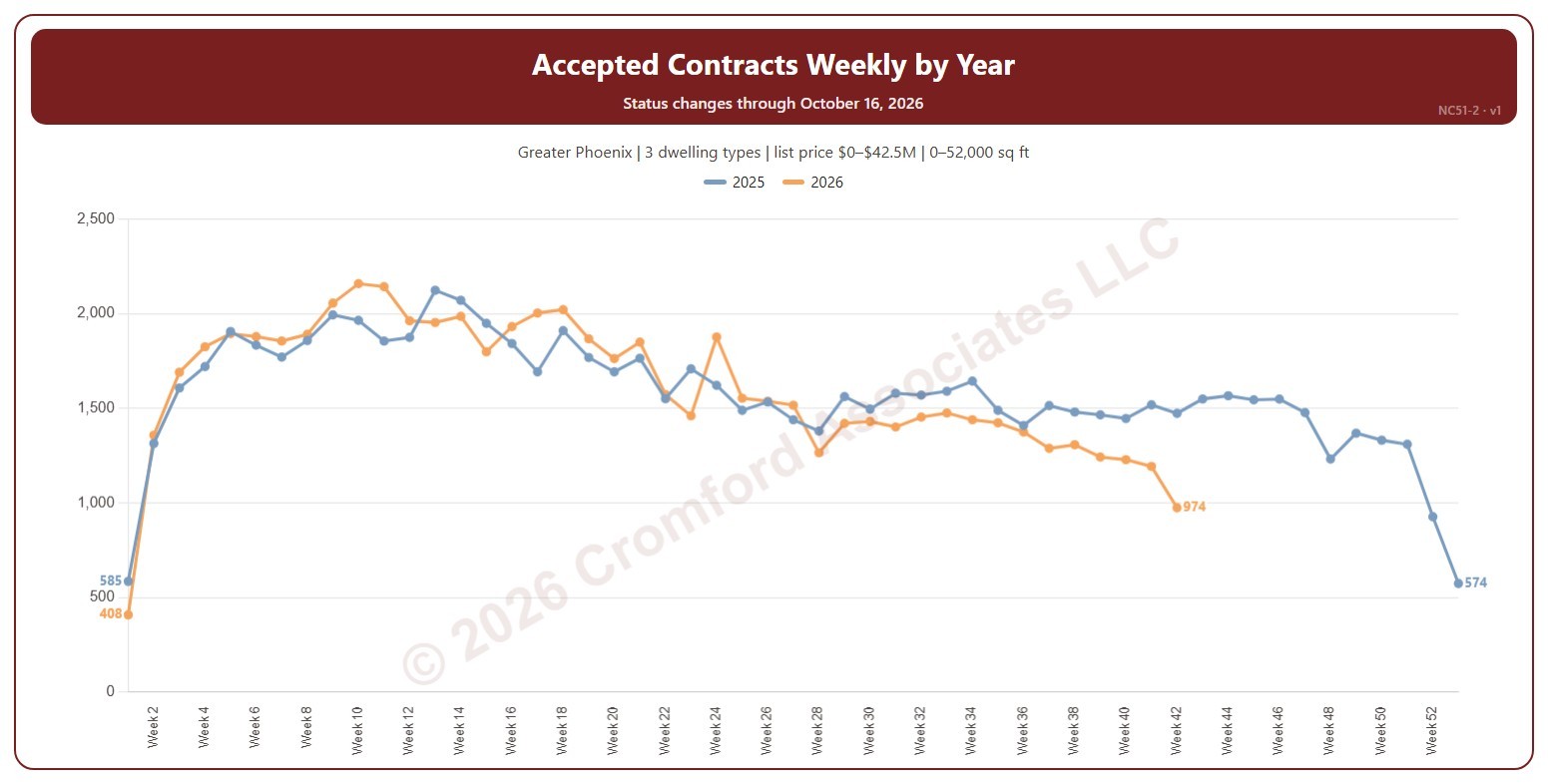
This chart shows the number of contracts accepted each week, a line per year by week number, so this year can be read against earlier years. An accepted contract is a listing on ARMLS that went from active (or temporarily off the market) to pending or UCB / CCBS, counted on the day the change appeared.

Weeks run Sunday to Saturday. Week 1 of each year starts on 1 January, so the first and last weeks of a year can be short. It opens on the latest 2 years; tick other years in the Year box to go back as far as 2014. The chart is updated every week.

It opens on the Greater Phoenix area: the counties, cities, and ZIP codes that make it up are ticked to start with. Tick or untick any of them to change the area, including counties beyond Greater Phoenix. Narrow it further with the Dwelling Type, Transaction Type, and New / Resale boxes and the list price, home size, and year built sliders.

Hover over the chart to see each year’s count for that week.

Accepted Contracts Daily – Measured Weekly

About this chart

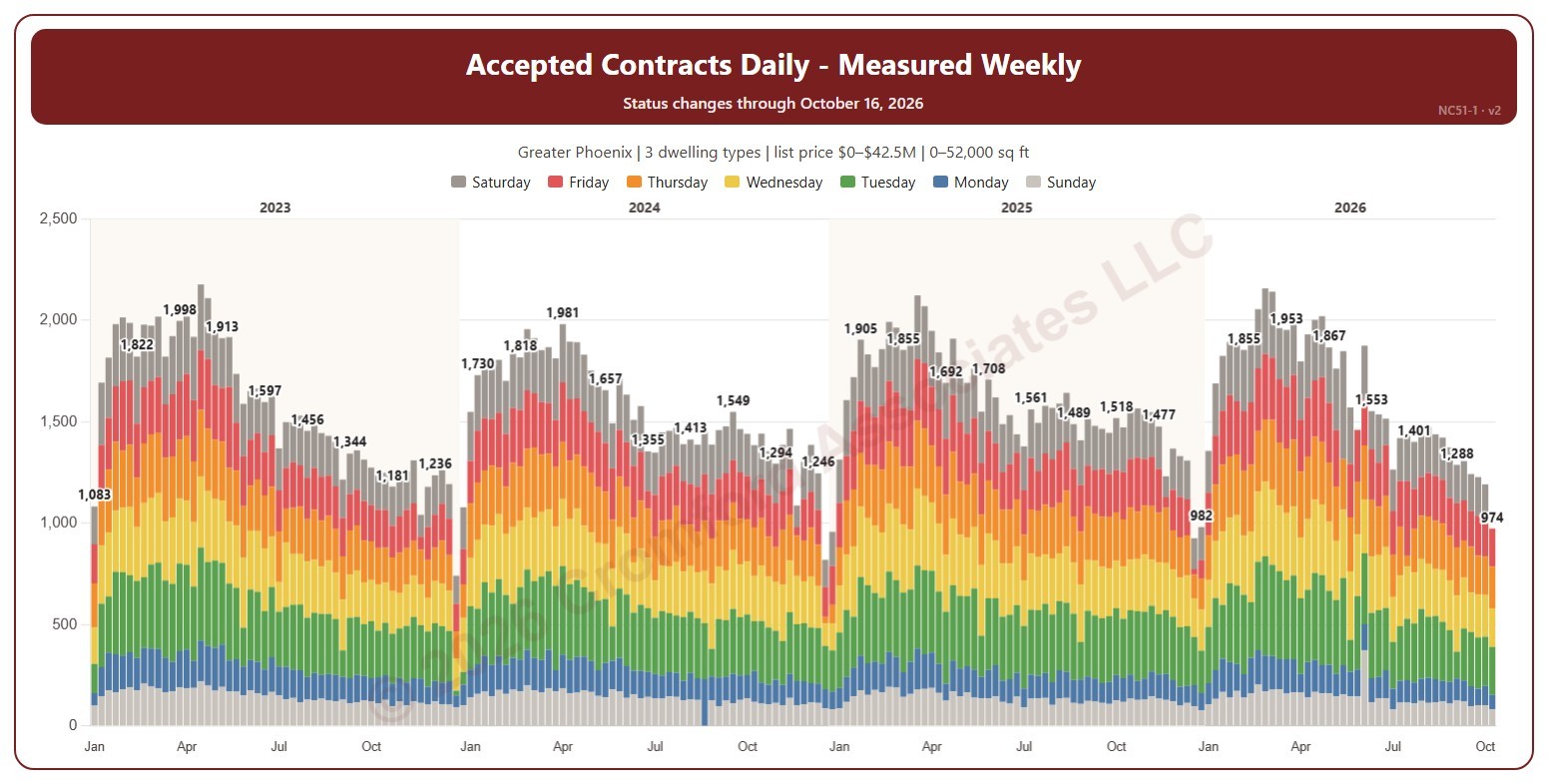
This chart shows the number of contracts accepted each week, each bar split by the day of the week the contract was accepted, with week totals labeled. An accepted contract is a listing on ARMLS that went from active (or temporarily off the market) to pending or UCB / CCBS, counted on the day the change appeared.

Weeks run Sunday to Saturday. It opens on January three years back to date; drag the handles of the date slider under the chart to choose the weeks shown, as far back as 2014. The chart is updated every week.

It opens on the Greater Phoenix area: the counties, cities, and ZIP codes that make it up are ticked to start with. Tick or untick any of them to change the area, including counties beyond Greater Phoenix. Narrow it further with the Dwelling Type, Transaction Type, and New / Resale boxes and the list price, home size, and year built sliders.

Hover over a bar to see each day and the week’s total.

Seasonal Patterns – New Listings by Calendar Month

About this chart

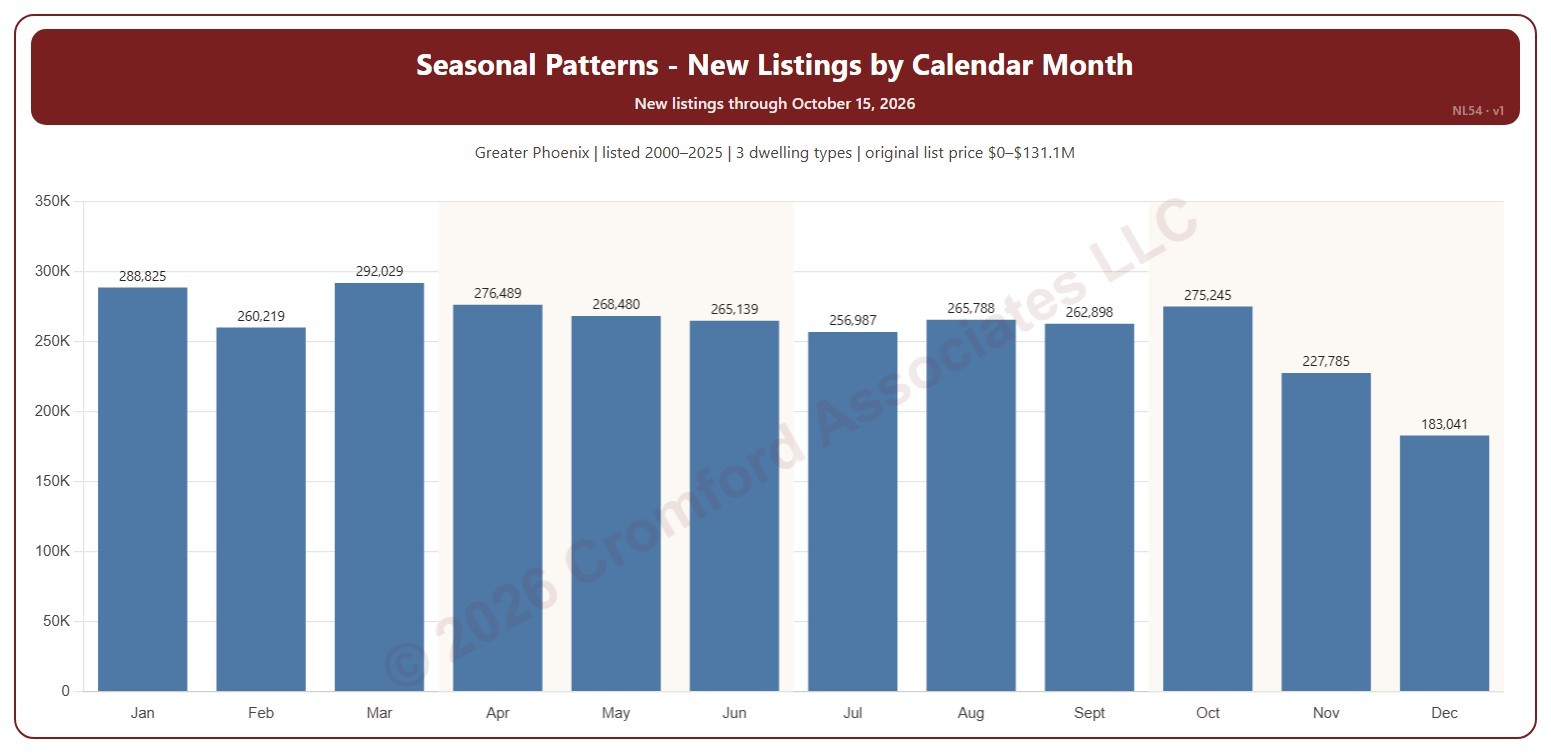
This chart shows the seasonal pattern of new listings: the number of listings on ARMLS by the calendar month they were listed, January to December, added up over the years ticked. A new listing is any listing, counted on the date it was listed, whatever happened to it afterwards.

It opens on 2000 to the last complete year; tick or untick years in the Year box to change them. The current year can be added, but its later months are not in yet, so it makes the early months look stronger. The chart is updated every week.

It opens on the Greater Phoenix area: the counties, cities, and ZIP codes that make it up are ticked to start with. Tick or untick any of them to change the area, including counties beyond Greater Phoenix. Narrow it further with the Dwelling Type, Transaction Type, and New / Resale boxes and the original list price, home size, and year built sliders.

Hover over a bar to see the month’s total and the average for one year.

New Listings by Transaction Type

About this chart

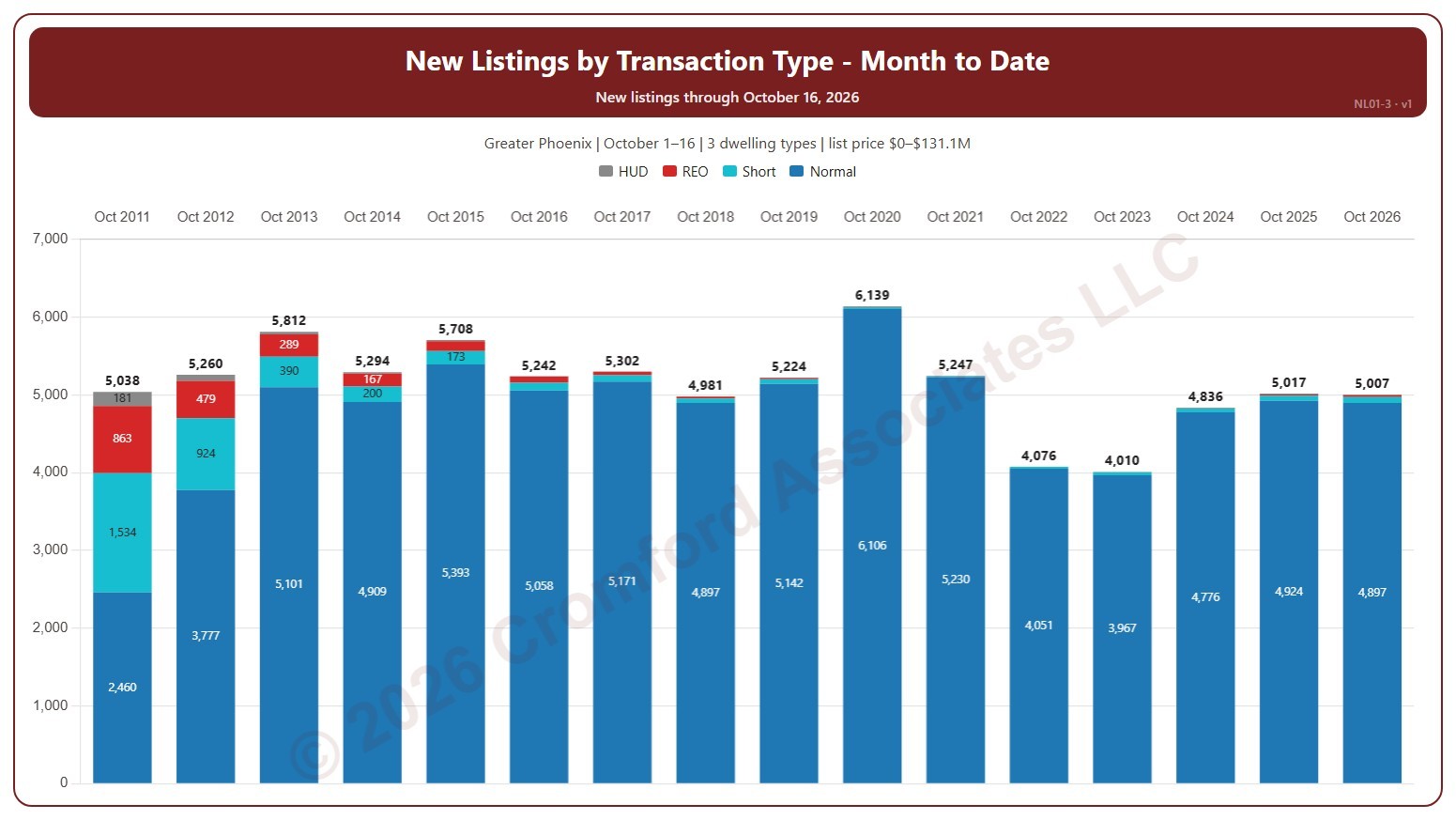
This chart shows new listings month to date, each bar split by transaction type (normal, short sale, lender-owned, HUD). Each bar counts the new listings on ARMLS in the same month, from the same first day to the same last day, in each year, so this month so far can be read against the same days of earlier years. A new listing is counted on the date it was listed, whatever happened to it afterwards.

It opens on the current month, from the 1st to the day of the latest new listing, in every year. Use the Month list and the Days boxes above the chart to compare any month and any run of days, and Month to date to return; if the days run past the latest listing, this year’s bar is drawn lighter. Tick years in the Year box (it opens on the latest 16). The chart is updated every day.

It opens on the Greater Phoenix area: the counties, cities, and ZIP codes that make it up are ticked to start with. Tick or untick any of them to change the area, including counties beyond Greater Phoenix. Narrow it further with the Dwelling Type, Transaction Type, and New / Resale boxes and the original list price, home size, and year built sliders.

Hover over a bar to see each transaction type and the total for the days chosen.