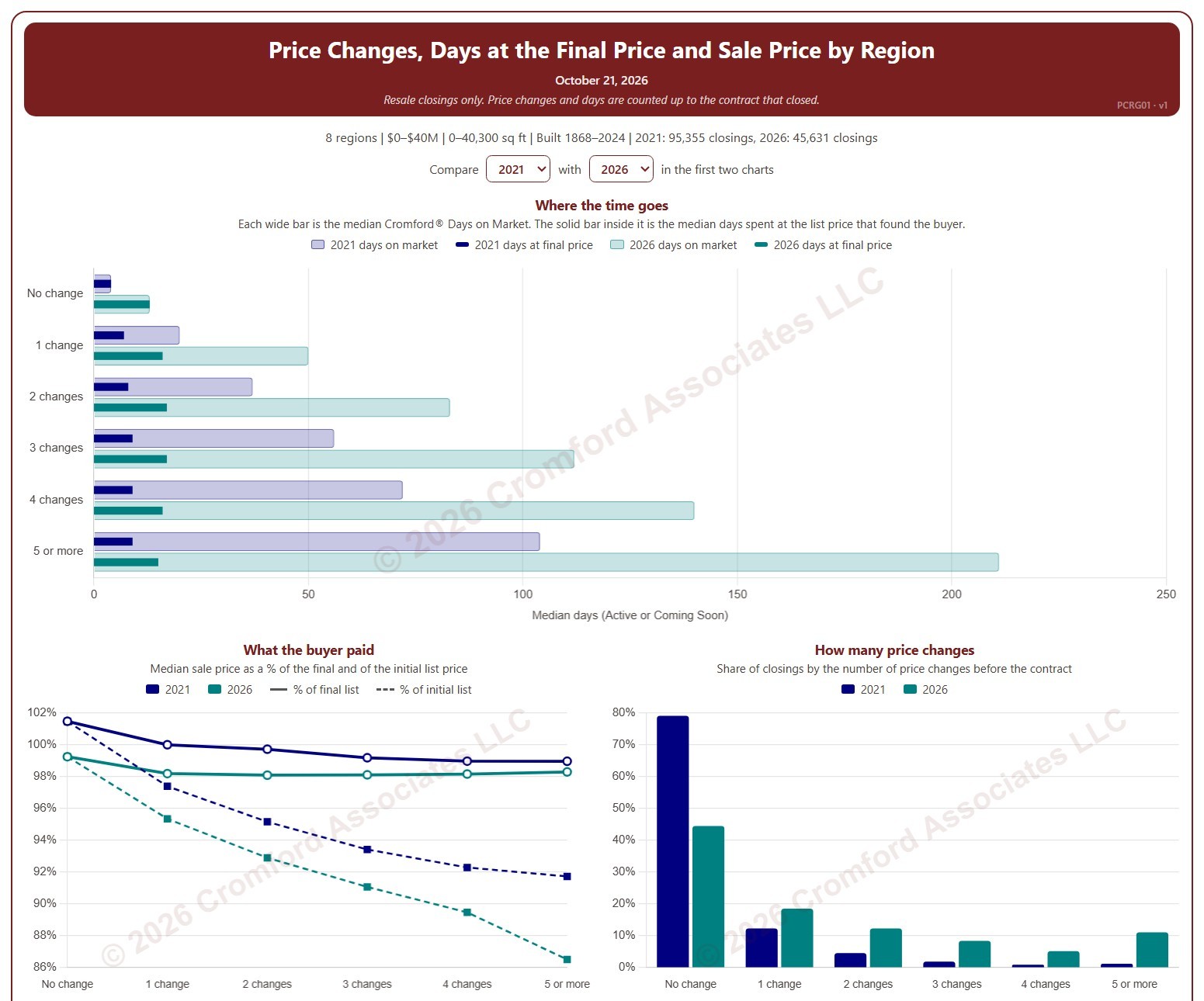
Price Changes, Days at the Final Price and Sale Price by Region

About this chart

This chart shows how many times homes changed their list price before going under contract, and what that meant for how long they took to sell and the price they sold for, by region. Each closed resale is grouped by the number of list price changes before the contract that closed, from none to five or more. Price increases and price cuts both count as a change.

The top chart compares two figures for each group. The wide bar is the median Cromford® Days on Market. The solid bar inside it is the median number of days the home spent at its final list price, the price that found the buyer. However long a home was on the market, the time it spent at the price that sold it is usually much shorter.

The top two charts compare any two years from 2020 on, picked with the selectors above them. The lower left chart shows the median sale price as a percentage of the final list price (solid line) and of the initial list price (dashed line). The lower right chart shows the share of closings in each group for the years ticked in the Year panel.

The map shades every ZIP code with its region’s figure for one year at a time, chosen with the year selector above it, so each region reads as one block. A few ZIP codes lie in two regions; they are striped in both regions’ shades and their closings count in both. Regions not ticked in the Region panel are faded. Click a ZIP code to show its region alone in the charts.

Days count while the home was Active or Coming Soon, up to the contract that closed. A contract that fell through does not reset the count. New construction is excluded. Years are by closing date, and the current year is year to date. The chart opens on 2021 and the current year in the Greater Phoenix regions, with manufactured and modular homes left out.
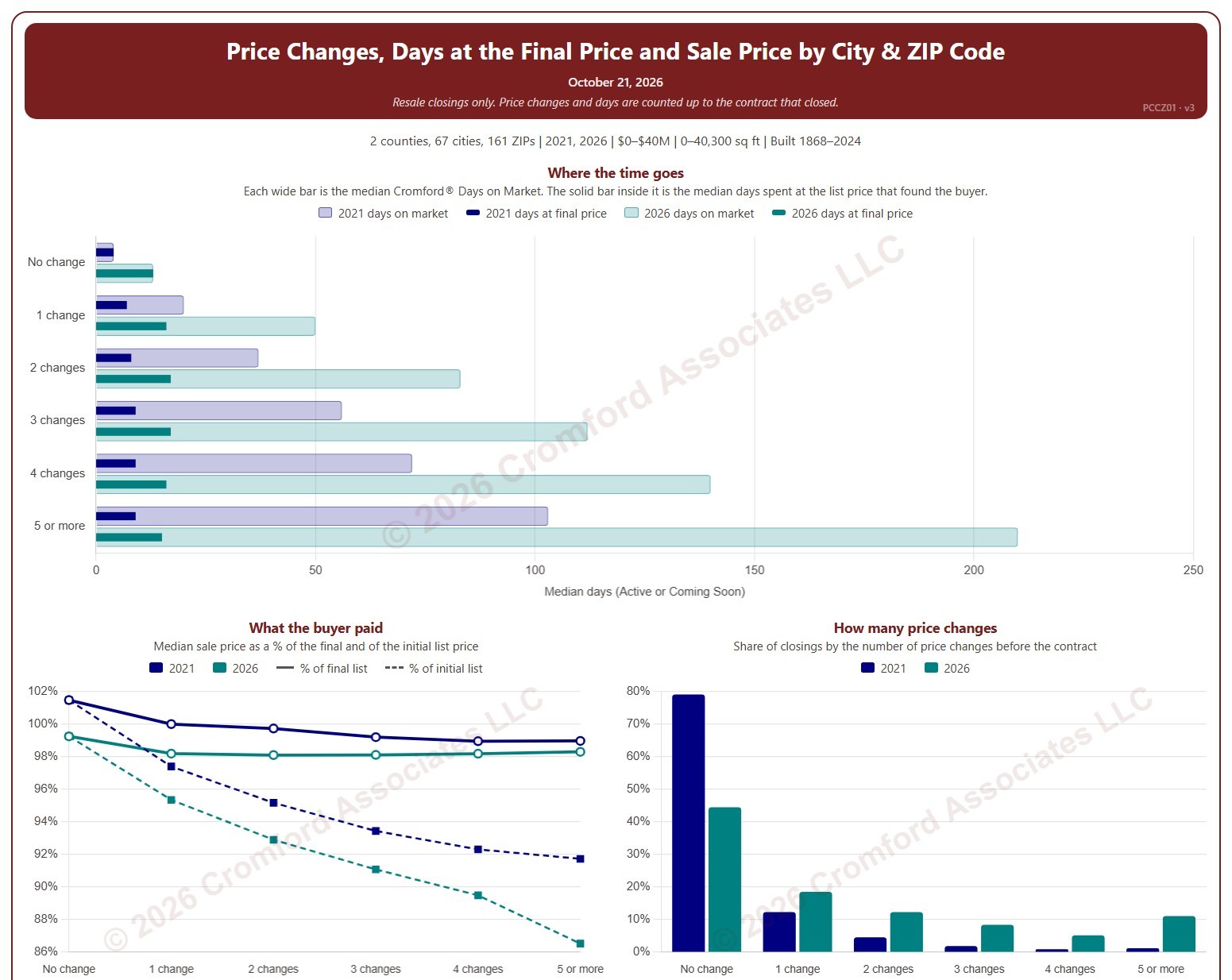
Price Changes, Days at the Final Price and Sale Price by City and ZIP Code

About this chart

This chart shows how many times homes changed their list price before going under contract, and what that meant for how long they took to sell and the price they sold for. Each closed resale is grouped by the number of list price changes before the contract that closed, from none to five or more. Price increases and price cuts both count as a change.

The top chart compares two figures for each group. The wide bar is the median Cromford® Days on Market. The solid bar inside it is the median number of days the home spent at its final list price, the price that found the buyer. However long a home was on the market, the time it spent at the price that sold it is usually much shorter.

The top two charts compare any two years from 2020 on, picked with the selectors above them. The lower left chart shows the median sale price as a percentage of the final list price (solid line) and of the initial list price (dashed line). The lower right chart shows the share of closings in each group for the years ticked in the Year panel.

The map shades each ZIP code for one year at a time, chosen with the year selector above it. ZIP codes with fewer than 20 closings are shown in gray. Click a ZIP code to show it alone in the charts.

Days count while the home was Active or Coming Soon, up to the contract that closed. A contract that fell through does not reset the count. New construction is excluded. Years are by closing date, and the current year is year to date. The chart opens on 2021 and the current year in Maricopa and Pinal counties, with manufactured and modular homes left out.
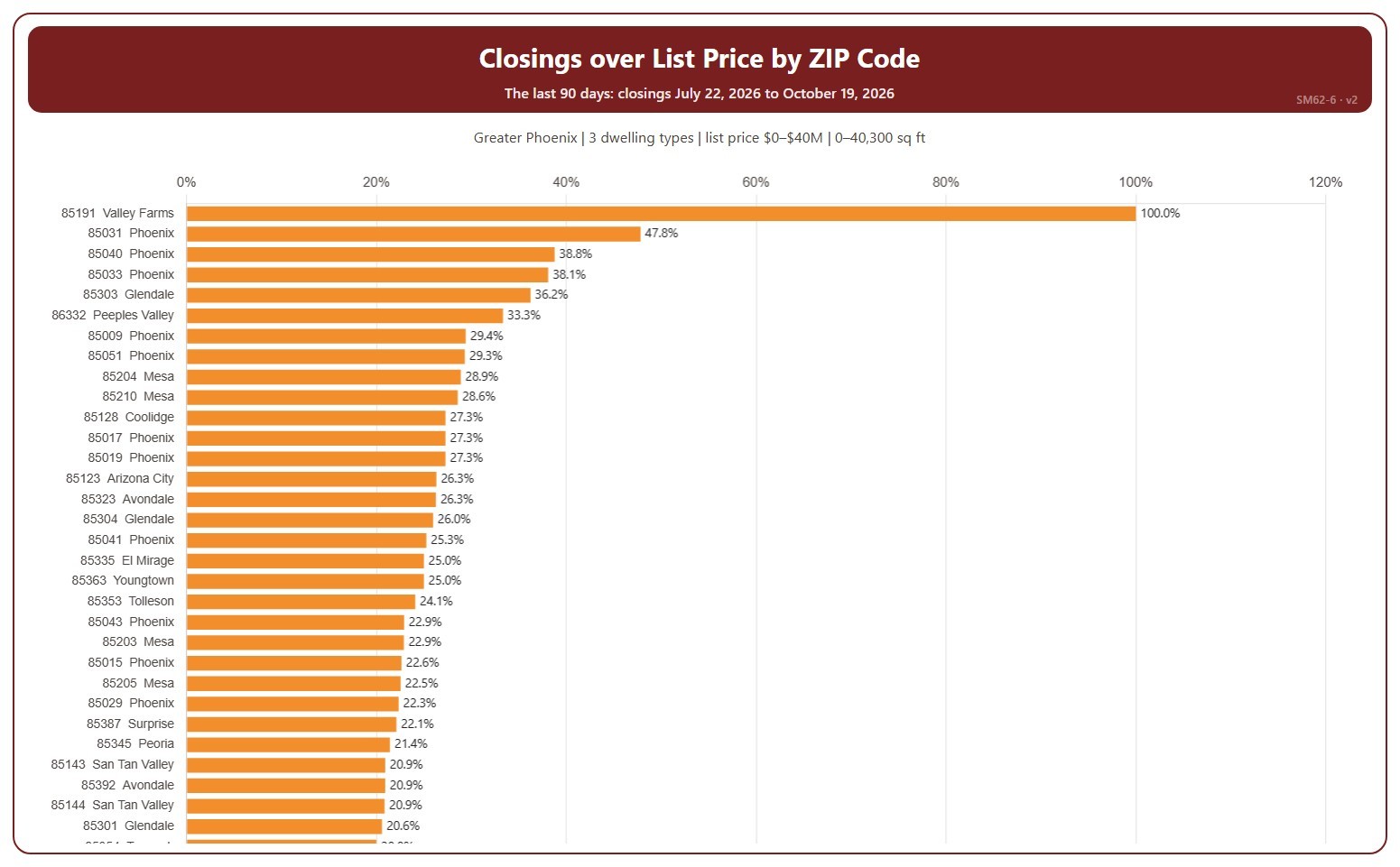
Closings over List Price by ZIP Code

About this chart

This chart ranks ZIP codes by the percentage of their closings that closed over list price in the last 90 days, highest first. Each ZIP code is shown with the city most of its closings are in. A home closed over list price when its sale price was higher than its list price on its ARMLS listing; the amount over is the sale price minus the list price. A ZIP code with only a few closings can show 0% or 100%.

It covers the 90 days of closings up to the newest one; the heading shows the exact dates. Scroll inside the chart to see every ZIP code; a printed copy runs over as many pages as it needs. The chart is updated every day.

It opens on the Greater Phoenix area: the counties, cities, and ZIP codes that make it up are ticked to start with. Tick or untick any of them to change the area, including counties beyond Greater Phoenix. Narrow it further with the Dwelling Type, Transaction Type, and New / Resale boxes and the list price, home size, and year built sliders.

Hover over a bar to see the percentage, the number over list price, and all closings in that ZIP code.

Closings over List Price by City

About this chart

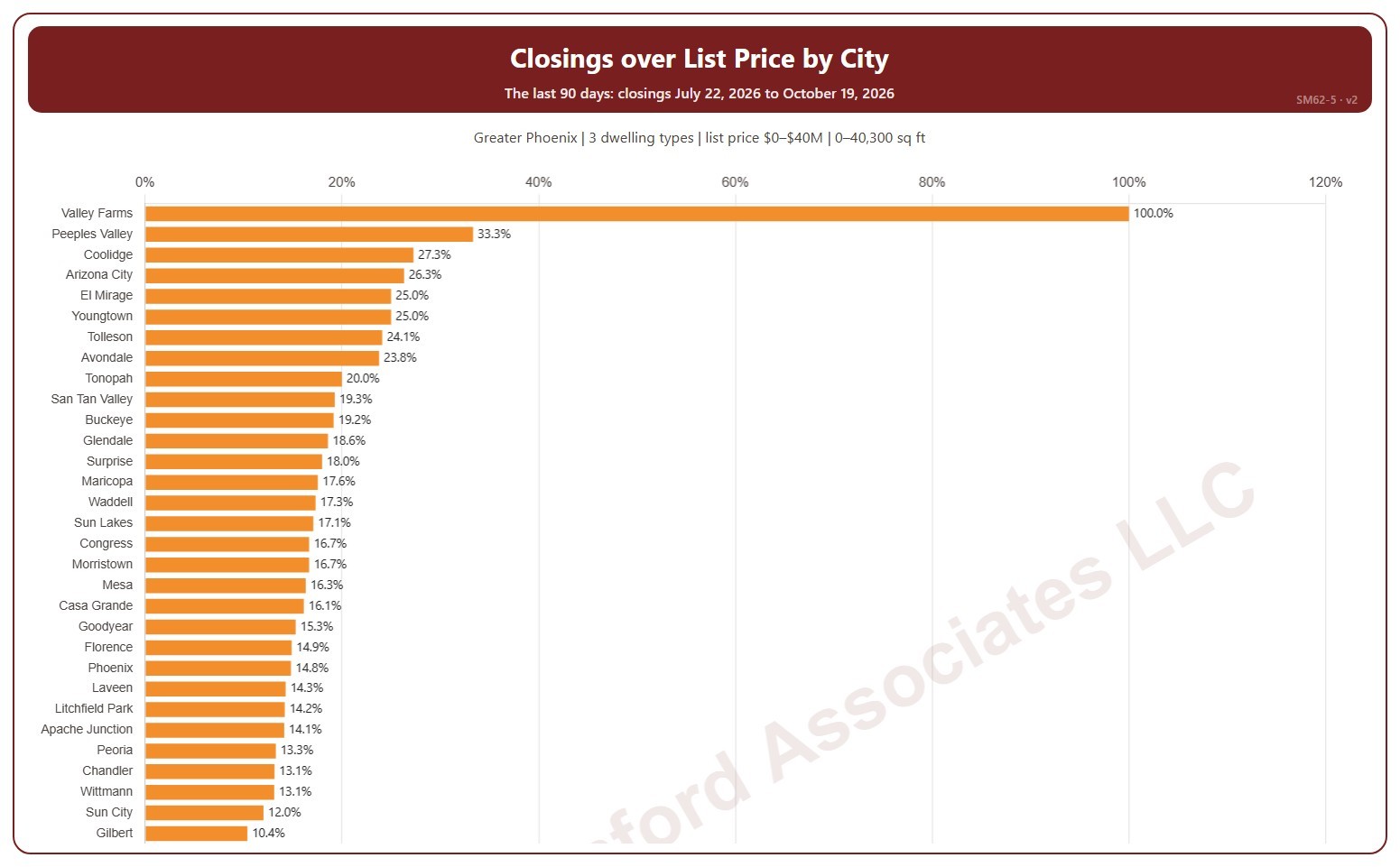
This chart ranks cities by the percentage of their closings that closed over list price in the last 90 days, highest first. A home closed over list price when its sale price was higher than its list price on its ARMLS listing; the amount over is the sale price minus the list price. A city with only a few closings can show 0% or 100%.

It covers the 90 days of closings up to the newest one; the heading shows the exact dates. Scroll inside the chart to see every city; a printed copy runs over as many pages as it needs. The chart is updated every day.

It opens on the Greater Phoenix area: the counties, cities, and ZIP codes that make it up are ticked to start with. Tick or untick any of them to change the area, including counties beyond Greater Phoenix. Narrow it further with the Dwelling Type, Transaction Type, and New / Resale boxes and the list price, home size, and year built sliders.

Hover over a bar to see the percentage, the number over list price, and all closings in that city.

Phoenix Urban Village Snapshot

About this chart

This table shows 38 measures of the market for single-family detached homes in each of 14 of the City of Phoenix’s urban villages, one village at a time. Pick the village from the box at the top. Rio Vista, the fifteenth village, has too few sales to include.

Each measure is shown today, a month ago, a quarter ago, a year ago, and two years ago, and earlier dates back to January 2018 can be chosen from the date box. The ST and LT marks compare today with last month and with last year, colored by whether the change favors sellers or buyers.

Urban villages are planning areas inside the City of Phoenix, so every home in them is also counted in Phoenix. Laveen Urban Village is not the same as the postal city of Laveen, and Paradise Valley Urban Village is not the Town of Paradise Valley.

Brand Listing Success Rate

About this chart

This chart compares how often the listings of each real estate brand sell, together with the median list price and average year built of the homes it lists. It covers listings added to ARMLS in the last two years, new homes and resales alike, and the success rate is the share of them that closed rather than expired or being cancelled.

A listing counts once it has closed, expired, or been cancelled. Listings that are still active, under contract, or temporarily off the market are not counted yet, so the most recent months contribute fewer listings than earlier ones. Brands with fewer than 200 such listings are left out.

Each listing is credited to the brand of its listing office, so all the offices of a franchise or brokerage count together. An office that does not belong to a larger brand is shown under its own name.

New-home builders and iBuyers list their own inventory rather than acting as an agent for a seller, and some brokers specialize in listing homes owned by institutional investors; all three tend to show unusually high success rates for that reason.

The bars rank every brand by success rate and then by the number of listings. Hover over a bar for the counts and median list price. The table below can be searched by brand name and sorted by clicking a column heading.

Office Listing Success Rate

About this chart

This chart compares how often each brokerage office’s listings sell. It covers listings added to ARMLS in the last 12 months, and the success rate is the share of them that closed rather than expired or being cancelled. Each listing is credited to its listing office.

A listing counts once it has closed, expired, or been cancelled. Listings that are still active, under contract, or temporarily off the market are not counted yet, so the most recent months contribute fewer listings than earlier ones. An office needs at least 50 such listings in the selection to appear.

Narrow the comparison with the County, Region, City, Dwelling Type, and Price Range controls; the City list follows the county you pick, and you can tick any combination of the 16 price ranges. New Construction lets you include or exclude homes built this year or in the previous two. The tiles show the totals and the overall success rate for the selection, as a yardstick for each office.

The bar chart shows the top 10, 25, 50, or 100 offices, ranked by success rate and then by the number of listings. The table below lists every office that qualifies; search it by office name or ID, and click a column heading to sort by it. Many brokerages have several offices with the same name, so the table shows each office with its ARMLS office ID.

Offices that list new homes for a builder, or homes for an iBuyer or an institutional investor, are listing their own client’s inventory and tend to show unusually high success rates for that reason.

Agent Listing Success Rate

About this chart

This chart compares how often each listing agent’s listings sell. It covers listings added to ARMLS in the last 12 months, and the success rate is the share of them that closed rather than expired or being cancelled. Each listing is credited to its listing agent.

A listing counts once it has closed, expired, or been cancelled. Listings that are still active, under contract, or temporarily off the market are not counted yet, so the most recent months contribute fewer listings than earlier ones. An agent needs at least 10 such listings in the selection to appear.

Narrow the comparison with the County, Region, City, Dwelling Type, and Price Range controls; the City list follows the county you pick, and you can tick any combination of the 16 price ranges. New Construction lets you include or exclude homes built this year or in the previous two. The tiles show the totals and the overall success rate for the selection, as a yardstick for each agent.

The bar chart shows the top 10, 25, 50, or 100 agents, ranked by success rate and then by the number of listings. The table below lists every agent that qualifies, with the office they listed through most often. Search it by name, agent ID, or office, and click a column heading to sort by it.

A high rate on a handful of listings means less than the same rate on many, so read the success rate together with the number of listings.

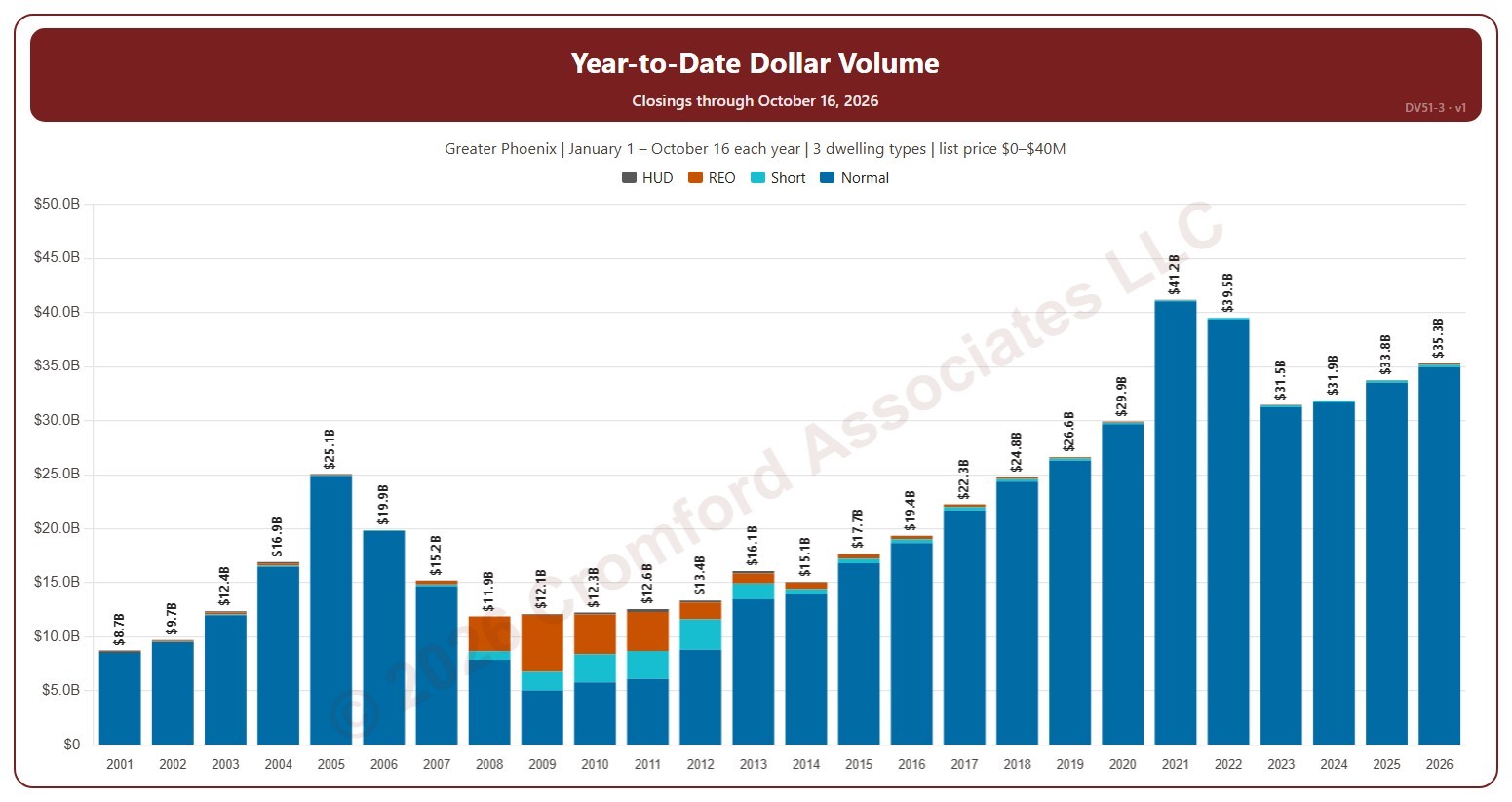
Year-to-Date Dollar Volume

About this chart

This chart compares the dollar volume of closings year to date: every year is cut to 1 January – the day of the latest closing, so this year so far can be read against the same days of earlier years. Dollar volume is the total of the sale prices of the homes that closed on ARMLS, each bar split by transaction type (normal, short sale, lender-owned, HUD).

It opens on 2001 to date; drag the handles of the date slider under the chart to choose the years shown, as far back as 2001. Use the Month box to count only some months of the year. The chart is updated every day.

It opens on the Greater Phoenix area: the counties, cities, and ZIP codes that make it up are ticked to start with. Tick or untick any of them to change the area, including counties beyond Greater Phoenix. Narrow it further with the Dwelling Type, Transaction Type, and New / Resale boxes and the list price, home size, and year built sliders.

Hover over a bar to see each transaction type and the year-to-date total.

HOA Fees for High-Rise Condos

About this chart

This chart shows the monthly HOA fees stated in ARMLS listings for 35 high-rise condo buildings in Maricopa County, from 1999 to the latest listing shown at the top. The fee is the total monthly amount for every association the unit belongs to. Listings that do not give a fee are left out.

Pick a building from the Building list; the chart opens on 3rd Avenue Lofts. The Summary view has two charts. The first shows each listing as a bubble at its list date and fee, and a bigger bubble is a bigger unit. The second shows the median and average fee for each calendar year; the current year runs only to the latest listing. The tiles above give the number of listings, the median and average for the latest full year, and the latest listing.

Use Show to switch between the monthly fee and the fee per square foot, and Dollars to switch between the fees as listed and fees adjusted for inflation, restated in today’s dollars using the US Consumer Price Index. The Detailed view shows all six charts at once: the fee and the fee per square foot for every listing, and the yearly median and average of each, both as listed and adjusted for inflation.

The median is the better guide to a typical fee: one unusual unit moves the average but not the median. Hover over a bubble to see the unit, MLS number, list date, fee, size, and fee per square foot.