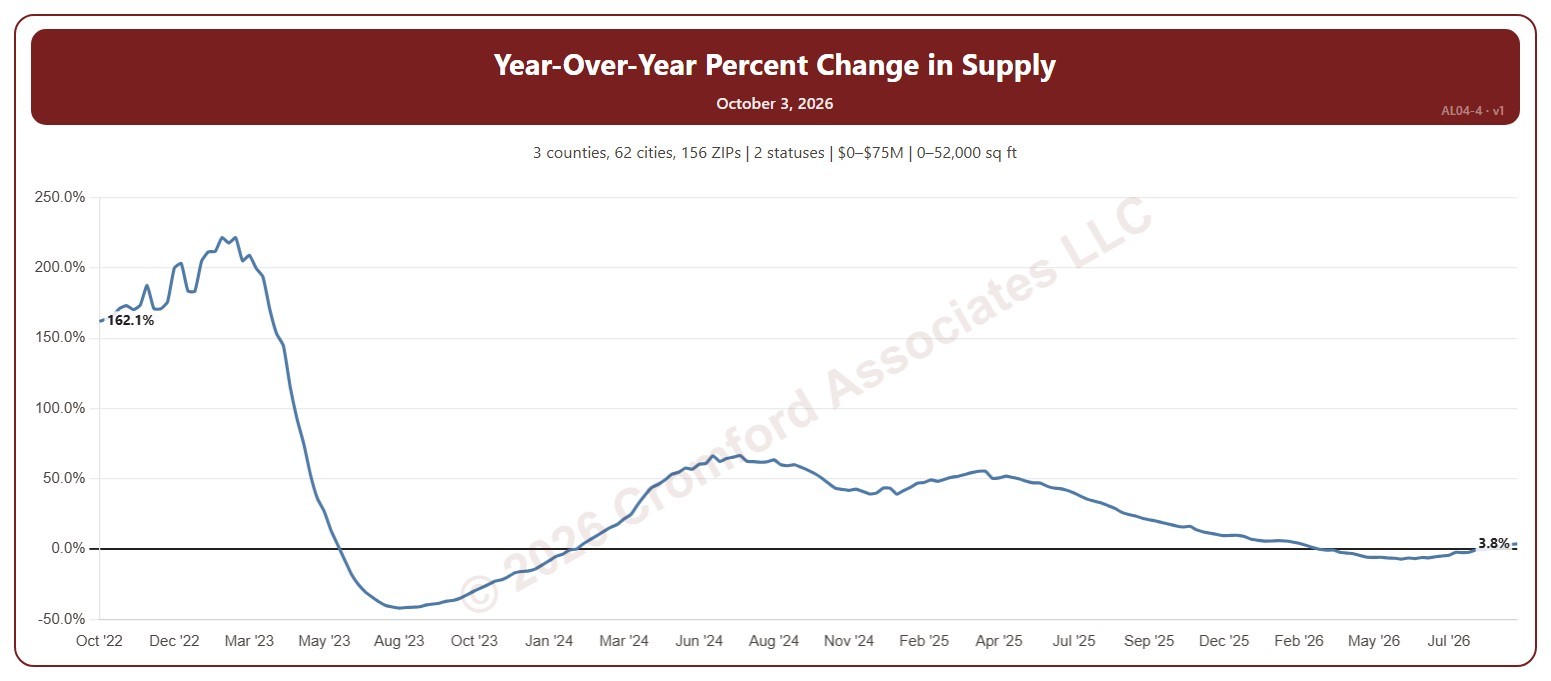
Year-over-Year Percent Change in Supply

About this chart

This chart shows the year-over-year change in supply: the number of homes for sale on ARMLS each Saturday compared with the same week a year earlier, as a percentage. Above zero, there is more inventory than a year ago, which gives buyers more choice; below zero, less.

By default it counts Active and Coming Soon listings; tick UCB / CCBS (under contract but still accepting back-up offers) or Temp Off Market in the List Status panel to include them. It opens on the last four years; use the Period panel to show the last 2 or 8 years, everything since 2011, or chosen years.

It opens on the Greater Phoenix area: the counties, cities, and ZIP codes that make it up are ticked to start with. Tick or untick any of them to change the area, including counties beyond Greater Phoenix. Narrow it further with the Dwelling Type, List Status, Transaction Type, and New / Resale boxes and the list price, home size, year built, and days on market sliders.

Hover over the chart to see the figures for that week.
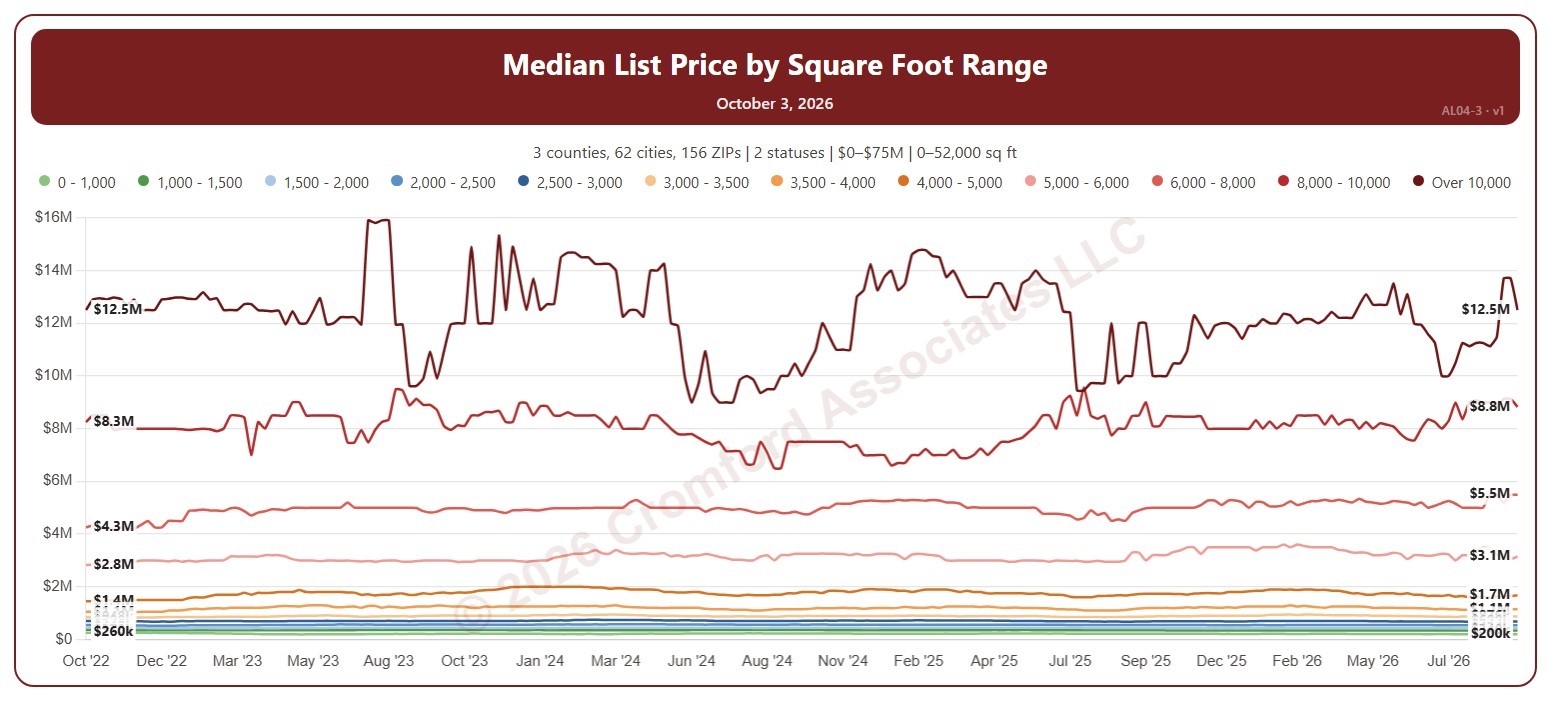
Median List Price by Square Foot Range

About this chart

This chart shows the median list price of the homes for sale on ARMLS each week (on Saturdays), one line for each of 12 home-size bands from 1,000 square feet or less up to over 10,000. Comparing homes of similar size shows how asking prices are moving without the mix of sizes getting in the way.

By default it counts Active and Coming Soon listings; tick UCB / CCBS (under contract but still accepting back-up offers) or Temp Off Market in the List Status panel to include them. It opens on the last four years; use the Period panel to show the last 2 or 8 years, everything since 2011, or chosen years.

It opens on the Greater Phoenix area: the counties, cities, and ZIP codes that make it up are ticked to start with. Tick or untick any of them to change the area, including counties beyond Greater Phoenix. Narrow it further with the Dwelling Type, List Status, Transaction Type, and New / Resale boxes and the list price, home size, year built, and days on market sliders.

Hover over the chart to see the figures for that week.
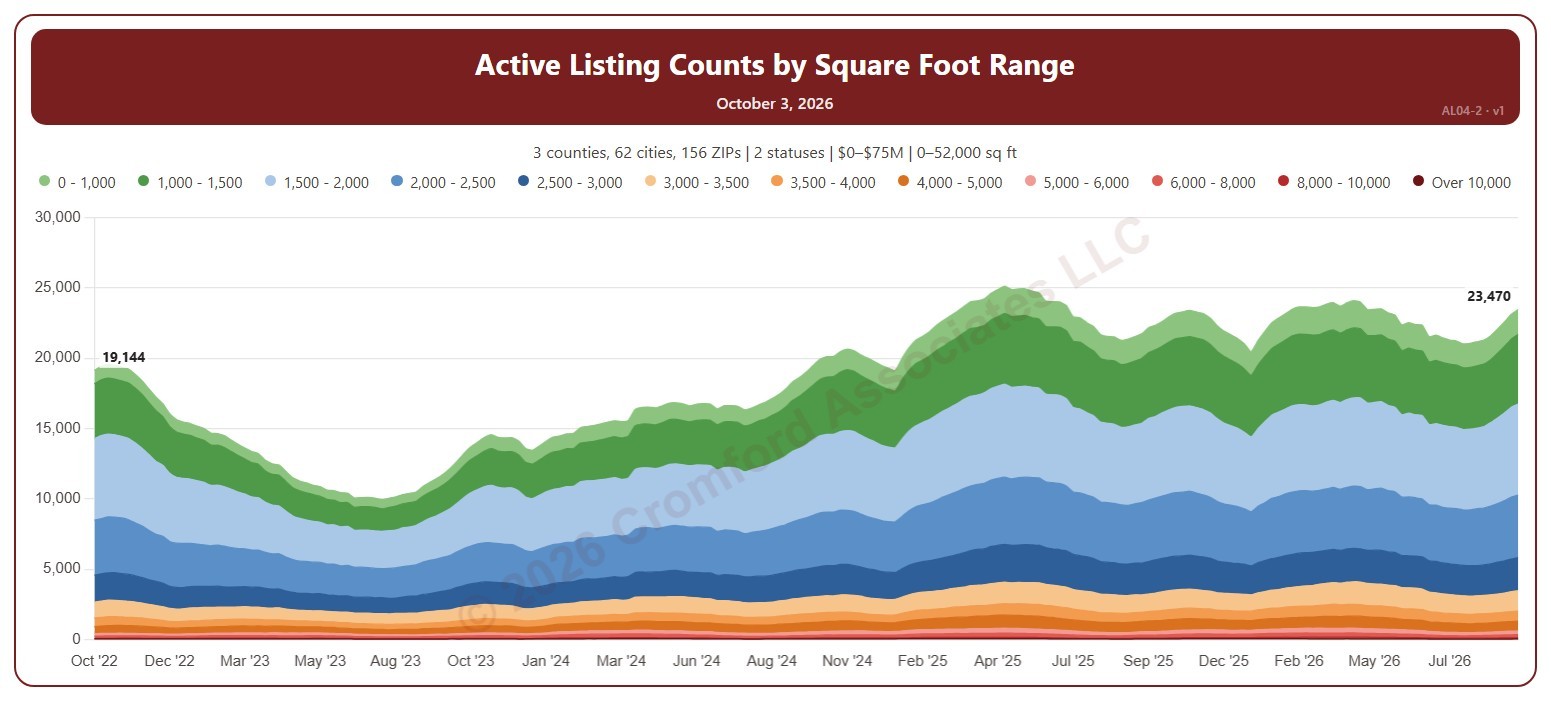
Active Listings by Size

About this chart

This chart counts the homes listed for sale on ARMLS each week (on Saturdays), stacked by home size in 12 bands from 1,000 square feet or less up to over 10,000. It shows which sizes make up the inventory and how that is changing.

By default it counts Active and Coming Soon listings; tick UCB / CCBS (under contract but still accepting back-up offers) or Temp Off Market in the List Status panel to include them. It opens on the last four years; use the Period panel to show the last 2 or 8 years, everything since 2011, or chosen years.

It opens on the Greater Phoenix area: the counties, cities, and ZIP codes that make it up are ticked to start with. Tick or untick any of them to change the area, including counties beyond Greater Phoenix. Narrow it further with the Dwelling Type, List Status, Transaction Type, and New / Resale boxes and the list price, home size, year built, and days on market sliders.

Hover over the chart to see the figures for that week.
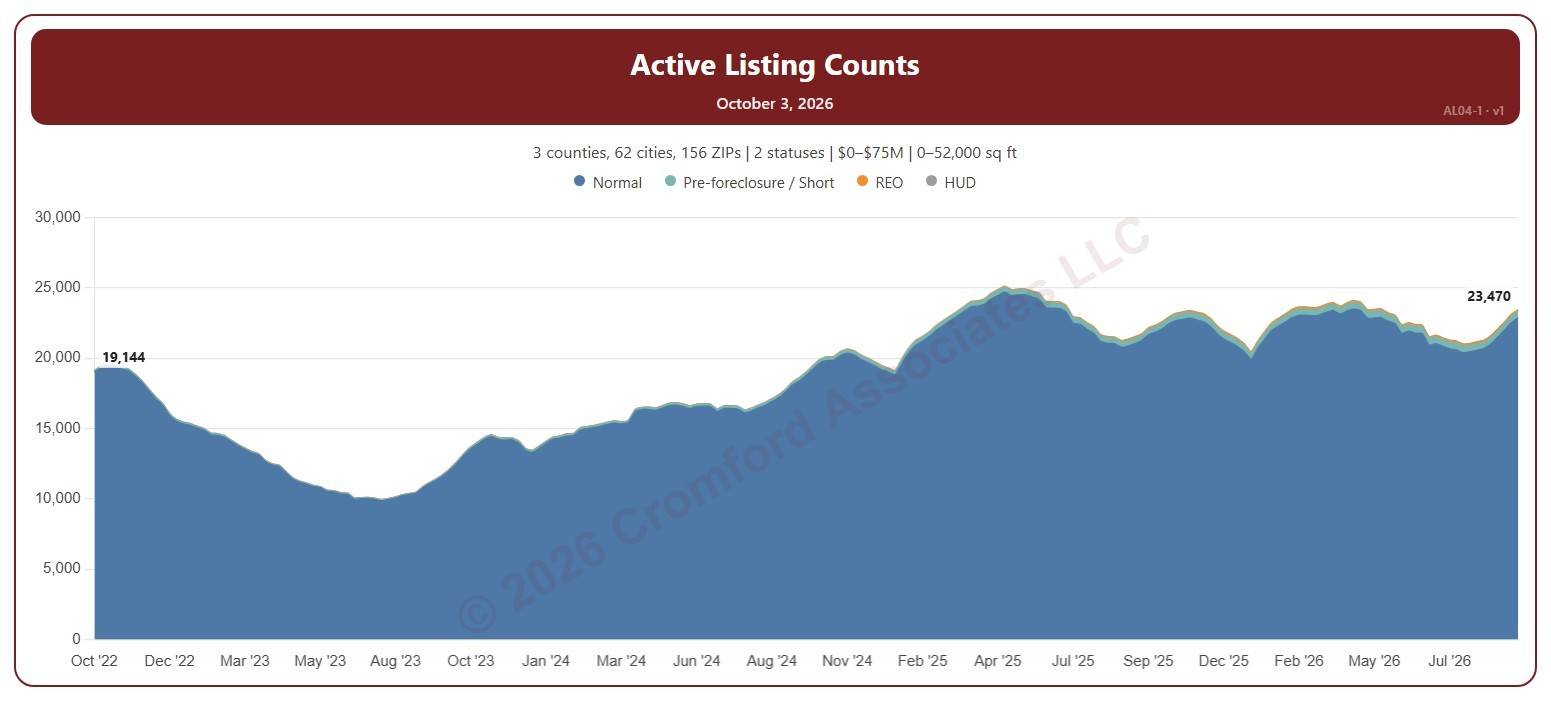
Active Listings Weekly

About this chart

This chart counts the homes for sale on ARMLS each week (measured on Saturdays), stacked by transaction type: normal sales, pre-foreclosure / short sales, REOs, and HUD homes. The height of the stack is the total number of listings.

By default it counts Active and Coming Soon listings. Tick UCB / CCBS to include listings that are under contract but still accepting back-up offers, or Temp Off Market for listings that are temporarily withdrawn.

It opens on the last four years for the Greater Phoenix area: the counties, cities, and ZIP codes that make it up are ticked to start with. Use the Period panel to show the last 2, 4, or 8 years, or everything since 2011. The geography, dwelling type, list price, home size, year built, days on market, and New / Resale filters narrow the count to the part of the market you are interested in.

Rising inventory gives buyers more choice and more negotiating power; falling inventory favors sellers. Hover over the chart to see the counts for any week.

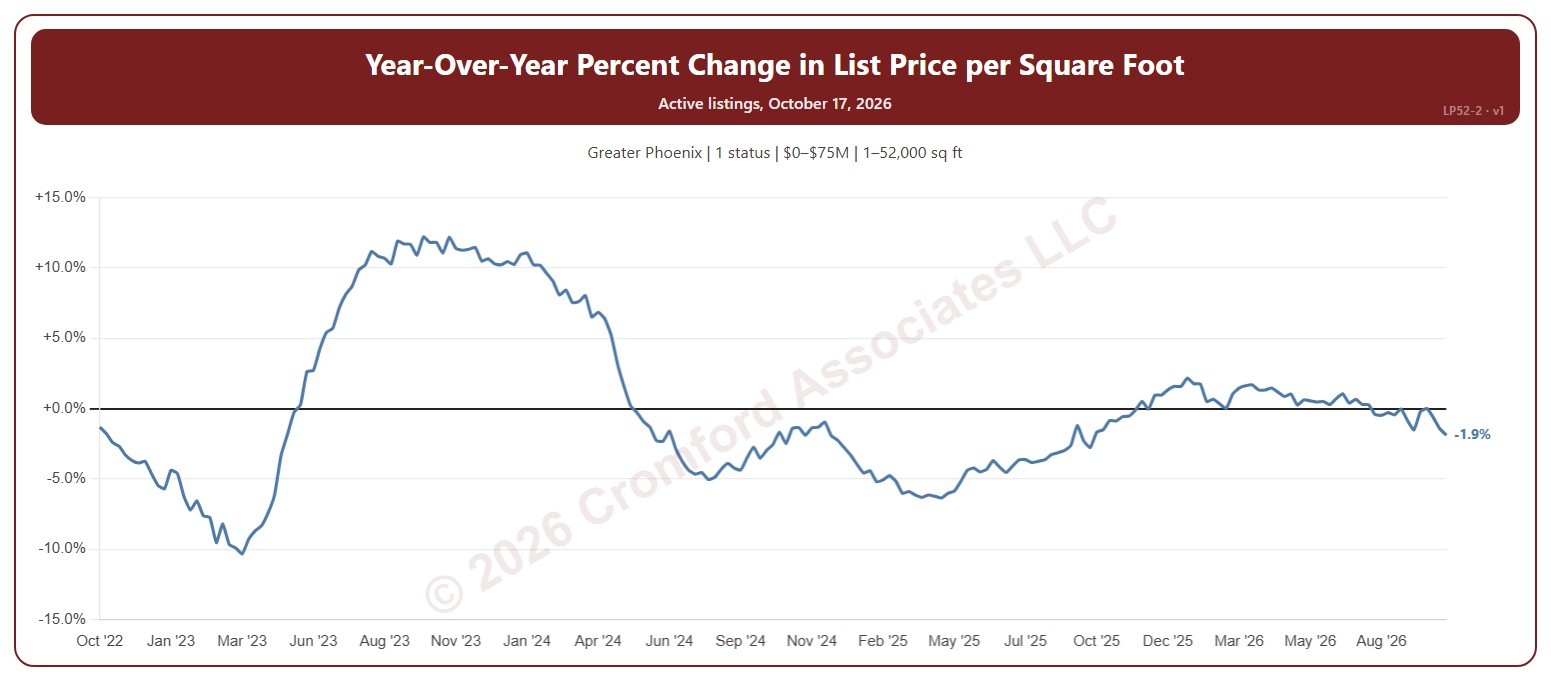
Year-over-Year Percent Change in List Price per Square Foot – Active Listings

About this chart

This chart shows how the average asking price per square foot of the homes for sale compares with the same Saturday a year earlier, as a percentage. The average is the total asking price of the active listings divided by their total square feet, taken every Saturday, so larger homes count for more.

It opens on the last 4 years; choose a longer period in the Period box, back to 2012. The chart is updated every day.

It opens on the Greater Phoenix area and on Active listings; tick UCB / CCBS or Coming Soon in the Status box to add them. Tick or untick counties, cities, and ZIP codes to change the area, including counties beyond Greater Phoenix. Narrow it further with the Dwelling Type, Transaction Type, and New / Resale boxes and the list price, home size, year built, and days on market sliders.

Hover over the line to see the change and the two prices per square foot it compares, each with its Saturday.

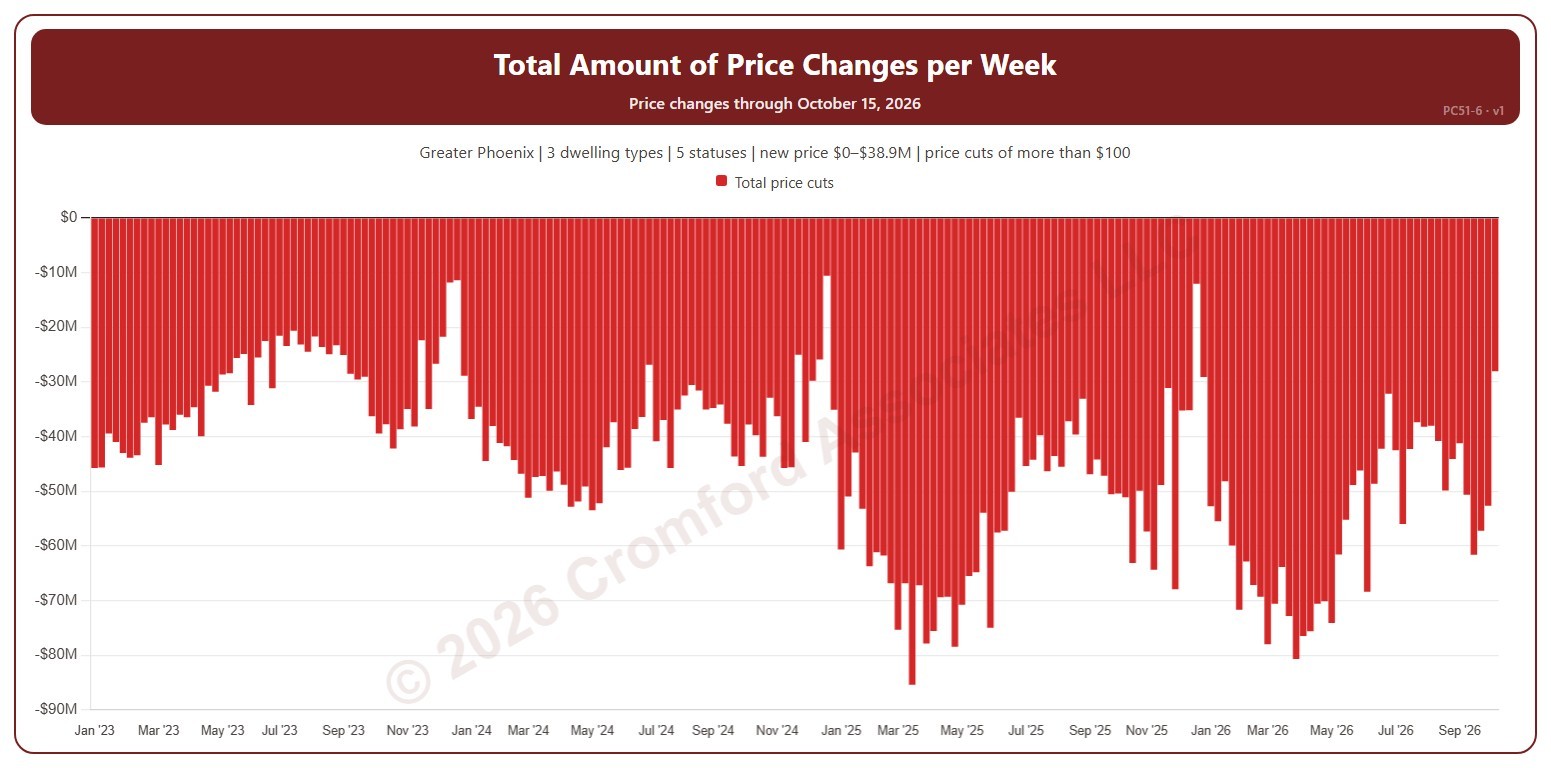
Total Amount of Price Changes per Week

About this chart

This chart shows the total dollar amount of list price changes each week. Price cuts show below zero. It counts changes to a listing’s list price on ARMLS, using the new price for the price filter. A change counts only when it is more than the amount in the Price Change panel ($100 to start with). Use the Price Change panel to show price cuts (the opening view), price increases, or both. Use the Week box to pick one week number and compare that week across the years; week 1 is the week holding 1 January.

Weeks run Sunday to Saturday. It opens on January three years back to date; drag the handles of the date slider under the chart to choose the weeks shown, as far back as January 2013. The newest week is the week so far. The chart is updated every week.

It opens on the Greater Phoenix area: the counties, cities, and ZIP codes that make it up are ticked to start with. Tick or untick any of them to change the area, including counties beyond Greater Phoenix. Narrow it further with the Dwelling Type, List Status, Transaction Type, and New / Resale boxes and the new list price, home size, and year built sliders.

Hover over a bar to see the week’s dates and the total.

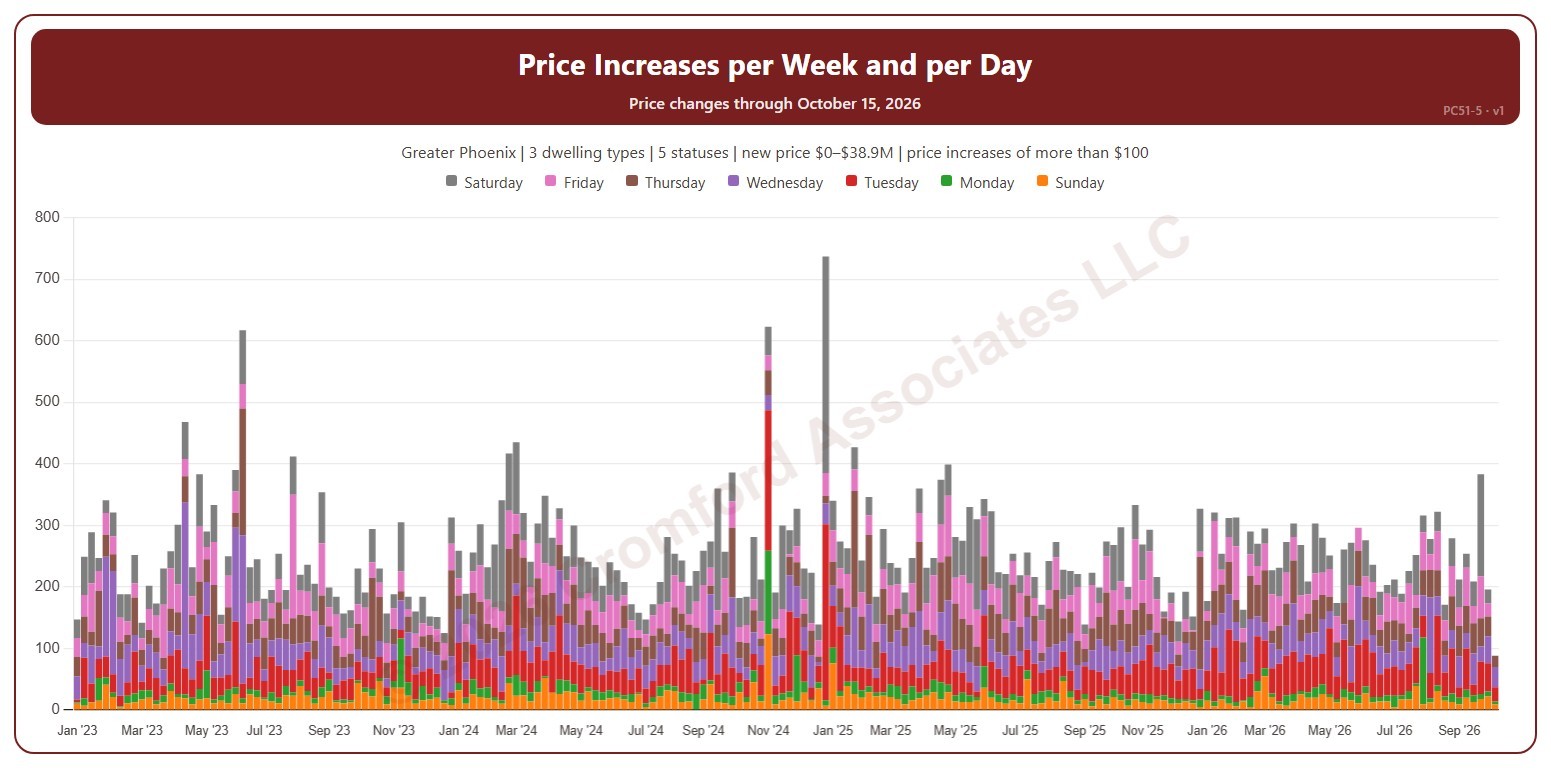
Price Increases per Week and per Day

About this chart

This chart shows the number of list price increases each week, each bar split by the day of the week the increase was made. It counts changes to a listing’s list price on ARMLS, using the new price for the price filter. A change counts only when it is more than the amount in the Price Change panel ($100 to start with).

Weeks run Sunday to Saturday. It opens on January three years back to date; drag the handles of the date slider under the chart to choose the weeks shown, as far back as January 2013. The newest week is the week so far. The chart is updated every week.

It opens on the Greater Phoenix area: the counties, cities, and ZIP codes that make it up are ticked to start with. Tick or untick any of them to change the area, including counties beyond Greater Phoenix. Narrow it further with the Dwelling Type, List Status, Transaction Type, and New / Resale boxes and the new list price, home size, and year built sliders.

Hover over a bar to see each day and the total for the week.

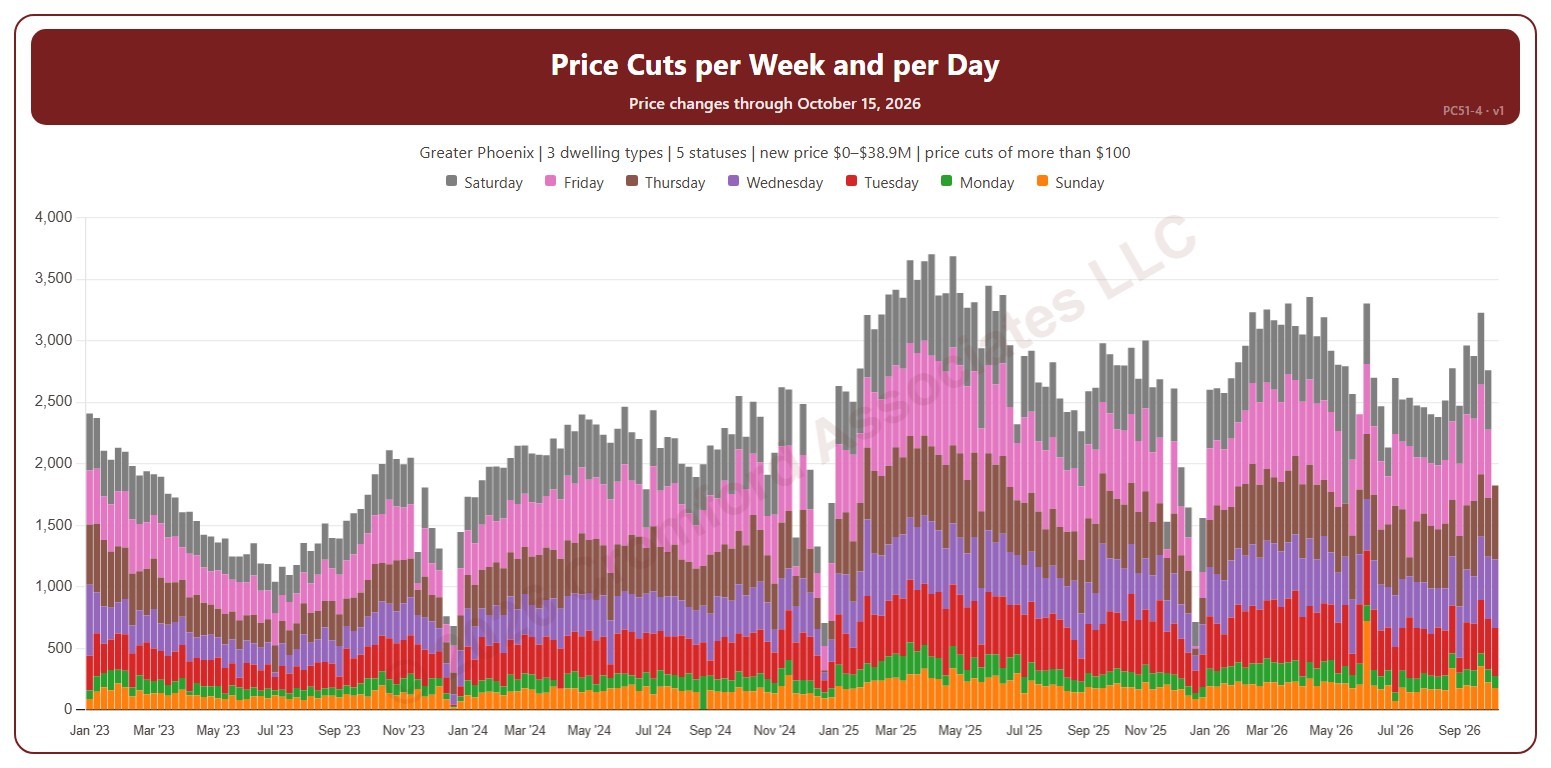
Price Cuts per Week and per Day

About this chart

This chart shows the number of list price cuts each week, each bar split by the day of the week the cut was made. It counts changes to a listing’s list price on ARMLS, using the new price for the price filter. A change counts only when it is more than the amount in the Price Change panel ($100 to start with).

Weeks run Sunday to Saturday. It opens on January three years back to date; drag the handles of the date slider under the chart to choose the weeks shown, as far back as January 2013. The newest week is the week so far. The chart is updated every week.

It opens on the Greater Phoenix area: the counties, cities, and ZIP codes that make it up are ticked to start with. Tick or untick any of them to change the area, including counties beyond Greater Phoenix. Narrow it further with the Dwelling Type, List Status, Transaction Type, and New / Resale boxes and the new list price, home size, and year built sliders.

Hover over a bar to see each day and the total for the week.

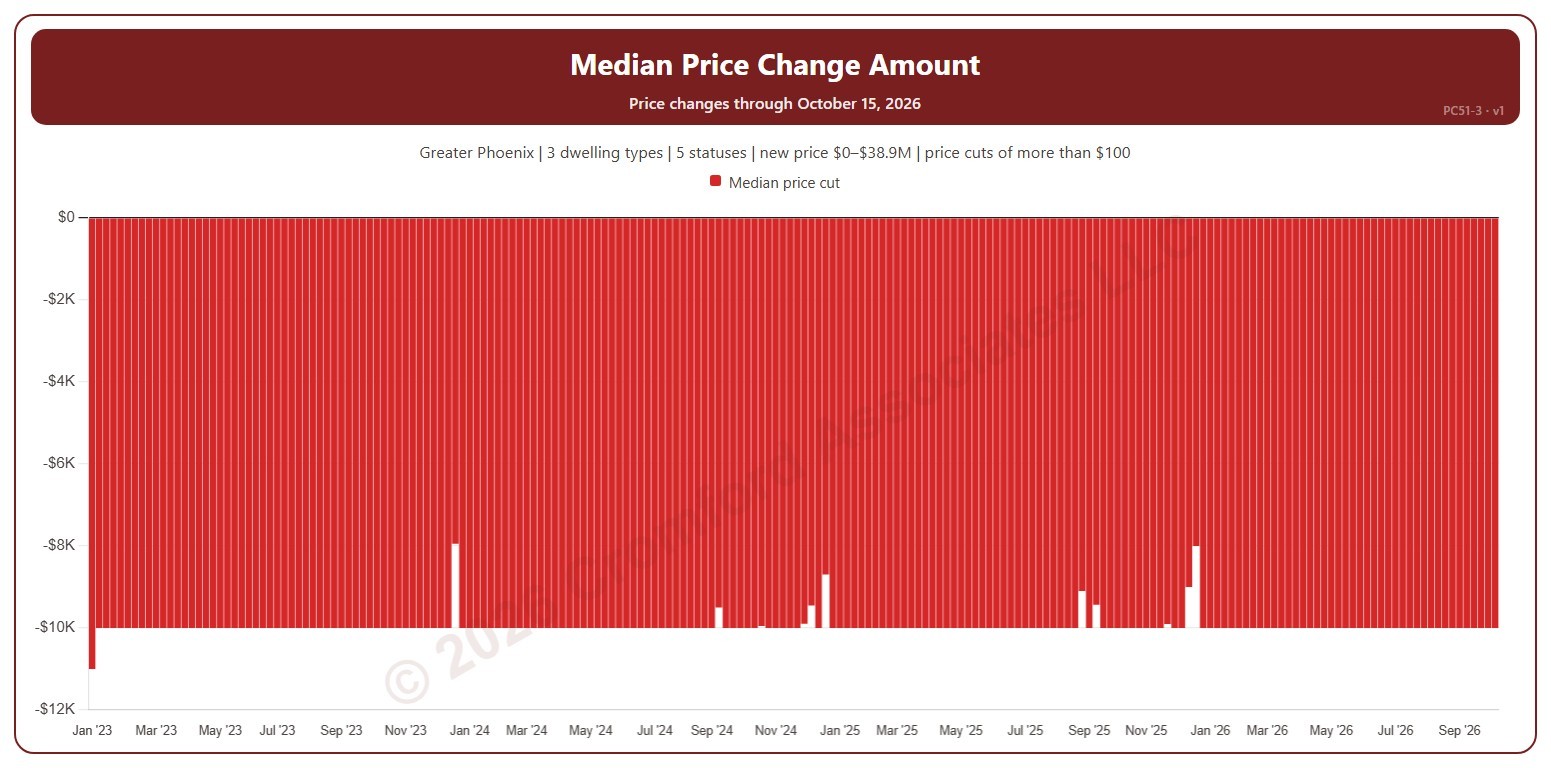
Median Price Change Amount

About this chart

This chart shows the median amount of the list price changes each week: the middle change when they are lined up from smallest to largest. Price cuts show below zero. It counts changes to a listing’s list price on ARMLS, using the new price for the price filter. A change counts only when it is more than the amount in the Price Change panel ($100 to start with). Use the Price Change panel to show price cuts (the opening view), price increases, or both.

Weeks run Sunday to Saturday. It opens on January three years back to date; drag the handles of the date slider under the chart to choose the weeks shown, as far back as January 2013. The newest week is the week so far. The chart is updated every week.

It opens on the Greater Phoenix area: the counties, cities, and ZIP codes that make it up are ticked to start with. Tick or untick any of them to change the area, including counties beyond Greater Phoenix. Narrow it further with the Dwelling Type, List Status, Transaction Type, and New / Resale boxes and the new list price, home size, and year built sliders.

Hover over a bar to see the median change.

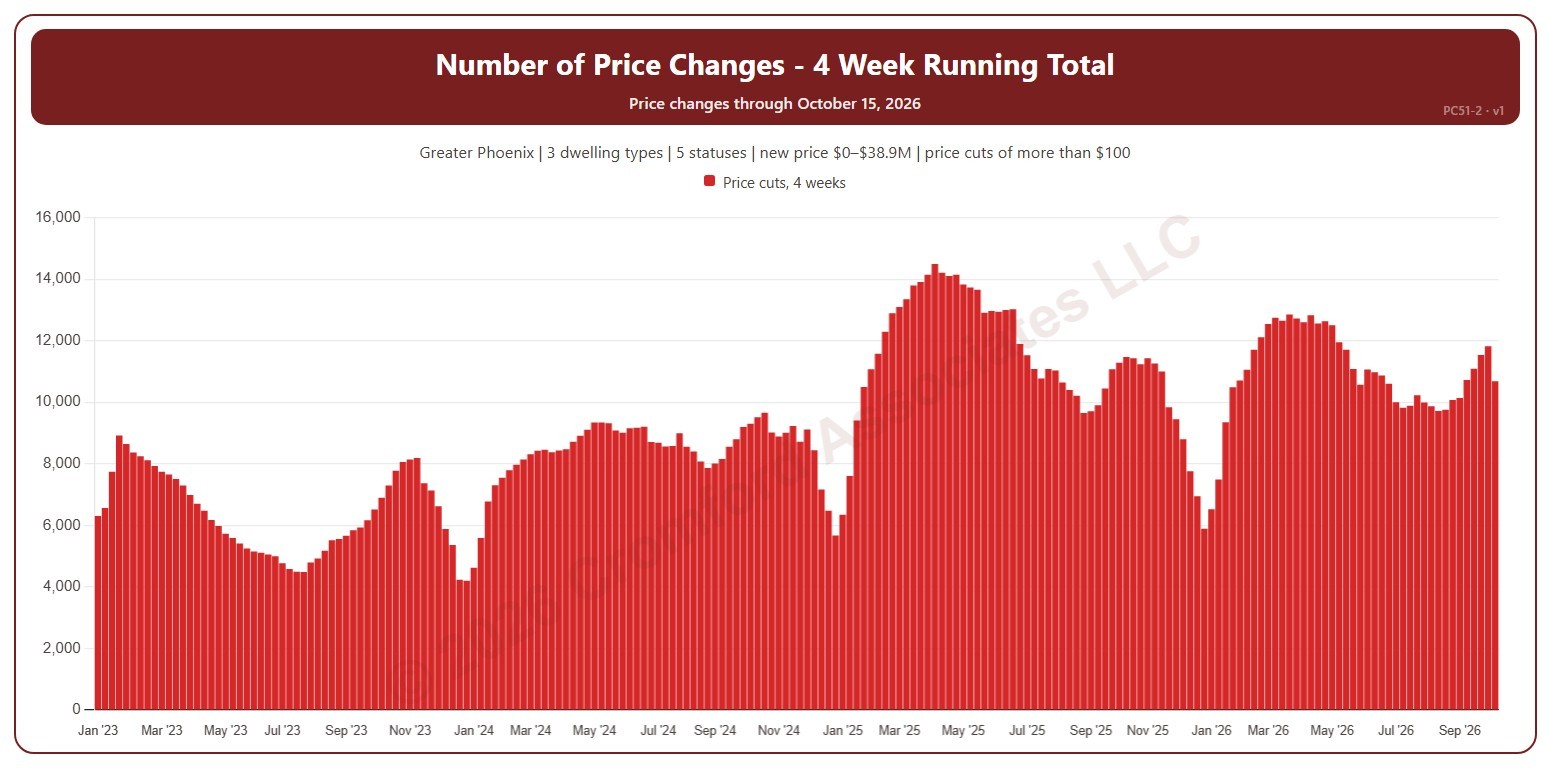
Number of Price Changes – 4 Week Running Total

About this chart

This chart shows the number of list price changes in the four weeks ending each week, which smooths out week-to-week swings. It counts changes to a listing’s list price on ARMLS, using the new price for the price filter. A change counts only when it is more than the amount in the Price Change panel ($100 to start with). Use the Price Change panel to show price cuts (the opening view), price increases, or both.

Weeks run Sunday to Saturday. It opens on January three years back to date; drag the handles of the date slider under the chart to choose the weeks shown, as far back as January 2013. The newest week is the week so far. The chart is updated every week.

It opens on the Greater Phoenix area: the counties, cities, and ZIP codes that make it up are ticked to start with. Tick or untick any of them to change the area, including counties beyond Greater Phoenix. Narrow it further with the Dwelling Type, List Status, Transaction Type, and New / Resale boxes and the new list price, home size, and year built sliders.

Hover over a bar to see the four-week total.