Contract Ratio Monthly

About this chart

This chart shows the Contract Ratio for each month: the number of listings under contract (pending, plus UCB and CCBS) for every 100 active listings, measured on the first day of the month. Each bar is one month, colored by month. The shaded bands mark a Cool market (below 30), Warm (30 to 60), Hot (60 to 100), Frenzy! (100 to 200), and Insanity!! (above 200), and the line marks the highest month shown.

It opens on January 2020 to date. Drag the handles of the date slider under the chart to choose the months shown, as far back as April 2010. Click a month in the legend to hide or show it. A new month appears once its first-day figures are in.

It opens on the Greater Phoenix area: the counties, cities, and ZIP codes that make it up are ticked to start with. Tick or untick any of them to change the area, including counties beyond Greater Phoenix. Narrow it further with the Dwelling Type, Transaction Type, and New / Resale boxes and the list price and home size sliders. Tick Count Coming Soon as Active to add Coming Soon listings to the active count.

Hover over a bar to see the ratio and the numbers of listings under contract and active that day.
Contract Ratio Heat Map

About this chart

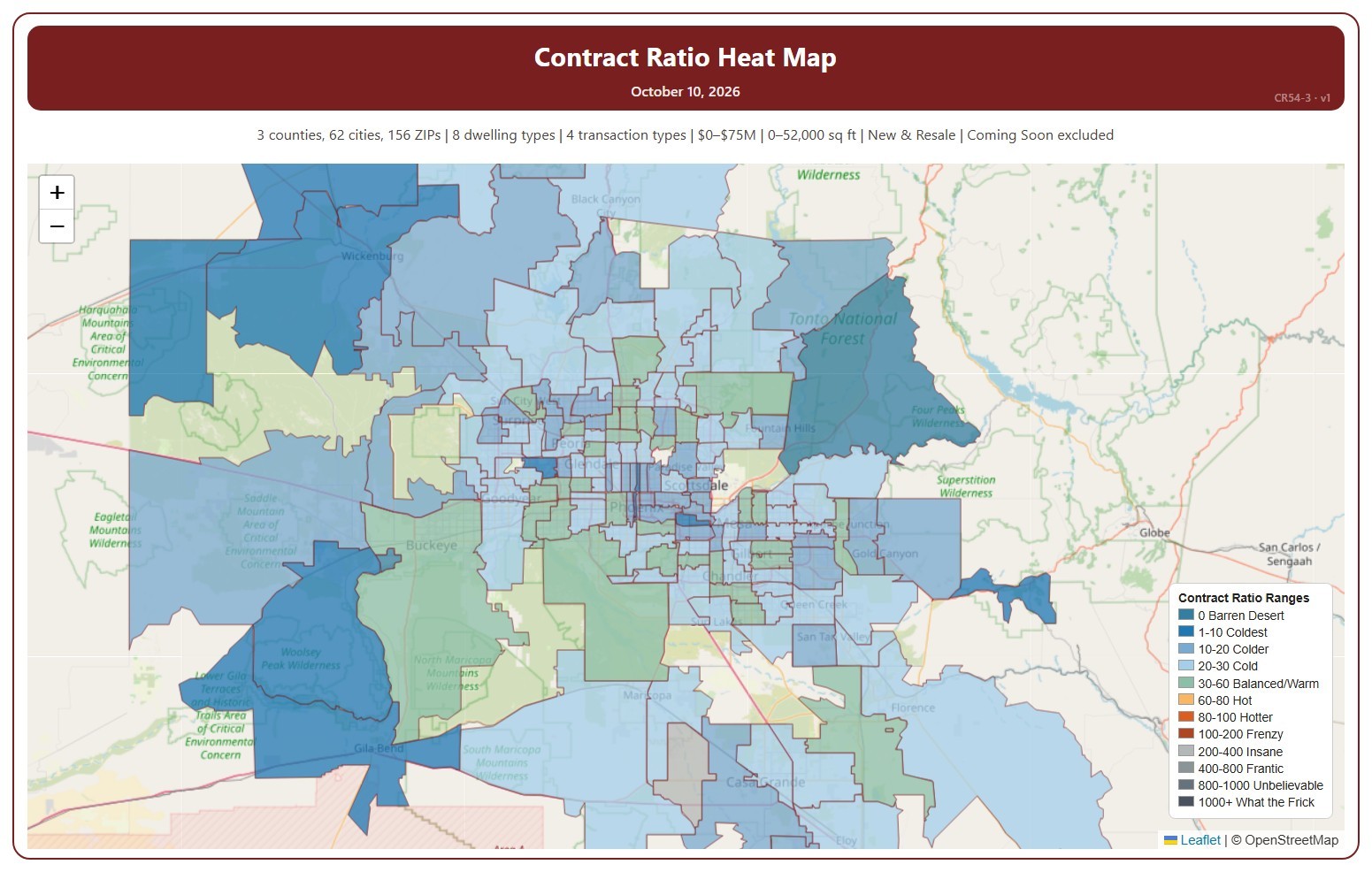
This map shades each ZIP code by its Contract Ratio on one Saturday: the number of listings under contract (pending, plus UCB and CCBS) for every 100 active listings, measured on Saturdays. The ranges run from 0 Barren Desert (nothing under contract) to 1000+. Click a range in the legend to show only that range, click more ranges to add them, and click Show all ranges to see every range again.

It opens on the latest Saturday. Use the controls under the map to step a week at a time, pick any Saturday back to January 2011, or drag the slider. Press play to step through the weeks as a slide show at the speed you choose. ZIP codes with no active listings that week are left unshaded. The map is updated every week.

It opens on the Greater Phoenix area: the counties, cities, and ZIP codes that make it up are ticked to start with. Tick or untick any of them to change the area, including counties beyond Greater Phoenix. Narrow it further with the Dwelling Type, Transaction Type, and New / Resale boxes and the list price and home size sliders. Tick Count Coming Soon as Active to add Coming Soon listings to the active count.

Hover over a ZIP code to see its ratio, its range, and the numbers of listings under contract and active.

Contract Ratios

About this chart

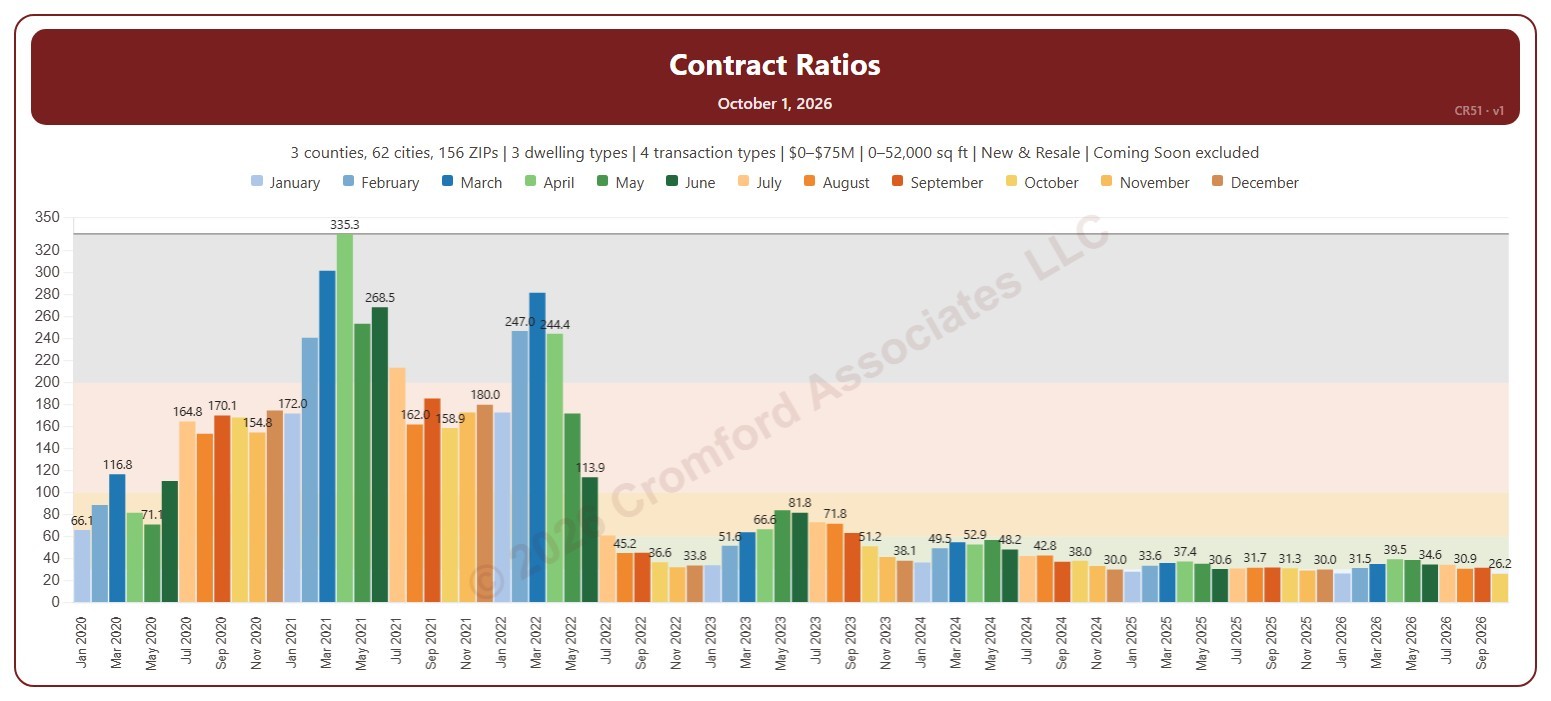
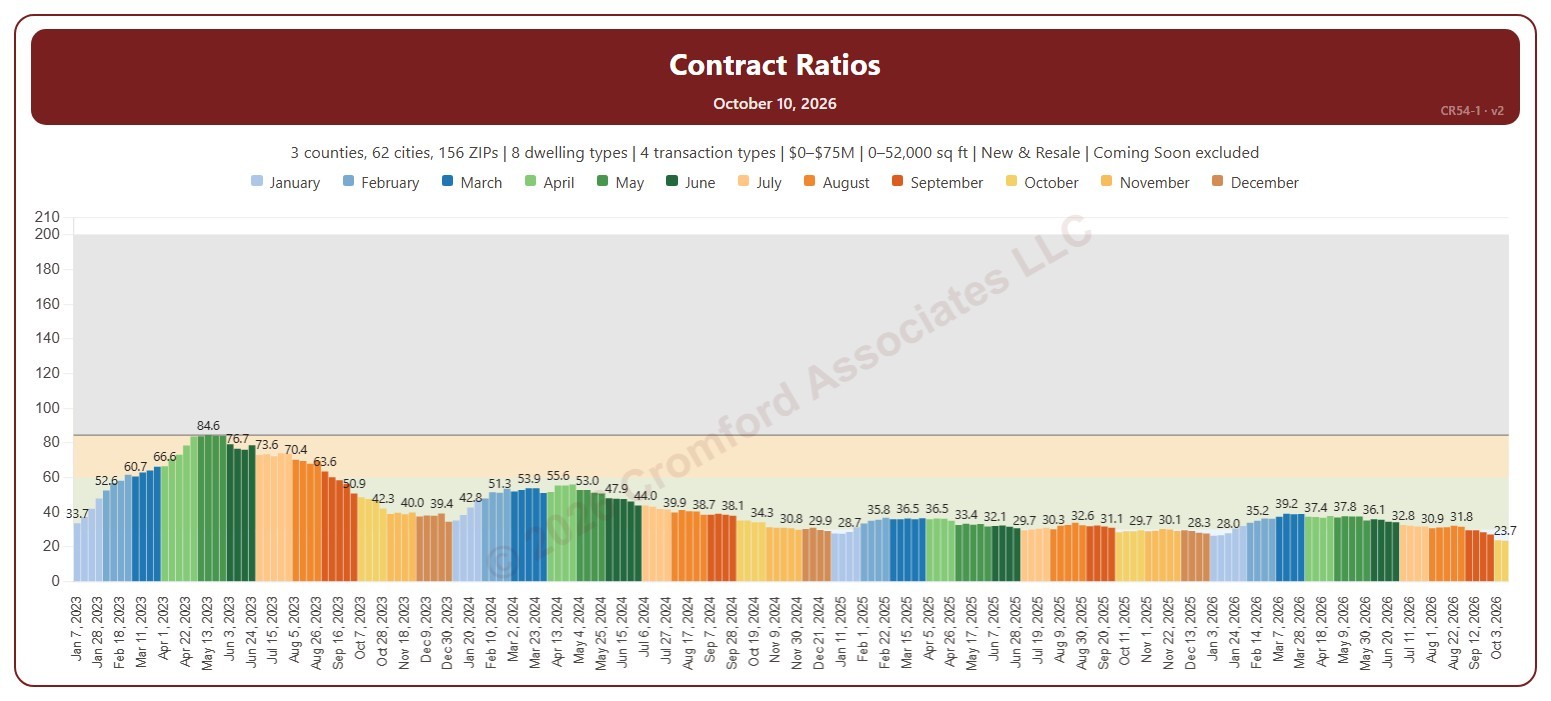
This chart shows the Contract Ratio for each week: the number of listings under contract (pending, plus UCB and CCBS) for every 100 active listings, measured on Saturdays. Each bar is one Saturday, colored by month. The shaded bands mark a Cool market (below 30), Warm (30 to 60), Hot (60 to 100), Frenzy! (100 to 200), and Insanity!! (above 200), and the line marks the highest week shown.

It opens on January 2023 to date. Drag the handles of the date slider under the chart to choose the weeks shown, as far back as January 2011. Click a month in the legend to hide or show its weeks. The chart is updated every week.

It opens on the Greater Phoenix area: the counties, cities, and ZIP codes that make it up are ticked to start with. Tick or untick any of them to change the area, including counties beyond Greater Phoenix. Narrow it further with the Dwelling Type, Transaction Type, and New / Resale boxes and the list price and home size sliders. Tick Count Coming Soon as Active to add Coming Soon listings to the active count.

Hover over a bar to see the ratio and the numbers of listings under contract and active that week.

Market Conditions Dashboard

About this chart

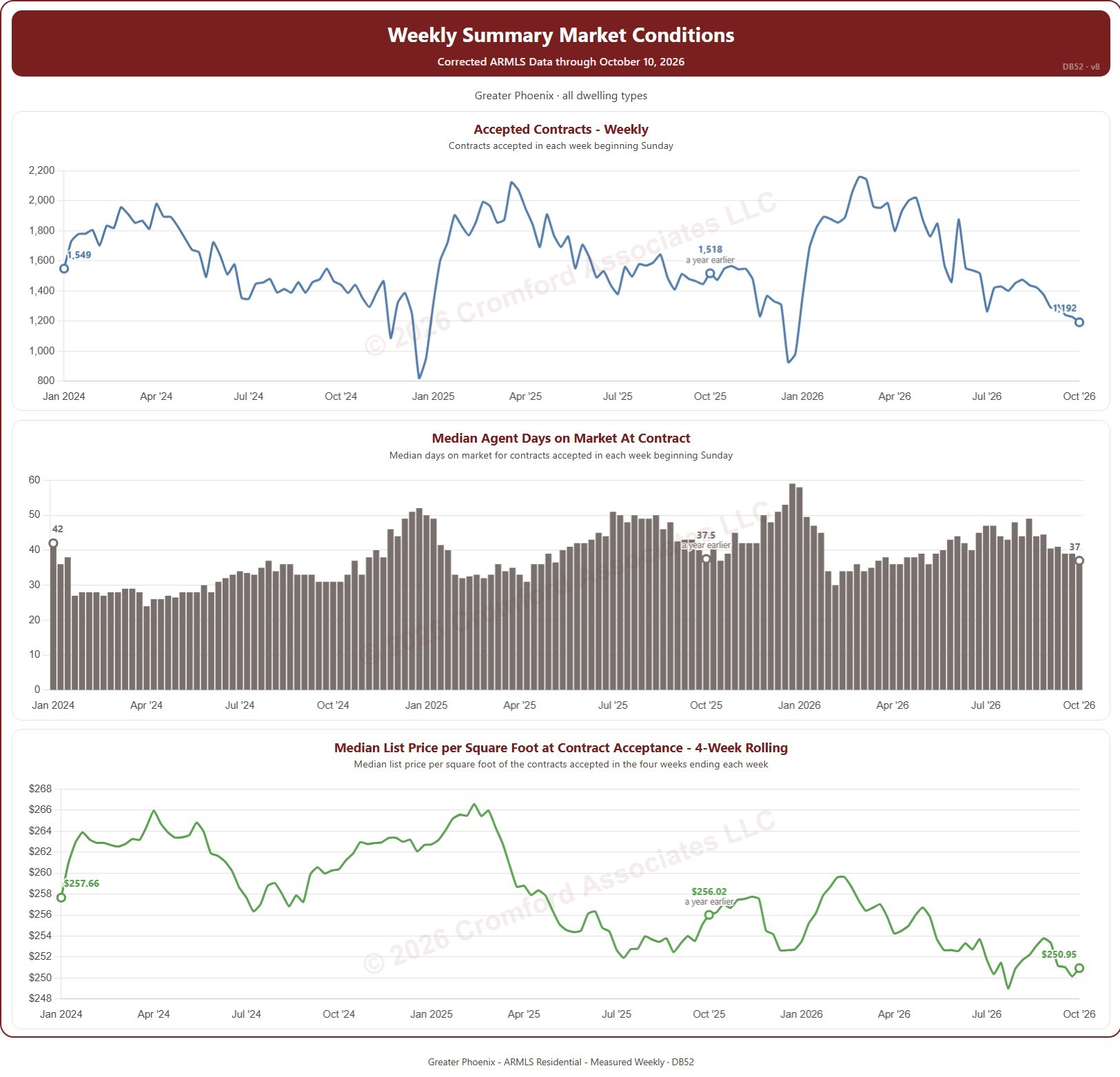
This dashboard tracks the contracts accepted on ARMLS each week. A contract counts when a listing goes from Active or Temp Off Market to Pending or UCB / CCBS. Weeks run Sunday to Saturday and are labeled by their Sunday. Three charts share one set of filters: the number of contracts accepted each week; the median agent days on market of those contracts; and the median list price per square foot of the contracts accepted in the four weeks ending each week.

It opens on January of the year two years back to the latest complete week. Drag the handles of the date slider under each chart to choose the weeks shown, as far back as January 2014. Each chart marks the week a year before its last week, so the latest figure can be read against the same week a year earlier. The dashboard is updated every week.

It opens on the Greater Phoenix area: the counties, cities, and ZIP codes that make it up are ticked to start with. Tick or untick any of them to change the area, including counties beyond Greater Phoenix. Narrow it further with the Dwelling Type and Transaction Type boxes and the list price and home size sliders.

Hover over a chart to see the figures for that week.

Days of Inventory

About this chart

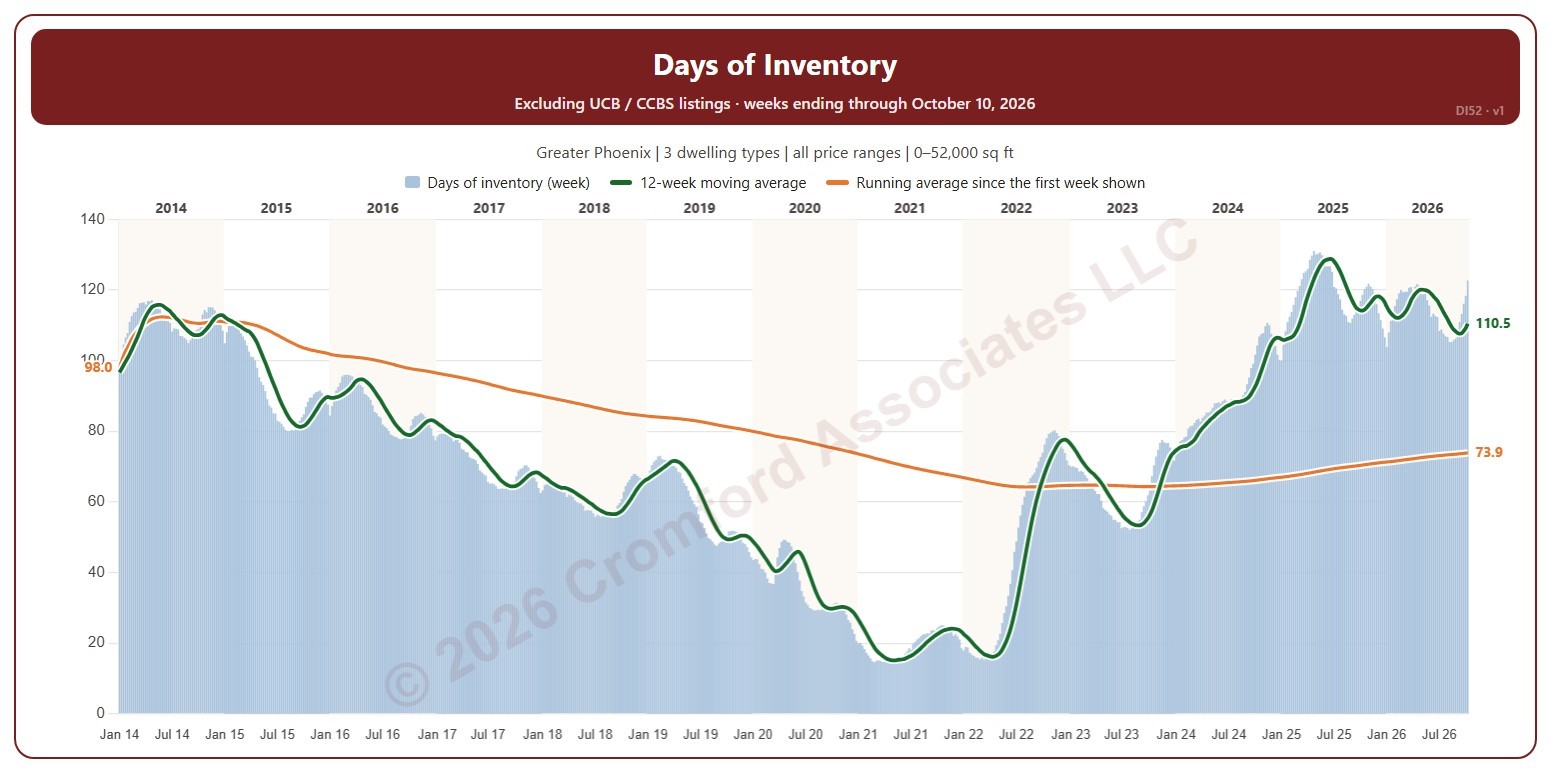
This chart shows days of inventory each week: how many days the homes for sale would last at the pace they have been selling. Each Saturday, the number of active listings on ARMLS is multiplied by 365 and divided by the closings in the year to the day before. It leaves out UCB and CCBS listings and Coming Soon listings, counting active listings only.

The bars are each week’s figure. The green line is the average of the last 12 weeks; the orange line is the average of every week from the first one shown, so it changes with the date range. It opens on January 2014 to date; drag the handles of the date slider under the chart to choose the weeks shown, as far back as January 2011. The chart is updated every week.

It opens on the Greater Phoenix area: the counties, cities, and ZIP codes that make it up are ticked to start with. Tick or untick any of them to change the area, including counties beyond Greater Phoenix. Narrow it further with the Price Range boxes, the Dwelling Type, Transaction Type, and New / Resale boxes, and the home size and year built sliders; both the listings and the closings are narrowed the same way.

Hover over the chart to see the week’s figure, both averages, the active listings, and the closings in the year.

Median Cumulative Days on Market for Closed Listings

About this chart

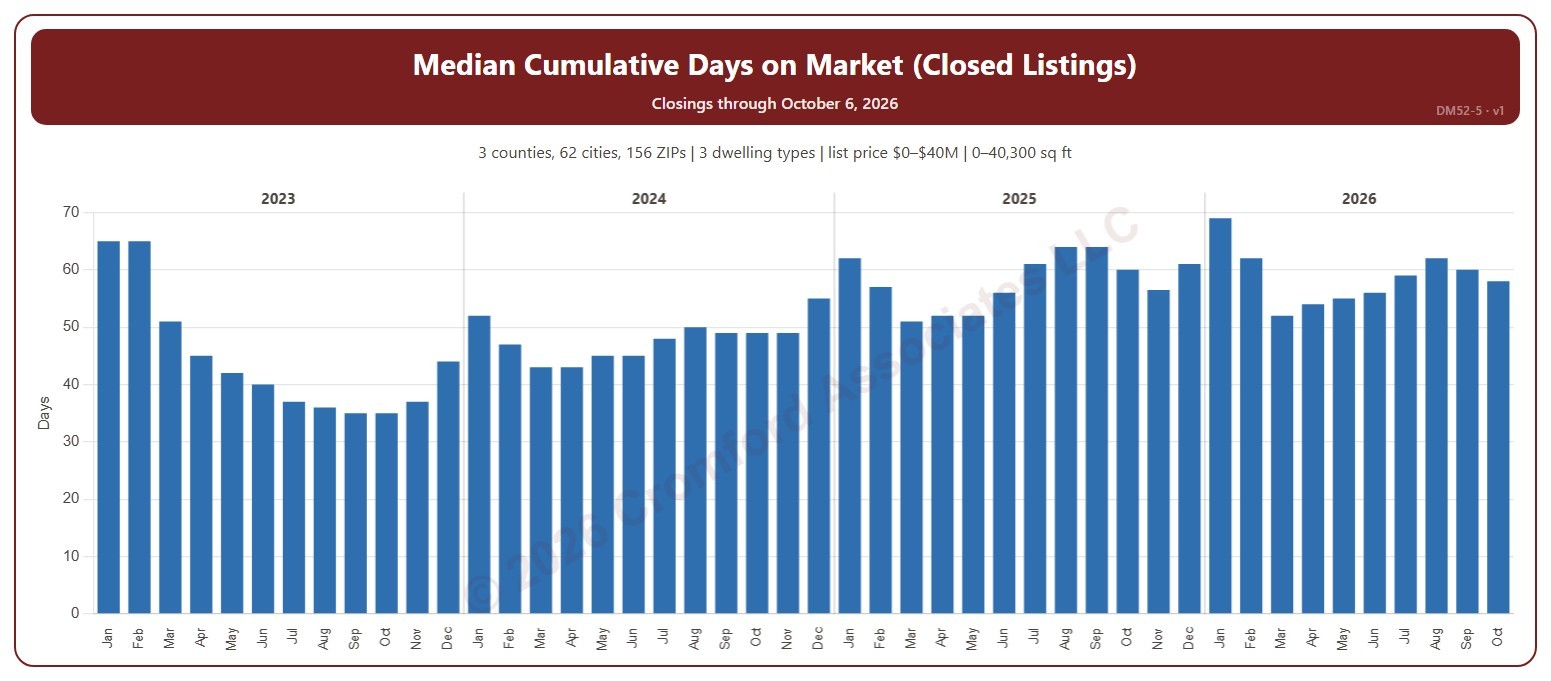
This chart shows the median cumulative days on market of the homes that closed through ARMLS, one bar per calendar month of closing: half took longer to sell and half less. Cumulative days on market is ARMLS’s own count of the days a home was on the market. The median is less affected than the average by a few homes that sat on the market for a very long time.

It opens on the last four years; tick any year back to 2000 in the Year panel. The newest month is the month so far.

It opens on the Greater Phoenix area: the counties, cities, and ZIP codes that make it up are ticked to start with. Tick or untick any of them to change the area, including counties beyond Greater Phoenix. Narrow it further with the Dwelling Type (condo, mobile, single family), Transaction Type, and New / Resale boxes and the list price, home size, and year built sliders.

Hover over the chart to see the figures for that month.

Weekly Cumulative Days on Market for Closed Listings

About this chart

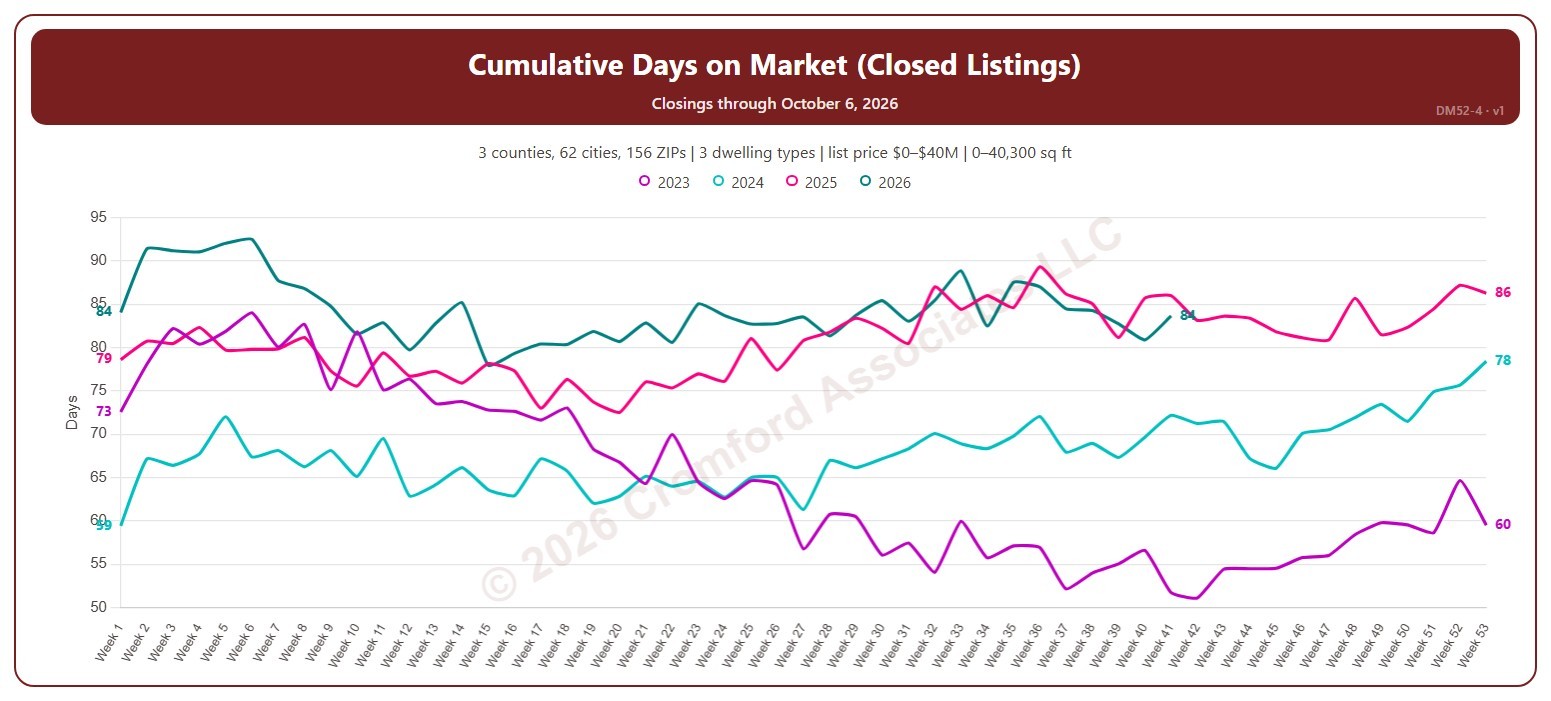
This chart shows the average cumulative days on market of the homes that closed through ARMLS, by week of closing, with one line per year so you can compare the same point in the season. Cumulative days on market is ARMLS’s own count of the days a home was on the market. Weeks start on Sunday, with week 1 being the week that includes January 1.

It opens on the last four years; tick any year back to 2000 in the Year panel. The newest week is the week so far.

It opens on the Greater Phoenix area: the counties, cities, and ZIP codes that make it up are ticked to start with. Tick or untick any of them to change the area, including counties beyond Greater Phoenix. Narrow it further with the Dwelling Type (condo, mobile, single family), Transaction Type, and New / Resale boxes and the list price, home size, and year built sliders.

Hover over the chart to see the figures for that week.

Year-over-Year Change in Average Days on Market for Closed Listings

About this chart

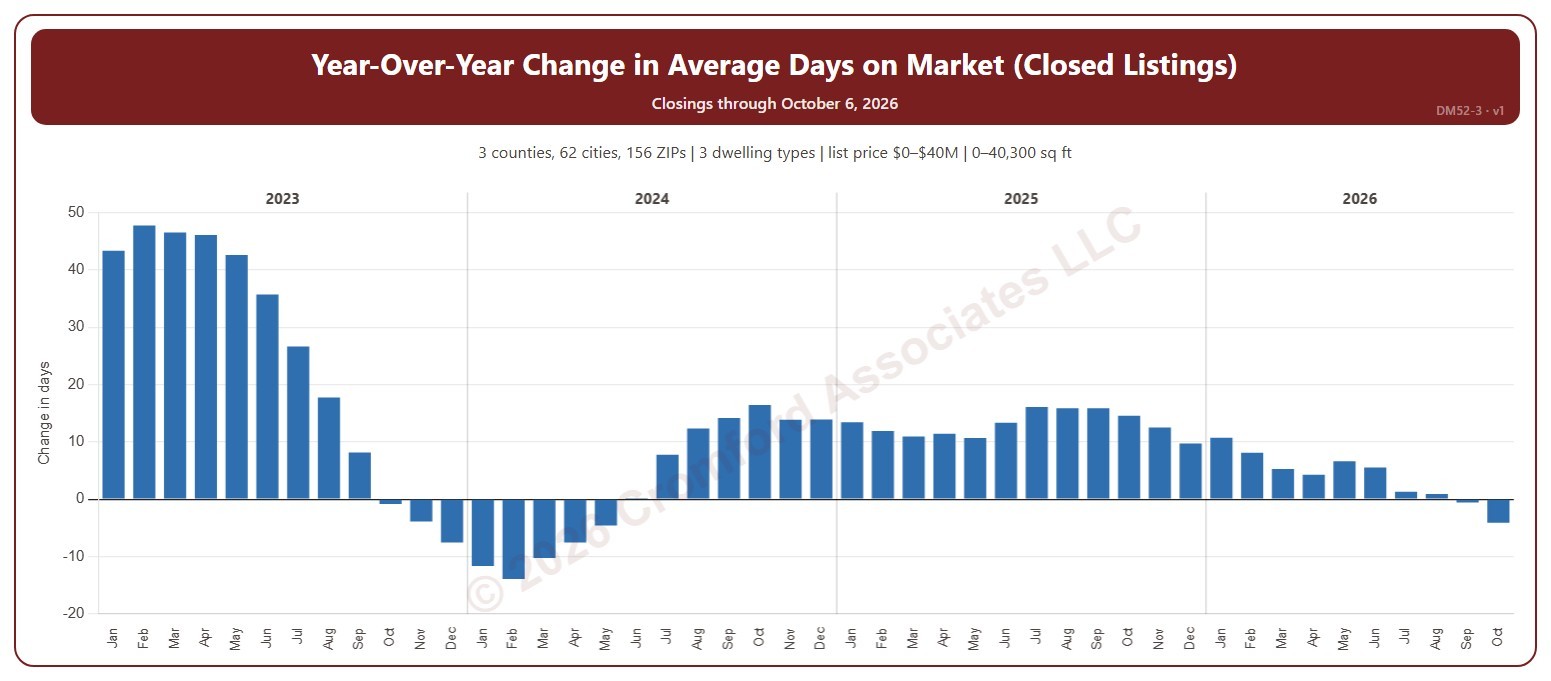
This chart shows the year-over-year change in the average cumulative days on market of the homes that closed through ARMLS: each month’s average compared with the same month a year earlier, in days. Cumulative days on market is ARMLS’s own count of the days a home was on the market. Above zero, homes are taking longer to sell than a year ago; below zero, they are selling faster.

It opens on the last four years; tick any year back to 2000 in the Year panel. The newest month is the month so far.

It opens on the Greater Phoenix area: the counties, cities, and ZIP codes that make it up are ticked to start with. Tick or untick any of them to change the area, including counties beyond Greater Phoenix. Narrow it further with the Dwelling Type (condo, mobile, single family), Transaction Type, and New / Resale boxes and the list price, home size, and year built sliders.

Hover over the chart to see the figures for that month.

Average Cumulative Days on Market for Closed Listings

About this chart

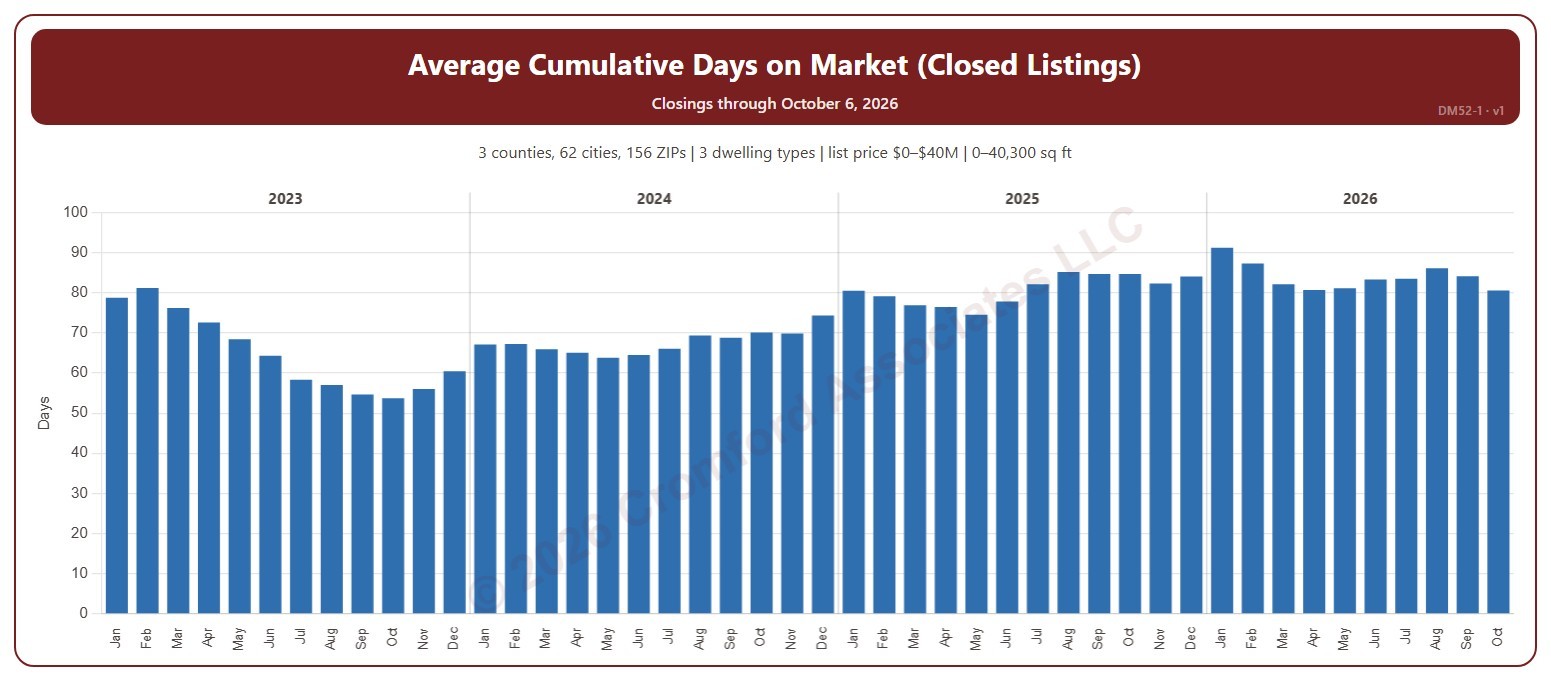
This chart shows the average cumulative days on market of the homes that closed through ARMLS, one bar per calendar month of closing. Cumulative days on market is ARMLS’s own count of the days a home was on the market. Fewer days means homes are selling faster.

It opens on the last four years; tick any year back to 2000 in the Year panel. The newest month is the month so far.

It opens on the Greater Phoenix area: the counties, cities, and ZIP codes that make it up are ticked to start with. Tick or untick any of them to change the area, including counties beyond Greater Phoenix. Narrow it further with the Dwelling Type (condo, mobile, single family), Transaction Type, and New / Resale boxes and the list price, home size, and year built sliders.

Hover over the chart to see the figures for that month.

Annual Dollar Volume

About this chart

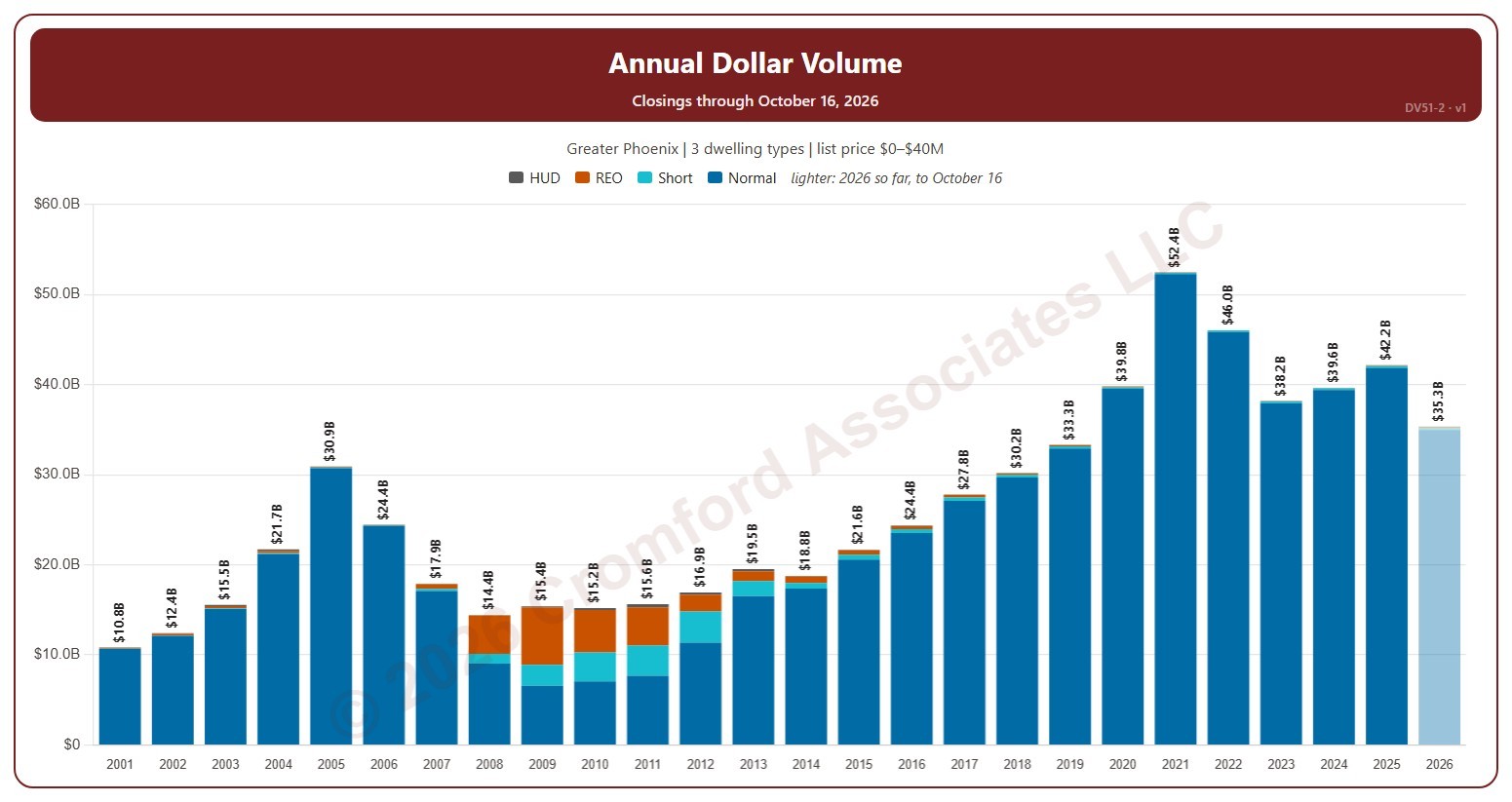
This chart shows the dollar volume of closings each year. Dollar volume is the total of the sale prices of the homes that closed on ARMLS, each bar split by transaction type (normal, short sale, lender-owned, HUD).

It opens on 2001 to date; drag the handles of the date slider under the chart to choose the years shown, as far back as 2001. Use the Month box to count only some months of the year. The chart is updated every day. The current year is the year so far and is drawn lighter; Year-to-Date Dollar Volume compares it with the same part of earlier years.

It opens on the Greater Phoenix area: the counties, cities, and ZIP codes that make it up are ticked to start with. Tick or untick any of them to change the area, including counties beyond Greater Phoenix. Narrow it further with the Dwelling Type, Transaction Type, and New / Resale boxes and the list price, home size, and year built sliders.

Hover over a bar to see each transaction type and the year’s total.