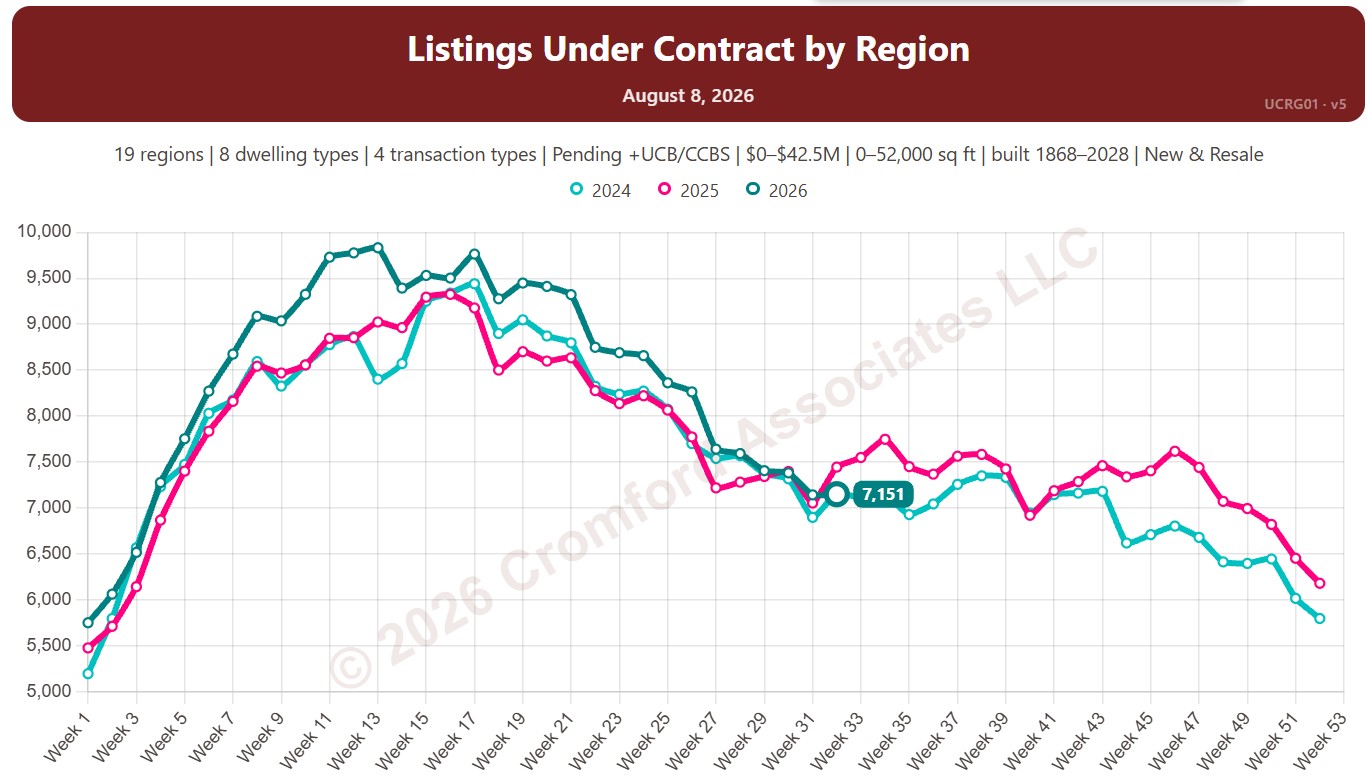
Listings Under Contract by Region

About this chart

This chart counts the listings under contract on ARMLS, measured every week (on Saturdays): Pending listings plus UCB / CCBS listings (under contract but still marked active). Untick Include UCB/CCBS to count Pending listings only.

Listings under contract show how much buying activity is under way: these are the homes heading for closing.

Each year has its own line, laid out by week of the year, so you can compare this year with earlier years at the same point in the season. It opens on the last three years; tick any year back to 2011 in the Year panel.

It opens with every region included. Use the Region panel to focus on one region or compare a combination of them. Narrow it with the Dwelling Type, Transaction Type, and New / Resale boxes and the list price, home size, and year built sliders.

Hover over a line to see the exact figure for that week.
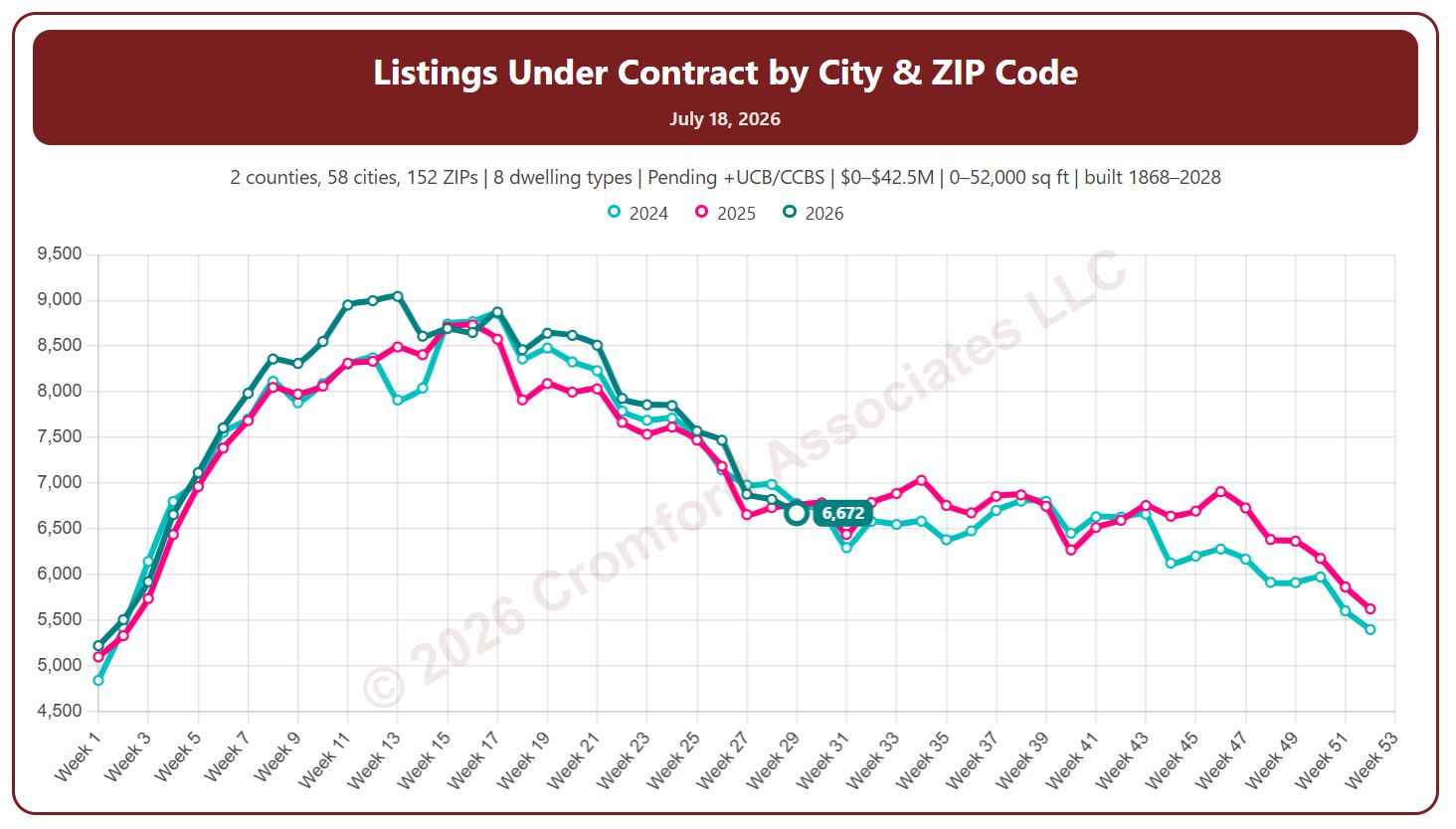
Listings Under Contract by City and ZIP Code

About this chart

This chart counts the listings under contract on ARMLS, measured every week (on Saturdays): Pending listings plus UCB / CCBS listings (under contract but still marked active). Untick Include UCB/CCBS to count Pending listings only.

Listings under contract show how much buying activity is under way: these are the homes heading for closing.

Each year has its own line, laid out by week of the year, so you can compare this year with earlier years at the same point in the season. It opens on the last three years; tick any year back to 2011 in the Year panel.

It opens on Maricopa and Pinal Counties with every city and ZIP code included. Use the County, City, and ZIP panels to focus on any area, from a whole county down to a single ZIP code. Narrow it with the Dwelling Type, Transaction Type, and New / Resale boxes and the list price, home size, and year built sliders.

Hover over a line to see the exact figure for that week.
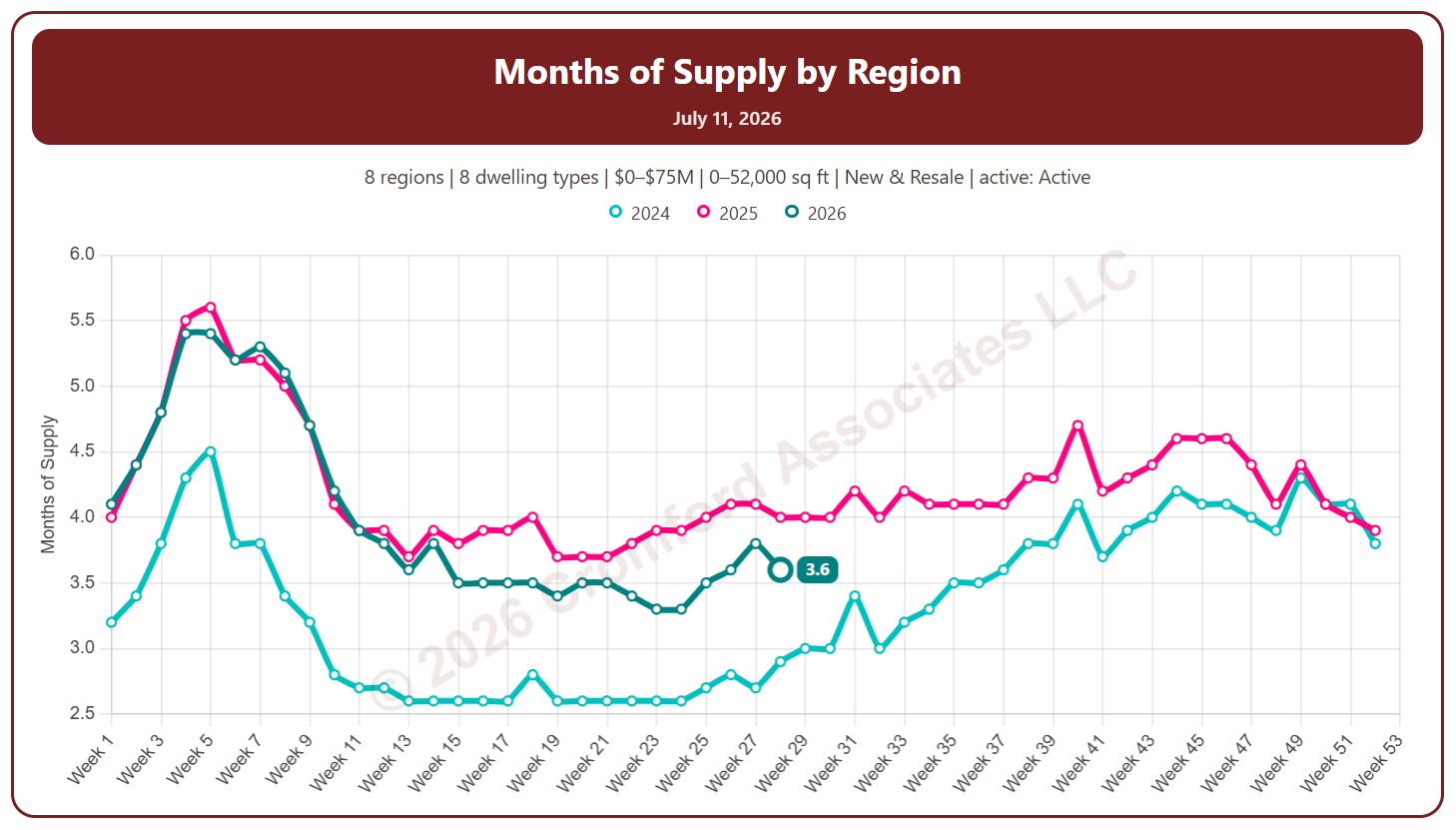
Months of Supply by Region

About this chart

This chart shows months of supply, measured every week: how many months it would take to sell all the active listings at the current monthly pace of closings, if no new listings came on. The lower the number, the tighter the supply; a rising number means supply is building up relative to sales.

By default it counts Active listings only; tick Include UCB/CCBS or Include Coming Soon to add them.

Each year has its own line, laid out by week of the year, so you can compare this year with earlier years at the same point in the season. It opens on the last three years; tick any year back to 2011 in the Year panel.

It opens with every region included. Use the Region panel to focus on one region or compare a combination of them. Narrow it with the Dwelling Type, Transaction Type, and Build Type boxes and the price, home size, and year built sliders.

Hover over a line to see the exact figure for that week.
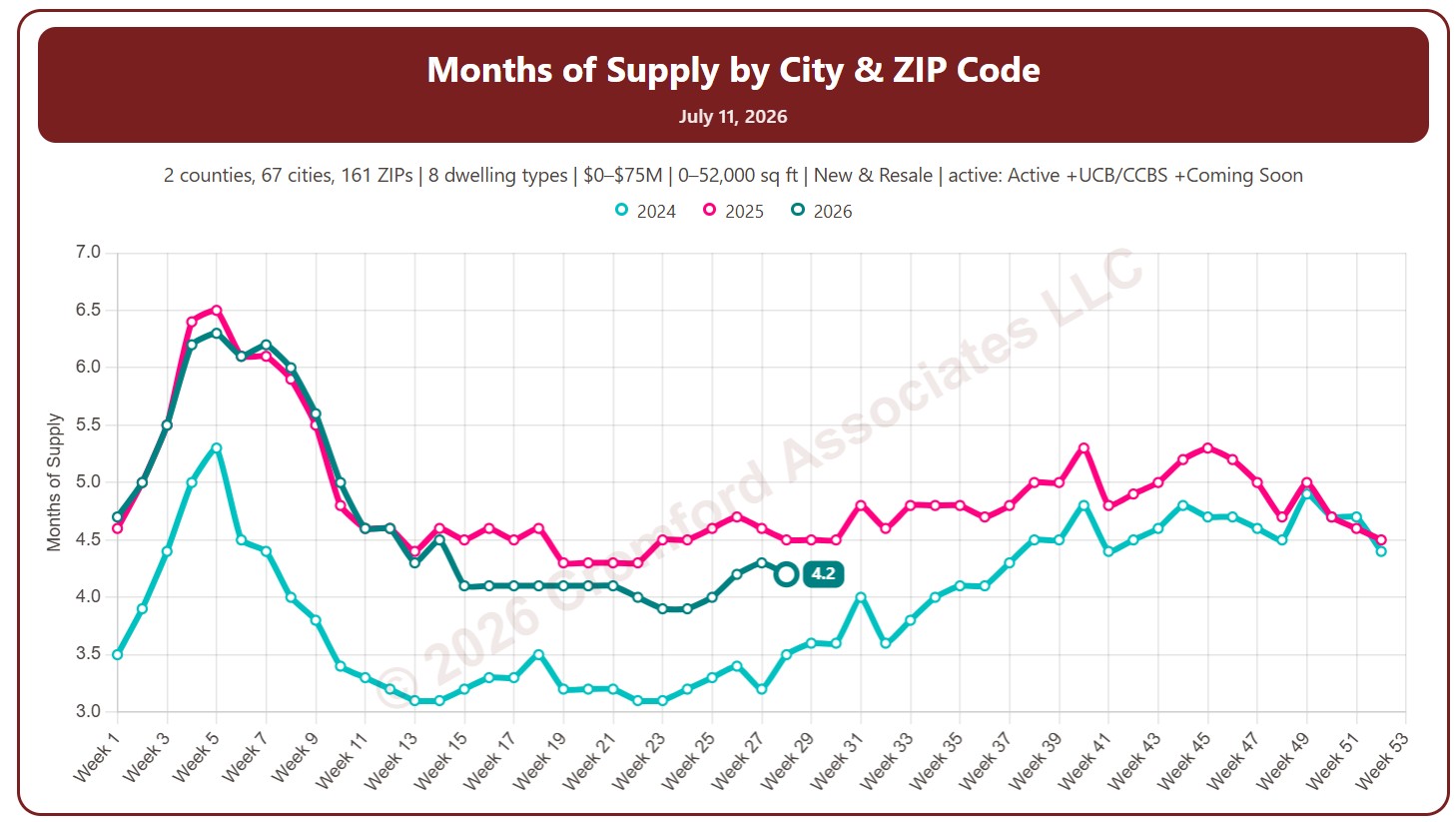
Months of Supply by City and ZIP Code

About this chart

This chart shows months of supply, measured every week: how many months it would take to sell all the active listings at the current monthly pace of closings, if no new listings came on. The lower the number, the tighter the supply; a rising number means supply is building up relative to sales.

By default it counts Active listings only; tick Include UCB/CCBS or Include Coming Soon to add them.

Each year has its own line, laid out by week of the year, so you can compare this year with earlier years at the same point in the season. It opens on the last three years; tick any year back to 2011 in the Year panel.

It opens on Maricopa and Pinal Counties with every city and ZIP code included. Use the County, City, and ZIP panels to focus on any area, from a whole county down to a single ZIP code. Narrow it with the Dwelling Type, Transaction Type, and Build Type boxes and the price, home size, and year built sliders.

Hover over a line to see the exact figure for that week.
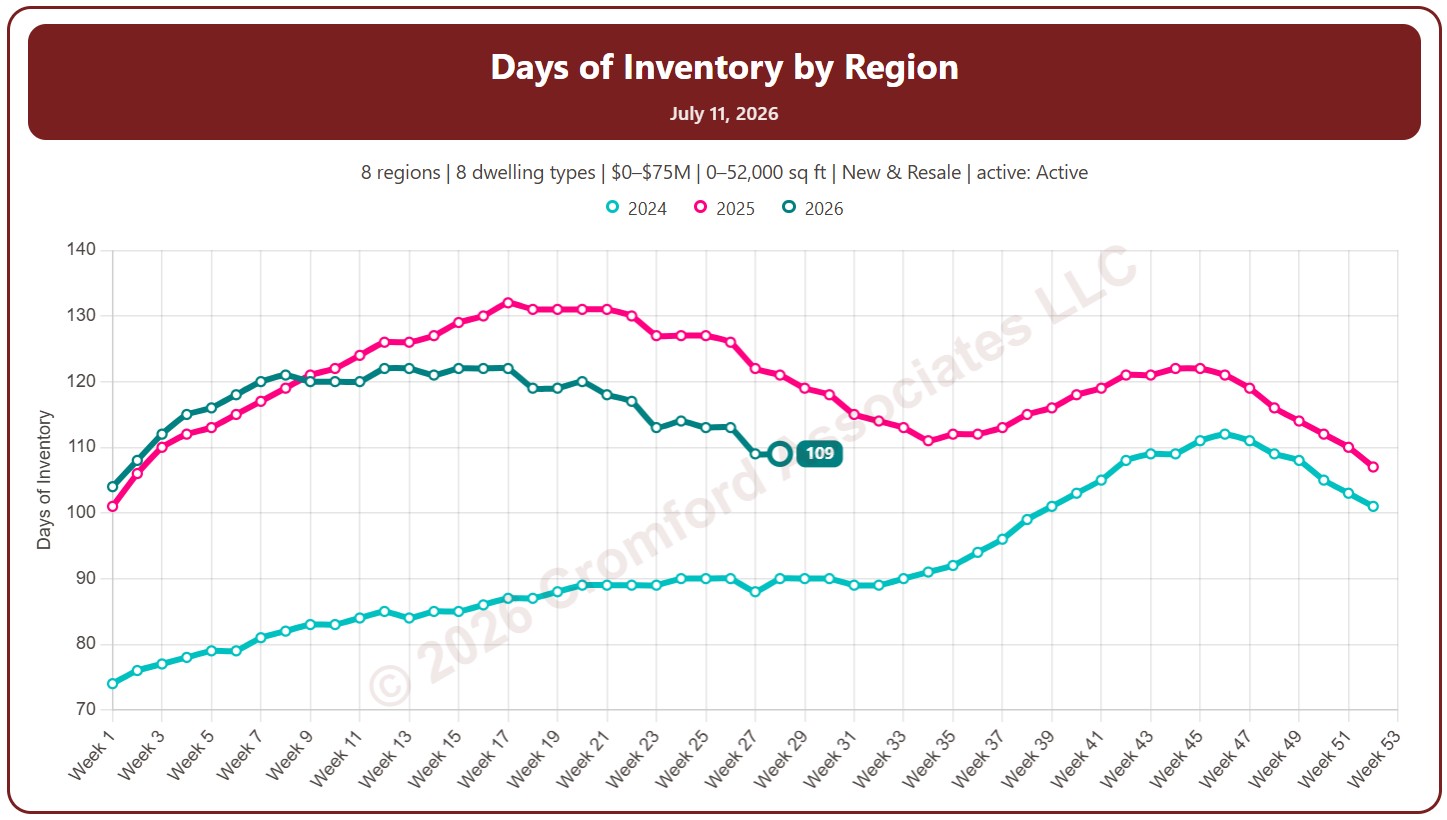
Days of Inventory by Region

About this chart

This chart shows days of inventory, measured every week: how many days it would take to sell all the active listings at the rate homes have been selling over the last year, if no new listings came on. The lower the number, the tighter the supply; a rising number means supply is building up relative to sales.

By default it counts Active listings only; tick Include UCB/CCBS or Include Coming Soon to add them.

Each year has its own line, laid out by week of the year, so you can compare this year with earlier years at the same point in the season. It opens on the last three years; tick any year back to 2011 in the Year panel.

It opens with every region included. Use the Region panel to focus on one region or compare a combination of them. Narrow it with the Dwelling Type and Build Type boxes and the price and home size sliders.

Hover over a line to see the exact figure for that week.
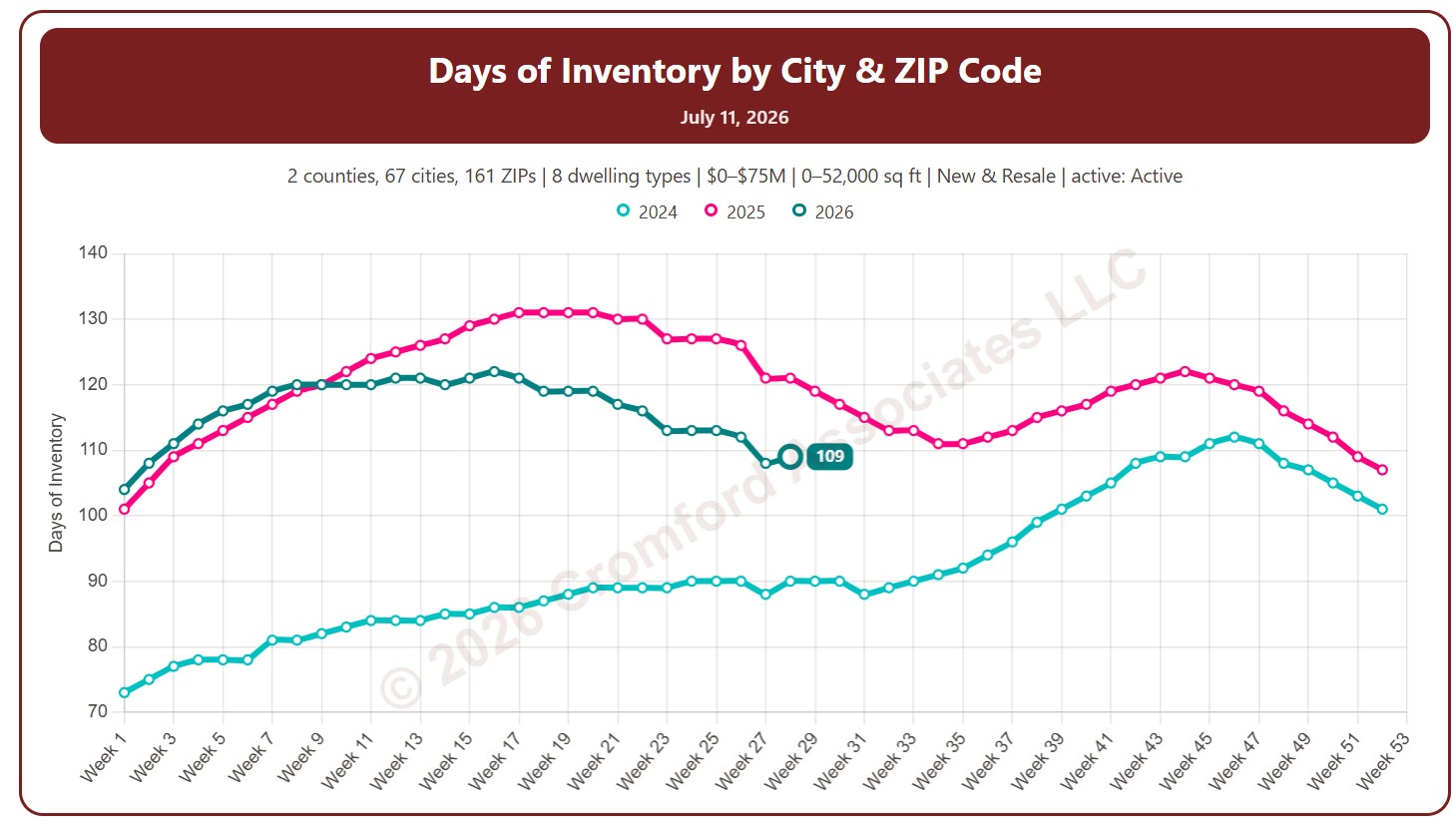
Days of Inventory by City and ZIP Code

About this chart

This chart shows days of inventory, measured every week: how many days it would take to sell all the active listings at the rate homes have been selling over the last year, if no new listings came on. The lower the number, the tighter the supply; a rising number means supply is building up relative to sales.

By default it counts Active listings only; tick Include UCB/CCBS or Include Coming Soon to add them.

Each year has its own line, laid out by week of the year, so you can compare this year with earlier years at the same point in the season. It opens on the last three years; tick any year back to 2011 in the Year panel.

It opens on Maricopa and Pinal Counties with every city and ZIP code included. Use the County, City, and ZIP panels to focus on any area, from a whole county down to a single ZIP code. Narrow it with the Dwelling Type and Build Type boxes and the price and home size sliders.

Hover over a line to see the exact figure for that week.
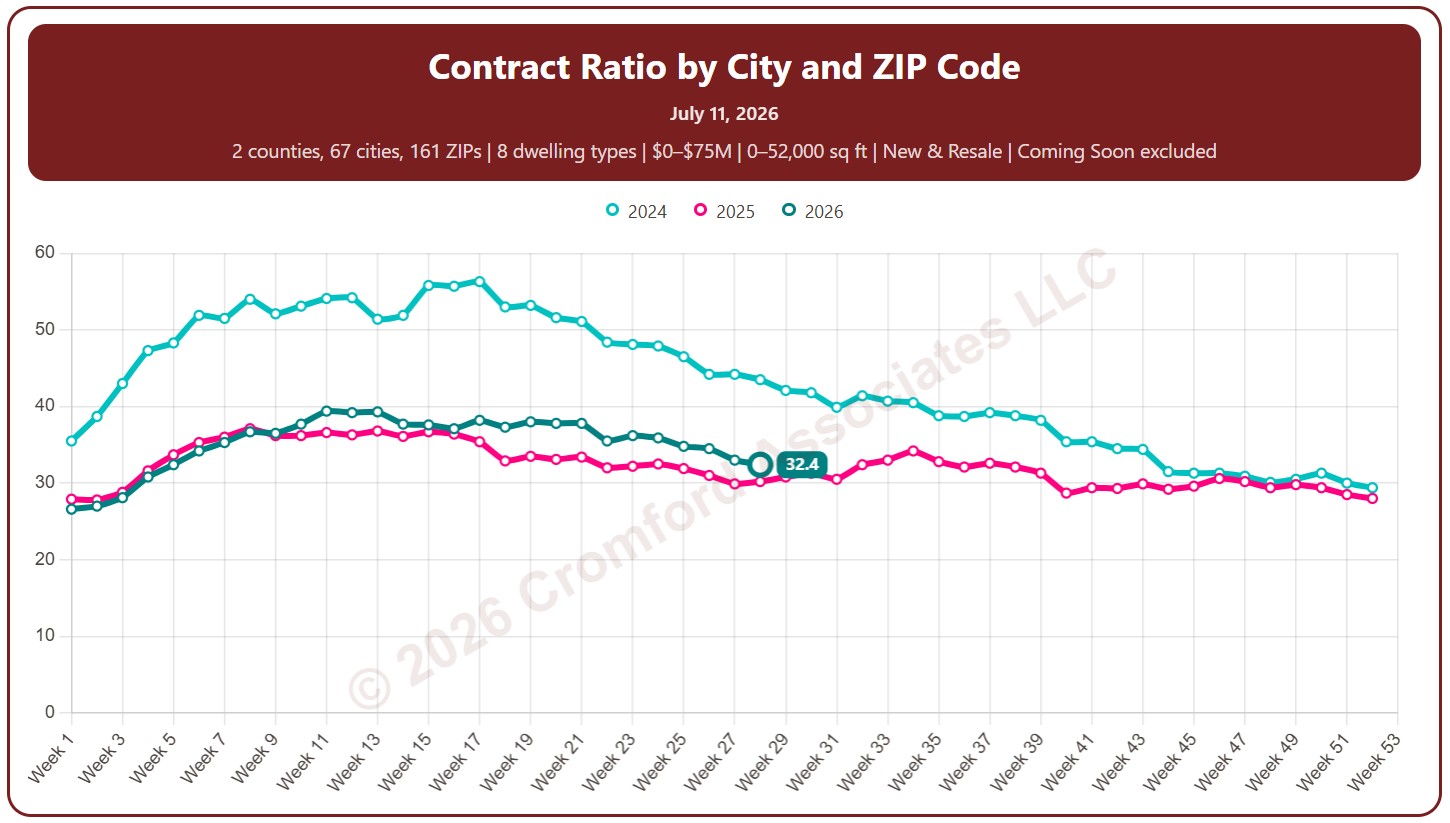
Contract Ratio by City and ZIP Code

About this chart

This chart shows the contract ratio, measured every week (on Saturdays). It compares the listings under contract with the active listings available. The higher the ratio, the stronger buying activity is relative to supply: a rising ratio is good news for sellers, a falling one for buyers.

Coming Soon listings are left out by default; tick Count Coming Soon as Active to include them.

Each year has its own line, laid out by week of the year, so you can compare this year with earlier years at the same point in the season. It opens on the last three years; tick any year back to 2011 in the Year panel.

It opens on Maricopa and Pinal Counties with every city and ZIP code included. Use the County, City, and ZIP panels to focus on any area, from a whole county down to a single ZIP code. Narrow it with the Dwelling Type and New / Resale boxes and the list price and home size sliders.

Hover over a line to see the exact figure for that week.
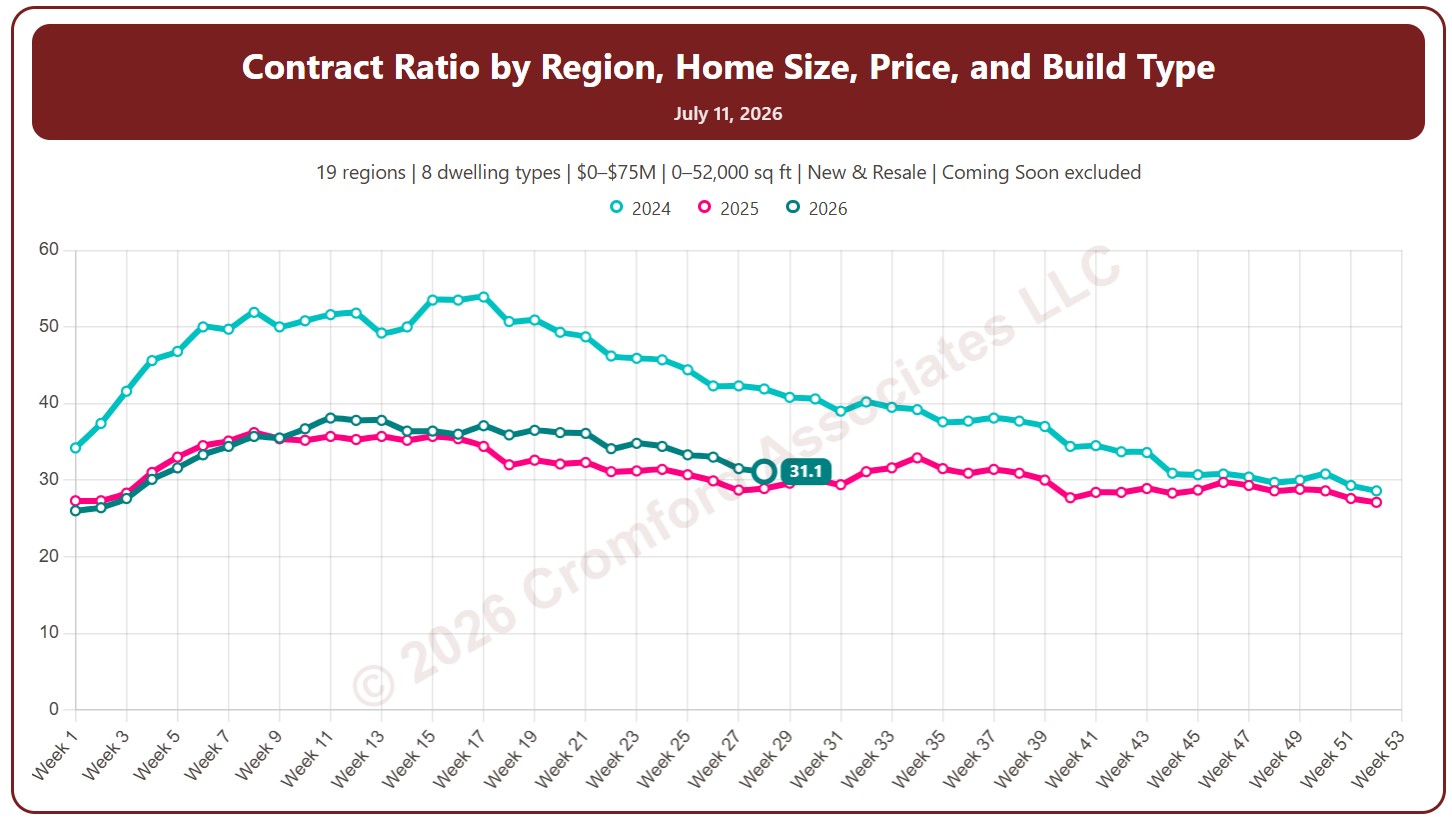
Contract Ratio by Region

About this chart

This chart shows the contract ratio, measured every week (on Saturdays). It compares the listings under contract with the active listings available. The higher the ratio, the stronger buying activity is relative to supply: a rising ratio is good news for sellers, a falling one for buyers.

Coming Soon listings are left out by default; tick Count Coming Soon as Active to include them.

Each year has its own line, laid out by week of the year, so you can compare this year with earlier years at the same point in the season. It opens on the last three years; tick any year back to 2011 in the Year panel.

It opens with every region included. Use the Region panel to focus on one region or compare a combination of them. Narrow it with the Dwelling Type and New / Resale boxes and the list price and home size sliders.

Hover over a line to see the exact figure for that week.
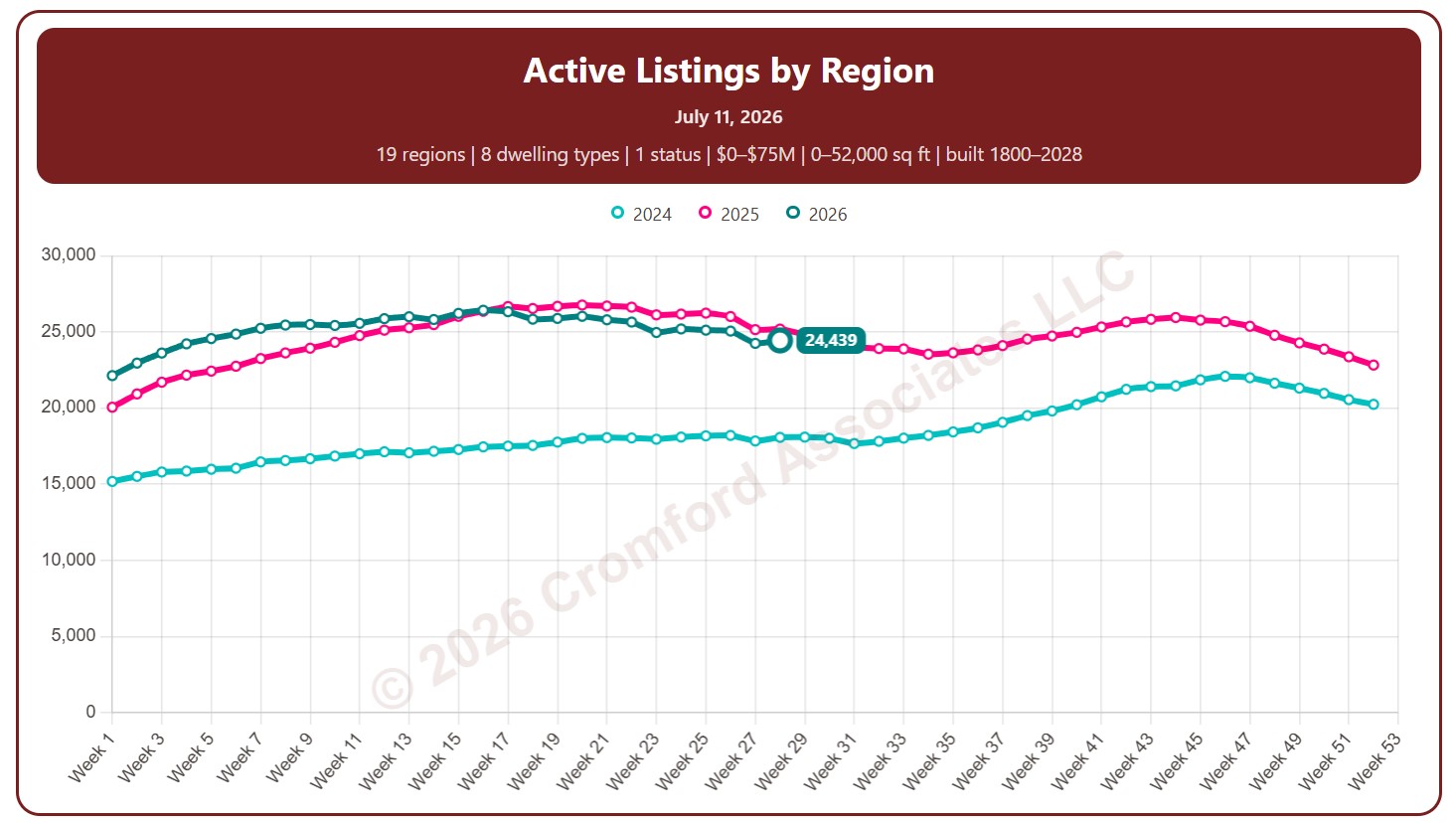
Active Listings by Region

About this chart

This chart counts the homes listed for sale on ARMLS, measured every week (on Saturdays).

By default it counts Active listings. Tick Coming Soon, UCB / CCBS (under contract but still accepting back-up offers), or Temp Off Market in the List Status panel to include them.

Each year has its own line, laid out by week of the year, so you can compare this year with earlier years at the same point in the season. It opens on the last three years; tick any year back to 2011 in the Year panel.

It opens with every region included. Use the Region panel to focus on one region or compare a combination of them. Narrow it with the Dwelling Type, List Status, Transaction Type, and New / Resale boxes and the list price, home size, year built, and days on market sliders.

Rising inventory gives buyers more choice and more negotiating power; falling inventory favors sellers. Hover over a line to see the exact figure for that week.
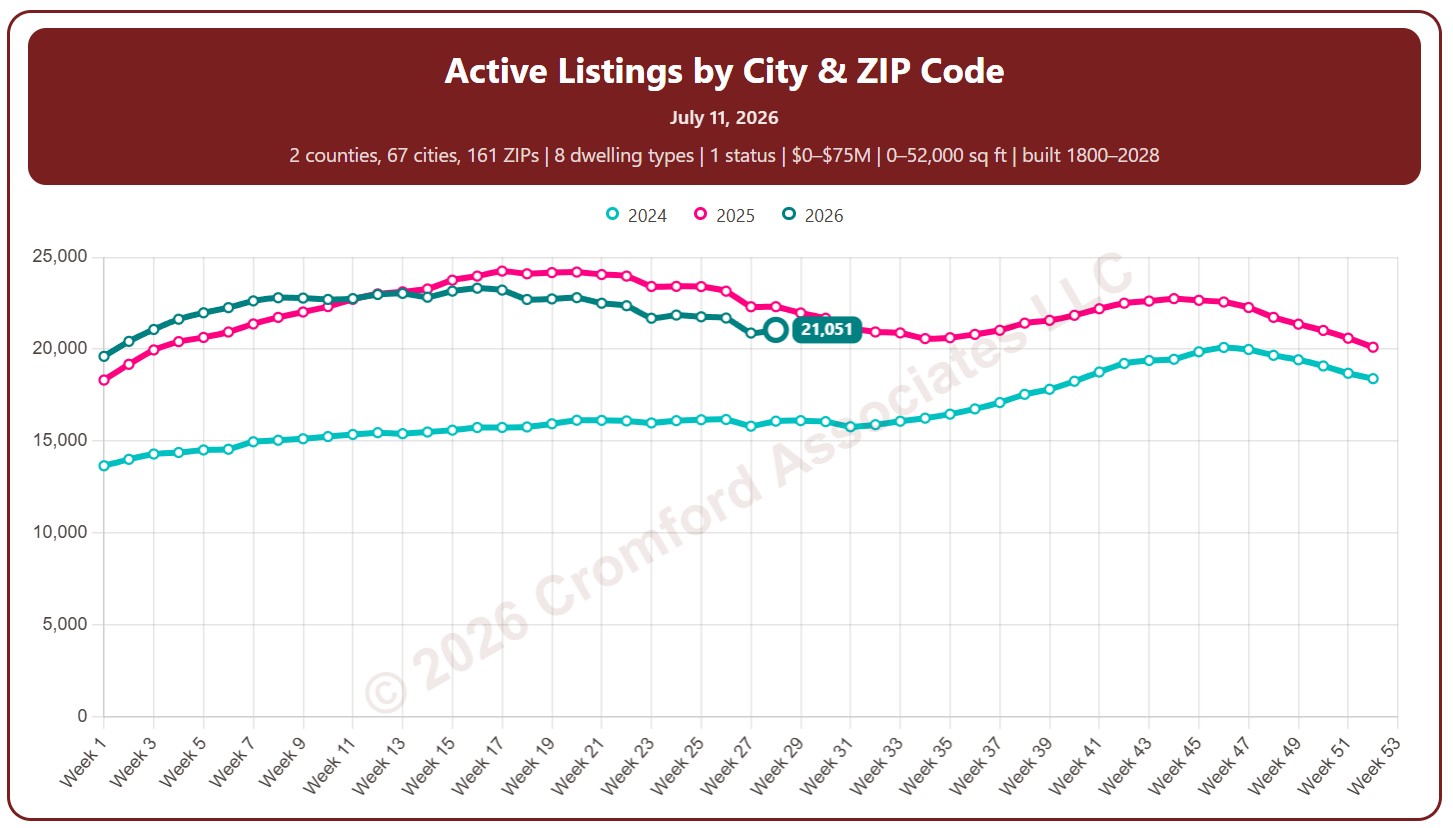
Notes:

  • This chart excludes listings for homes that are located outside Arizona

Active Listings by City and ZIP Code

About this chart

This chart counts the homes listed for sale on ARMLS, measured every week (on Saturdays).

By default it counts Active listings. Tick Coming Soon, UCB / CCBS (under contract but still accepting back-up offers), or Temp Off Market in the List Status panel to include them.

Each year has its own line, laid out by week of the year, so you can compare this year with earlier years at the same point in the season. It opens on the last three years; tick any year back to 2011 in the Year panel.

It opens on Maricopa and Pinal Counties with every city and ZIP code included. Use the County, City, and ZIP panels to focus on any area, from a whole county down to a single ZIP code. Narrow it with the Dwelling Type, List Status, Transaction Type, and New / Resale boxes and the list price, home size, year built, and days on market sliders.

Rising inventory gives buyers more choice and more negotiating power; falling inventory favors sellers. Hover over a line to see the exact figure for that week.