Phoenix Urban Village Snapshot

About this chart

This table shows 38 measures of the market for single-family detached homes in each of 14 of the City of Phoenix’s urban villages, one village at a time. Pick the village from the box at the top. Rio Vista, the fifteenth village, has too few sales to include.

Each measure is shown today, a month ago, a quarter ago, a year ago, and two years ago, and earlier dates back to January 2018 can be chosen from the date box. The ST and LT marks compare today with last month and with last year, colored by whether the change favors sellers or buyers.

Urban villages are planning areas inside the City of Phoenix, so every home in them is also counted in Phoenix. Laveen Urban Village is not the same as the postal city of Laveen, and Paradise Valley Urban Village is not the Town of Paradise Valley.
Price Range Market Snapshot

About this chart

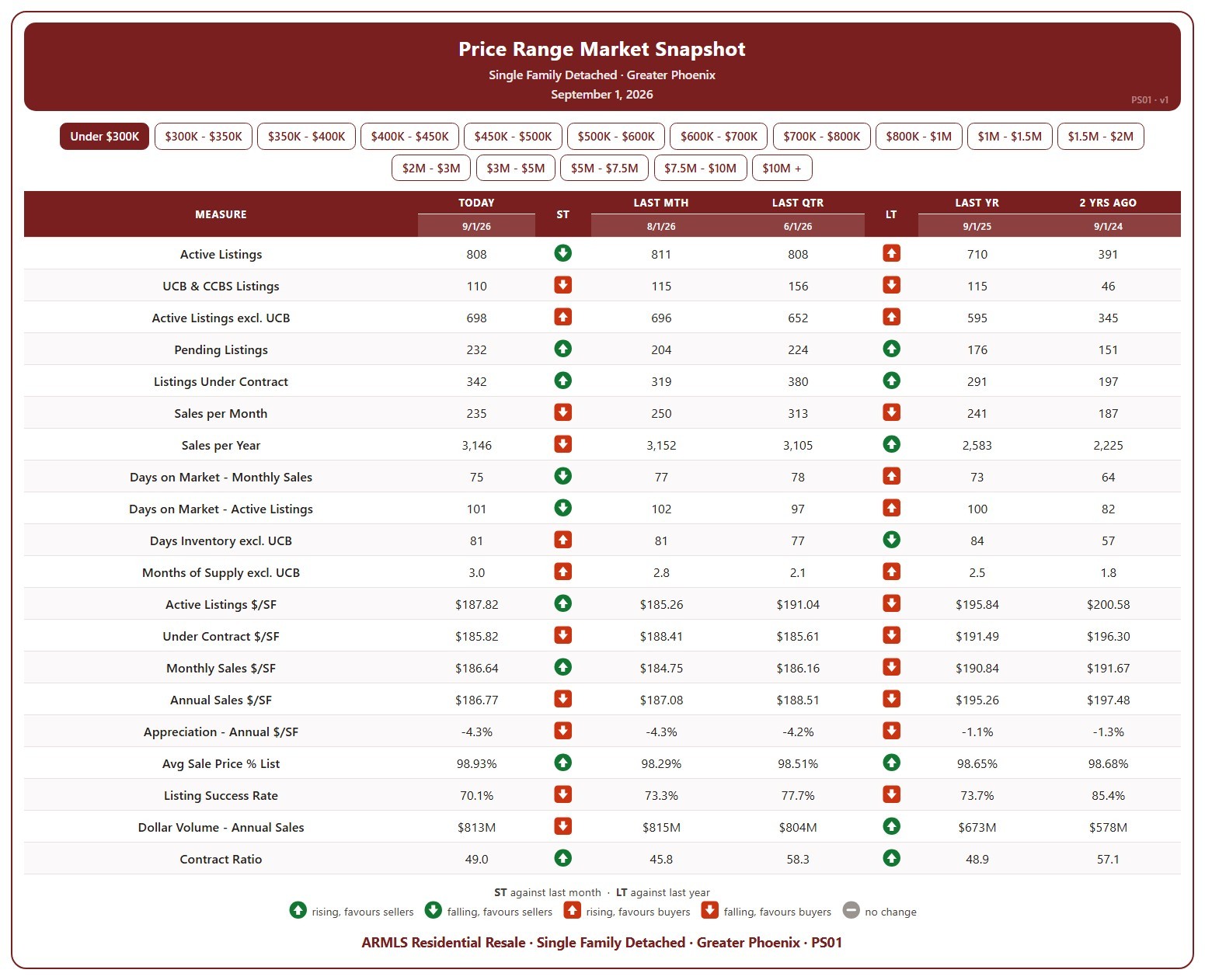
This table shows 20 measures of the market for single-family detached homes in Greater Phoenix, for one list price band at a time, from under $300K up to $10M and over. Pick the band with the buttons at the top.

Each measure is shown today (the 1st of the month), a month ago, a quarter ago, a year ago, and two years ago, so you can see how that part of the market has moved. The ST and LT marks compare today with last month and with last year, colored by whether the change favors sellers or buyers.

It covers supply (active listings, UCB / CCBS, pending, days inventory, months of supply), demand (sales per month and per year, days on market, listing success rate, contract ratio), and pricing ($/SF of active, under contract, and sold homes, appreciation, sale price as a percentage of list, and dollar volume).

Contract Ratio by City – Weekly

About this chart

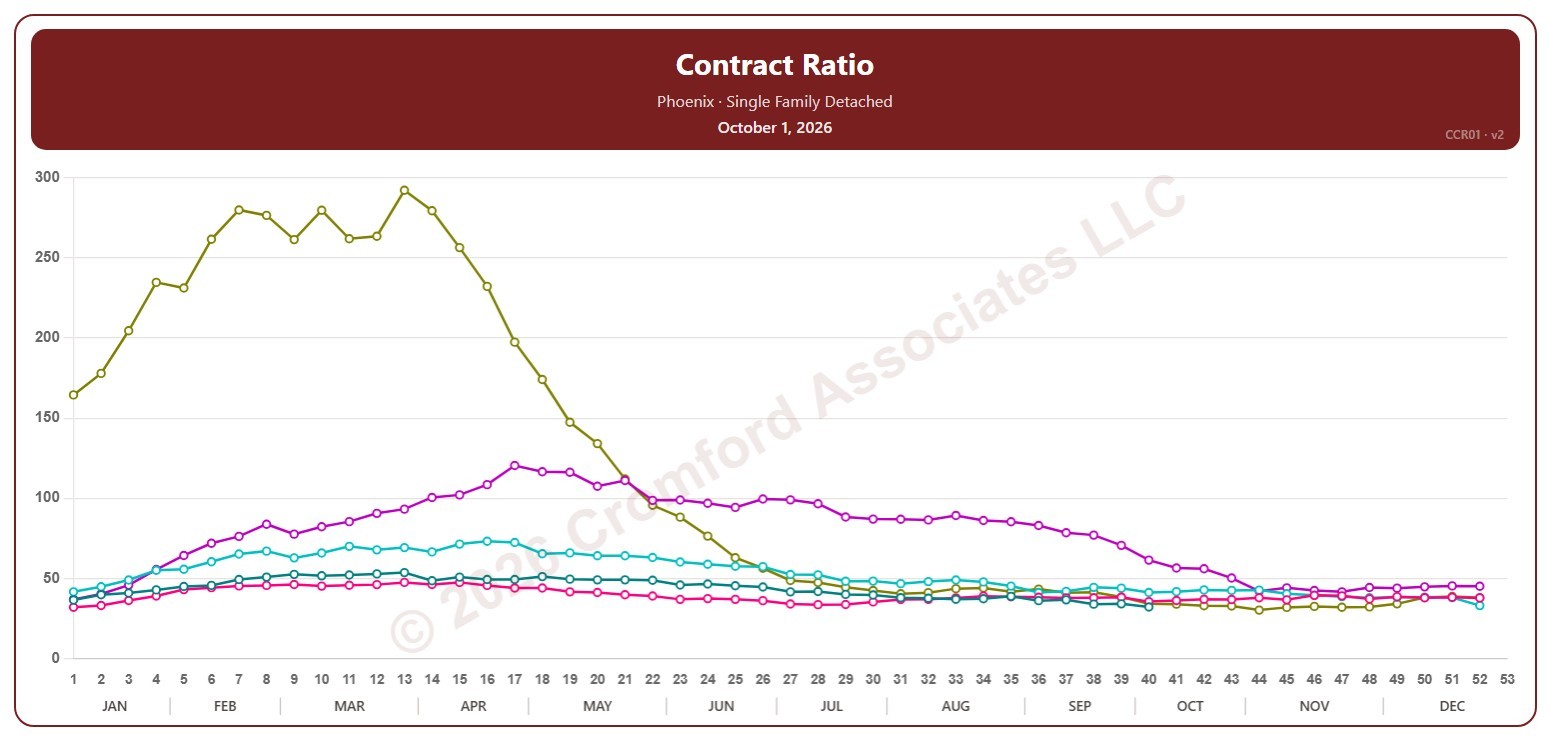
This chart shows the contract ratio for single-family detached homes on ARMLS in one city, measured every week on Thursdays. It compares the listings under contract (Pending plus UCB / CCBS) with the active listings available: the higher the ratio, the stronger buying activity is relative to supply, and in a very hot market it can go above 100.

Each year has its own line, laid out by week of the year, so you can compare this year with earlier years at the same point in the season. It opens on Phoenix and the last five years. Pick any of the 34 cities (18 major and 16 secondary) from the City list, and tick any year back to 2006 in the Year panel. Queen Creek and San Tan Valley start in 2010, and Coolidge, Florence, Waddell, and Wickenburg in 2011.

Hover over a line to see the exact figure for that week.

Contract Ratio

About this chart

This chart shows the contract ratio for the whole ARMLS market, all areas and all dwelling types, as one bar per month since November 2005, each the reading on the 1st of the month. It compares the listings under contract (Pending plus UCB / CCBS) with the active listings available: the higher the ratio, the stronger buying activity is relative to supply. The value axis is logarithmic, so equal steps up the axis are equal percentage changes; this keeps both the extreme years and today readable.

Hover over a bar to see the exact figure for that month.

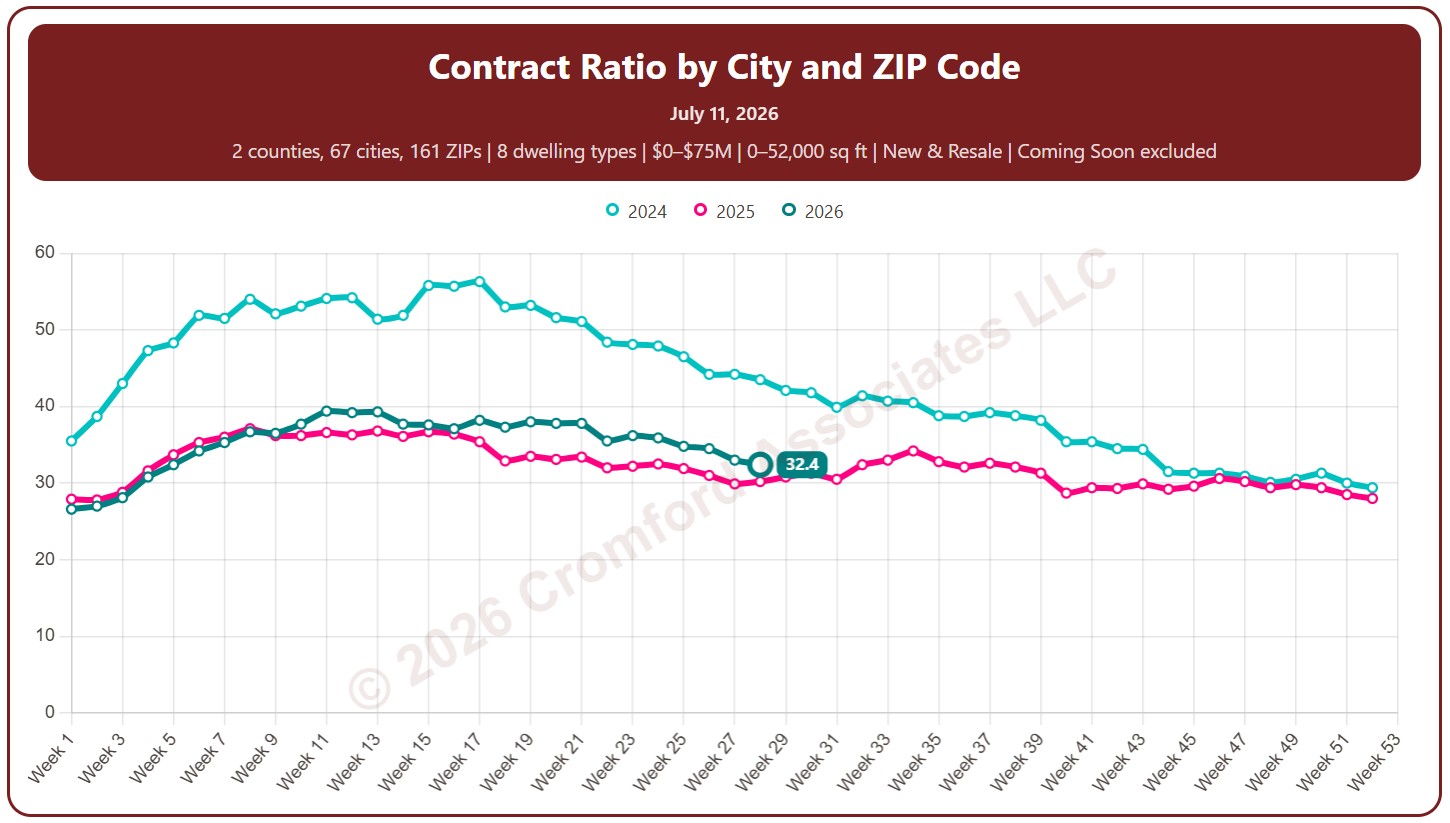
Contract Ratio by City and ZIP Code

About this chart

This chart shows the contract ratio, measured every week (on Saturdays). It compares the listings under contract with the active listings available. The higher the ratio, the stronger buying activity is relative to supply: a rising ratio is good news for sellers, a falling one for buyers.

Coming Soon listings are left out by default; tick Count Coming Soon as Active to include them.

Each year has its own line, laid out by week of the year, so you can compare this year with earlier years at the same point in the season. It opens on the last three years; tick any year back to 2011 in the Year panel.

It opens on Maricopa and Pinal Counties with every city and ZIP code included. Use the County, City, and ZIP panels to focus on any area, from a whole county down to a single ZIP code. Narrow it with the Dwelling Type and New / Resale boxes and the list price and home size sliders.

Hover over a line to see the exact figure for that week.

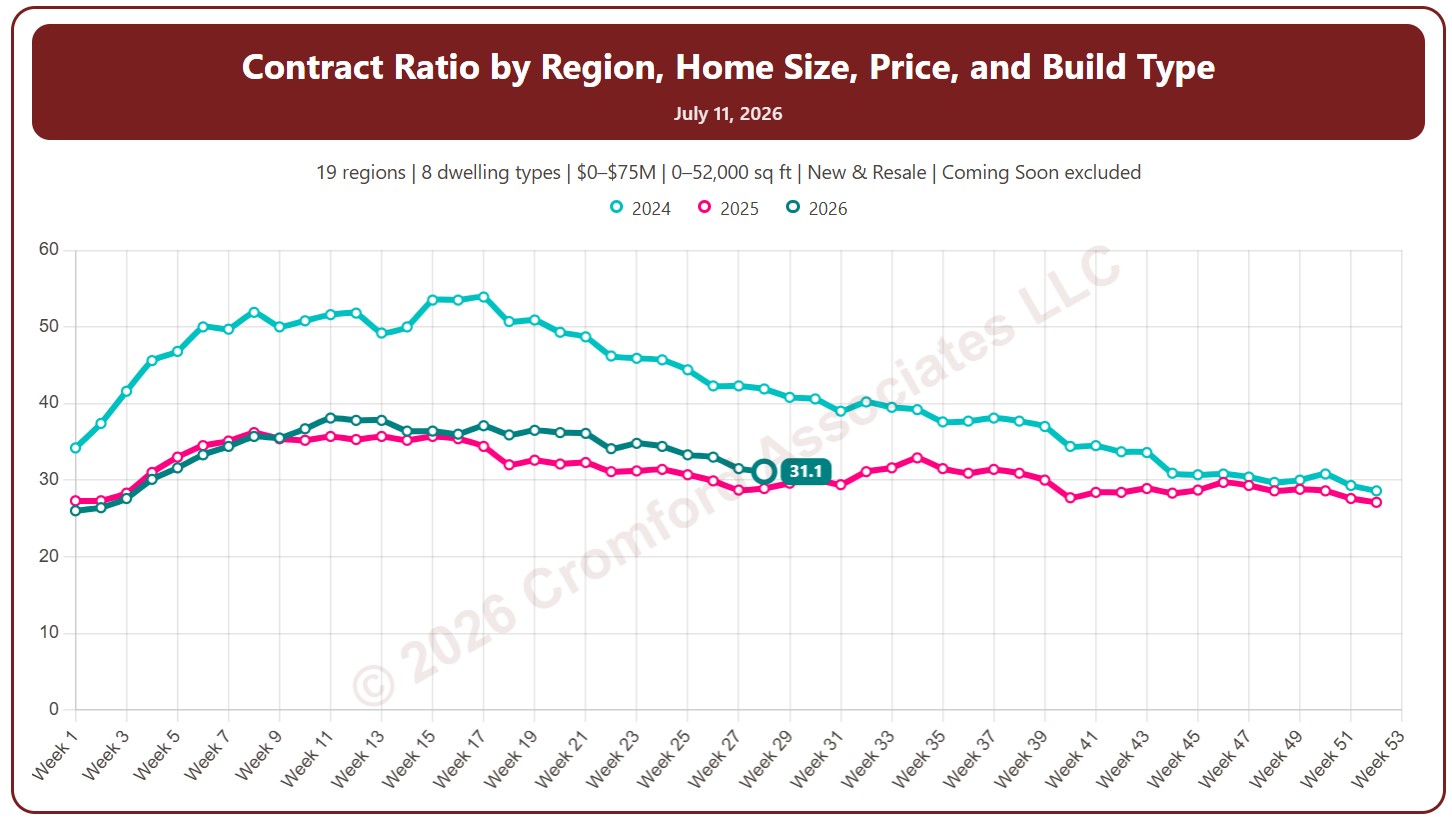
Contract Ratio by Region

About this chart

This chart shows the contract ratio, measured every week (on Saturdays). It compares the listings under contract with the active listings available. The higher the ratio, the stronger buying activity is relative to supply: a rising ratio is good news for sellers, a falling one for buyers.

Coming Soon listings are left out by default; tick Count Coming Soon as Active to include them.

Each year has its own line, laid out by week of the year, so you can compare this year with earlier years at the same point in the season. It opens on the last three years; tick any year back to 2011 in the Year panel.

It opens with every region included. Use the Region panel to focus on one region or compare a combination of them. Narrow it with the Dwelling Type and New / Resale boxes and the list price and home size sliders.

Hover over a line to see the exact figure for that week.

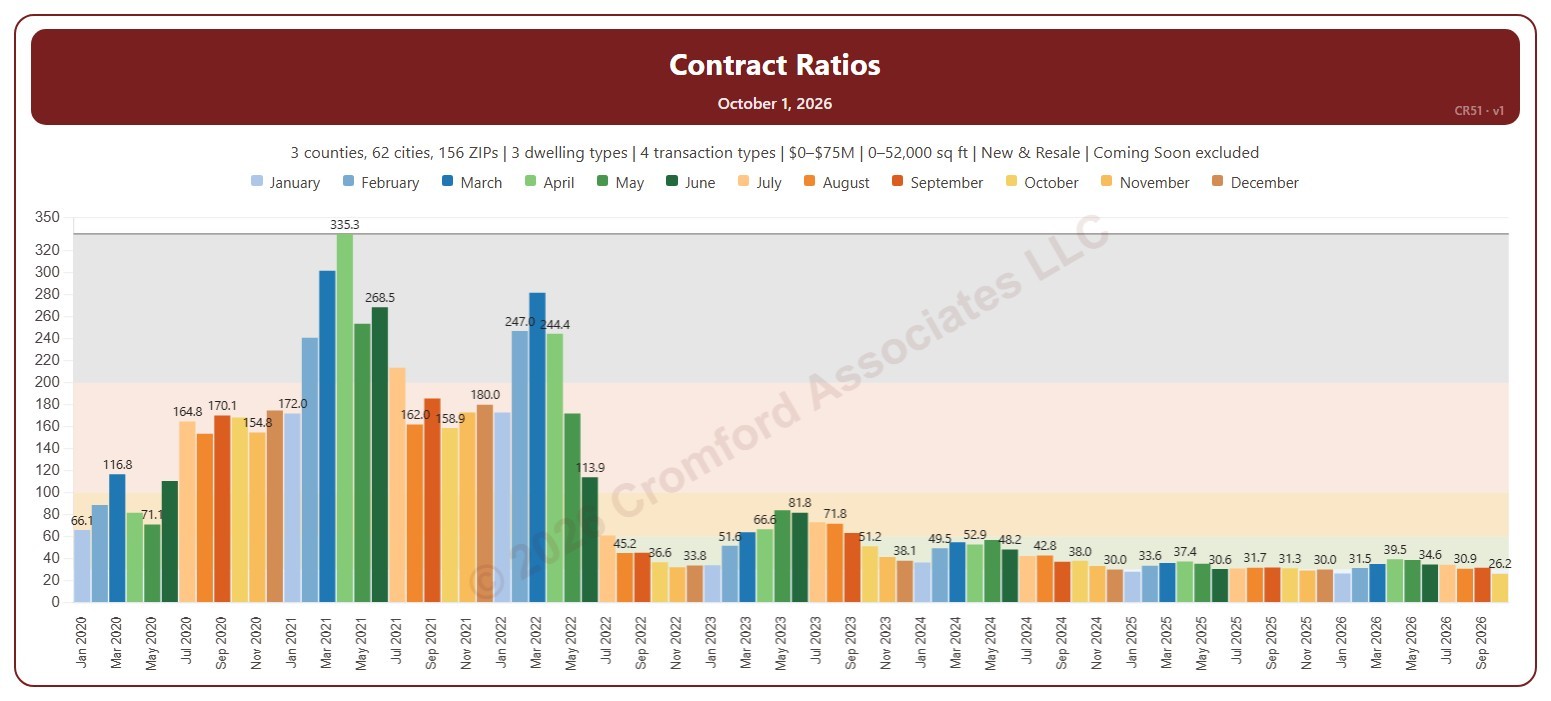
Contract Ratio Monthly

About this chart

This chart shows the Contract Ratio for each month: the number of listings under contract (pending, plus UCB and CCBS) for every 100 active listings, measured on the first day of the month. Each bar is one month, colored by month. The shaded bands mark a Cool market (below 30), Warm (30 to 60), Hot (60 to 100), Frenzy! (100 to 200), and Insanity!! (above 200), and the line marks the highest month shown.

It opens on January 2020 to date. Drag the handles of the date slider under the chart to choose the months shown, as far back as April 2010. Click a month in the legend to hide or show it. A new month appears once its first-day figures are in.

It opens on the Greater Phoenix area: the counties, cities, and ZIP codes that make it up are ticked to start with. Tick or untick any of them to change the area, including counties beyond Greater Phoenix. Narrow it further with the Dwelling Type, Transaction Type, and New / Resale boxes and the list price and home size sliders. Tick Count Coming Soon as Active to add Coming Soon listings to the active count.

Hover over a bar to see the ratio and the numbers of listings under contract and active that day.

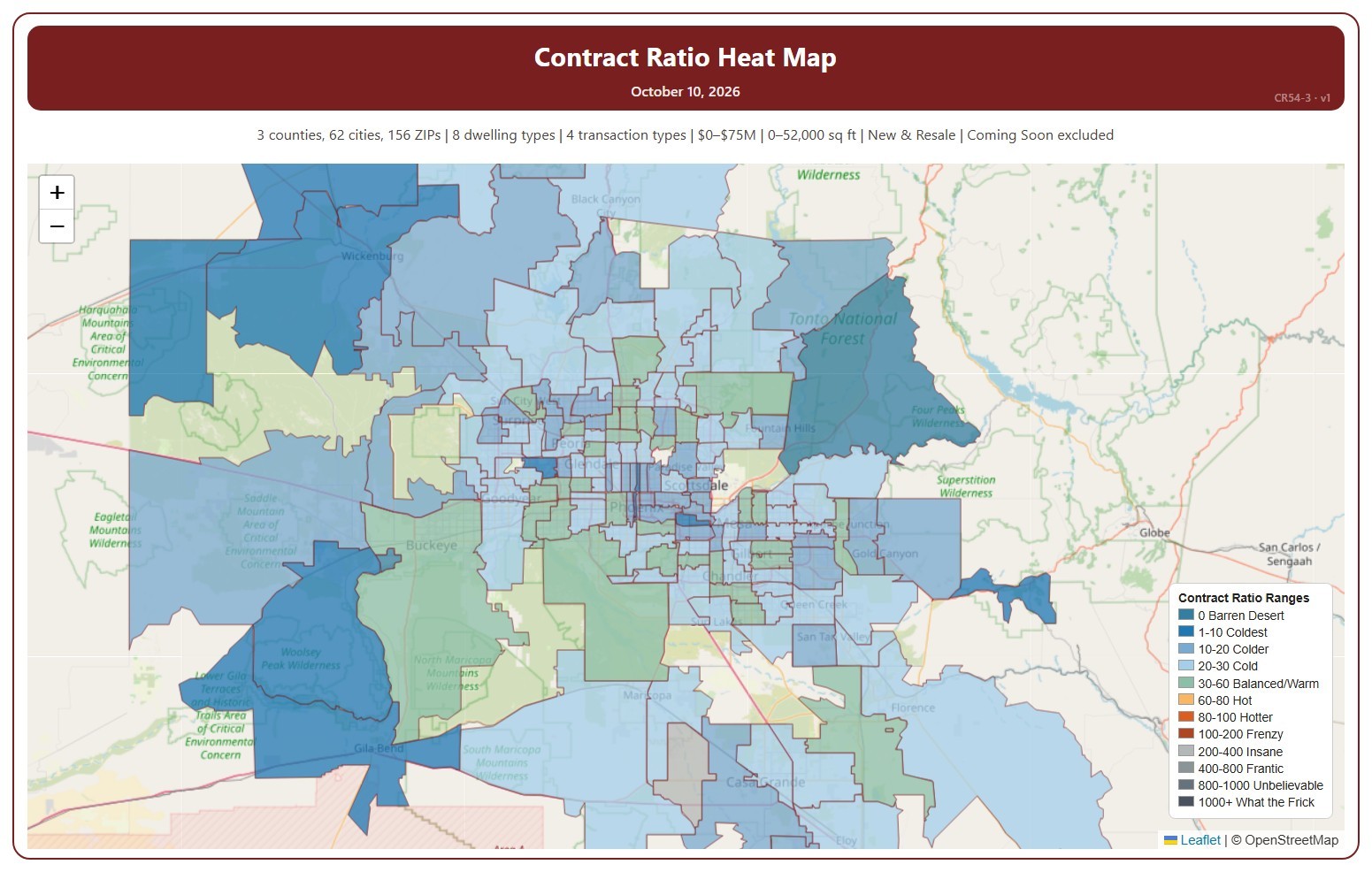
Contract Ratio Heat Map

About this chart

This map shades each ZIP code by its Contract Ratio on one Saturday: the number of listings under contract (pending, plus UCB and CCBS) for every 100 active listings, measured on Saturdays. The ranges run from 0 Barren Desert (nothing under contract) to 1000+. Click a range in the legend to show only that range, click more ranges to add them, and click Show all ranges to see every range again.

It opens on the latest Saturday. Use the controls under the map to step a week at a time, pick any Saturday back to January 2011, or drag the slider. Press play to step through the weeks as a slide show at the speed you choose. ZIP codes with no active listings that week are left unshaded. The map is updated every week.

It opens on the Greater Phoenix area: the counties, cities, and ZIP codes that make it up are ticked to start with. Tick or untick any of them to change the area, including counties beyond Greater Phoenix. Narrow it further with the Dwelling Type, Transaction Type, and New / Resale boxes and the list price and home size sliders. Tick Count Coming Soon as Active to add Coming Soon listings to the active count.

Hover over a ZIP code to see its ratio, its range, and the numbers of listings under contract and active.

Contract Ratios

About this chart

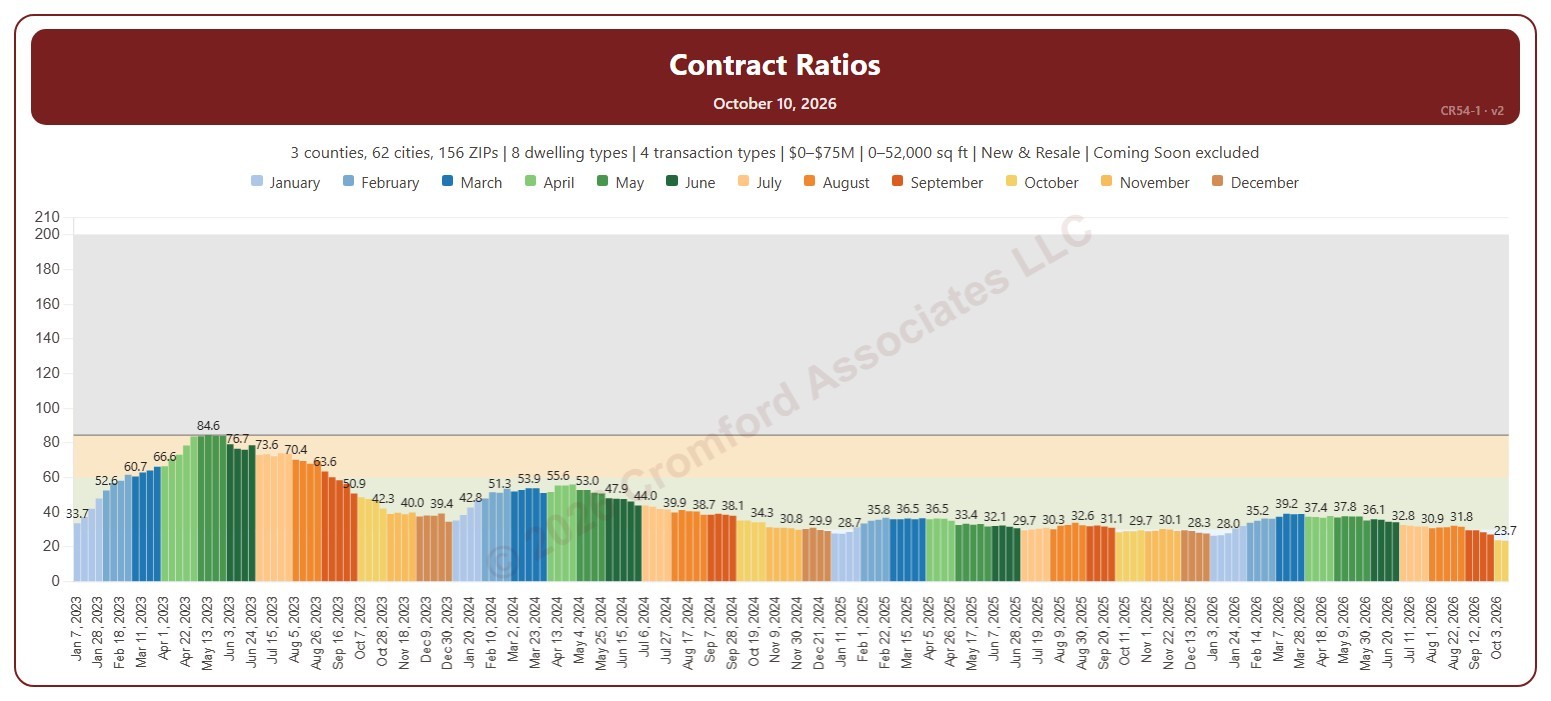
This chart shows the Contract Ratio for each week: the number of listings under contract (pending, plus UCB and CCBS) for every 100 active listings, measured on Saturdays. Each bar is one Saturday, colored by month. The shaded bands mark a Cool market (below 30), Warm (30 to 60), Hot (60 to 100), Frenzy! (100 to 200), and Insanity!! (above 200), and the line marks the highest week shown.

It opens on January 2023 to date. Drag the handles of the date slider under the chart to choose the weeks shown, as far back as January 2011. Click a month in the legend to hide or show its weeks. The chart is updated every week.

It opens on the Greater Phoenix area: the counties, cities, and ZIP codes that make it up are ticked to start with. Tick or untick any of them to change the area, including counties beyond Greater Phoenix. Narrow it further with the Dwelling Type, Transaction Type, and New / Resale boxes and the list price and home size sliders. Tick Count Coming Soon as Active to add Coming Soon listings to the active count.

Hover over a bar to see the ratio and the numbers of listings under contract and active that week.