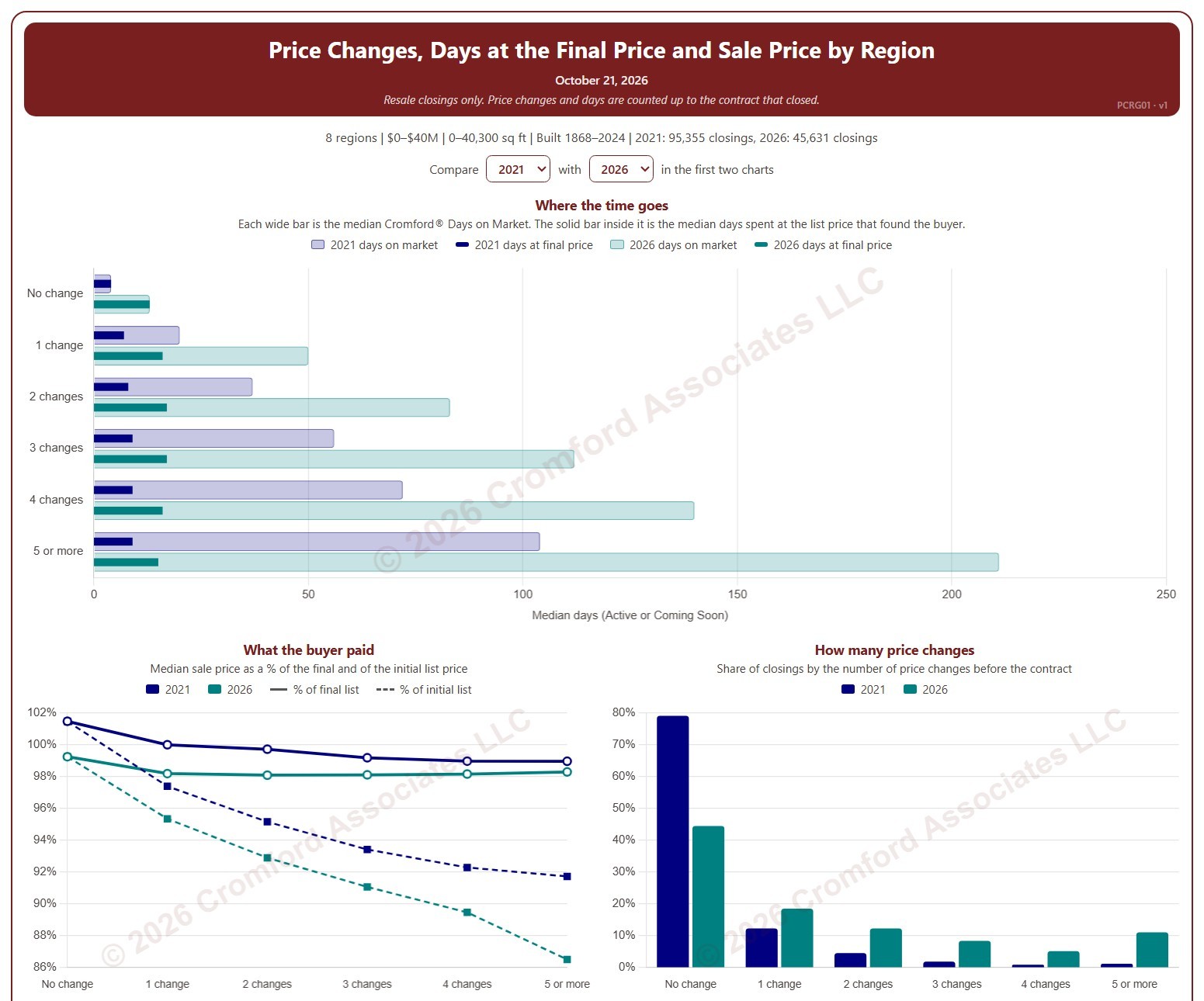
Price Changes, Days at the Final Price and Sale Price by Region

About this chart

This chart shows how many times homes changed their list price before going under contract, and what that meant for how long they took to sell and the price they sold for, by region. Each closed resale is grouped by the number of list price changes before the contract that closed, from none to five or more. Price increases and price cuts both count as a change.

The top chart compares two figures for each group. The wide bar is the median Cromford® Days on Market. The solid bar inside it is the median number of days the home spent at its final list price, the price that found the buyer. However long a home was on the market, the time it spent at the price that sold it is usually much shorter.

The top two charts compare any two years from 2020 on, picked with the selectors above them. The lower left chart shows the median sale price as a percentage of the final list price (solid line) and of the initial list price (dashed line). The lower right chart shows the share of closings in each group for the years ticked in the Year panel.

The map shades every ZIP code with its region’s figure for one year at a time, chosen with the year selector above it, so each region reads as one block. A few ZIP codes lie in two regions; they are striped in both regions’ shades and their closings count in both. Regions not ticked in the Region panel are faded. Click a ZIP code to show its region alone in the charts.

Days count while the home was Active or Coming Soon, up to the contract that closed. A contract that fell through does not reset the count. New construction is excluded. Years are by closing date, and the current year is year to date. The chart opens on 2021 and the current year in the Greater Phoenix regions, with manufactured and modular homes left out.
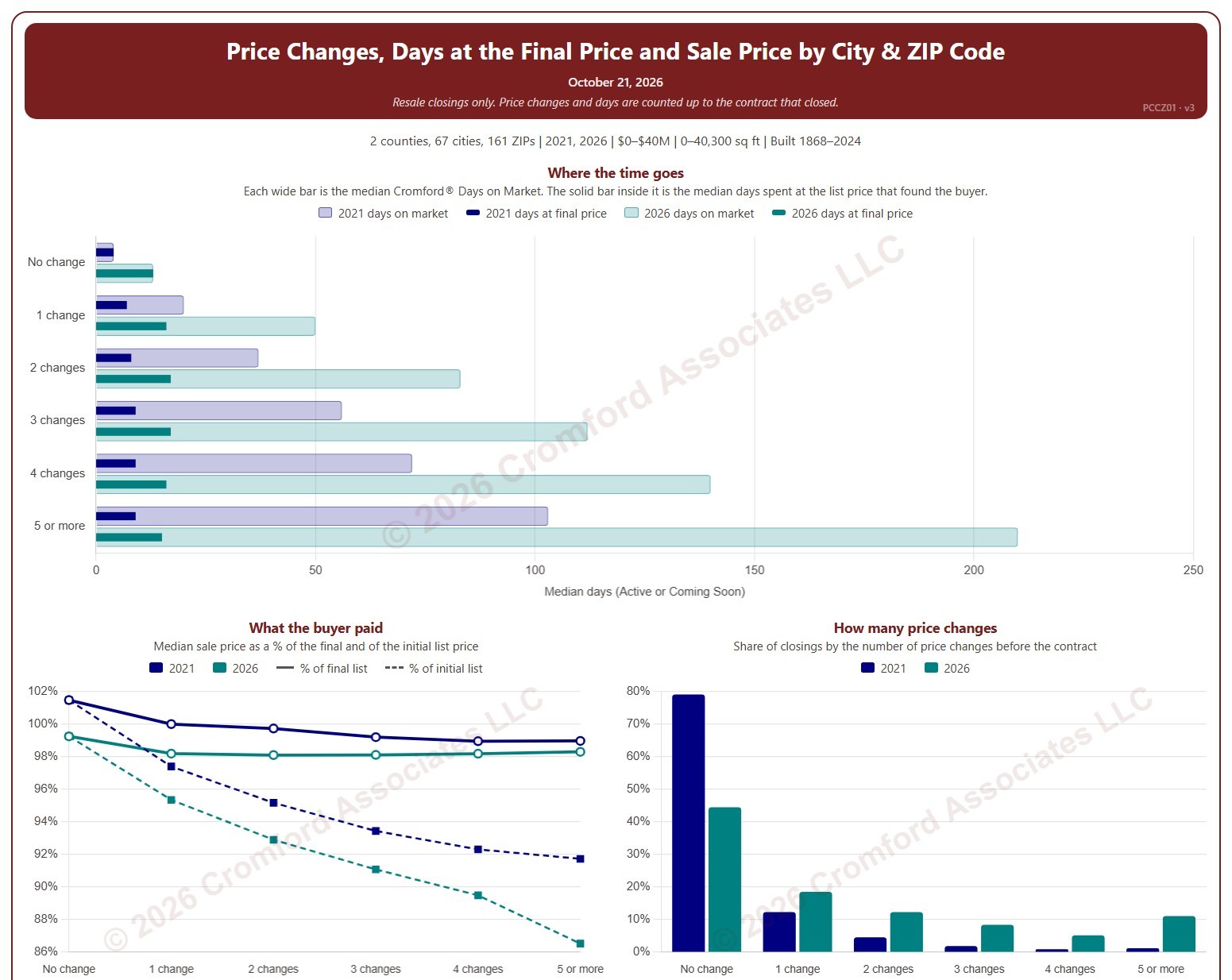
Price Changes, Days at the Final Price and Sale Price by City and ZIP Code

About this chart

This chart shows how many times homes changed their list price before going under contract, and what that meant for how long they took to sell and the price they sold for. Each closed resale is grouped by the number of list price changes before the contract that closed, from none to five or more. Price increases and price cuts both count as a change.

The top chart compares two figures for each group. The wide bar is the median Cromford® Days on Market. The solid bar inside it is the median number of days the home spent at its final list price, the price that found the buyer. However long a home was on the market, the time it spent at the price that sold it is usually much shorter.

The top two charts compare any two years from 2020 on, picked with the selectors above them. The lower left chart shows the median sale price as a percentage of the final list price (solid line) and of the initial list price (dashed line). The lower right chart shows the share of closings in each group for the years ticked in the Year panel.

The map shades each ZIP code for one year at a time, chosen with the year selector above it. ZIP codes with fewer than 20 closings are shown in gray. Click a ZIP code to show it alone in the charts.

Days count while the home was Active or Coming Soon, up to the contract that closed. A contract that fell through does not reset the count. New construction is excluded. Years are by closing date, and the current year is year to date. The chart opens on 2021 and the current year in Maricopa and Pinal counties, with manufactured and modular homes left out.
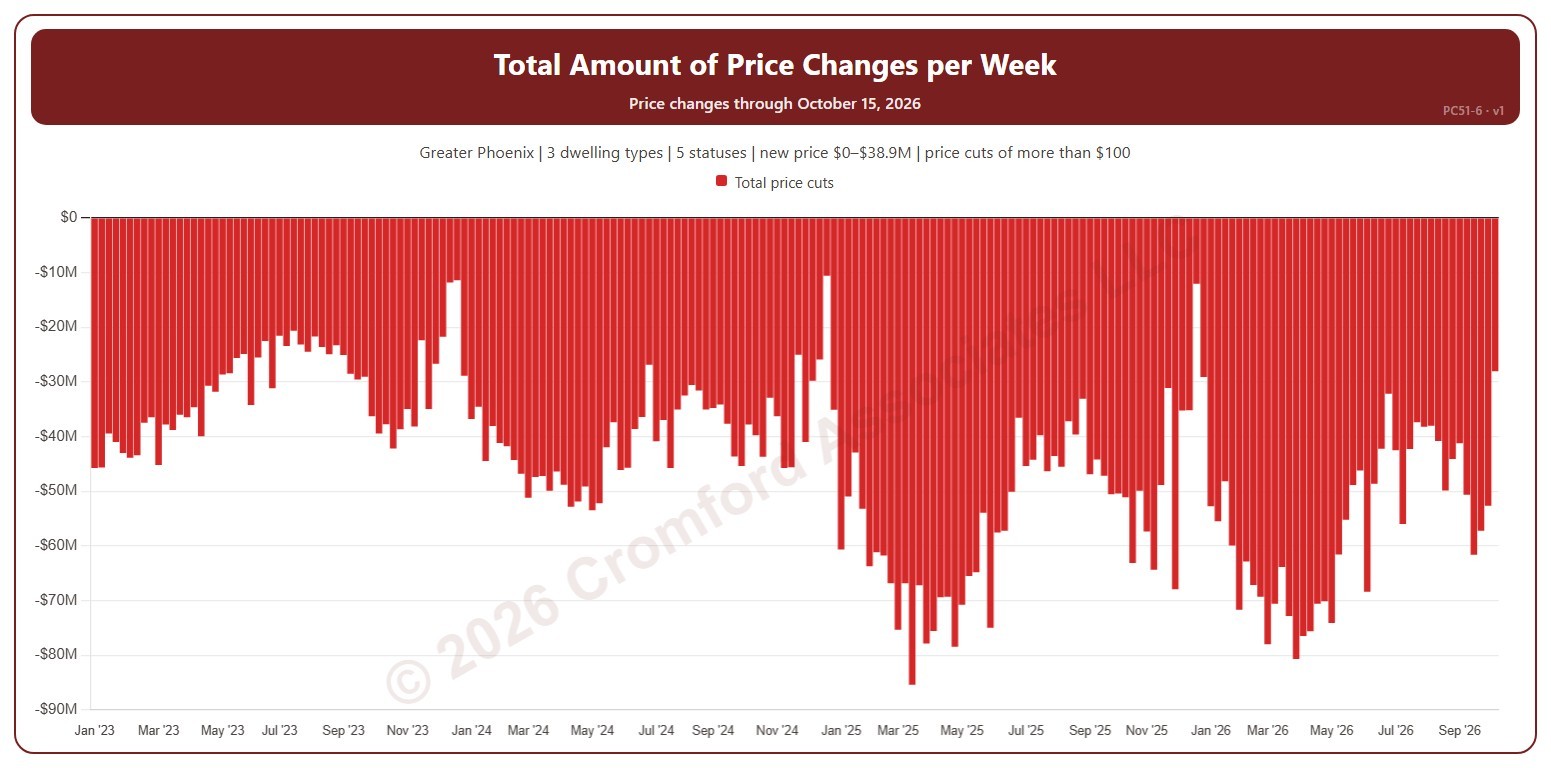
Total Amount of Price Changes per Week

About this chart

This chart shows the total dollar amount of list price changes each week. Price cuts show below zero. It counts changes to a listing’s list price on ARMLS, using the new price for the price filter. A change counts only when it is more than the amount in the Price Change panel ($100 to start with). Use the Price Change panel to show price cuts (the opening view), price increases, or both. Use the Week box to pick one week number and compare that week across the years; week 1 is the week holding 1 January.

Weeks run Sunday to Saturday. It opens on January three years back to date; drag the handles of the date slider under the chart to choose the weeks shown, as far back as January 2013. The newest week is the week so far. The chart is updated every week.

It opens on the Greater Phoenix area: the counties, cities, and ZIP codes that make it up are ticked to start with. Tick or untick any of them to change the area, including counties beyond Greater Phoenix. Narrow it further with the Dwelling Type, List Status, Transaction Type, and New / Resale boxes and the new list price, home size, and year built sliders.

Hover over a bar to see the week’s dates and the total.

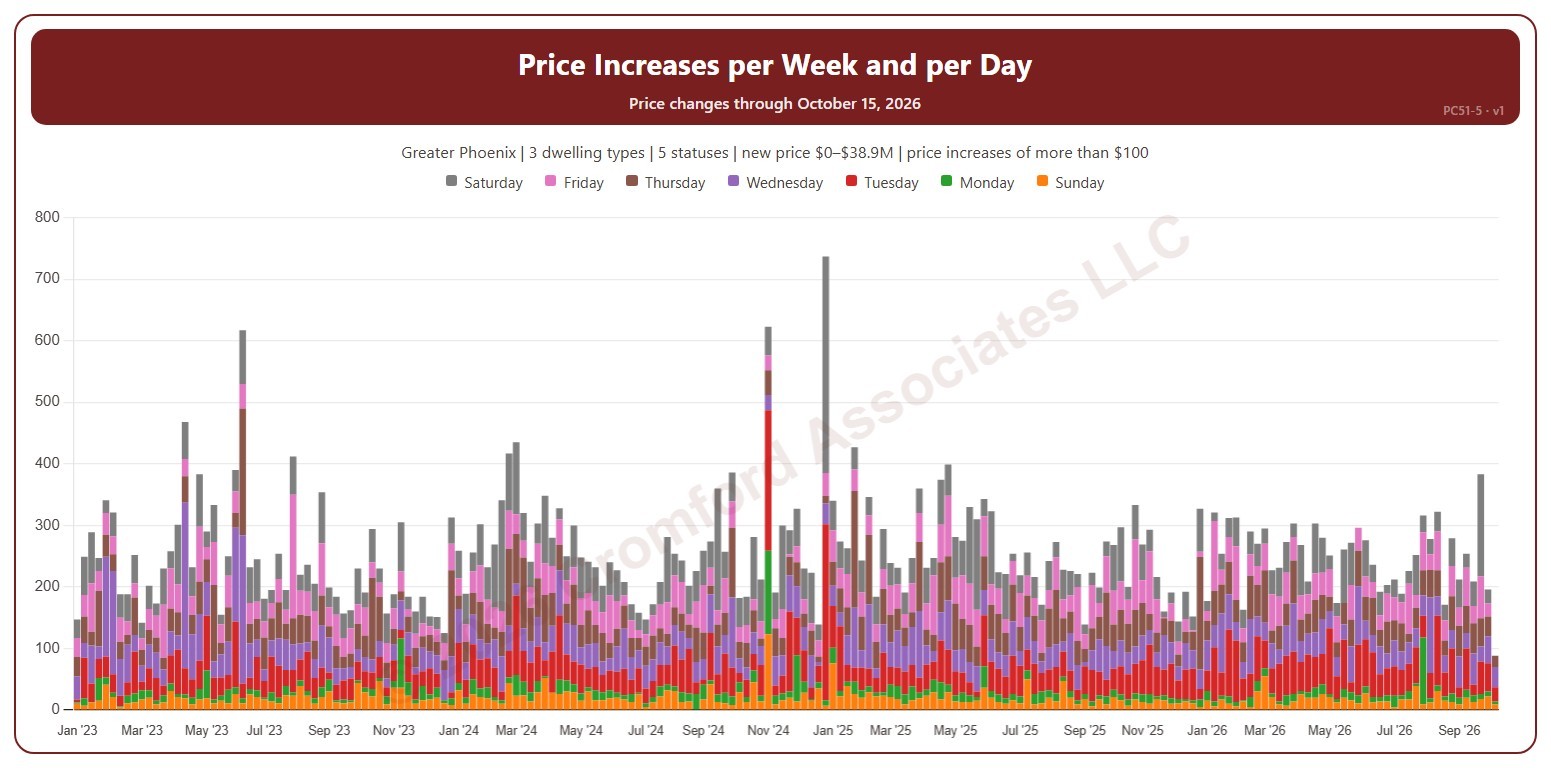
Price Increases per Week and per Day

About this chart

This chart shows the number of list price increases each week, each bar split by the day of the week the increase was made. It counts changes to a listing’s list price on ARMLS, using the new price for the price filter. A change counts only when it is more than the amount in the Price Change panel ($100 to start with).

Weeks run Sunday to Saturday. It opens on January three years back to date; drag the handles of the date slider under the chart to choose the weeks shown, as far back as January 2013. The newest week is the week so far. The chart is updated every week.

It opens on the Greater Phoenix area: the counties, cities, and ZIP codes that make it up are ticked to start with. Tick or untick any of them to change the area, including counties beyond Greater Phoenix. Narrow it further with the Dwelling Type, List Status, Transaction Type, and New / Resale boxes and the new list price, home size, and year built sliders.

Hover over a bar to see each day and the total for the week.

Price Cuts per Week and per Day

About this chart

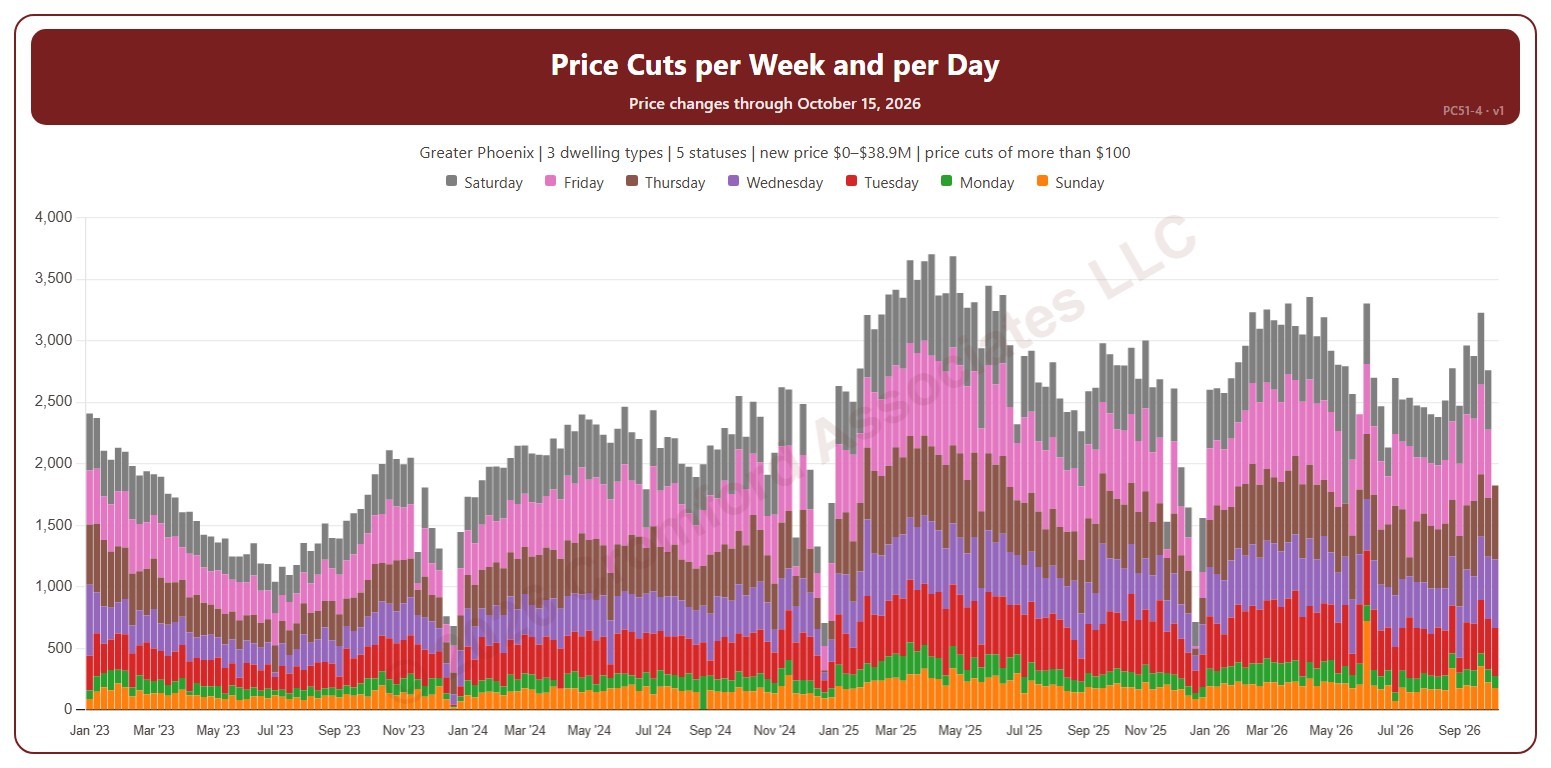
This chart shows the number of list price cuts each week, each bar split by the day of the week the cut was made. It counts changes to a listing’s list price on ARMLS, using the new price for the price filter. A change counts only when it is more than the amount in the Price Change panel ($100 to start with).

Weeks run Sunday to Saturday. It opens on January three years back to date; drag the handles of the date slider under the chart to choose the weeks shown, as far back as January 2013. The newest week is the week so far. The chart is updated every week.

It opens on the Greater Phoenix area: the counties, cities, and ZIP codes that make it up are ticked to start with. Tick or untick any of them to change the area, including counties beyond Greater Phoenix. Narrow it further with the Dwelling Type, List Status, Transaction Type, and New / Resale boxes and the new list price, home size, and year built sliders.

Hover over a bar to see each day and the total for the week.

Median Price Change Amount

About this chart

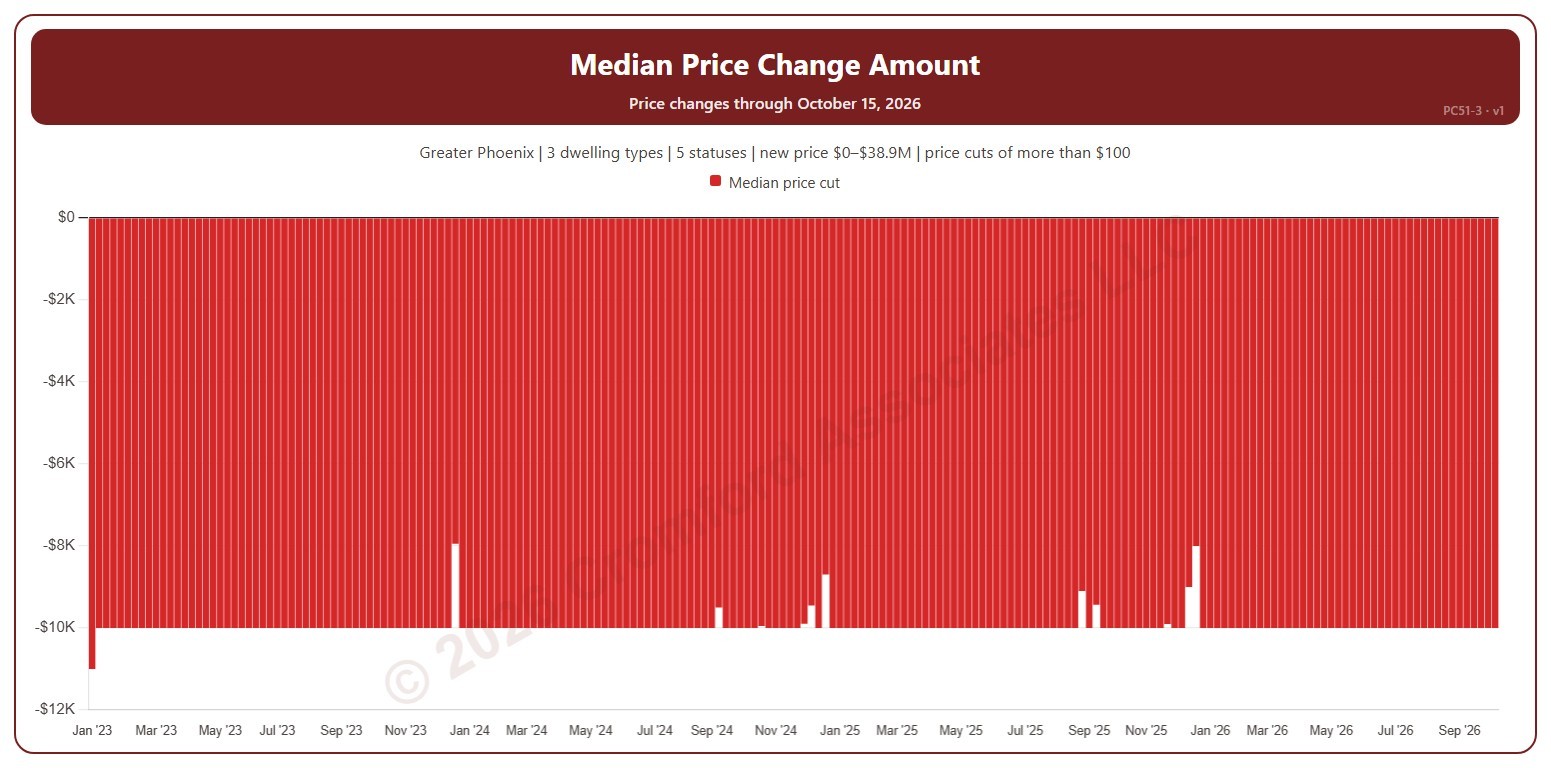
This chart shows the median amount of the list price changes each week: the middle change when they are lined up from smallest to largest. Price cuts show below zero. It counts changes to a listing’s list price on ARMLS, using the new price for the price filter. A change counts only when it is more than the amount in the Price Change panel ($100 to start with). Use the Price Change panel to show price cuts (the opening view), price increases, or both.

Weeks run Sunday to Saturday. It opens on January three years back to date; drag the handles of the date slider under the chart to choose the weeks shown, as far back as January 2013. The newest week is the week so far. The chart is updated every week.

It opens on the Greater Phoenix area: the counties, cities, and ZIP codes that make it up are ticked to start with. Tick or untick any of them to change the area, including counties beyond Greater Phoenix. Narrow it further with the Dwelling Type, List Status, Transaction Type, and New / Resale boxes and the new list price, home size, and year built sliders.

Hover over a bar to see the median change.

Number of Price Changes – 4 Week Running Total

About this chart

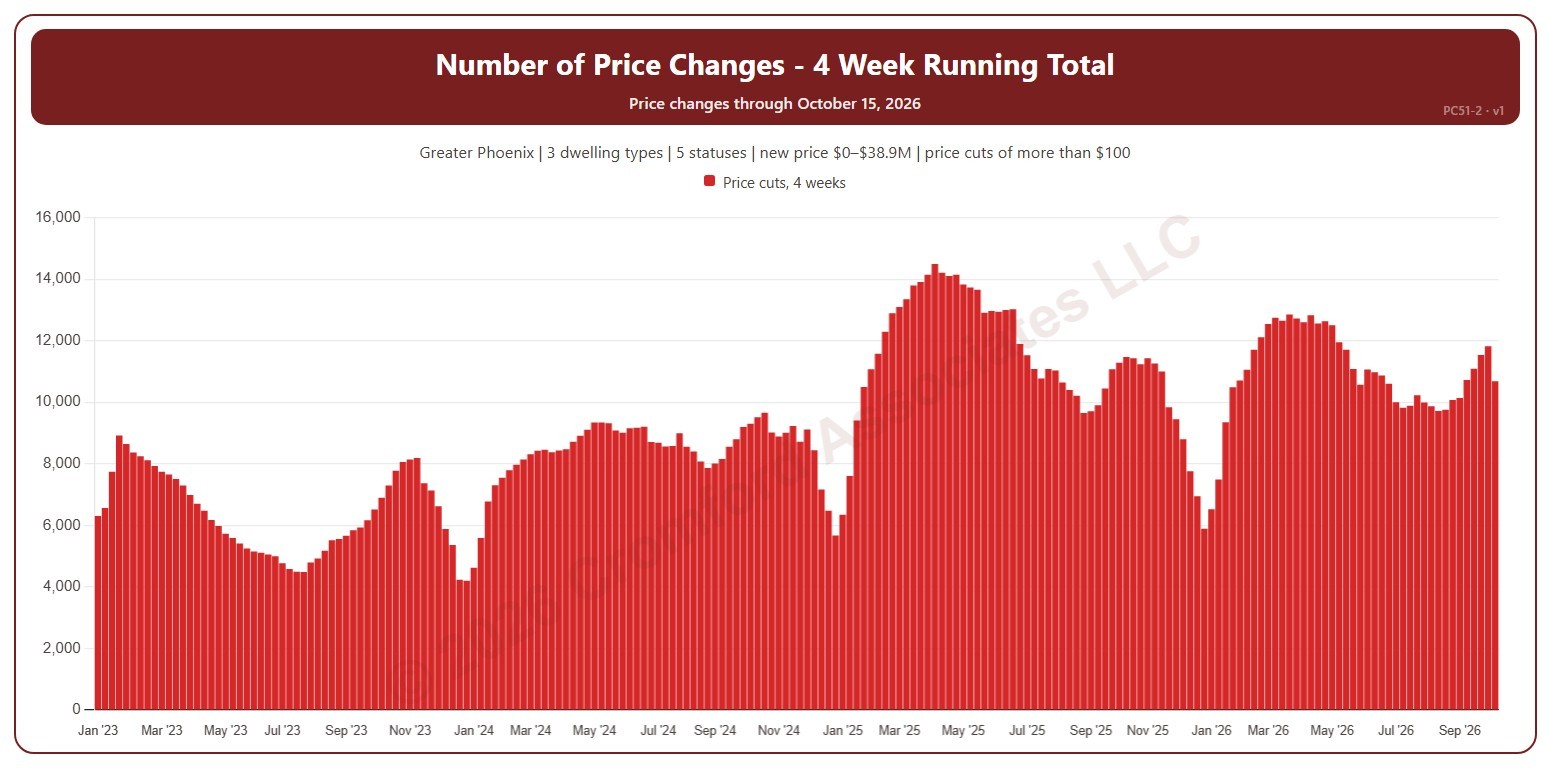
This chart shows the number of list price changes in the four weeks ending each week, which smooths out week-to-week swings. It counts changes to a listing’s list price on ARMLS, using the new price for the price filter. A change counts only when it is more than the amount in the Price Change panel ($100 to start with). Use the Price Change panel to show price cuts (the opening view), price increases, or both.

Weeks run Sunday to Saturday. It opens on January three years back to date; drag the handles of the date slider under the chart to choose the weeks shown, as far back as January 2013. The newest week is the week so far. The chart is updated every week.

It opens on the Greater Phoenix area: the counties, cities, and ZIP codes that make it up are ticked to start with. Tick or untick any of them to change the area, including counties beyond Greater Phoenix. Narrow it further with the Dwelling Type, List Status, Transaction Type, and New / Resale boxes and the new list price, home size, and year built sliders.

Hover over a bar to see the four-week total.

Number of Price Changes per Week

About this chart

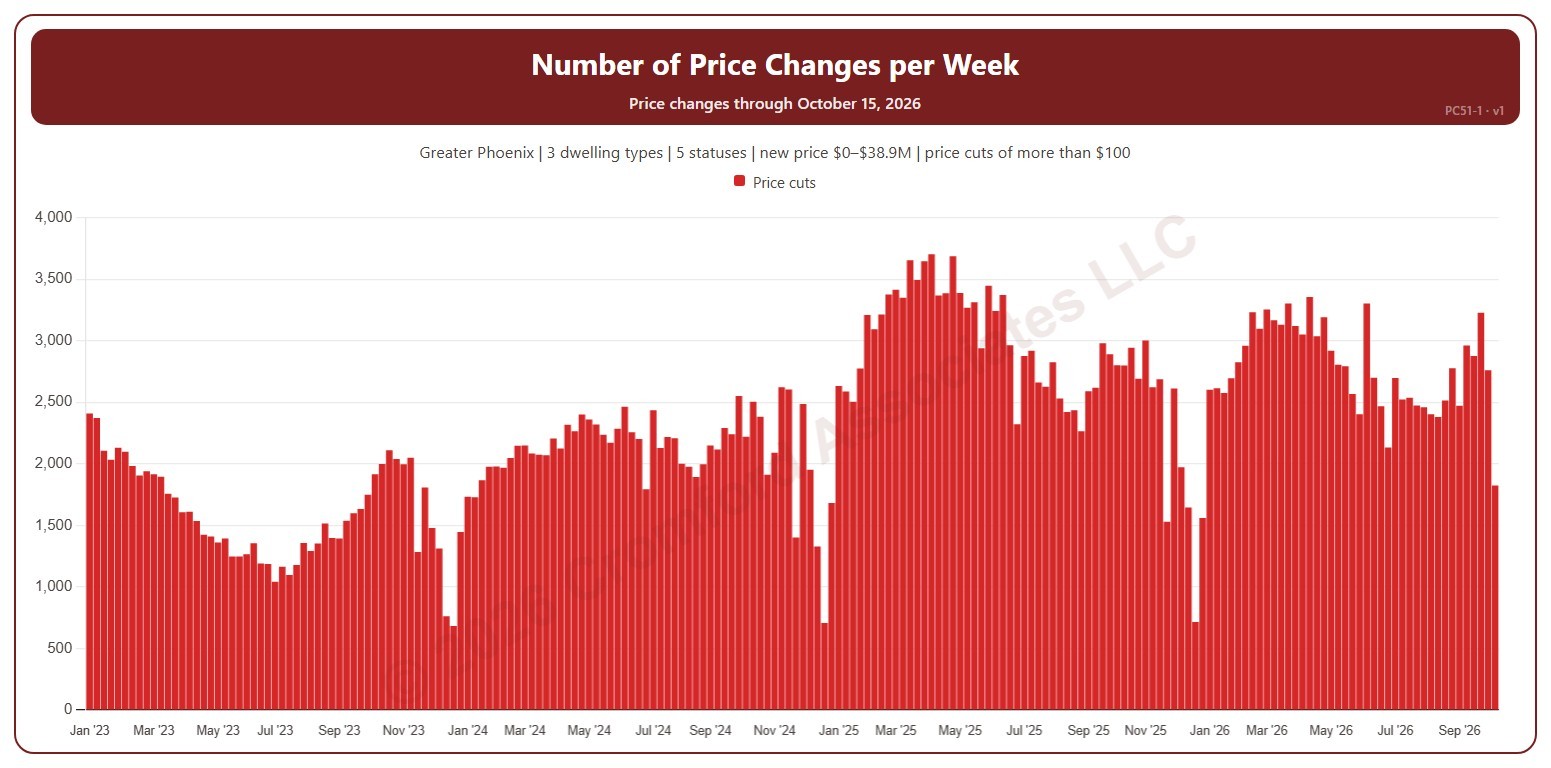
This chart shows the number of list price changes each week. It counts changes to a listing’s list price on ARMLS, using the new price for the price filter. A change counts only when it is more than the amount in the Price Change panel ($100 to start with). Use the Price Change panel to show price cuts (the opening view), price increases, or both.

Weeks run Sunday to Saturday. It opens on January three years back to date; drag the handles of the date slider under the chart to choose the weeks shown, as far back as January 2013. The newest week is the week so far. The chart is updated every week.

It opens on the Greater Phoenix area: the counties, cities, and ZIP codes that make it up are ticked to start with. Tick or untick any of them to change the area, including counties beyond Greater Phoenix. Narrow it further with the Dwelling Type, List Status, Transaction Type, and New / Resale boxes and the new list price, home size, and year built sliders.

Hover over a bar to see the week’s dates and the count.