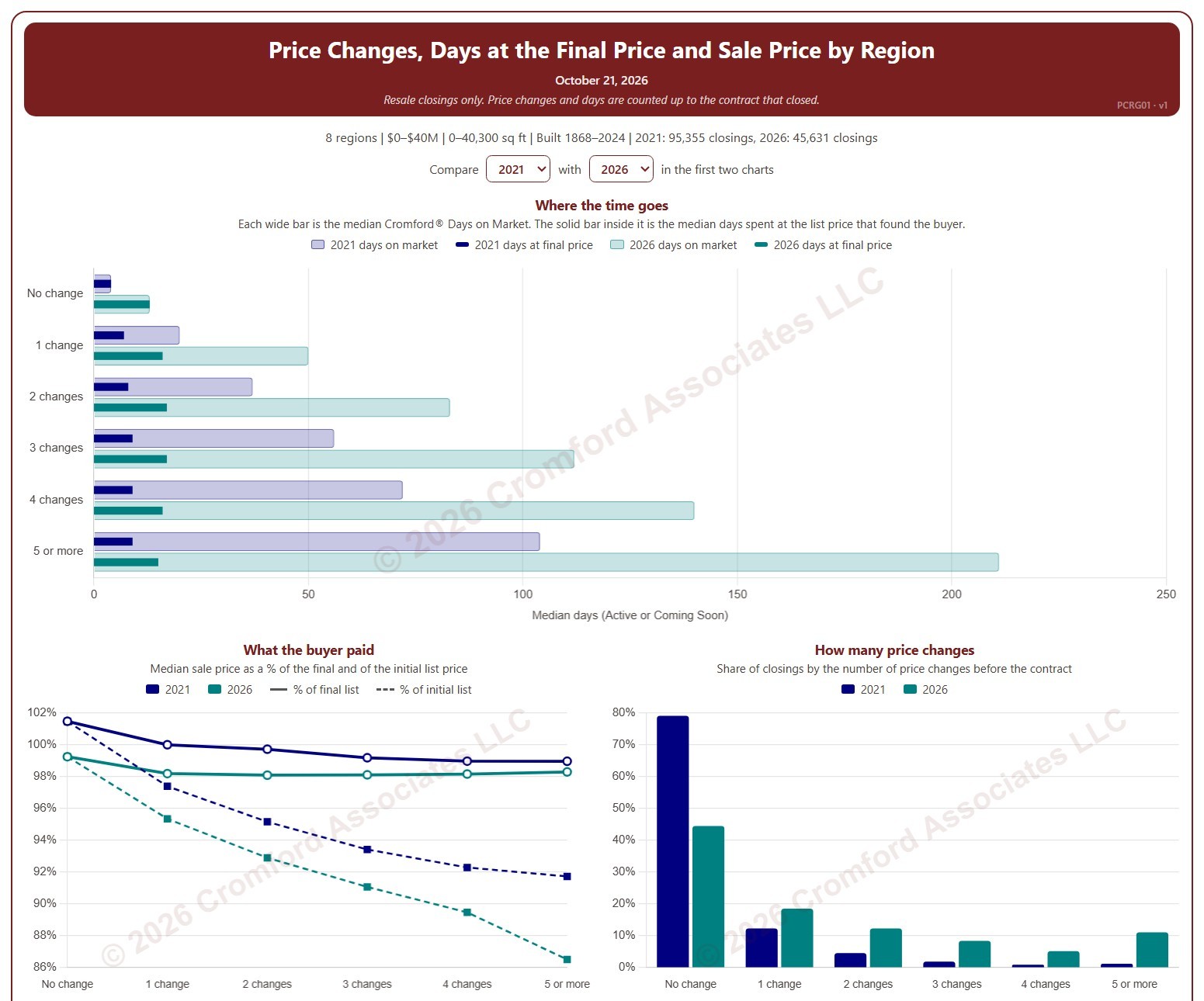
Price Changes, Days at the Final Price and Sale Price by Region

About this chart

This chart shows how many times homes changed their list price before going under contract, and what that meant for how long they took to sell and the price they sold for, by region. Each closed resale is grouped by the number of list price changes before the contract that closed, from none to five or more. Price increases and price cuts both count as a change.

The top chart compares two figures for each group. The wide bar is the median Cromford® Days on Market. The solid bar inside it is the median number of days the home spent at its final list price, the price that found the buyer. However long a home was on the market, the time it spent at the price that sold it is usually much shorter.

The top two charts compare any two years from 2020 on, picked with the selectors above them. The lower left chart shows the median sale price as a percentage of the final list price (solid line) and of the initial list price (dashed line). The lower right chart shows the share of closings in each group for the years ticked in the Year panel.

The map shades every ZIP code with its region’s figure for one year at a time, chosen with the year selector above it, so each region reads as one block. A few ZIP codes lie in two regions; they are striped in both regions’ shades and their closings count in both. Regions not ticked in the Region panel are faded. Click a ZIP code to show its region alone in the charts.

Days count while the home was Active or Coming Soon, up to the contract that closed. A contract that fell through does not reset the count. New construction is excluded. Years are by closing date, and the current year is year to date. The chart opens on 2021 and the current year in the Greater Phoenix regions, with manufactured and modular homes left out.
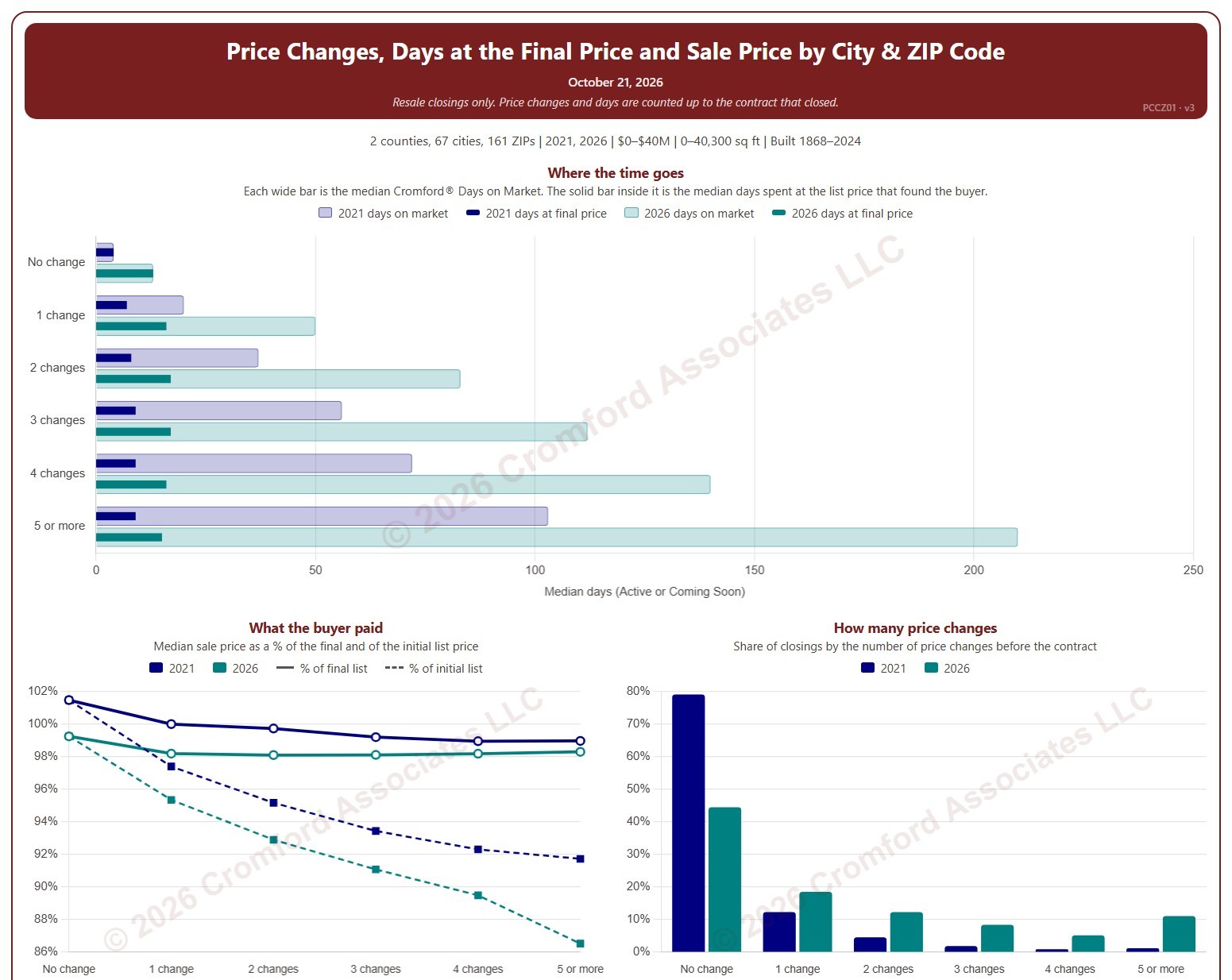
Price Changes, Days at the Final Price and Sale Price by City and ZIP Code

About this chart

This chart shows how many times homes changed their list price before going under contract, and what that meant for how long they took to sell and the price they sold for. Each closed resale is grouped by the number of list price changes before the contract that closed, from none to five or more. Price increases and price cuts both count as a change.

The top chart compares two figures for each group. The wide bar is the median Cromford® Days on Market. The solid bar inside it is the median number of days the home spent at its final list price, the price that found the buyer. However long a home was on the market, the time it spent at the price that sold it is usually much shorter.

The top two charts compare any two years from 2020 on, picked with the selectors above them. The lower left chart shows the median sale price as a percentage of the final list price (solid line) and of the initial list price (dashed line). The lower right chart shows the share of closings in each group for the years ticked in the Year panel.

The map shades each ZIP code for one year at a time, chosen with the year selector above it. ZIP codes with fewer than 20 closings are shown in gray. Click a ZIP code to show it alone in the charts.

Days count while the home was Active or Coming Soon, up to the contract that closed. A contract that fell through does not reset the count. New construction is excluded. Years are by closing date, and the current year is year to date. The chart opens on 2021 and the current year in Maricopa and Pinal counties, with manufactured and modular homes left out.
Phoenix Urban Village Snapshot

About this chart

This table shows 38 measures of the market for single-family detached homes in each of 14 of the City of Phoenix’s urban villages, one village at a time. Pick the village from the box at the top. Rio Vista, the fifteenth village, has too few sales to include.

Each measure is shown today, a month ago, a quarter ago, a year ago, and two years ago, and earlier dates back to January 2018 can be chosen from the date box. The ST and LT marks compare today with last month and with last year, colored by whether the change favors sellers or buyers.

Urban villages are planning areas inside the City of Phoenix, so every home in them is also counted in Phoenix. Laveen Urban Village is not the same as the postal city of Laveen, and Paradise Valley Urban Village is not the Town of Paradise Valley.

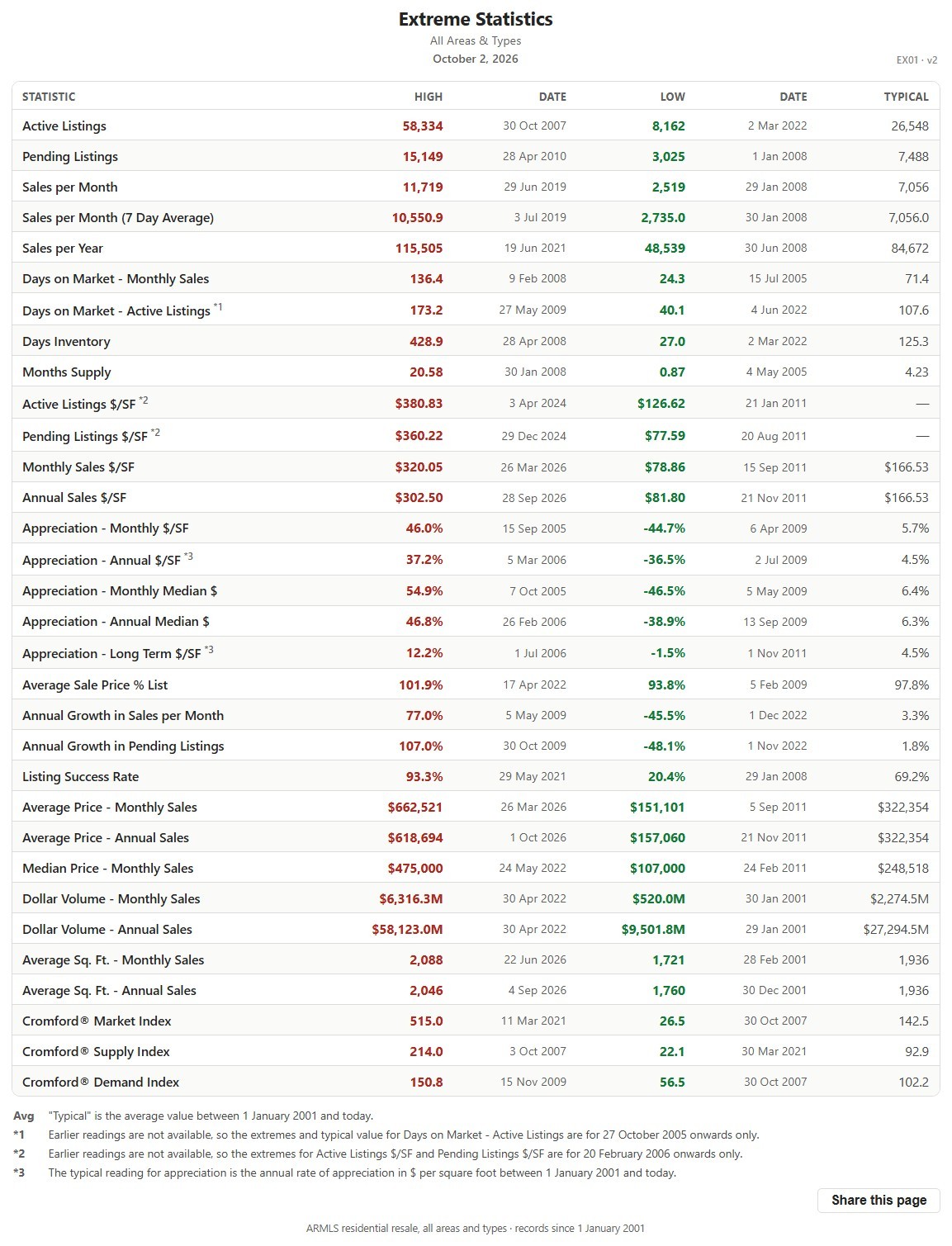
Extreme Statistics

About this chart

This table lists the record high and record low of more than 30 market measures for the whole ARMLS market, all areas and all dwelling types, each with the date it happened, since January 1, 2001, together with a typical value for comparison.

It shows how extreme past markets have been and what a typical reading looks like, a yardstick for the current figures on the other charts. The numbered notes under the table explain the few measures that are counted differently.

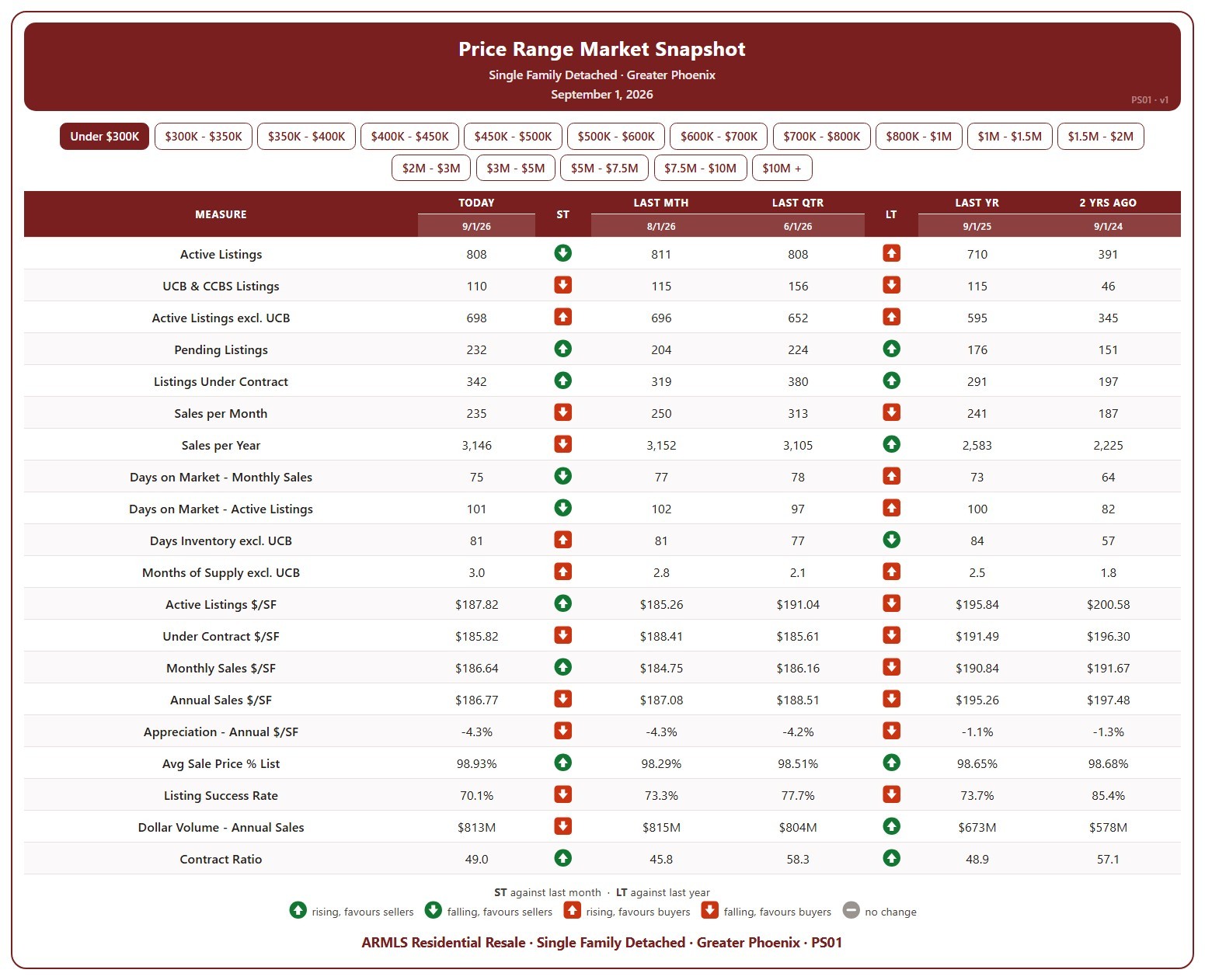
Price Range Market Snapshot

About this chart

This table shows 20 measures of the market for single-family detached homes in Greater Phoenix, for one list price band at a time, from under $300K up to $10M and over. Pick the band with the buttons at the top.

Each measure is shown today (the 1st of the month), a month ago, a quarter ago, a year ago, and two years ago, so you can see how that part of the market has moved. The ST and LT marks compare today with last month and with last year, colored by whether the change favors sellers or buyers.

It covers supply (active listings, UCB / CCBS, pending, days inventory, months of supply), demand (sales per month and per year, days on market, listing success rate, contract ratio), and pricing ($/SF of active, under contract, and sold homes, appreciation, sale price as a percentage of list, and dollar volume).

Market Dashboard

About this chart

This dashboard summarizes the current state of the residential market for all areas and types covered by ARMLS. It is measured daily and shows where the market stands today; for longer-term trends, use the individual charts in the Analysis section.

Use Select Type of Data to switch between 14 views: Sale Price / Sq Ft, Cromford® Index, Inventory, Active Listings, Under Contract, Expired Listings, Canceled Listings, List Price / Sq Ft, Closed Listings, Dollar Volume, Days on Market, Success Rate, Square Feet, and Sale Price $.

Each tile compares a recent figure with an earlier one and is colored to show whether the change is good for sellers, bad for sellers, or neither. The chart beneath the tiles shows the last 13 months, month by month. Hover over it to see each figure.

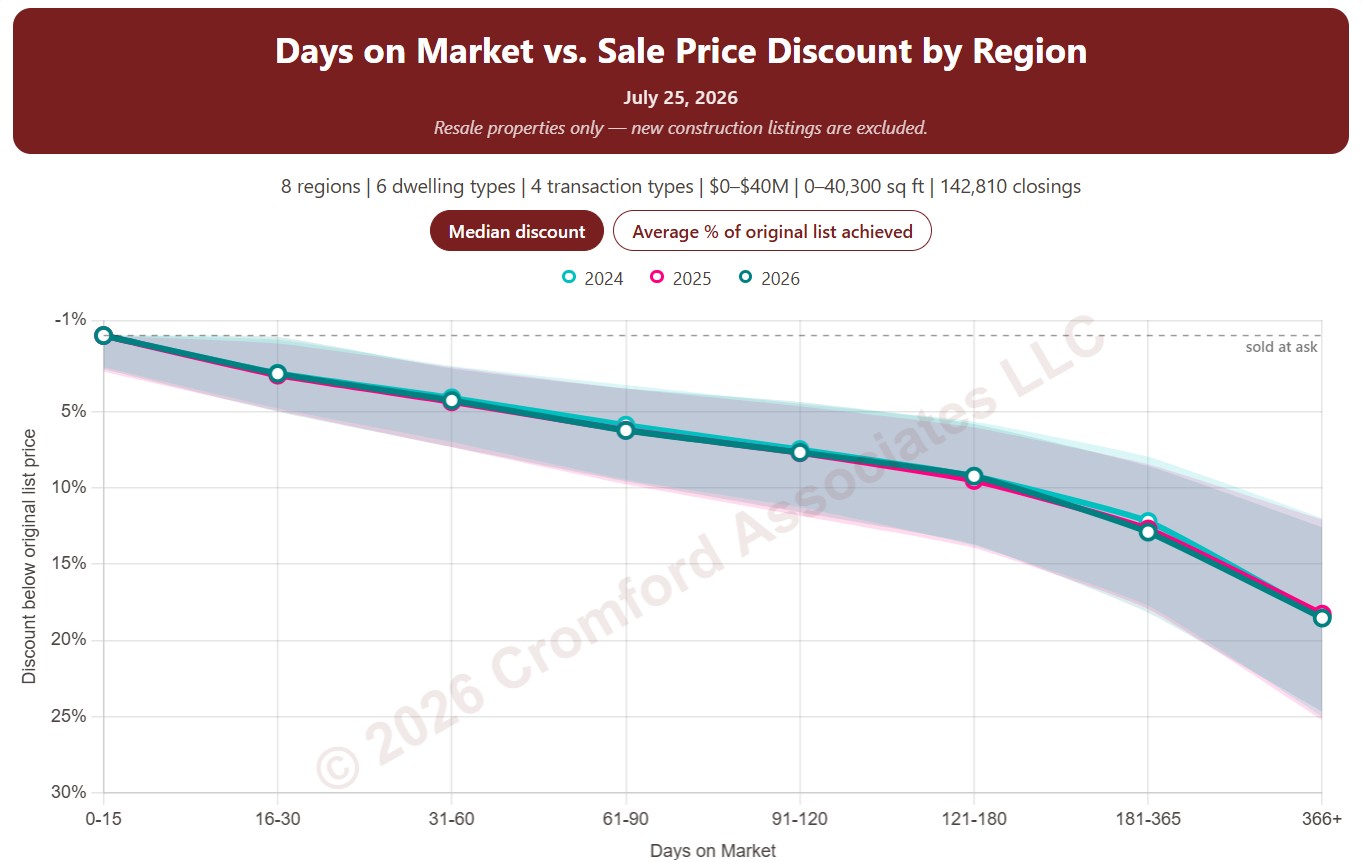
Cromford® Days on Market vs. Price Discount by Region

About this chart

This chart shows the discount from the original list price that sellers accepted, by how long the home was on the market. Homes that closed are grouped by their Cromford® Days on Market, from 0 to 15 days up to more than a year, and each point is the median discount from the original list price for that group. Each year has its own line, with a shaded band showing the range of the middle half of discounts.

It opens on the last three years; tick any year back to 2011 in the Year panel. The buttons on the chart switch between the median discount and the average percentage of the original list price achieved.

By default the days on market count the time a home was Active. Tick Coming Soon, Pending, or UCB / CCBS under Cromford® Days on Market to add that time as well.

It opens with every region included. Use the Region panel to focus on one region or compare a combination of them. Narrow it with the Dwelling Type and Transaction Type boxes and the original list price, home size, and year built sliders. Manufactured and modular homes are left out by default.

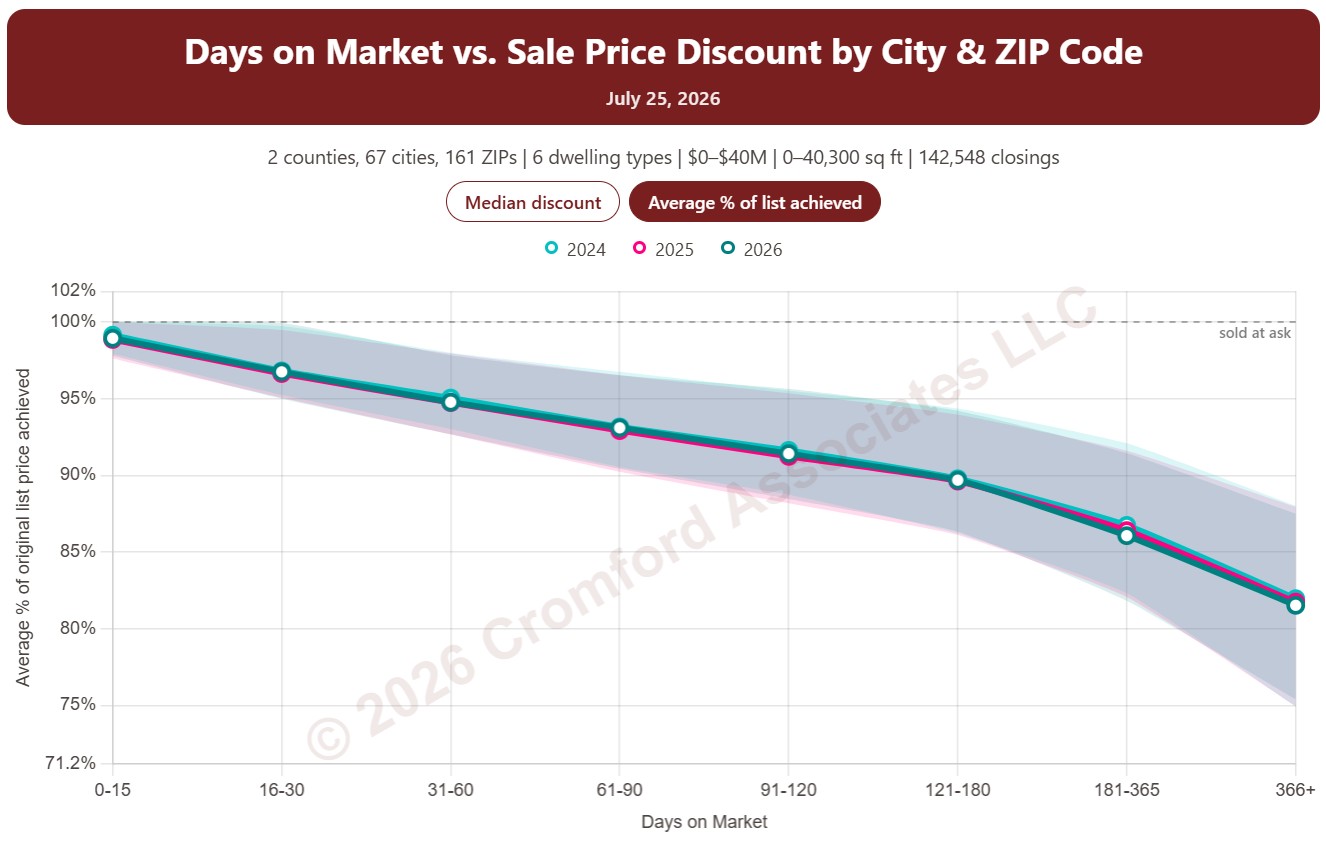
Cromford® Days on Market vs. Price Discount by City and ZIP Code

About this chart

This chart shows the discount from the original list price that sellers accepted, by how long the home was on the market. Homes that closed are grouped by their Cromford® Days on Market, from 0 to 15 days up to more than a year, and each point is the median discount from the original list price for that group. Each year has its own line, with a shaded band showing the range of the middle half of discounts.

It opens on the last three years; tick any year back to 2011 in the Year panel. The buttons on the chart switch between the median discount and the average percentage of the original list price achieved.

By default the days on market count the time a home was Active. Tick Coming Soon, Pending, or UCB / CCBS under Cromford® Days on Market to add that time as well.

It opens on Maricopa and Pinal Counties with every city and ZIP code included. Use the County, City, and ZIP panels to focus on any area, from a whole county down to a single ZIP code. Narrow it with the Dwelling Type and Transaction Type boxes and the original list price, home size, and year built sliders. Manufactured and modular homes are left out by default.

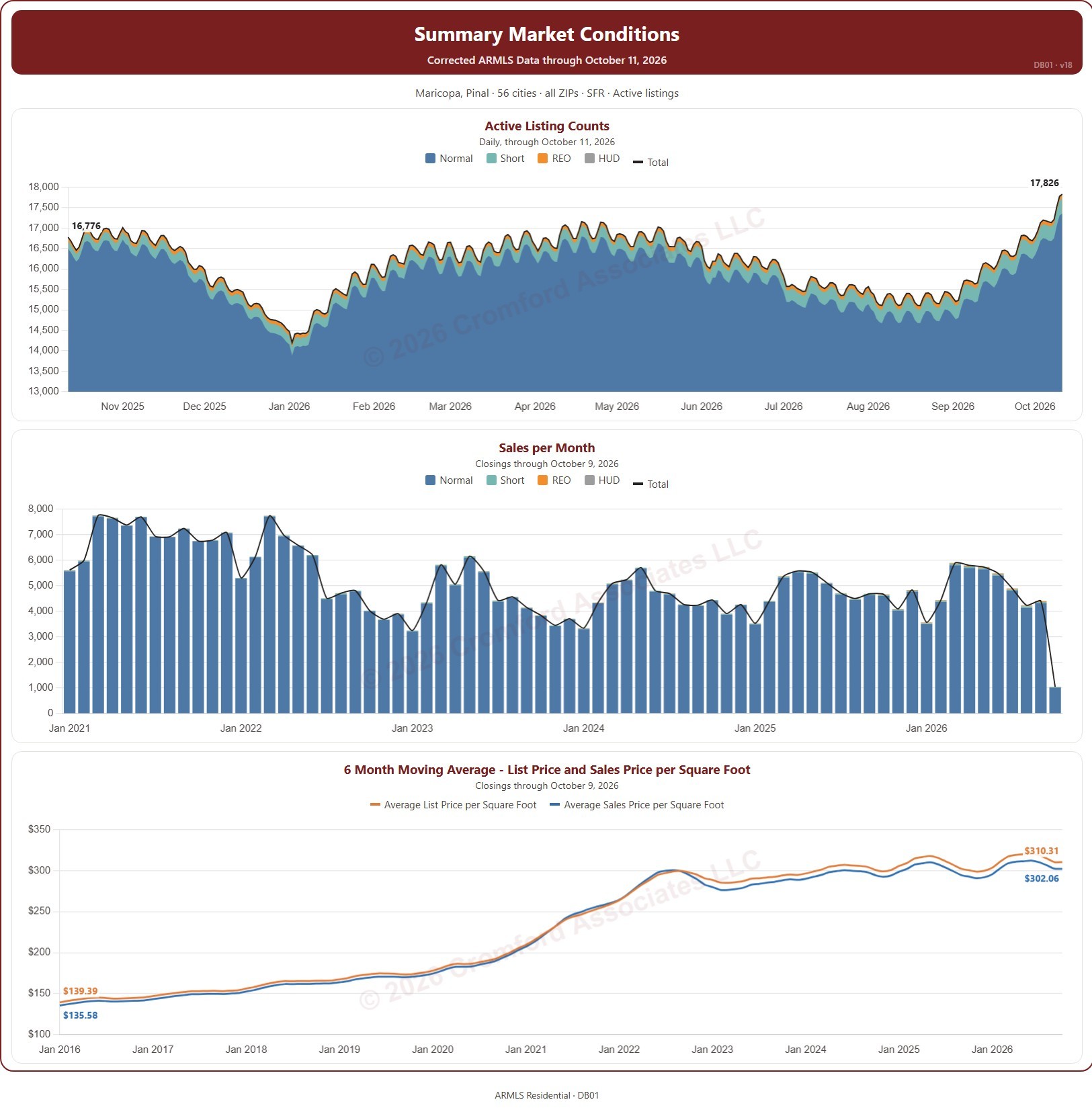
Listing Presentation Dashboard – with Price Filter

About this chart

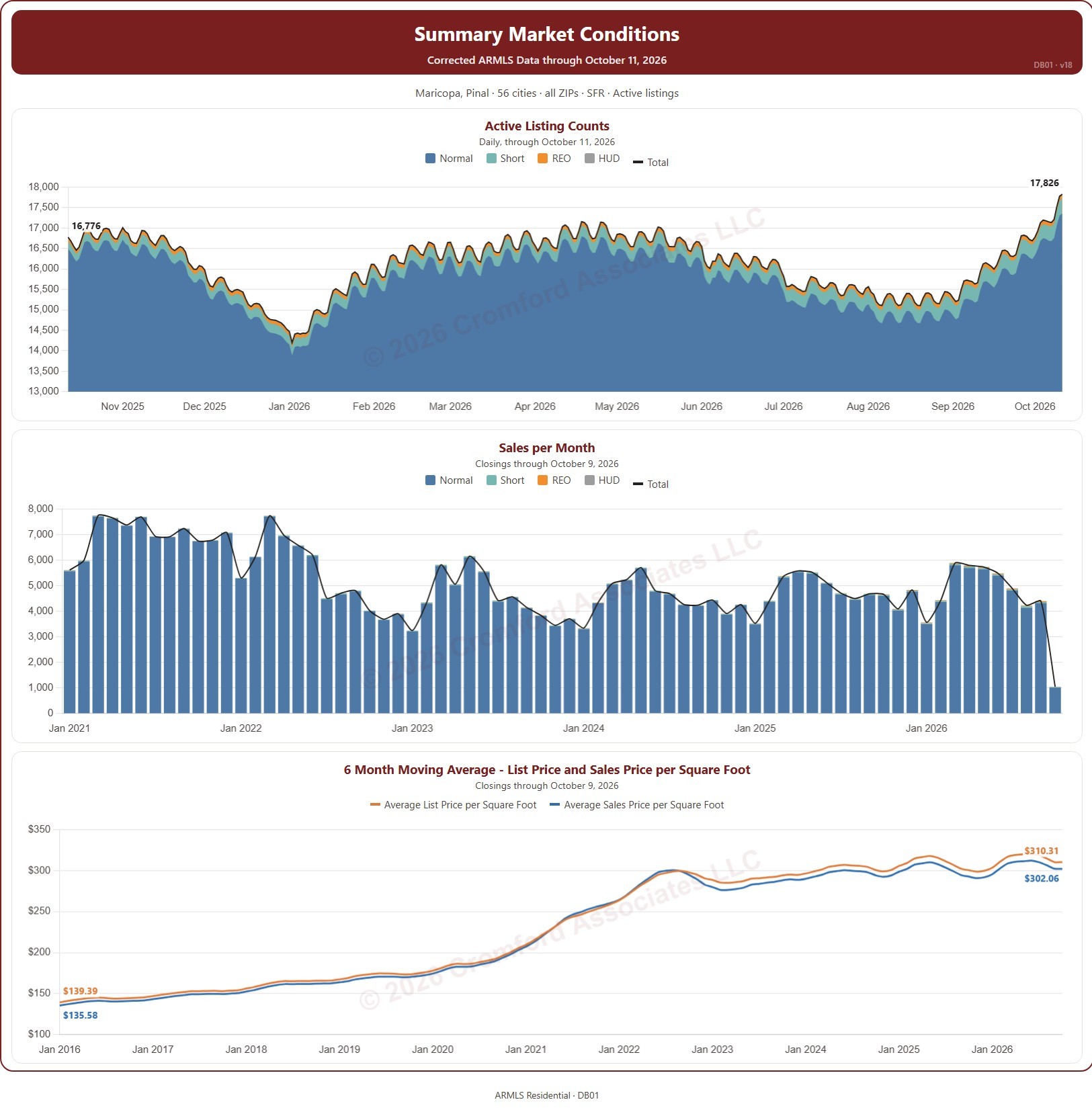
This dashboard puts three charts together for a listing presentation, for the area and type of home you choose: the number of active listings every day, split by transaction type (normal, short sale, REO, and HUD) with a total line; the number of closings each month; and the 6-month moving average of the list price and sale price per square foot.

Each chart has its own date range control beneath it. Active listings open on the last 12 months, closings on the months since January 2021 (back to January 2015 if you widen the range), and price per square foot on the months since January 2016.

It opens on the Greater Phoenix cities and ZIP codes of Maricopa and Pinal Counties, single-family homes, and Active listings. Use the County, City, and ZIP panels to focus on a client’s area, the Dwelling Type and Transaction Type boxes and the list price and square footage ranges to match their home, and Active Chart Status to add UCB / CCBS or Coming Soon listings to the first chart.

Fill in Your Details (name, contact, and company) and they are printed on the dashboard, so you can hand it to a client. Print fits the whole dashboard on one letter-size page. It is updated every day; the newest month of closings is the month so far.

Listing Presentation Dashboard – with Sq Ft Filter