Listings Under Contract by ZIP Code – Monthly

About this chart

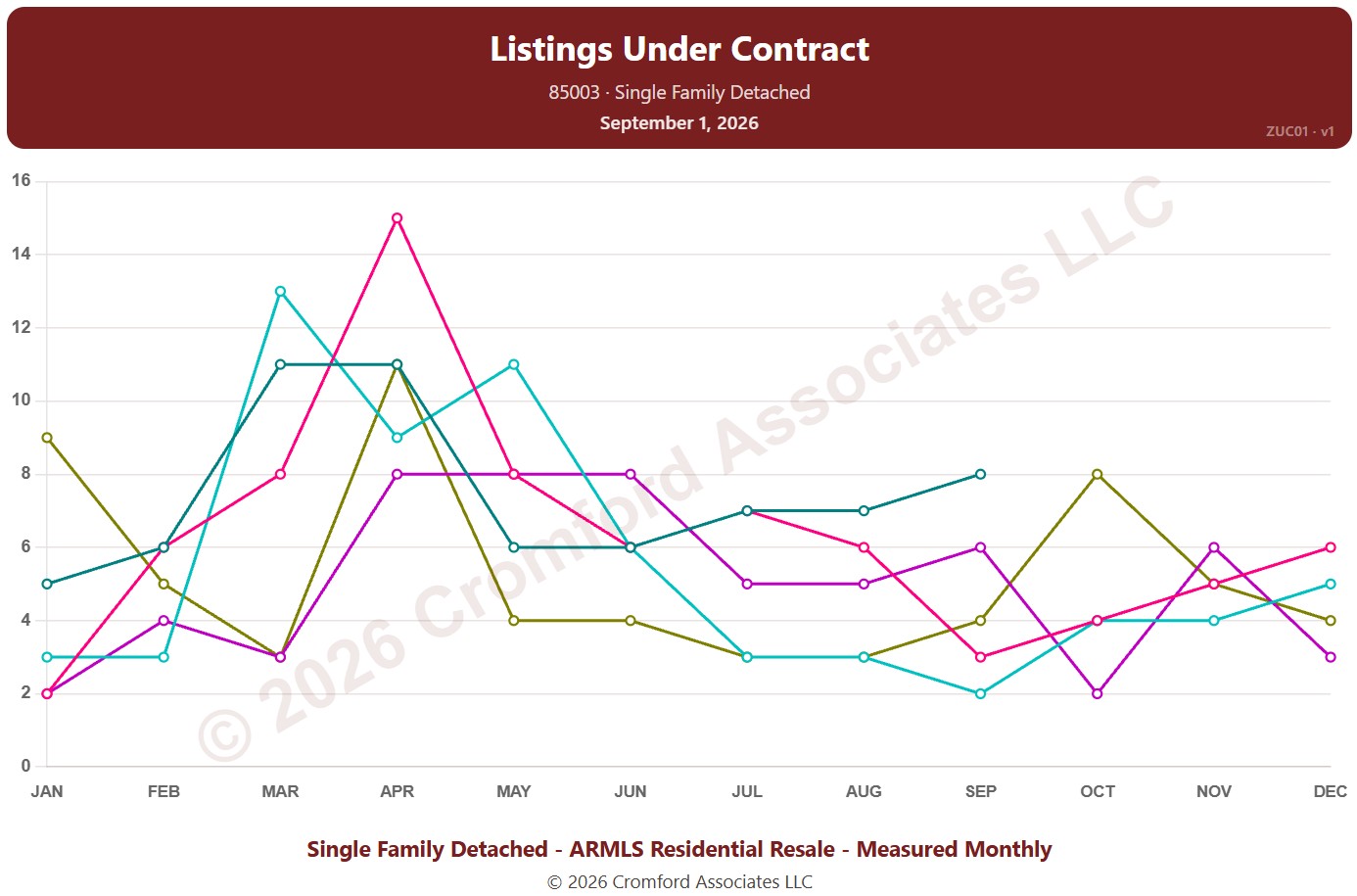
This chart counts the listings under contract for single-family detached homes on ARMLS in one ZIP code: Pending listings plus UCB / CCBS listings. Each point is the reading on the 1st of the month. It shows how much buying activity is under way.

Each year has its own line, laid out by month, so you can compare this year with earlier years at the same point in the season. Pick any of 149 ZIP codes from the ZIP Code list (it opens on 85003); the last three years are ticked to start with, and you can tick any year back to 2011.

Hover over a line to see the exact figure for that month.
Contract Fall-Through Rate by City and ZIP Code

About this chart

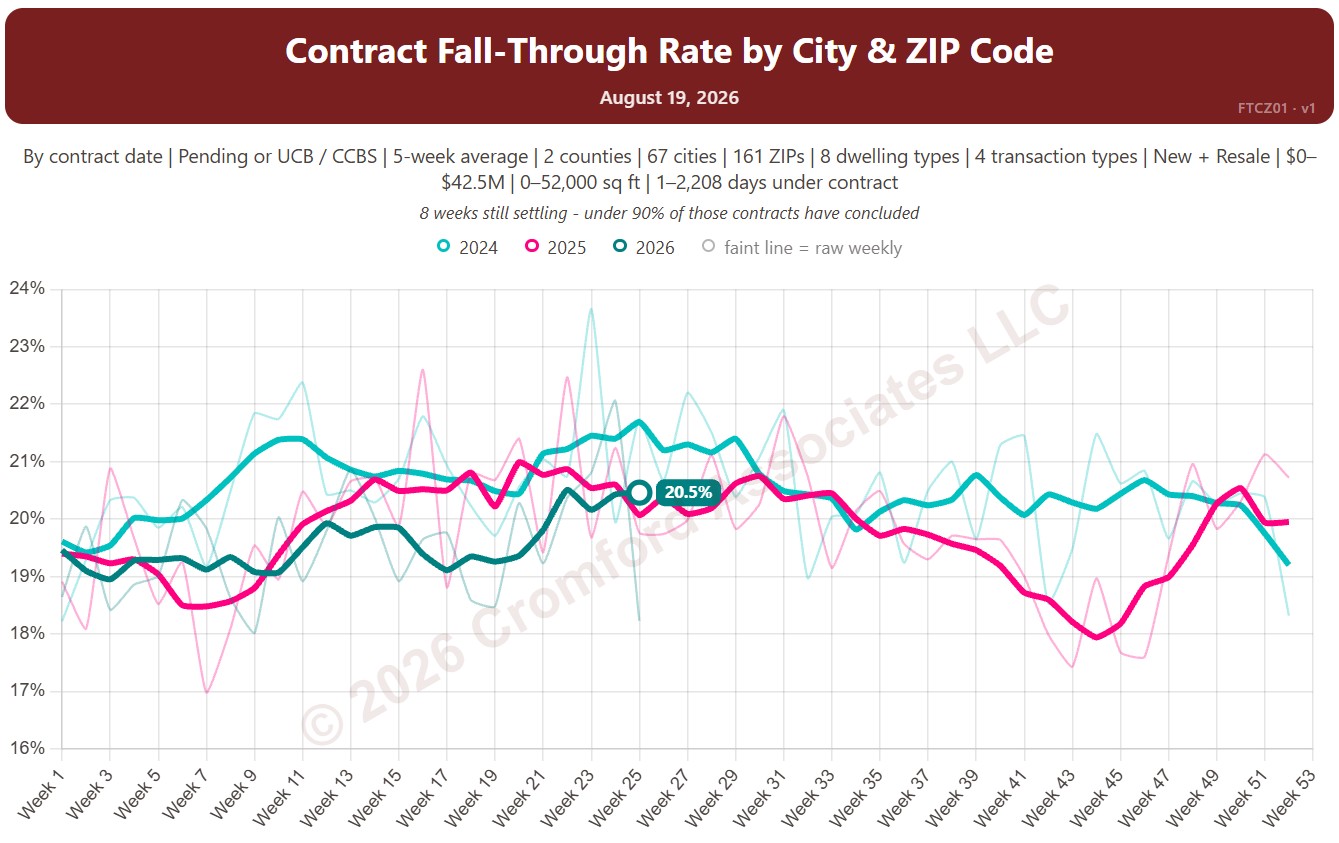
This chart shows the contract fall-through rate, measured every week: the share of accepted contracts that ended without the home closing, for example because financing or an inspection failed. The lines show a 5-week average to smooth out week-to-week noise.

By default contracts are counted by the date they were accepted and include Pending and UCB / CCBS contracts. Rate Basis switches to the date each contract ended, and Listing Status can limit it to Pending contracts only.

Each year has its own line, laid out by week of the year, so you can compare this year with earlier years at the same point in the season. It opens on the last three years; tick any year back to 2011 in the Year panel.

It opens on Maricopa and Pinal Counties with every city and ZIP code included. Use the County, City, and ZIP panels to focus on any area, from a whole county down to a single ZIP code. Narrow it with the Dwelling Type, Transaction Type, and New / Resale boxes and the list price, home size, and days under contract sliders.

Hover over a line to see the exact figure for that week.

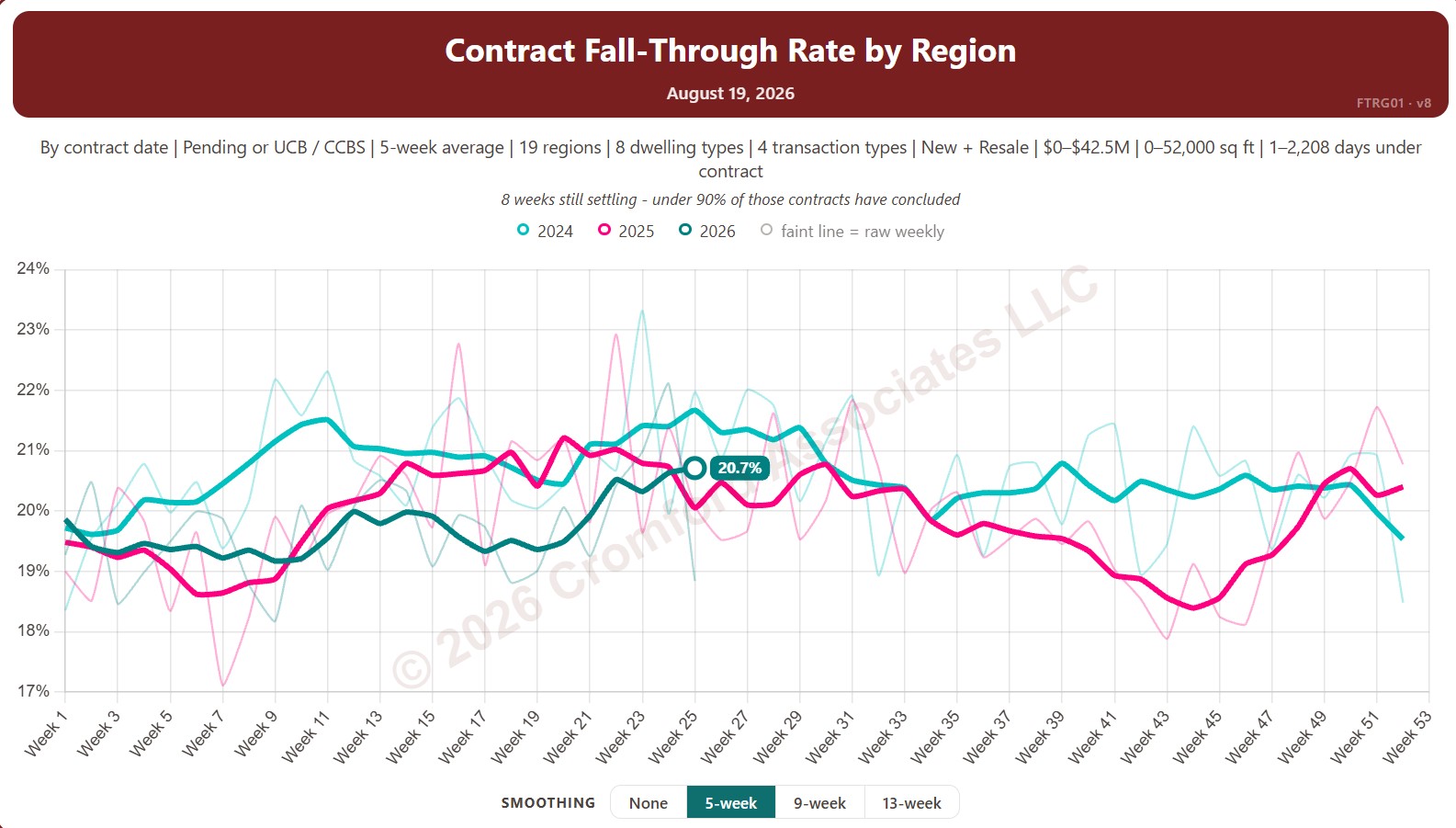
Contract Fall-Through Rate by Region

About this chart

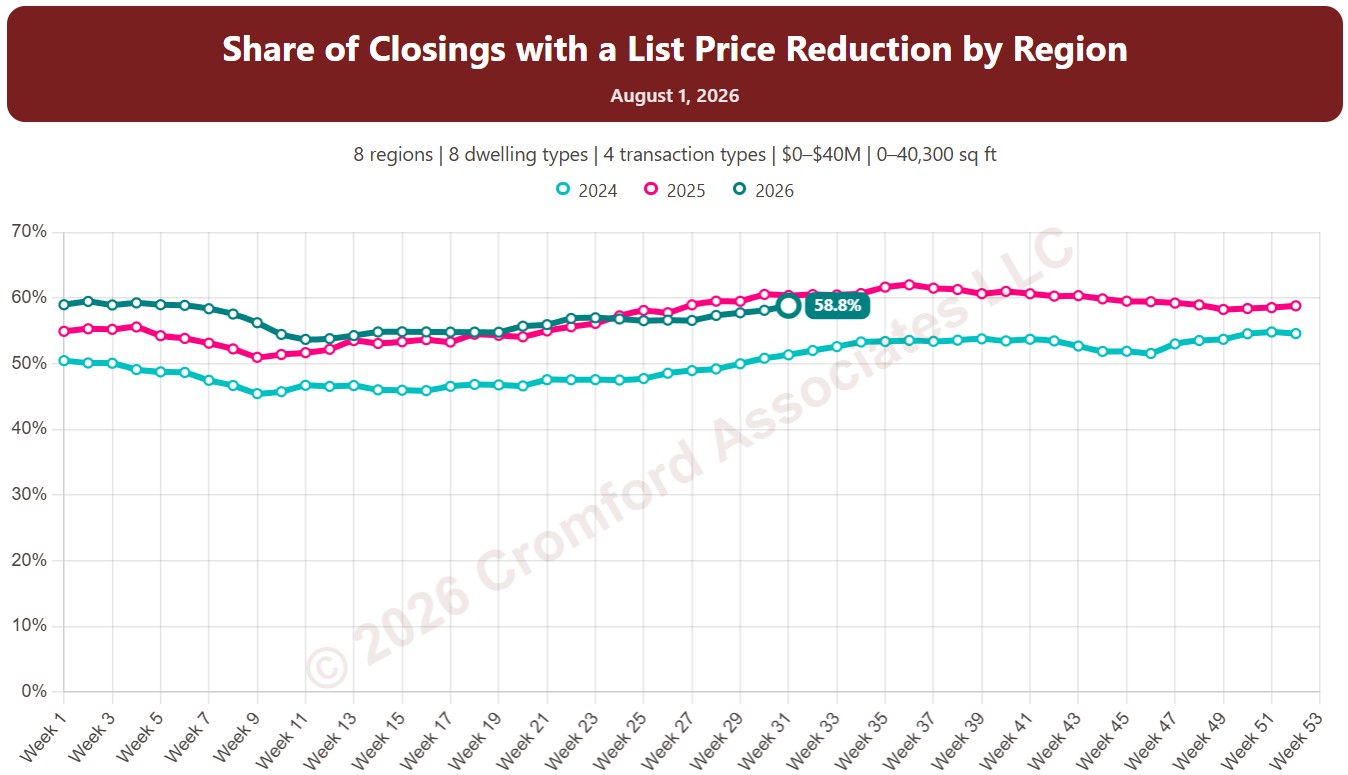
This chart shows the contract fall-through rate, measured every week: the share of accepted contracts that ended without the home closing, for example because financing or an inspection failed. The lines show a 5-week average to smooth out week-to-week noise.

By default contracts are counted by the date they were accepted and include Pending and UCB / CCBS contracts. Rate Basis switches to the date each contract ended, and Listing Status can limit it to Pending contracts only.

Each year has its own line, laid out by week of the year, so you can compare this year with earlier years at the same point in the season. It opens on the last three years; tick any year back to 2011 in the Year panel.

It opens with every region included. Use the Region panel to focus on one region or compare a combination of them. Narrow it with the Dwelling Type, Transaction Type, and New / Resale boxes and the list price, home size, and days under contract sliders.

Hover over a line to see the exact figure for that week.

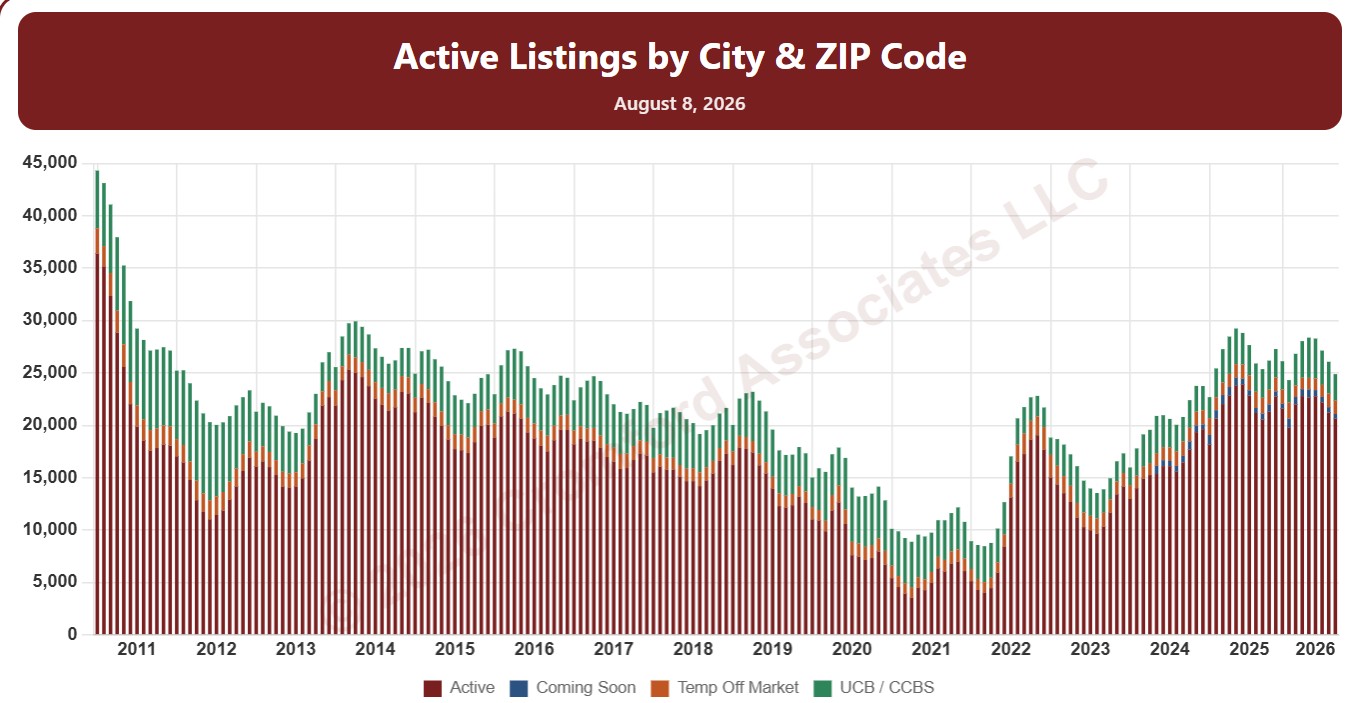
Active Listings by City and ZIP Code

About this chart

This chart counts the homes listed for sale on ARMLS on the 1st of every month since January 2011, as stacked bars.

By default it counts Active listings. Tick Coming Soon, UCB / CCBS (under contract but still accepting back-up offers), or Temp Off Market in the List Status panel to add them to the stack. A drop-down chooses what the bars are split by: list status, dwelling type, transaction type, or new / resale.

It opens on Maricopa and Pinal Counties with every city and ZIP code included. Use the County, City, and ZIP panels to focus on any area, from a whole county down to a single ZIP code. Narrow it with the Dwelling Type, List Status, Transaction Type, and New / Resale boxes and the list price, home size, year built, and days on market sliders. Use the date slider, or Full range, to choose the stretch of history shown.

Hover over a bar to see the counts for that month.

Annual Closed Listings by Region

About this chart

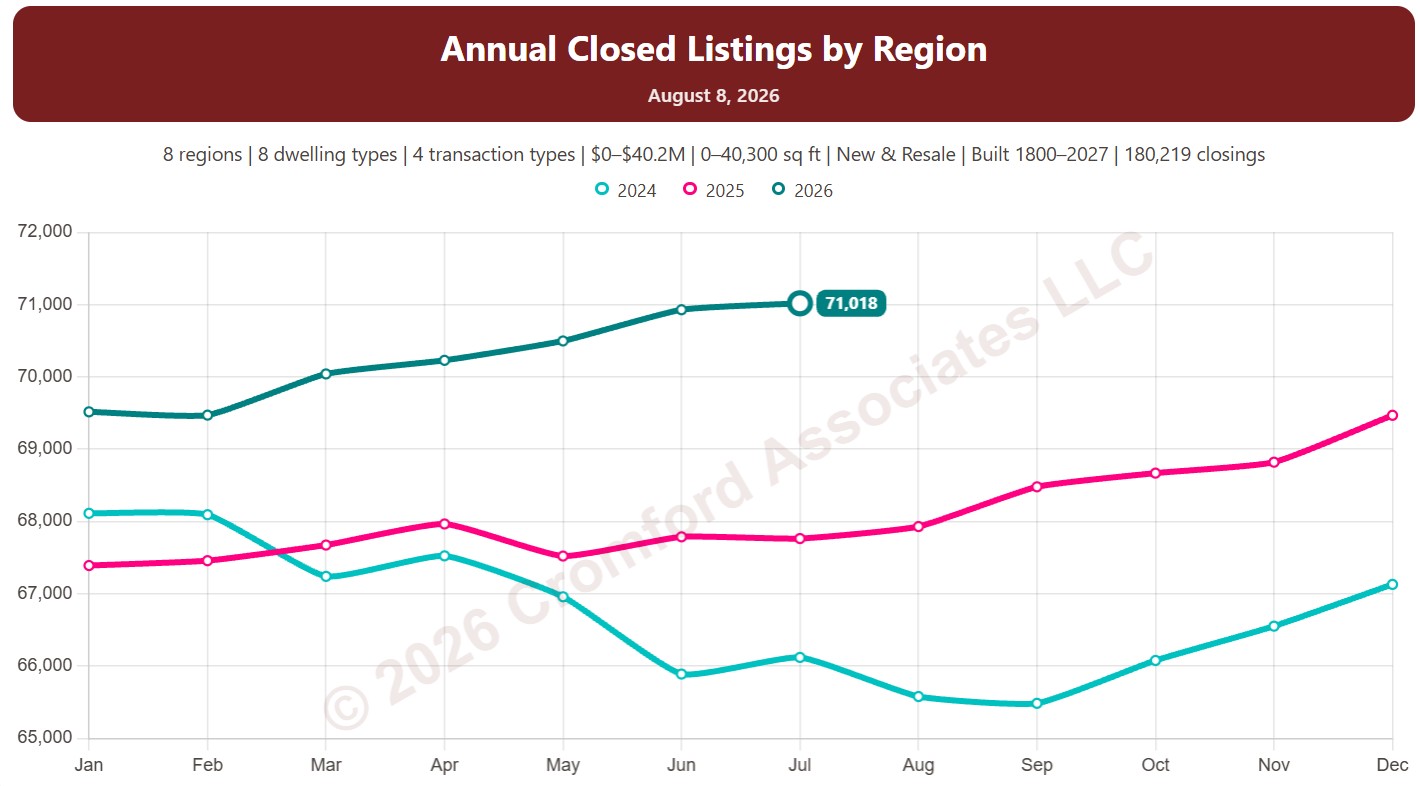
This chart counts the homes that closed through ARMLS over the last 12 months, measured on the 1st of every month, which smooths out the seasonal swings.

Each year has its own line, laid out by month of the year, so you can compare this year with earlier years at the same point in the season. It opens on the last three years; tick any year back to 2001 in the Year panel.

It opens with every region included. Use the Region panel to focus on one region or compare a combination of them. Narrow it with the Dwelling Type, Transaction Type, and New / Resale boxes and the sales price, home size, and year built sliders.

Hover over a line to see the exact figure for that month.
Annual Median Sales Price per Square Foot by City and ZIP Code

About this chart

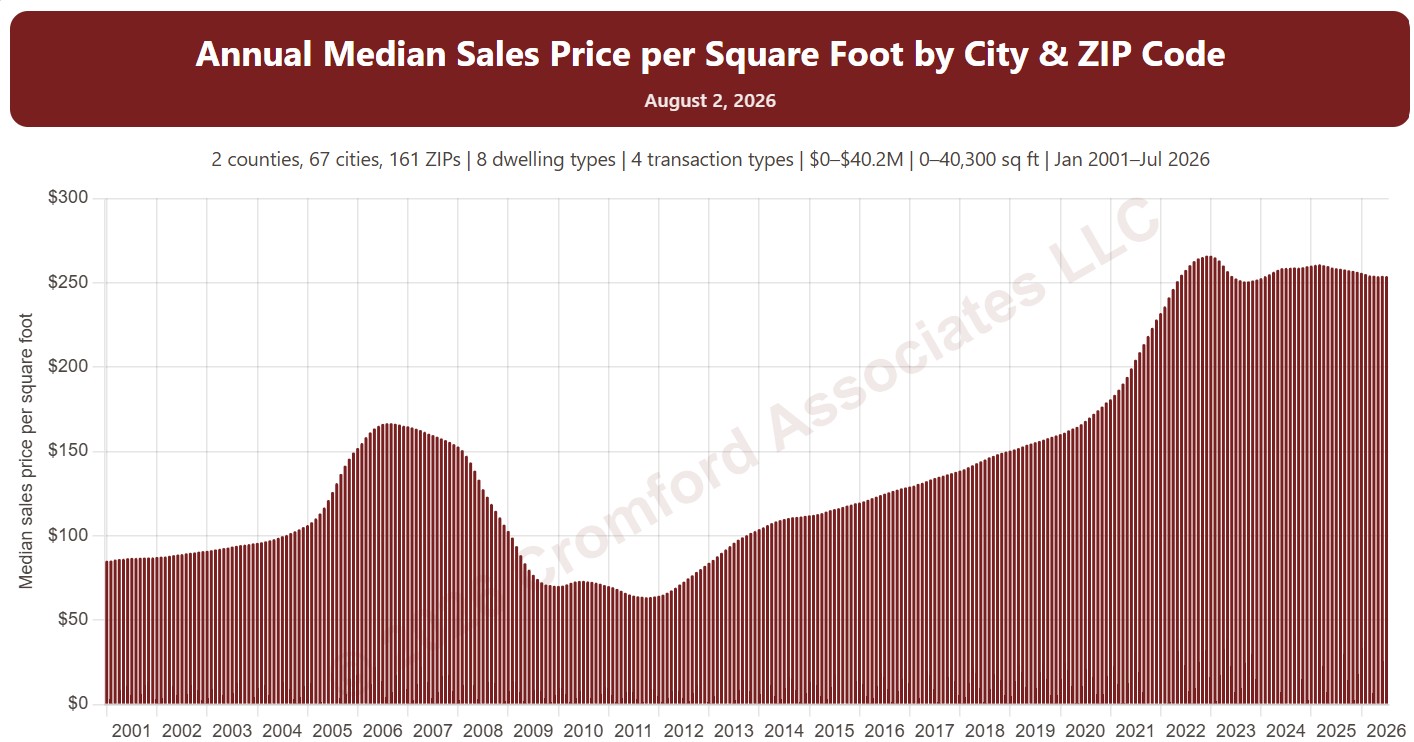
This chart shows the median sales price per square foot over the 12 months up to each month, as one bar per month from January 2001. Price per square foot lets you compare homes of different sizes; the median is the figure in the middle, so a few unusual sales move it less than an average.

It opens on Maricopa and Pinal Counties with every city and ZIP code included. Use the County, City, and ZIP panels to focus on any area, from a whole county down to a single ZIP code. Narrow it with the Dwelling Type, Transaction Type, and New / Resale boxes and the sale price, home size, and year built sliders. The Inflation (CPI) option restates prices in today’s dollars using national or Phoenix inflation. Use the date slider, or Full range, to choose the stretch of history shown.

Hover over a bar to see the exact figure for that month.
Cromford® Days on Market vs. Price Discount by Region

About this chart

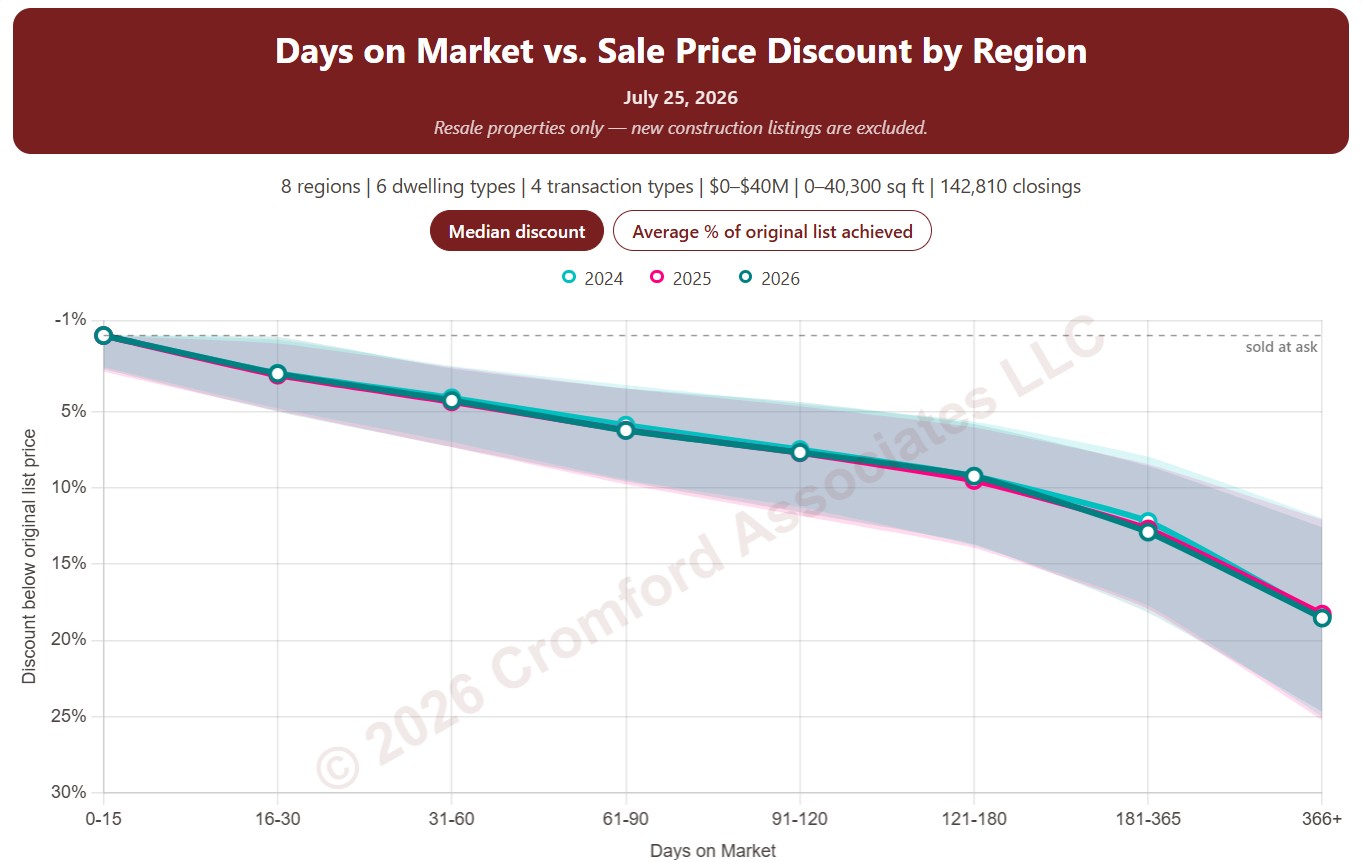
This chart shows the discount from the original list price that sellers accepted, by how long the home was on the market. Homes that closed are grouped by their Cromford® Days on Market, from 0 to 15 days up to more than a year, and each point is the median discount from the original list price for that group. Each year has its own line, with a shaded band showing the range of the middle half of discounts.

It opens on the last three years; tick any year back to 2011 in the Year panel. The buttons on the chart switch between the median discount and the average percentage of the original list price achieved.

By default the days on market count the time a home was Active. Tick Coming Soon, Pending, or UCB / CCBS under Cromford® Days on Market to add that time as well.

It opens with every region included. Use the Region panel to focus on one region or compare a combination of them. Narrow it with the Dwelling Type and Transaction Type boxes and the original list price, home size, and year built sliders. Manufactured and modular homes are left out by default.

Cromford® Days on Market vs. Price Discount by City and ZIP Code

About this chart

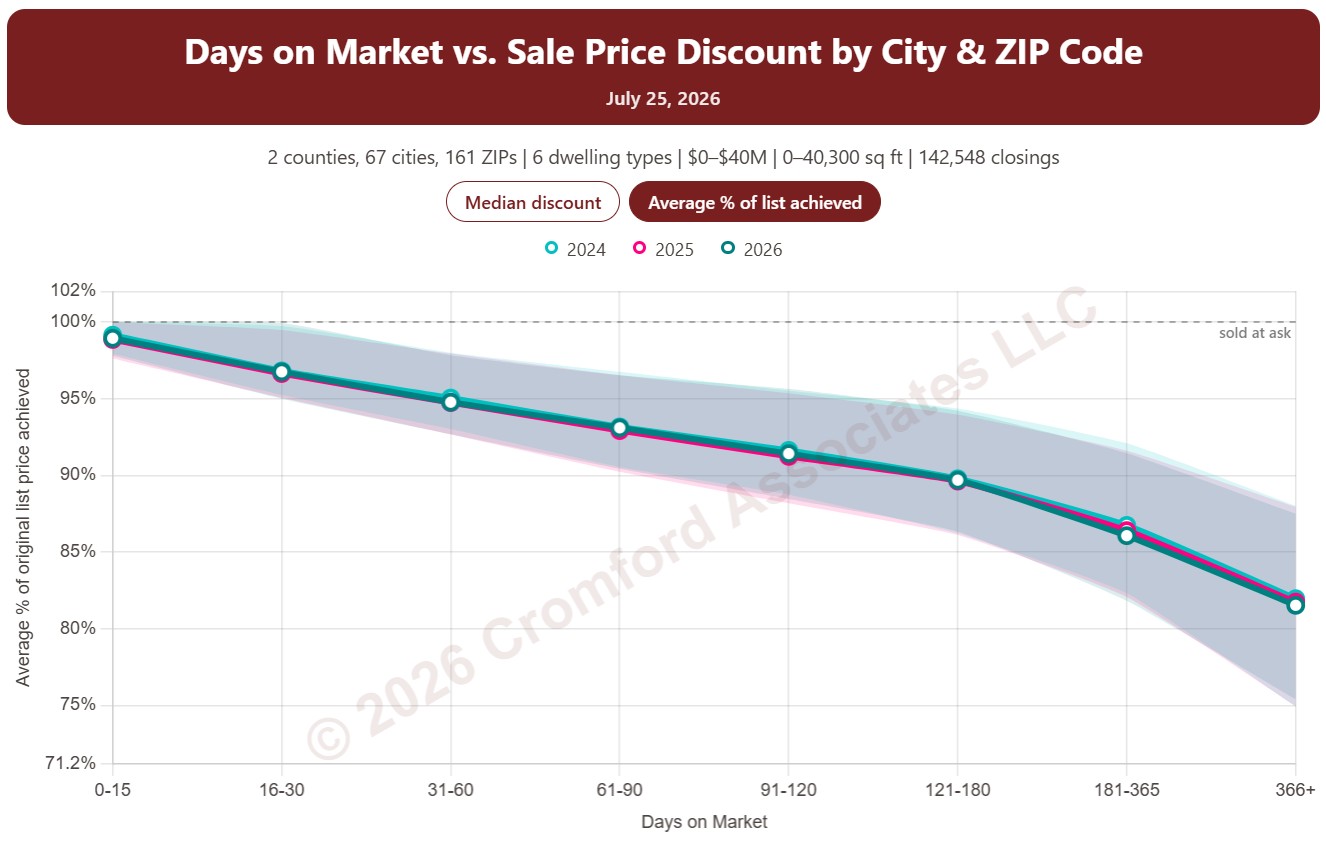
This chart shows the discount from the original list price that sellers accepted, by how long the home was on the market. Homes that closed are grouped by their Cromford® Days on Market, from 0 to 15 days up to more than a year, and each point is the median discount from the original list price for that group. Each year has its own line, with a shaded band showing the range of the middle half of discounts.

It opens on the last three years; tick any year back to 2011 in the Year panel. The buttons on the chart switch between the median discount and the average percentage of the original list price achieved.

By default the days on market count the time a home was Active. Tick Coming Soon, Pending, or UCB / CCBS under Cromford® Days on Market to add that time as well.

It opens on Maricopa and Pinal Counties with every city and ZIP code included. Use the County, City, and ZIP panels to focus on any area, from a whole county down to a single ZIP code. Narrow it with the Dwelling Type and Transaction Type boxes and the original list price, home size, and year built sliders. Manufactured and modular homes are left out by default.