Monthly Median Sales Price per Square Foot by City and ZIP Code

About this chart

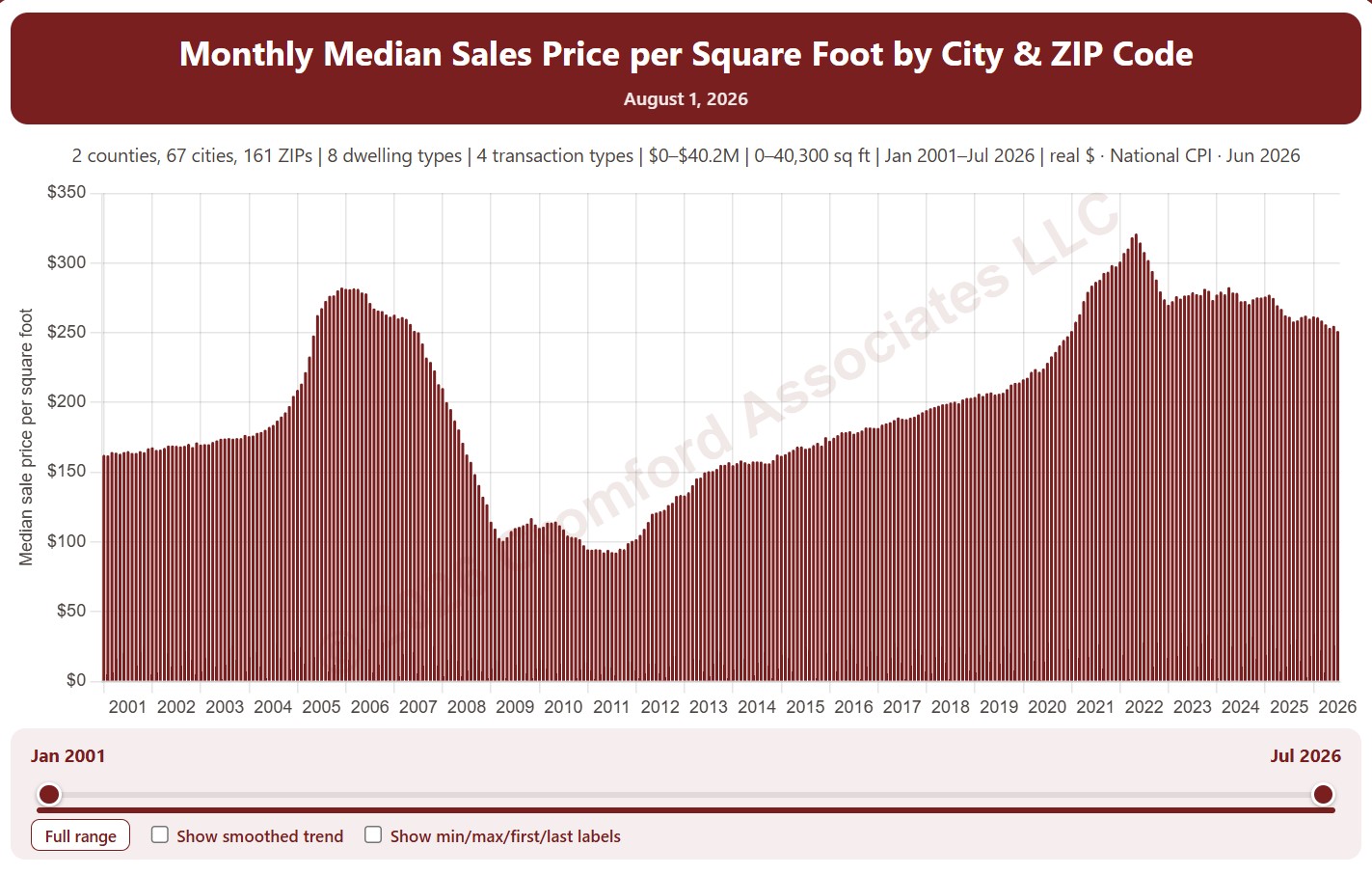
This chart shows the median sales price per square foot of the homes that closed in each month, as one bar per month from January 2001. Price per square foot lets you compare homes of different sizes; the median is the figure in the middle, so a few unusual sales move it less than an average.

It opens on Maricopa and Pinal Counties with every city and ZIP code included. Use the County, City, and ZIP panels to focus on any area, from a whole county down to a single ZIP code. Narrow it with the Dwelling Type, Transaction Type, and New / Resale boxes and the sale price, home size, and year built sliders. The Inflation (CPI) option restates prices in today’s dollars using national or Phoenix inflation. Use the date slider, or Full range, to choose the stretch of history shown.

Hover over a bar to see the exact figure for that month.
Case-Shiller® Home Price Index®

About this chart

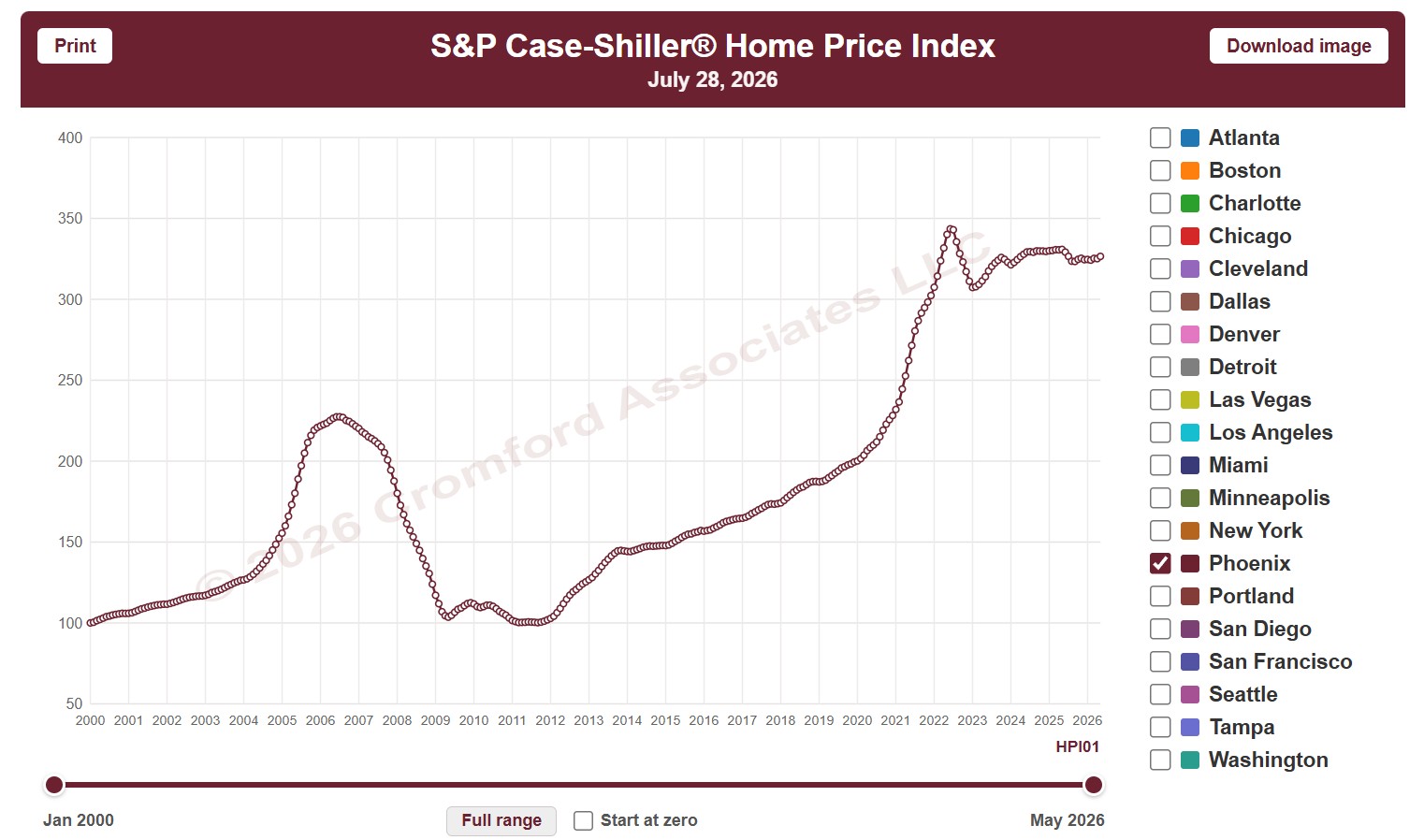
This chart shows the S&P Cotality Case-Shiller Home Price Index, which tracks the prices of the same homes as they resell, so it measures price change without being skewed by the mix of homes that sold. It opens on Phoenix; tick any of the other 19 metro areas to compare them.

The CPI option switches between nominal prices and real prices adjusted for US or Phoenix inflation, and Start at zero sets the axis to begin at zero. Use the date slider, or Full range, to choose the stretch of history shown.

The index is published monthly, about two months in arrears. Hover over the chart to see the figures for that month.

Listings Cancelled per Month

About this chart

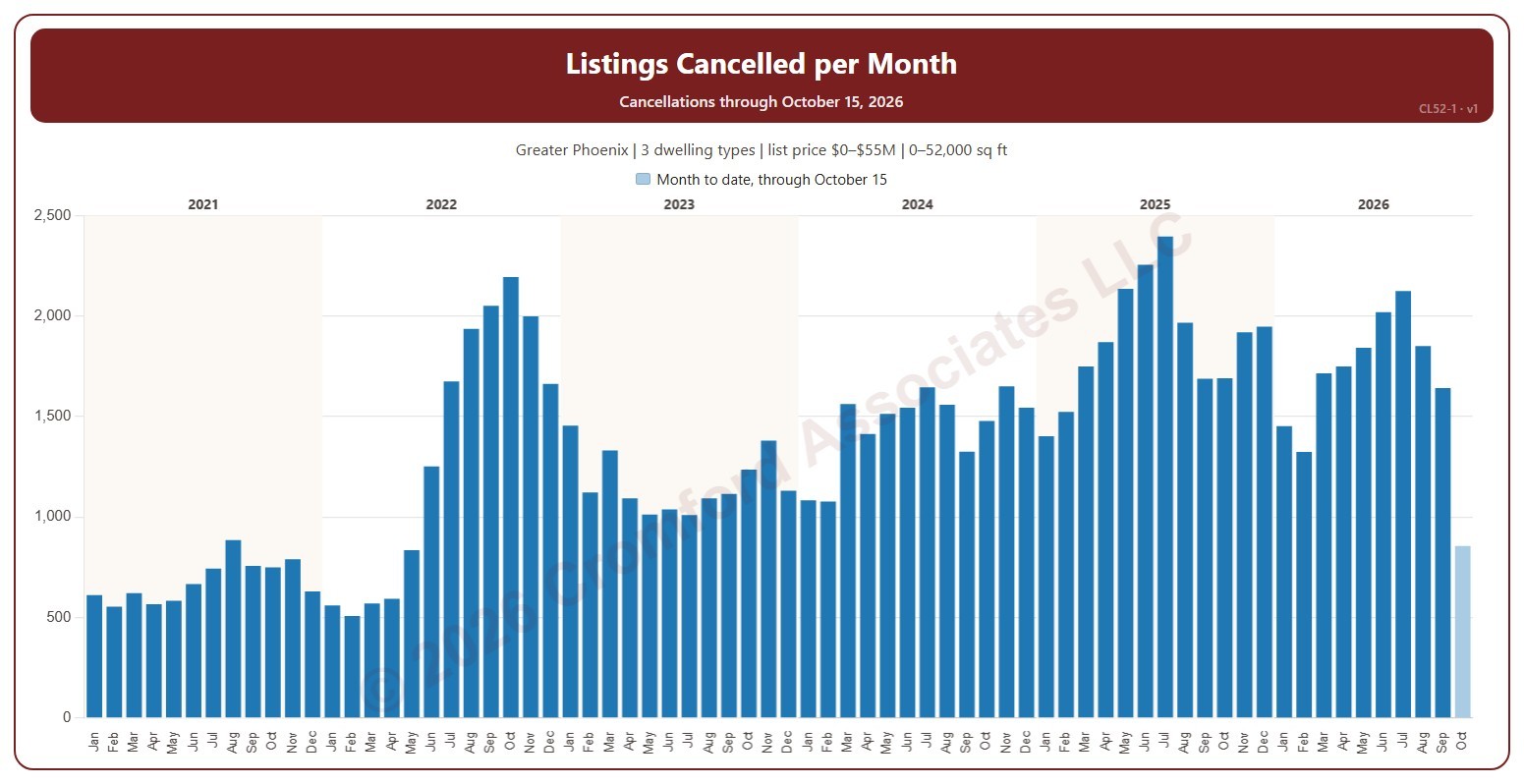
This chart shows the number of listings cancelled each month. A cancelled listing is one the seller took off the market before it sold, counted on the date it was cancelled.

It opens on January six years back to date; drag the handles of the date slider under the chart to choose the months shown, as far back as January 2001. The current month is the month so far and is drawn lighter. The chart is updated every day.

It opens on the Greater Phoenix area: the counties, cities, and ZIP codes that make it up are ticked to start with. Tick or untick any of them to change the area, including counties beyond Greater Phoenix. Narrow it further with the Dwelling Type, Transaction Type, and New / Resale boxes and the list price, home size, and year built sliders.

Hover over a bar to see the month’s count.

Contract Ratio Monthly

About this chart

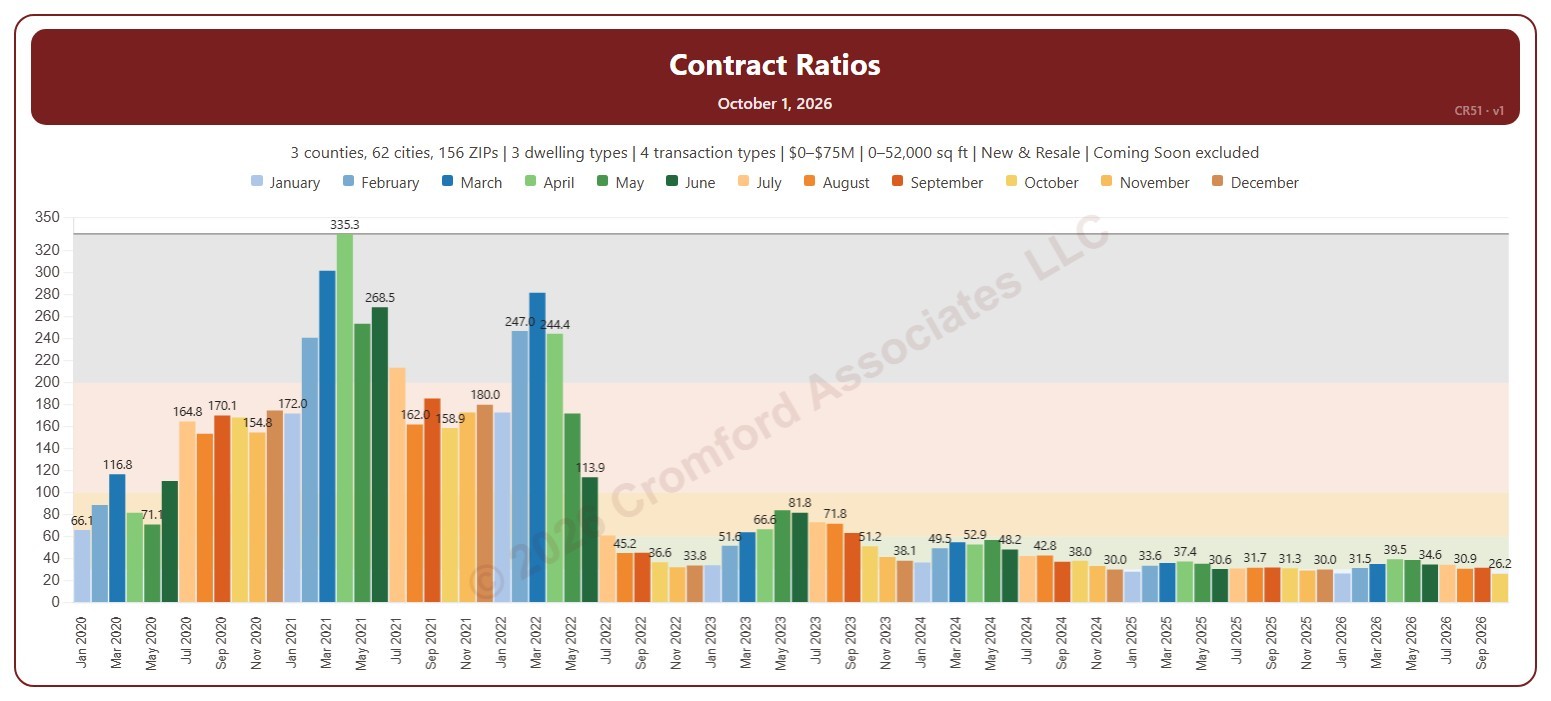
This chart shows the Contract Ratio for each month: the number of listings under contract (pending, plus UCB and CCBS) for every 100 active listings, measured on the first day of the month. Each bar is one month, colored by month. The shaded bands mark a Cool market (below 30), Warm (30 to 60), Hot (60 to 100), Frenzy! (100 to 200), and Insanity!! (above 200), and the line marks the highest month shown.

It opens on January 2020 to date. Drag the handles of the date slider under the chart to choose the months shown, as far back as April 2010. Click a month in the legend to hide or show it. A new month appears once its first-day figures are in.

It opens on the Greater Phoenix area: the counties, cities, and ZIP codes that make it up are ticked to start with. Tick or untick any of them to change the area, including counties beyond Greater Phoenix. Narrow it further with the Dwelling Type, Transaction Type, and New / Resale boxes and the list price and home size sliders. Tick Count Coming Soon as Active to add Coming Soon listings to the active count.

Hover over a bar to see the ratio and the numbers of listings under contract and active that day.

Listing Presentation Dashboard – with Price Filter

About this chart

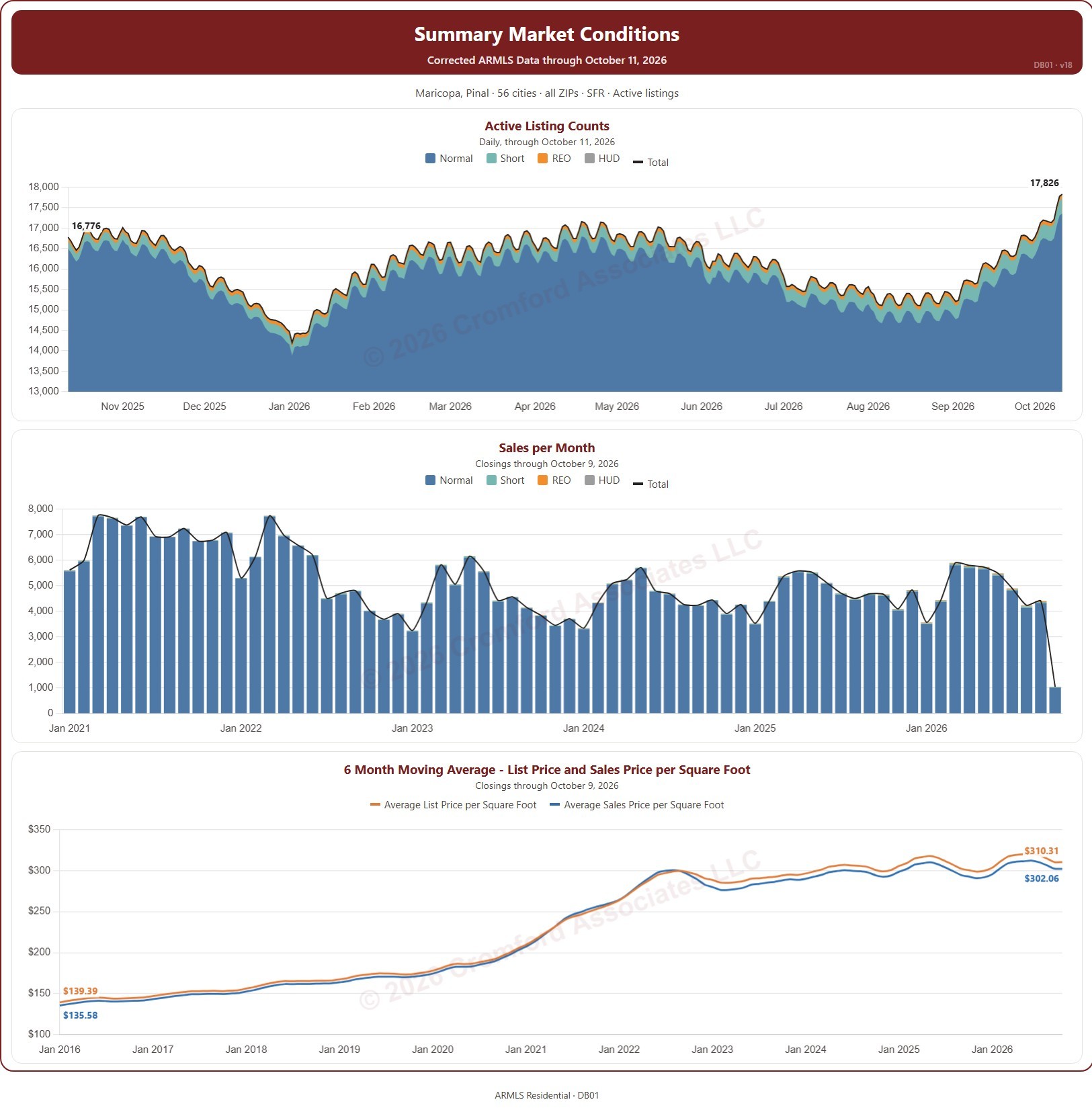
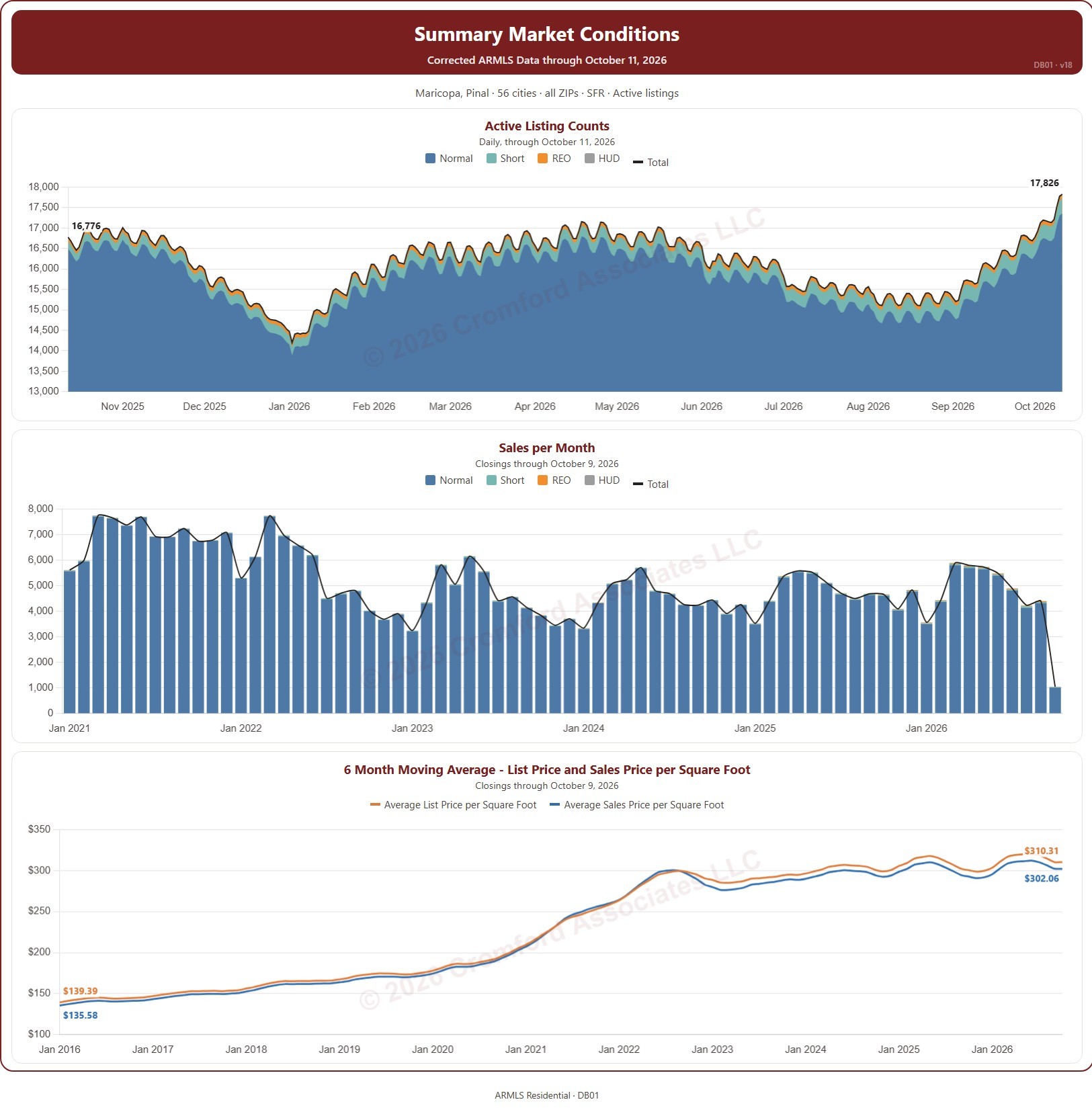
This dashboard puts three charts together for a listing presentation, for the area and type of home you choose: the number of active listings every day, split by transaction type (normal, short sale, REO, and HUD) with a total line; the number of closings each month; and the 6-month moving average of the list price and sale price per square foot.

Each chart has its own date range control beneath it. Active listings open on the last 12 months, closings on the months since January 2021 (back to January 2015 if you widen the range), and price per square foot on the months since January 2016.

It opens on the Greater Phoenix cities and ZIP codes of Maricopa and Pinal Counties, single-family homes, and Active listings. Use the County, City, and ZIP panels to focus on a client’s area, the Dwelling Type and Transaction Type boxes and the list price and square footage ranges to match their home, and Active Chart Status to add UCB / CCBS or Coming Soon listings to the first chart.

Fill in Your Details (name, contact, and company) and they are printed on the dashboard, so you can hand it to a client. Print fits the whole dashboard on one letter-size page. It is updated every day; the newest month of closings is the month so far.

Listing Presentation Dashboard – with Sq Ft Filter

Median Cumulative Days on Market for Closed Listings

About this chart

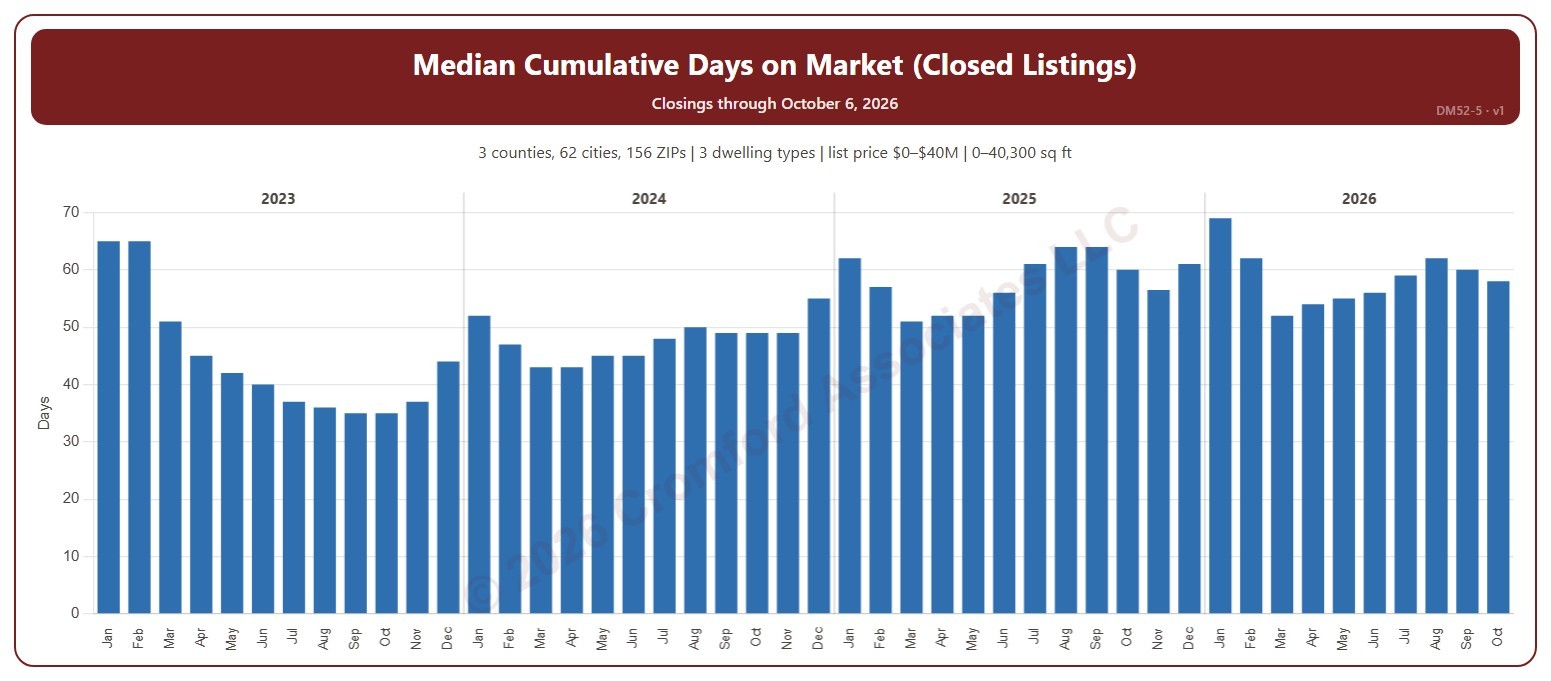
This chart shows the median cumulative days on market of the homes that closed through ARMLS, one bar per calendar month of closing: half took longer to sell and half less. Cumulative days on market is ARMLS’s own count of the days a home was on the market. The median is less affected than the average by a few homes that sat on the market for a very long time.

It opens on the last four years; tick any year back to 2000 in the Year panel. The newest month is the month so far.

It opens on the Greater Phoenix area: the counties, cities, and ZIP codes that make it up are ticked to start with. Tick or untick any of them to change the area, including counties beyond Greater Phoenix. Narrow it further with the Dwelling Type (condo, mobile, single family), Transaction Type, and New / Resale boxes and the list price, home size, and year built sliders.

Hover over the chart to see the figures for that month.

Year-over-Year Change in Average Days on Market for Closed Listings

About this chart

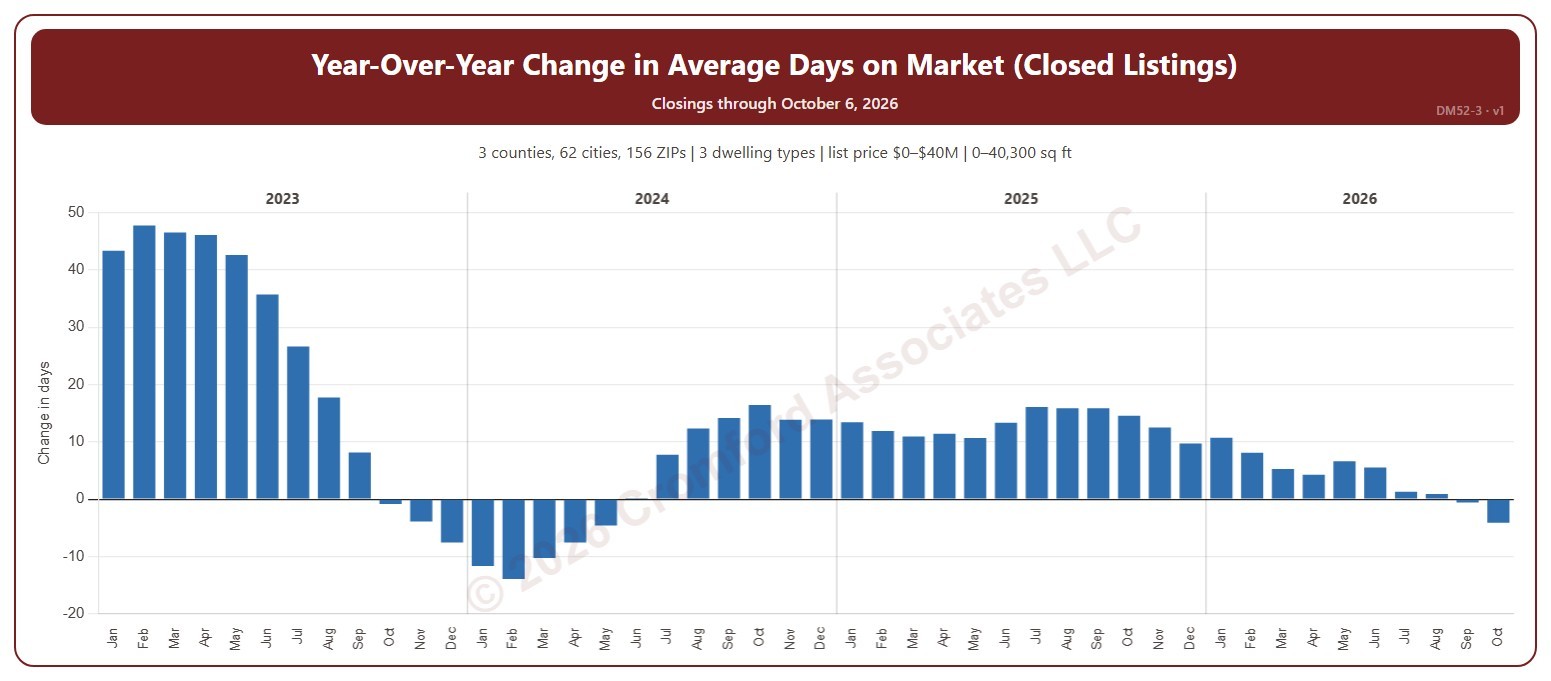
This chart shows the year-over-year change in the average cumulative days on market of the homes that closed through ARMLS: each month’s average compared with the same month a year earlier, in days. Cumulative days on market is ARMLS’s own count of the days a home was on the market. Above zero, homes are taking longer to sell than a year ago; below zero, they are selling faster.

It opens on the last four years; tick any year back to 2000 in the Year panel. The newest month is the month so far.

It opens on the Greater Phoenix area: the counties, cities, and ZIP codes that make it up are ticked to start with. Tick or untick any of them to change the area, including counties beyond Greater Phoenix. Narrow it further with the Dwelling Type (condo, mobile, single family), Transaction Type, and New / Resale boxes and the list price, home size, and year built sliders.

Hover over the chart to see the figures for that month.

Average Cumulative Days on Market for Closed Listings

About this chart

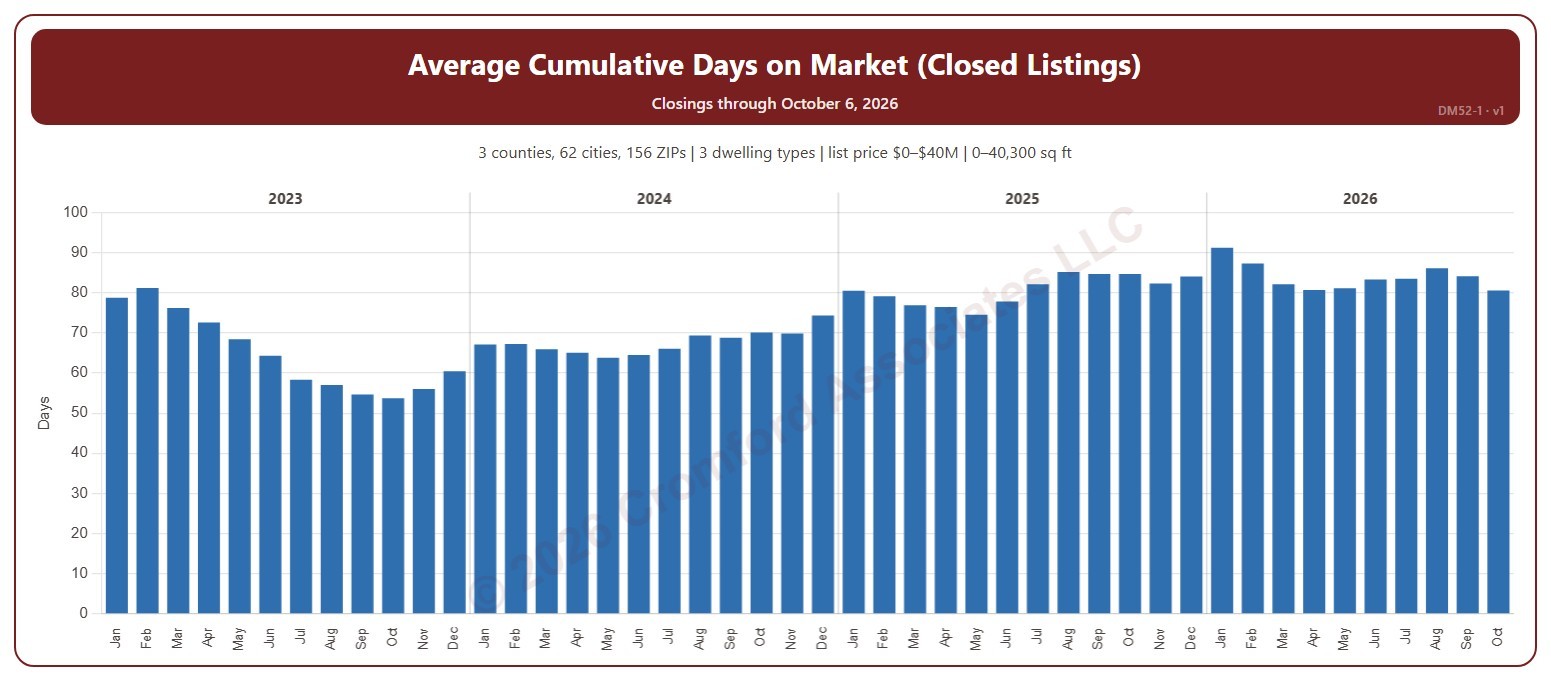
This chart shows the average cumulative days on market of the homes that closed through ARMLS, one bar per calendar month of closing. Cumulative days on market is ARMLS’s own count of the days a home was on the market. Fewer days means homes are selling faster.

It opens on the last four years; tick any year back to 2000 in the Year panel. The newest month is the month so far.

It opens on the Greater Phoenix area: the counties, cities, and ZIP codes that make it up are ticked to start with. Tick or untick any of them to change the area, including counties beyond Greater Phoenix. Narrow it further with the Dwelling Type (condo, mobile, single family), Transaction Type, and New / Resale boxes and the list price, home size, and year built sliders.

Hover over the chart to see the figures for that month.

Listings Expired per Month

About this chart

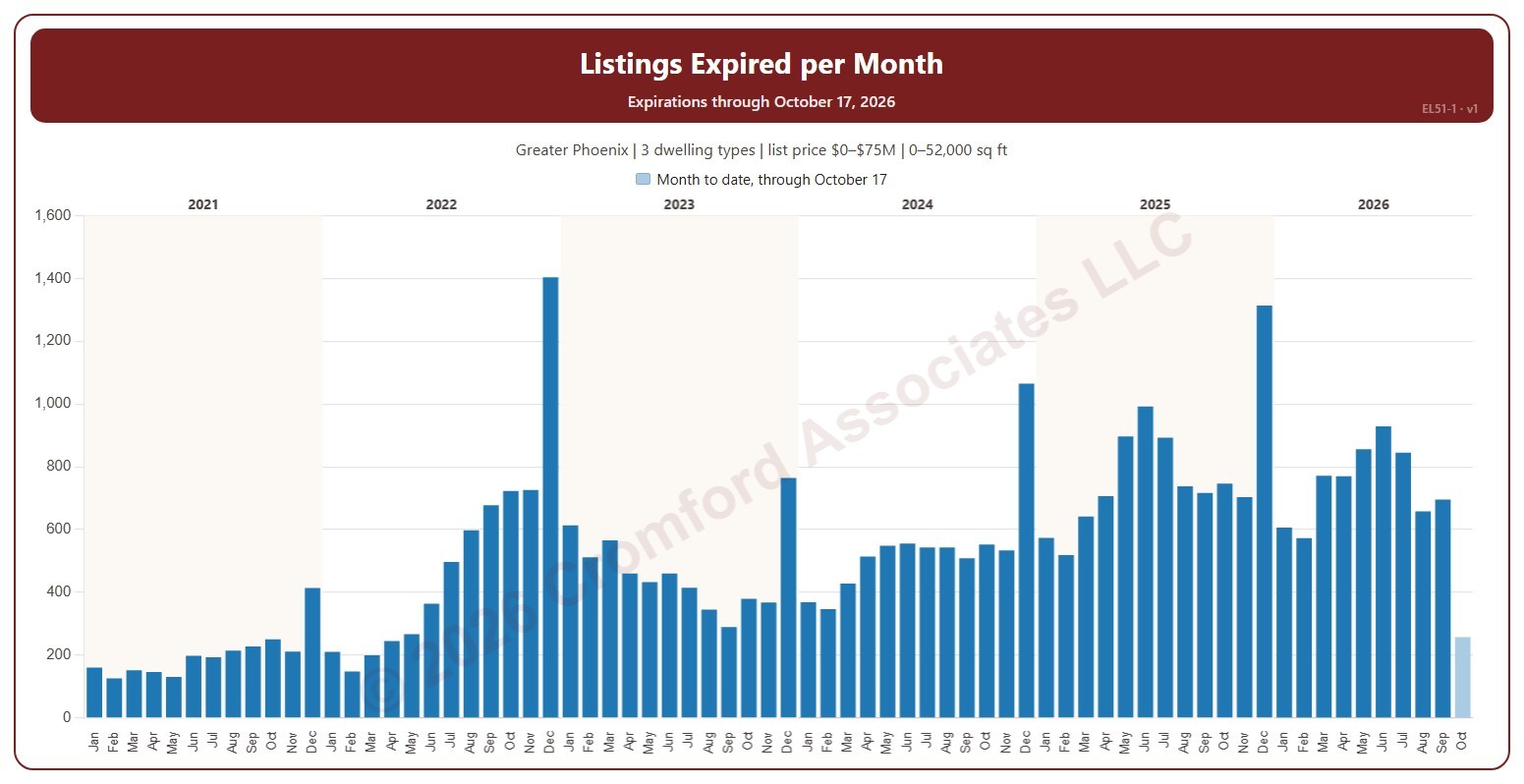
This chart shows the number of listings that expired each month. An expired listing is one whose listing agreement ran out before the home sold, counted on the date it expired.

It opens on January six years back to date; drag the handles of the date slider under the chart to choose the months shown, as far back as January 2001. The current month is the month so far and is drawn lighter. The chart is updated every day.

It opens on the Greater Phoenix area: the counties, cities, and ZIP codes that make it up are ticked to start with. Tick or untick any of them to change the area, including counties beyond Greater Phoenix. Narrow it further with the Dwelling Type, Transaction Type, and New / Resale boxes and the list price, home size, and year built sliders.

Hover over a bar to see the month’s count.