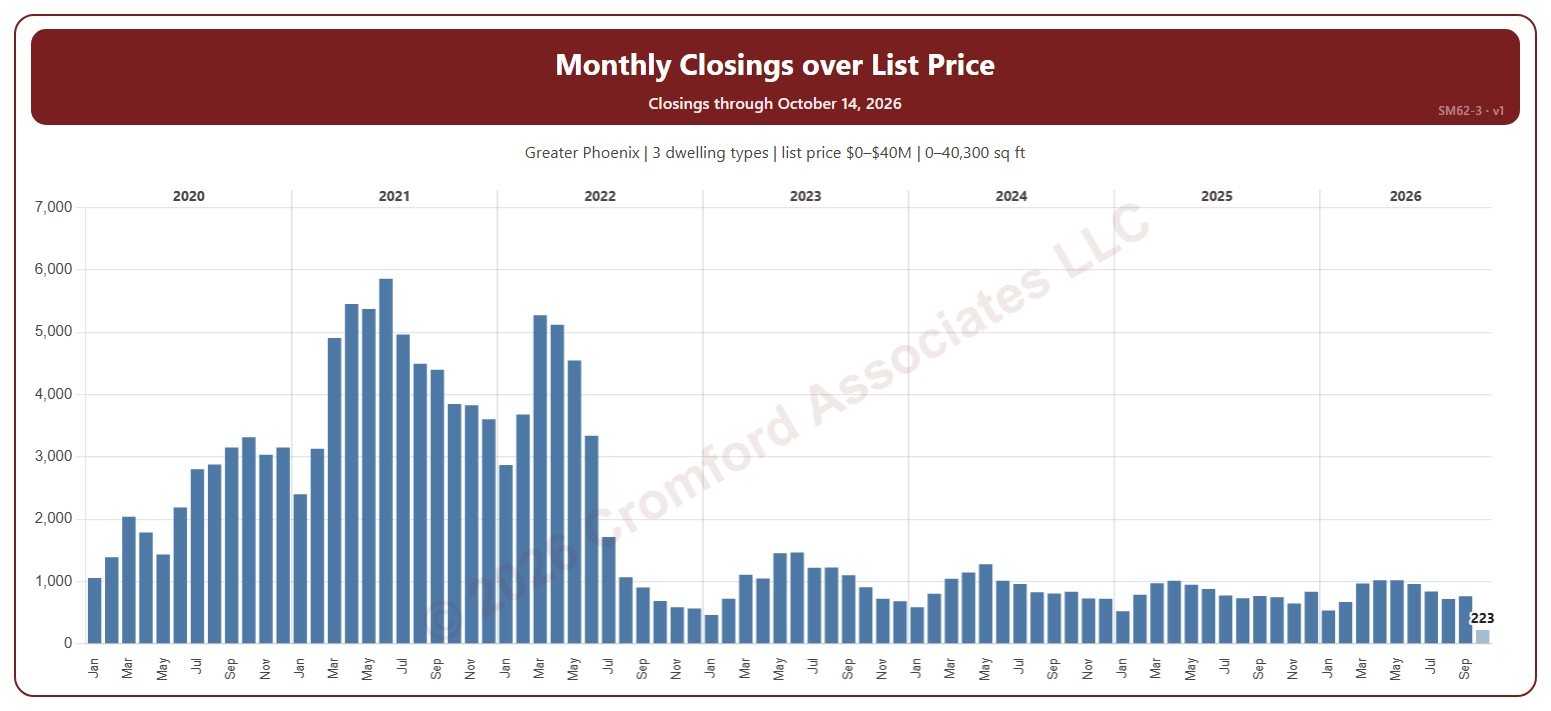
Monthly Closings over List Price

About this chart

This chart shows the number of homes that closed over list price each month. A home closed over list price when its sale price was higher than its list price on its ARMLS listing; the amount over is the sale price minus the list price.

It opens on January 2020 to date; drag the handles of the date slider under the chart to choose the months shown, as far back as January 2000. The newest month is the month so far, drawn in a lighter shade. The chart is updated every day.

It opens on the Greater Phoenix area: the counties, cities, and ZIP codes that make it up are ticked to start with. Tick or untick any of them to change the area, including counties beyond Greater Phoenix. Narrow it further with the Dwelling Type, Transaction Type, and New / Resale boxes and the list price, home size, and year built sliders.

Hover over a bar to see the number over list price, all closings, and the percentage that month.
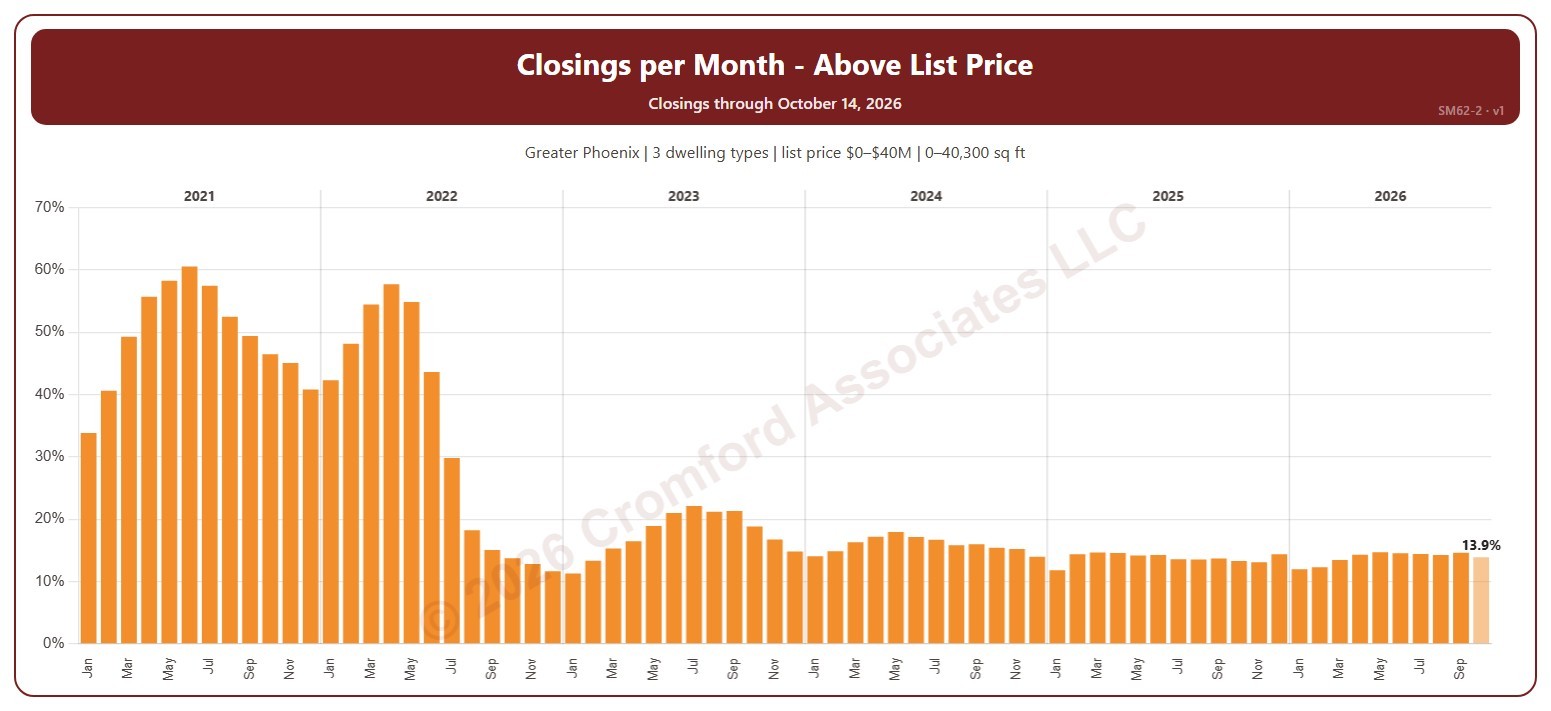
Closings per Month – Above List Price

About this chart

This chart shows the percentage of the homes closed each month that closed over list price. A home closed over list price when its sale price was higher than its list price on its ARMLS listing; the amount over is the sale price minus the list price.

It opens on January 2021 to date; drag the handles of the date slider under the chart to choose the months shown, as far back as January 2000. The newest month is the month so far, drawn in a lighter shade. The chart is updated every day.

It opens on the Greater Phoenix area: the counties, cities, and ZIP codes that make it up are ticked to start with. Tick or untick any of them to change the area, including counties beyond Greater Phoenix. Narrow it further with the Dwelling Type, Transaction Type, and New / Resale boxes and the list price, home size, and year built sliders.

Hover over a bar to see the percentage, the number over list price, and all closings that month.

Closings over List Price

About this chart

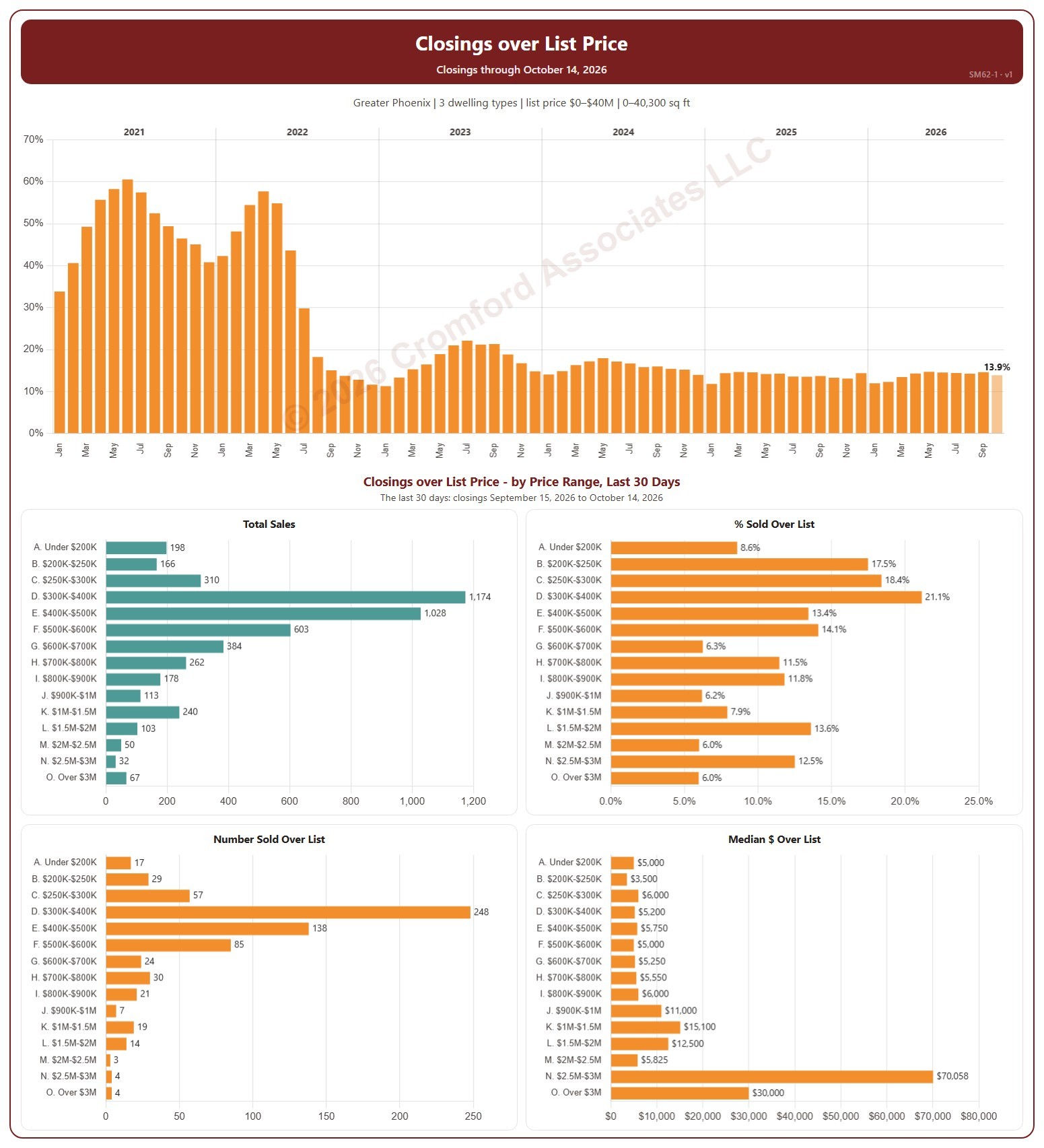
This dashboard shows how many homes closed over their list price. The top chart shows the percentage of each month’s closings that were over list price. Under it, four charts break the last 30 days of closings down by list price range, from under $200K to over $3M: all closings, the percentage over list price, the number over list price, and the median amount over list price. A home closed over list price when its sale price was higher than its list price on its ARMLS listing; the amount over is the sale price minus the list price.

It opens on January 2021 to date; drag the handles of the date slider under the chart to choose the months shown, as far back as January 2000. The newest month is the month so far, drawn in a lighter shade. The chart is updated every day. The 30 days run up to the newest closing; the heading shows the exact dates. A price range with only a few closings over list price can show an unusual median.

It opens on the Greater Phoenix area: the counties, cities, and ZIP codes that make it up are ticked to start with. Tick or untick any of them to change the area, including counties beyond Greater Phoenix. Narrow it further with the Dwelling Type, Transaction Type, and New / Resale boxes and the list price, home size, and year built sliders.

Hover over a bar to see its figures.

Seasonal Trends – Closed Sales by Calendar Month

About this chart

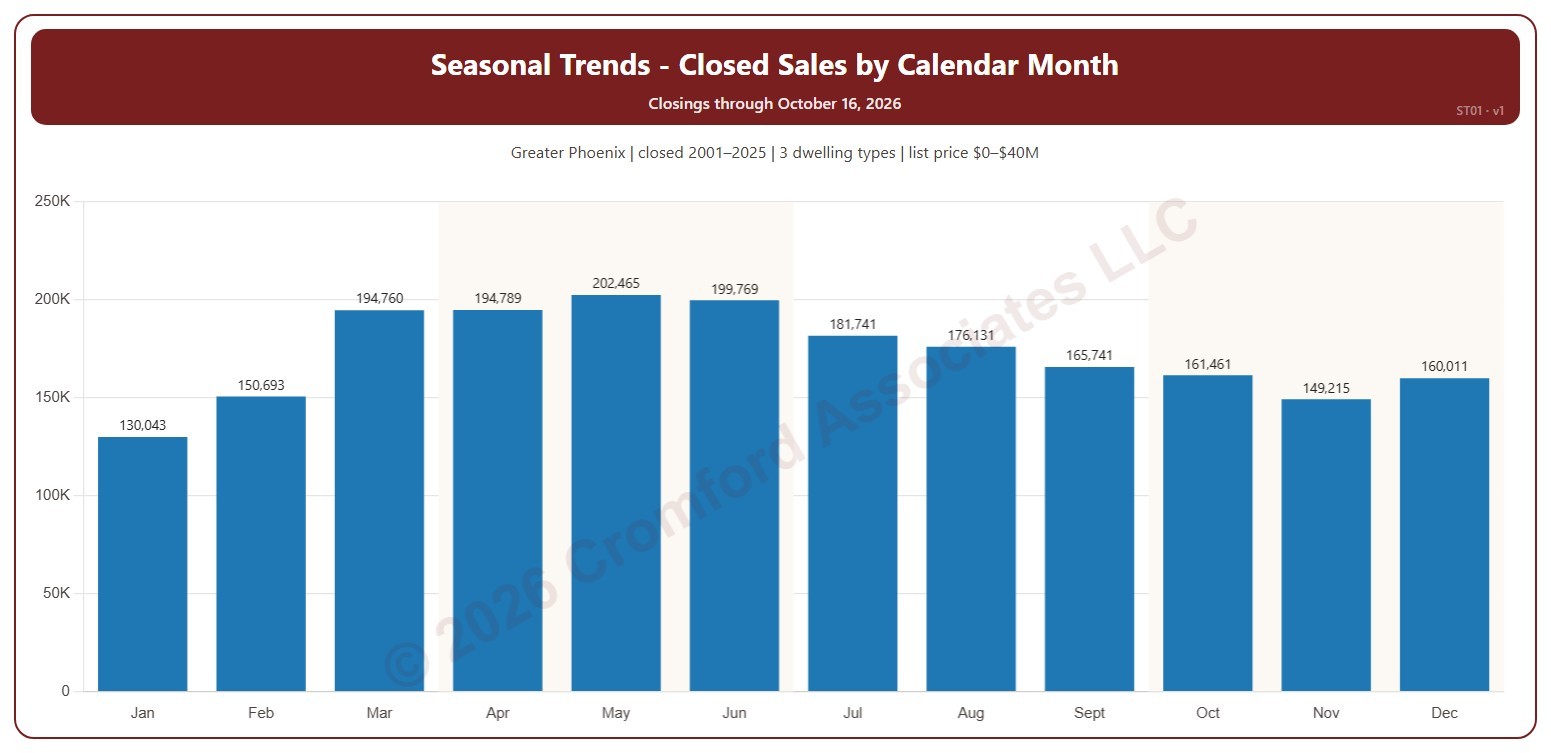
This chart shows the seasonal pattern of home sales: the number of homes that closed on ARMLS in each calendar month, January to December, added up over the years ticked. Each month’s share of the year is in its tooltip.

It opens on 2001 to the last complete year; tick or untick years in the Year box. The current year has only some of its months, so ticking it adds to the early months only. The chart is updated every day.

It opens on the Greater Phoenix area: the counties, cities, and ZIP codes that make it up are ticked to start with. Tick or untick any of them to change the area, including counties beyond Greater Phoenix. Narrow it further with the Dwelling Type, Transaction Type, and New / Resale boxes and the list price, home size, and year built sliders.

Hover over a bar to see the month’s closings, the average a year, and its share of the year.

Year-over-Year Change: Monthly Average Sales Price per Square Foot

About this chart

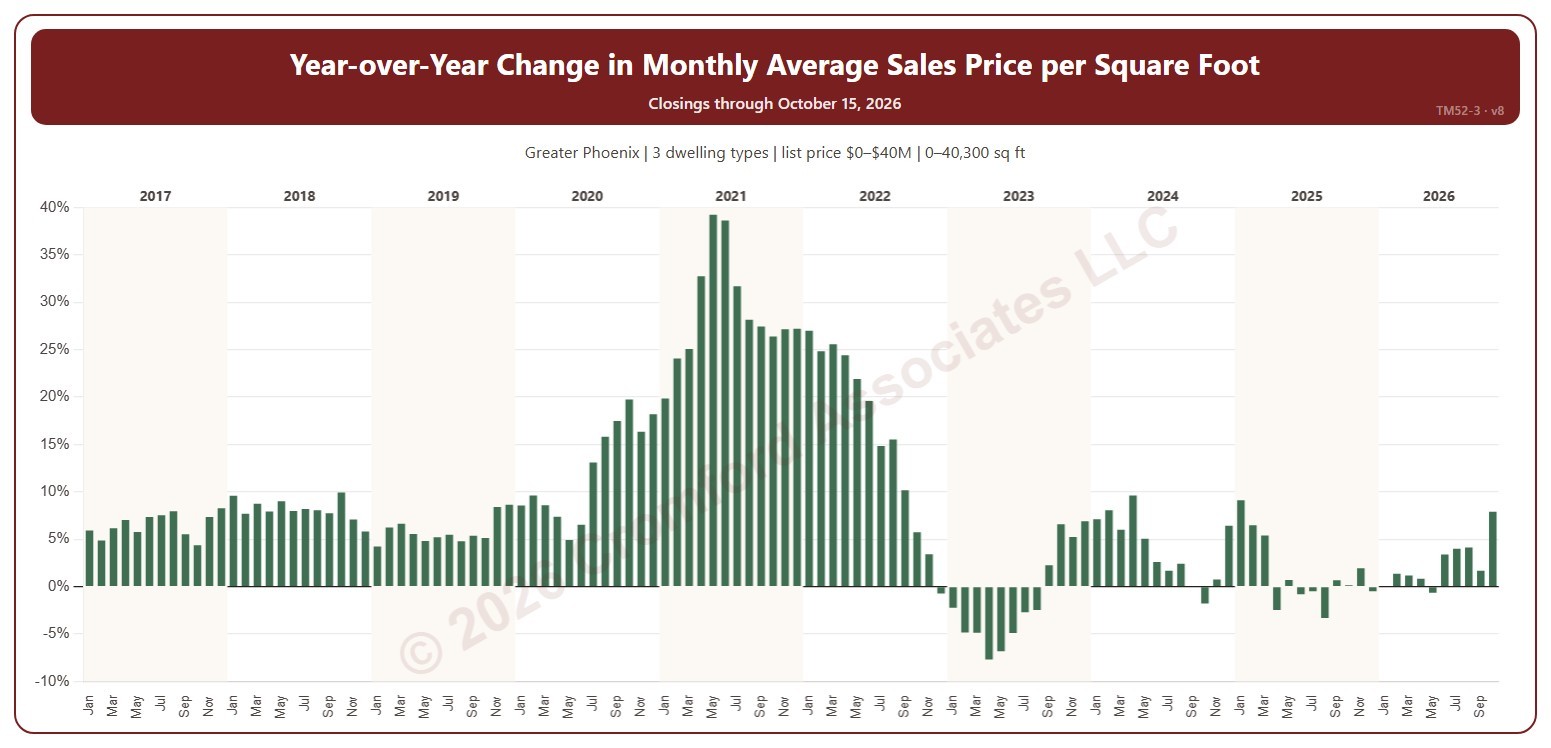
This chart shows the year-over-year change in the average sales price per square foot: each month compared with the same month a year earlier, as a percentage. Sales price per square foot is the total of the sale prices divided by the total of the homes’ square footage, over the homes that closed on ARMLS in the period.

It opens on January 2017 to date; drag the handles of the date slider under the chart to choose the months shown, as far back as January 2001. The chart is updated every day.

It opens on the Greater Phoenix area: the counties, cities, and ZIP codes that make it up are ticked to start with. Tick or untick any of them to change the area, including counties beyond Greater Phoenix. Narrow it further with the Dwelling Type, Transaction Type, and New / Resale boxes and the list price, home size, and year built sliders.

Hover over a bar to see the change and both months’ figures.

Active Listings Daily

About this chart

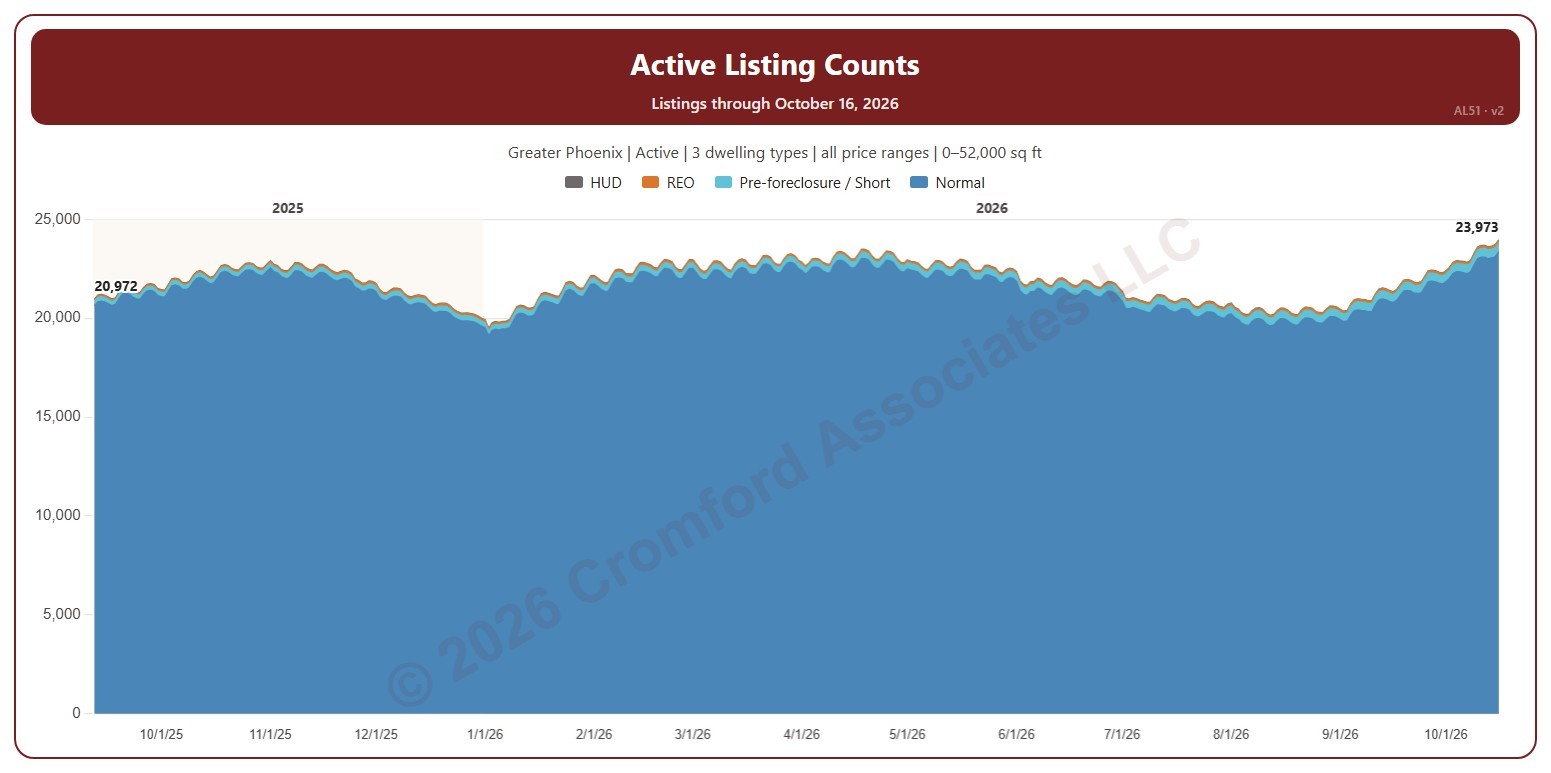
This chart shows the number of listings on ARMLS each day, stacked by transaction type: normal sales, pre-foreclosure / short sales, REO, and HUD. The day’s total is labeled at the first and last day shown. It opens on active listings; tick Coming Soon or UCB / CCBS in the Status box to add them.

It opens on the last 400 days; drag the handles of the date slider under the chart to choose the days shown, as far back as January 2011. The chart is updated every day.

It opens on the Greater Phoenix area: the counties, cities, and ZIP codes that make it up are ticked to start with. Tick or untick any of them to change the area, including counties beyond Greater Phoenix. Narrow it further with the Price Range boxes, the Dwelling Type, Transaction Type, and New / Resale boxes, and the home size and year built sliders.

Hover over the chart to see each transaction type’s count and the total for that day.