Market Dashboard

About this chart

This dashboard summarizes the current state of the residential market for all areas and types covered by ARMLS. It is measured daily and shows where the market stands today; for longer-term trends, use the individual charts in the Analysis section.

Use Select Type of Data to switch between 14 views: Sale Price / Sq Ft, Cromford® Index, Inventory, Active Listings, Under Contract, Expired Listings, Canceled Listings, List Price / Sq Ft, Closed Listings, Dollar Volume, Days on Market, Success Rate, Square Feet, and Sale Price $.

Each tile compares a recent figure with an earlier one and is colored to show whether the change is good for sellers, bad for sellers, or neither. The chart beneath the tiles shows the last 13 months, month by month. Hover over it to see each figure.
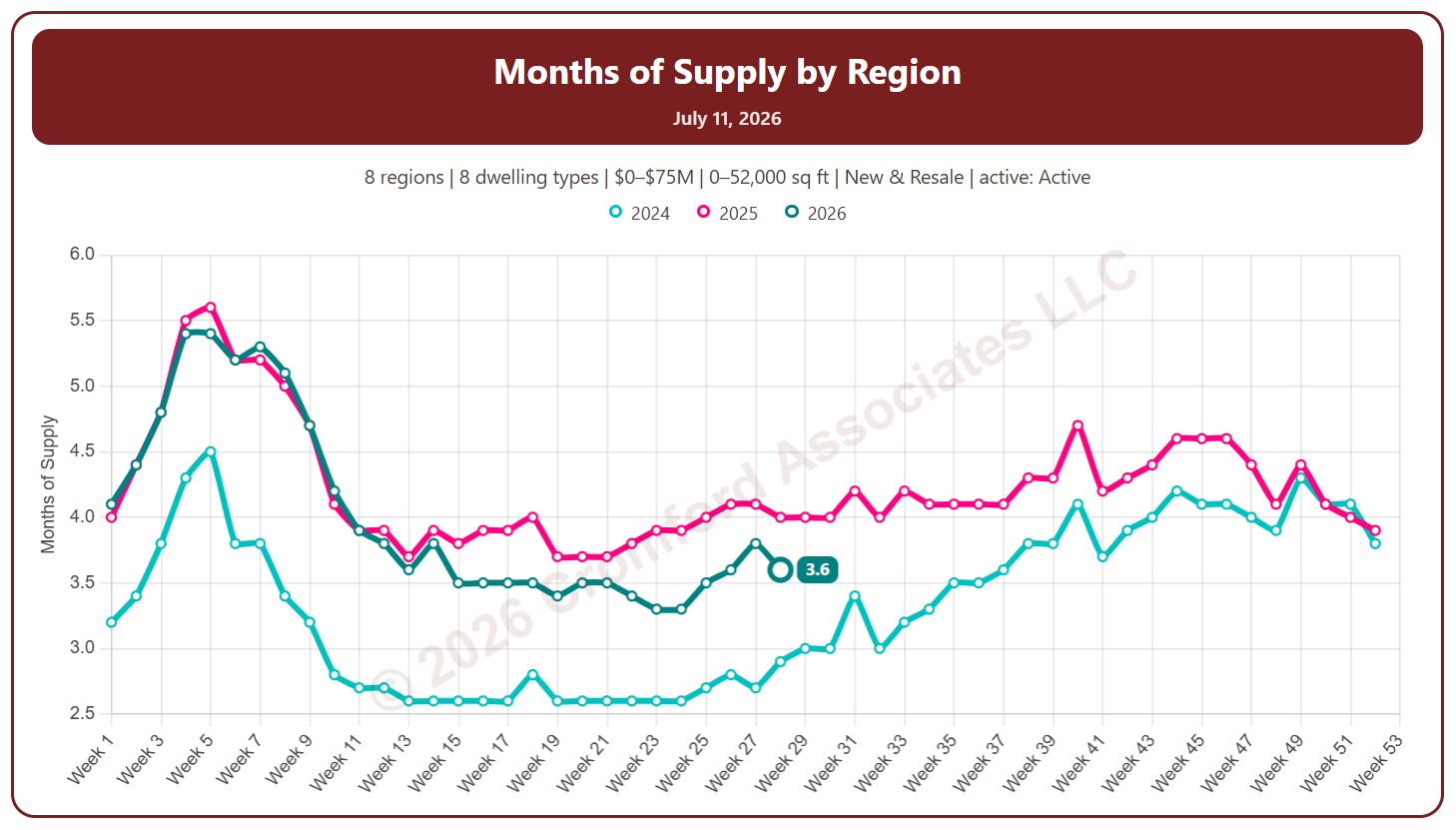
Months of Supply by Region

About this chart

This chart shows months of supply, measured every week: how many months it would take to sell all the active listings at the current monthly pace of closings, if no new listings came on. The lower the number, the tighter the supply; a rising number means supply is building up relative to sales.

By default it counts Active listings only; tick Include UCB/CCBS or Include Coming Soon to add them.

Each year has its own line, laid out by week of the year, so you can compare this year with earlier years at the same point in the season. It opens on the last three years; tick any year back to 2011 in the Year panel.

It opens with every region included. Use the Region panel to focus on one region or compare a combination of them. Narrow it with the Dwelling Type, Transaction Type, and Build Type boxes and the price, home size, and year built sliders.

Hover over a line to see the exact figure for that week.

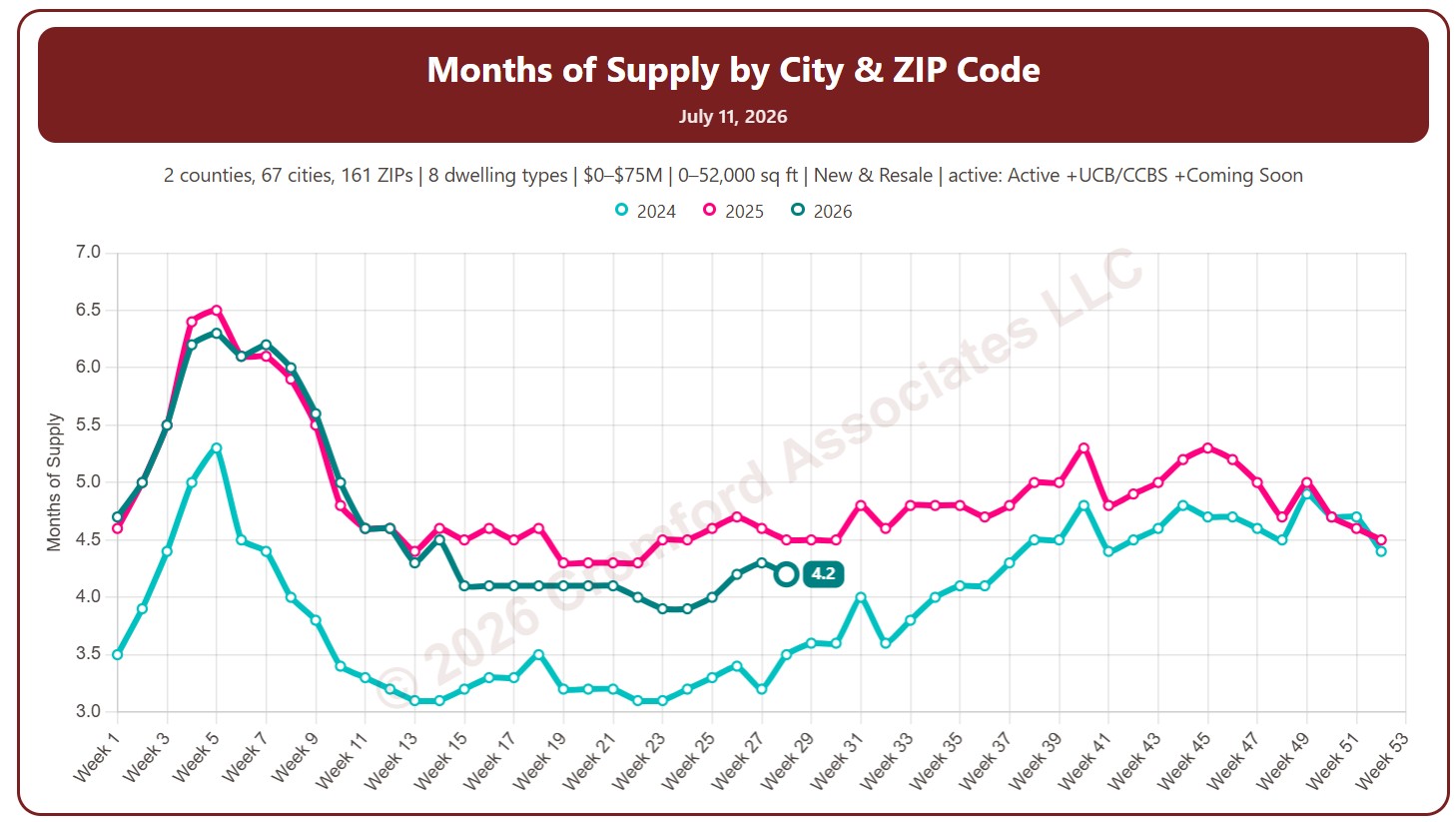
Months of Supply by City and ZIP Code

About this chart

This chart shows months of supply, measured every week: how many months it would take to sell all the active listings at the current monthly pace of closings, if no new listings came on. The lower the number, the tighter the supply; a rising number means supply is building up relative to sales.

By default it counts Active listings only; tick Include UCB/CCBS or Include Coming Soon to add them.

Each year has its own line, laid out by week of the year, so you can compare this year with earlier years at the same point in the season. It opens on the last three years; tick any year back to 2011 in the Year panel.

It opens on Maricopa and Pinal Counties with every city and ZIP code included. Use the County, City, and ZIP panels to focus on any area, from a whole county down to a single ZIP code. Narrow it with the Dwelling Type, Transaction Type, and Build Type boxes and the price, home size, and year built sliders.

Hover over a line to see the exact figure for that week.

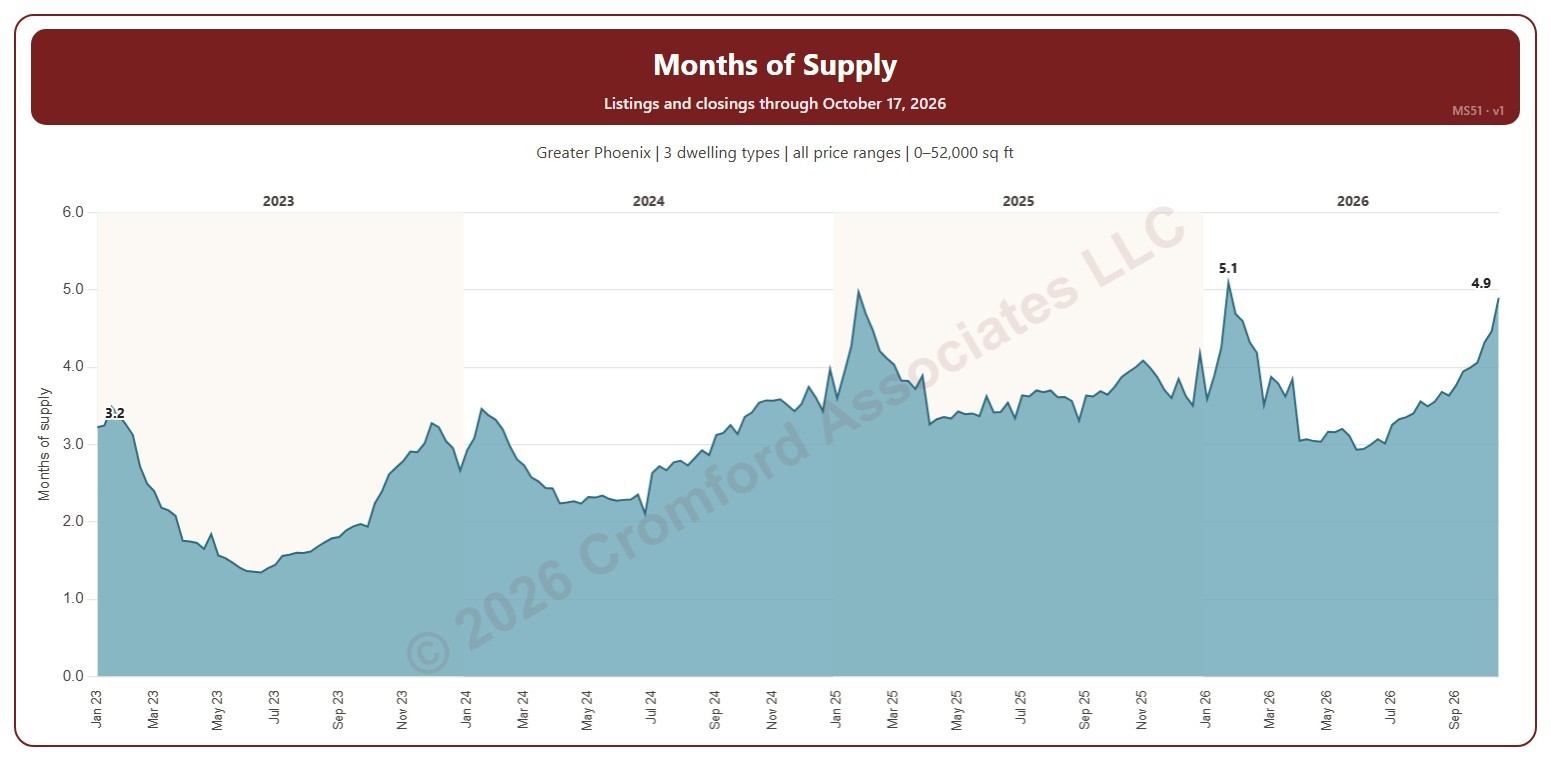
Months of Supply – Excluding UCB and CCBS Listings

About this chart

This chart shows months of supply each Saturday: the active listings on ARMLS that day divided by the homes that closed in the month up to the day before, so it says how many months the listings for sale would last at the current pace of sales. Listings under contract that are still taking backup offers (UCB / CCBS) are not counted as supply.

It opens on January three years back to date; drag the handles of the date slider under the chart to choose the weeks shown, as far back as January 2011. The chart is updated every day.

It opens on the Greater Phoenix area: the counties, cities, and ZIP codes that make it up are ticked to start with. Tick or untick any of them to change the area, including counties beyond Greater Phoenix. Narrow it further with the Price Range boxes, the Dwelling Type, Transaction Type, and New / Resale boxes, and the home size and year built sliders; the listings and the closings are narrowed the same way (a listing by its list price that day, a closing by its list price).

Hover over the chart to see the week’s months of supply, the active listings, and the closings in its month.

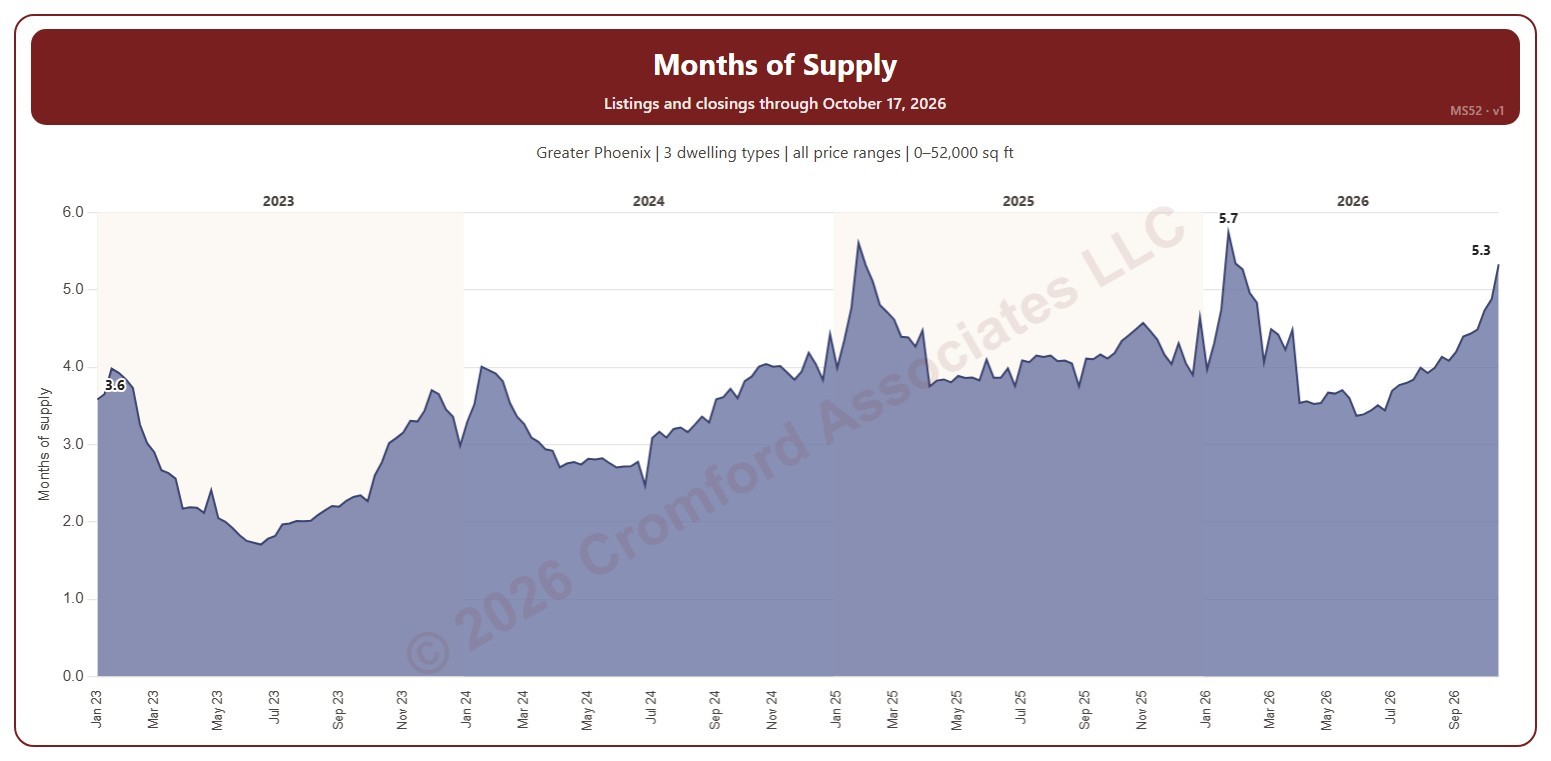
Months of Supply – including UCB/CCBS Listings

About this chart

This chart shows months of supply each Saturday: the listings on ARMLS that day that are active or under contract but still taking backup offers (UCB / CCBS), divided by the homes that closed in the month up to the day before, so it says how many months that supply would last at the current pace of sales. MS51 is the same measure without the UCB / CCBS listings.

It opens on January three years back to date; drag the handles of the date slider under the chart to choose the weeks shown, as far back as January 2011. The chart is updated every day.

It opens on the Greater Phoenix area: the counties, cities, and ZIP codes that make it up are ticked to start with. Tick or untick any of them to change the area, including counties beyond Greater Phoenix. Narrow it further with the Price Range boxes, the Dwelling Type, Transaction Type, and New / Resale boxes, and the home size and year built sliders; the listings and the closings are narrowed the same way (a listing by its list price that day, a closing by its list price).

Hover over the chart to see the week’s months of supply, the listings, and the closings in its month.