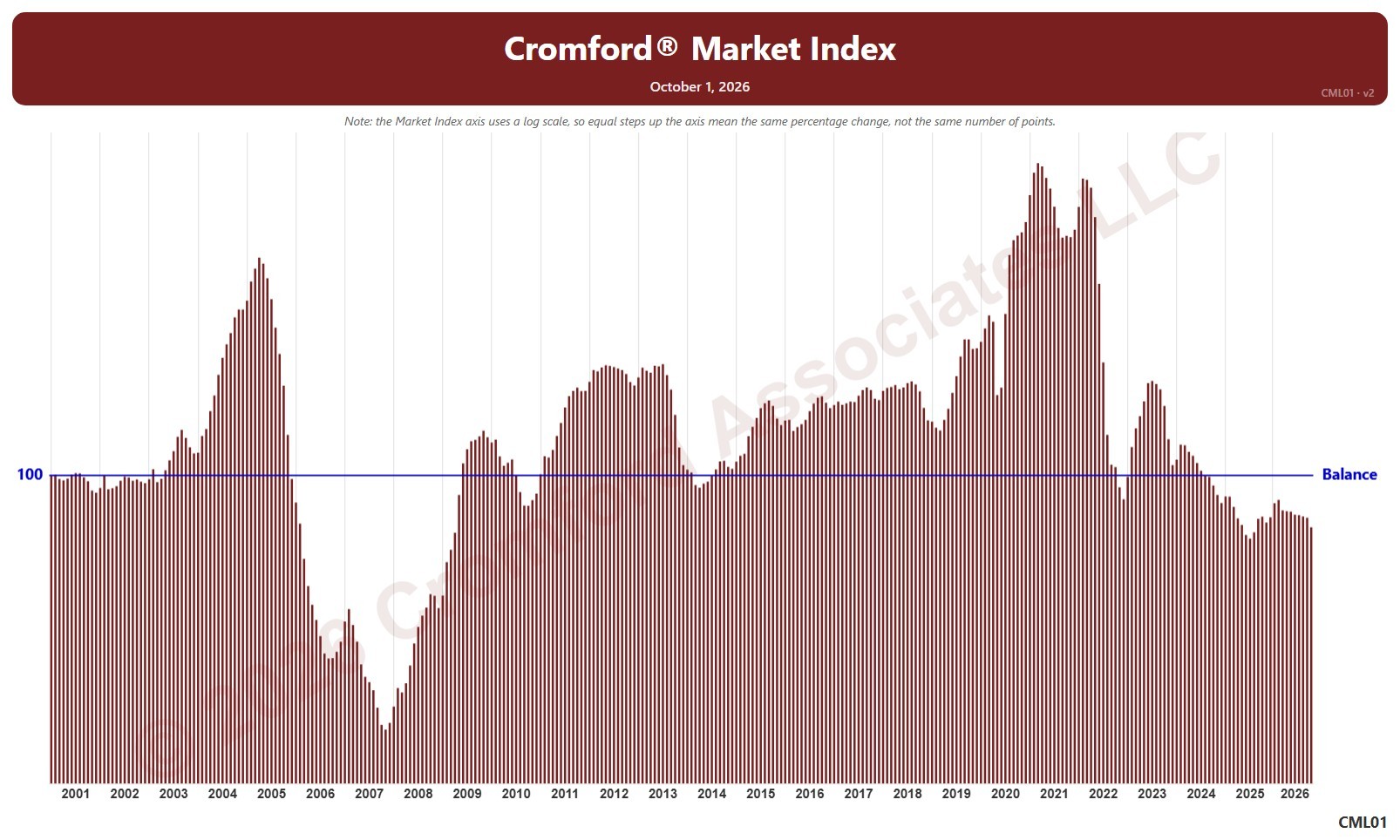
Cromford® Market Index

About this chart

This chart shows the Cromford® Market Index for the whole ARMLS market, all areas and all dwelling types, as one bar per month since January 2001, each the reading on the 1st of the month. A reading below 90 indicates a buyer’s market, above 110 a seller’s market, and between 90 and 110 a balanced market. The value axis is logarithmic, so equal steps up the axis are equal percentage changes; this keeps both the extreme years and today readable.

Hover over a bar to see the exact figure for that month.

Annual Median Sales Price per Square Foot by City and ZIP Code

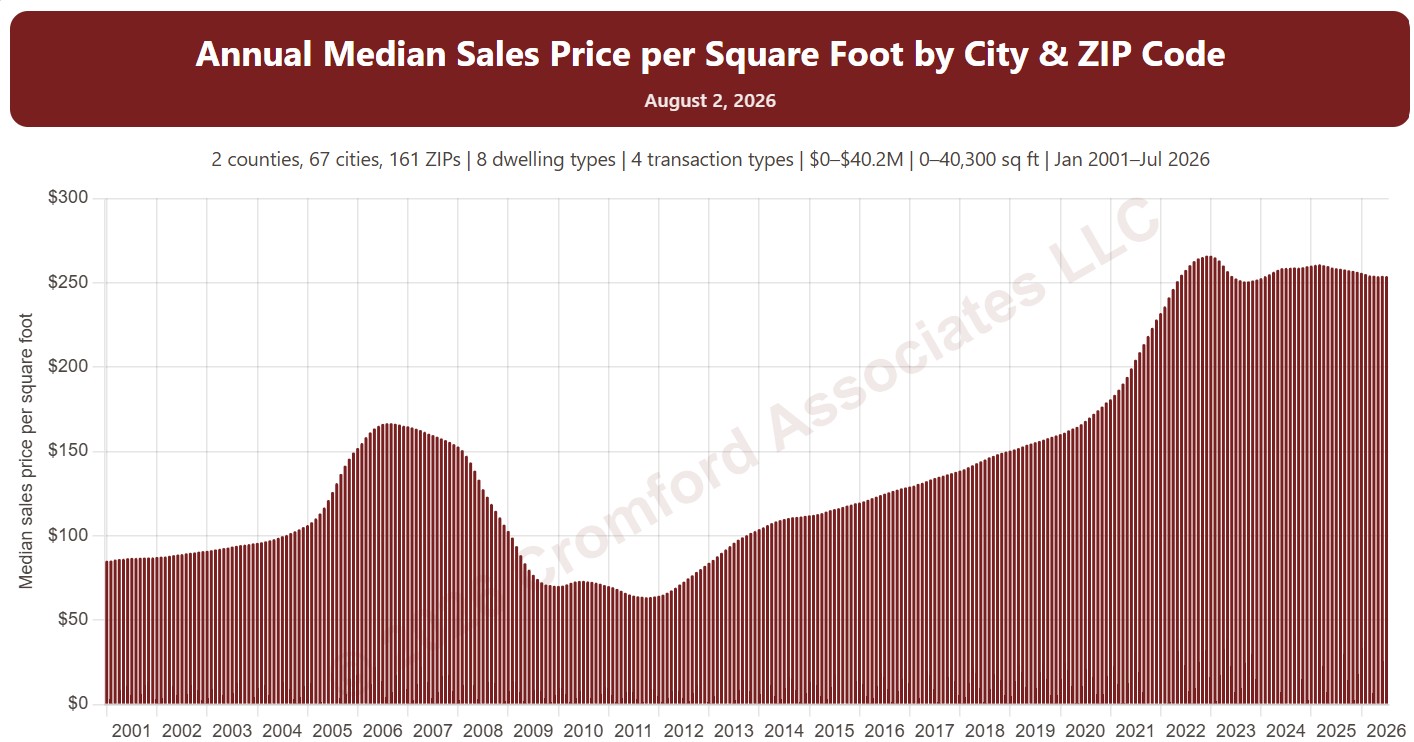
About this chart

This chart shows the median sales price per square foot over the 12 months up to each month, as one bar per month from January 2001. Price per square foot lets you compare homes of different sizes; the median is the figure in the middle, so a few unusual sales move it less than an average.

It opens on Maricopa and Pinal Counties with every city and ZIP code included. Use the County, City, and ZIP panels to focus on any area, from a whole county down to a single ZIP code. Narrow it with the Dwelling Type, Transaction Type, and New / Resale boxes and the sale price, home size, and year built sliders. The Inflation (CPI) option restates prices in today’s dollars using national or Phoenix inflation. Use the date slider, or Full range, to choose the stretch of history shown.

Hover over a bar to see the exact figure for that month.

Monthly Median Sales Price per Square Foot by Region

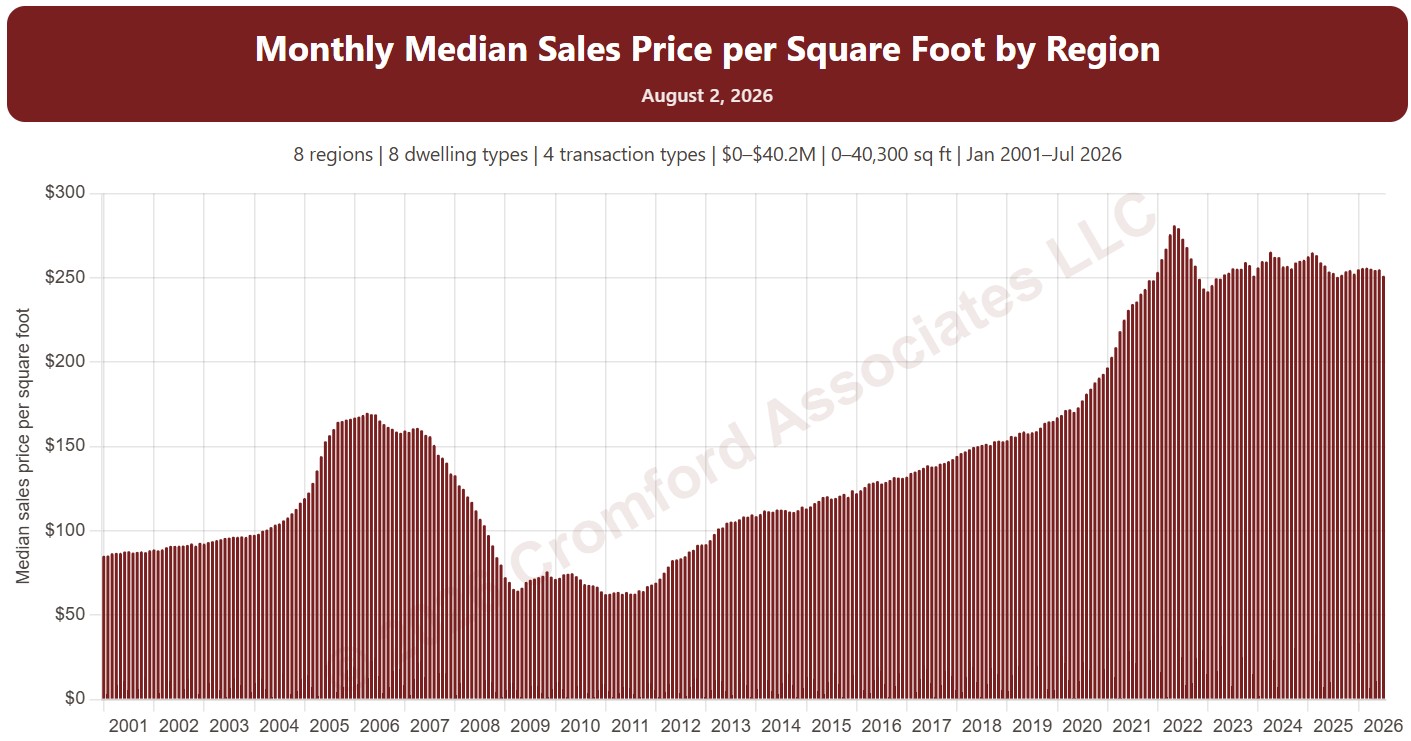
About this chart

This chart shows the median sales price per square foot of the homes that closed in each month, as one bar per month from January 2001. Price per square foot lets you compare homes of different sizes; the median is the figure in the middle, so a few unusual sales move it less than an average.

It opens with every region included. Use the Region panel to focus on one region or compare a combination of them. Narrow it with the Dwelling Type, Transaction Type, and New / Resale boxes and the sale price, home size, and year built sliders. The Inflation (CPI) option restates prices in today’s dollars using national or Phoenix inflation. Use the date slider, or Full range, to choose the stretch of history shown.

Hover over a bar to see the exact figure for that month.

Monthly Median Sales Price per Square Foot by City and ZIP Code

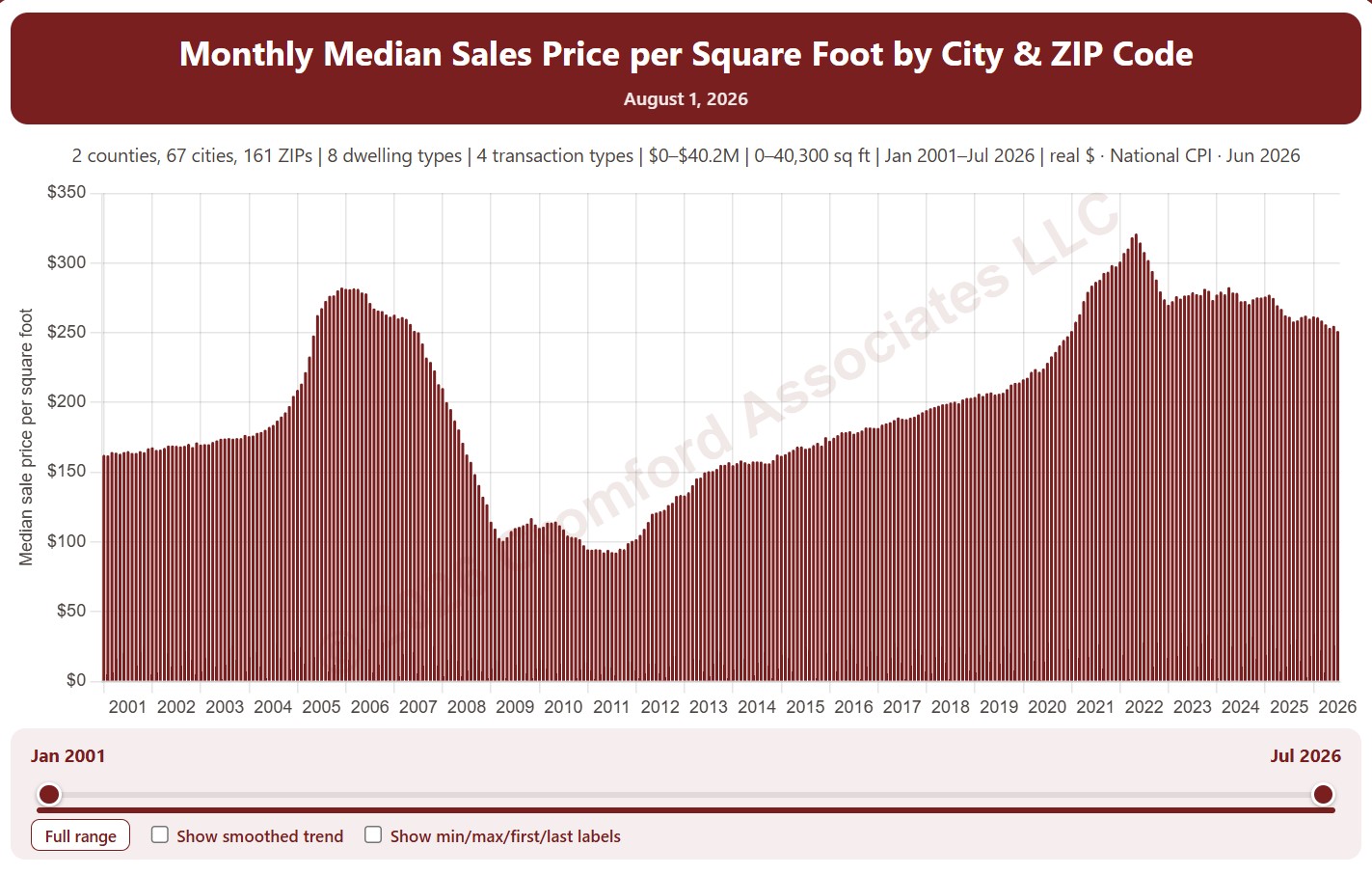
About this chart

This chart shows the median sales price per square foot of the homes that closed in each month, as one bar per month from January 2001. Price per square foot lets you compare homes of different sizes; the median is the figure in the middle, so a few unusual sales move it less than an average.

It opens on Maricopa and Pinal Counties with every city and ZIP code included. Use the County, City, and ZIP panels to focus on any area, from a whole county down to a single ZIP code. Narrow it with the Dwelling Type, Transaction Type, and New / Resale boxes and the sale price, home size, and year built sliders. The Inflation (CPI) option restates prices in today’s dollars using national or Phoenix inflation. Use the date slider, or Full range, to choose the stretch of history shown.

Hover over a bar to see the exact figure for that month.

Case-Shiller® Home Price Index®

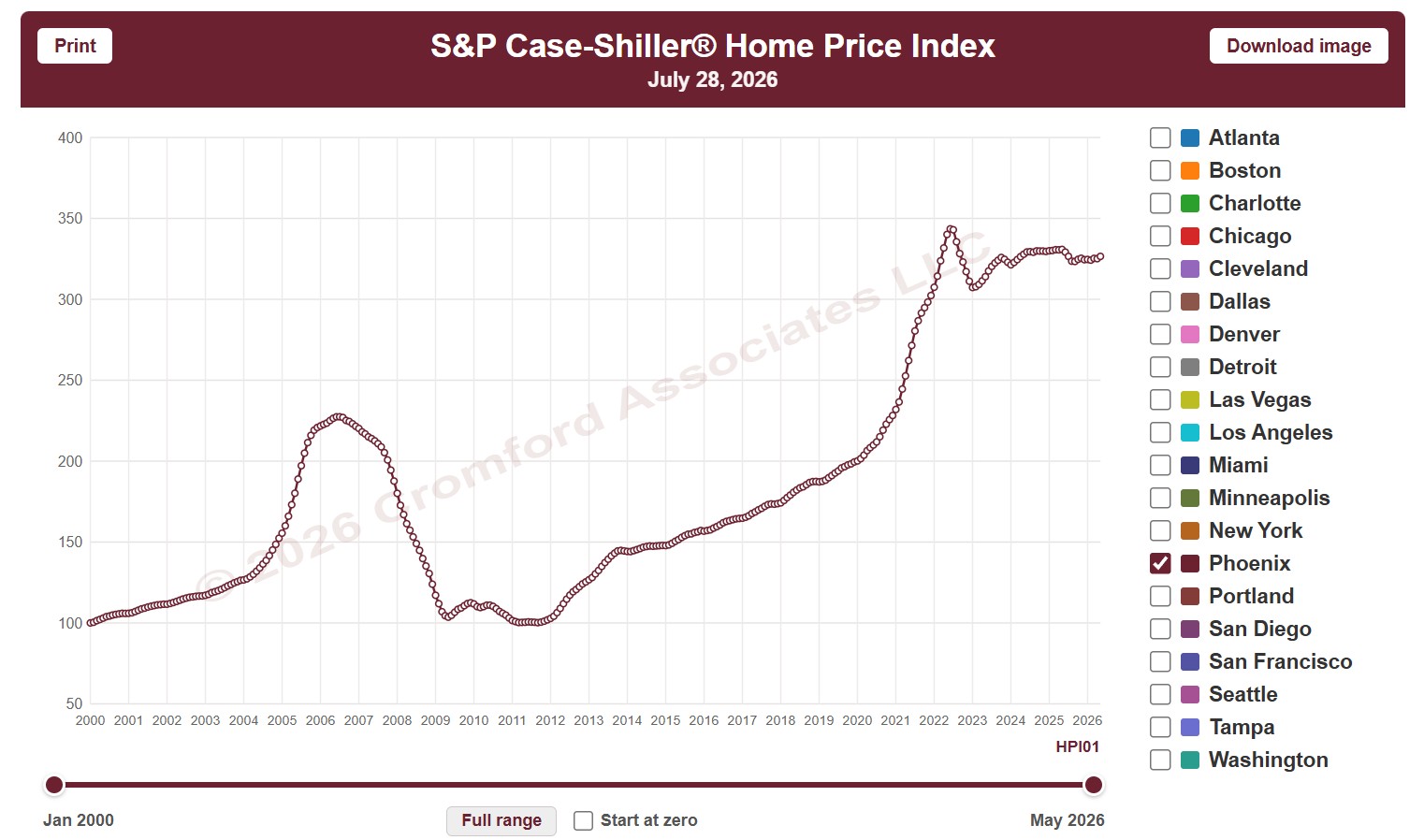
About this chart

This chart shows the S&P Cotality Case-Shiller Home Price Index, which tracks the prices of the same homes as they resell, so it measures price change without being skewed by the mix of homes that sold. It opens on Phoenix; tick any of the other 19 metro areas to compare them.

The CPI option switches between nominal prices and real prices adjusted for US or Phoenix inflation, and Start at zero sets the axis to begin at zero. Use the date slider, or Full range, to choose the stretch of history shown.

The index is published monthly, about two months in arrears. Hover over the chart to see the figures for that month.

Annual Median Sales Price ZIP Code Map

About this chart

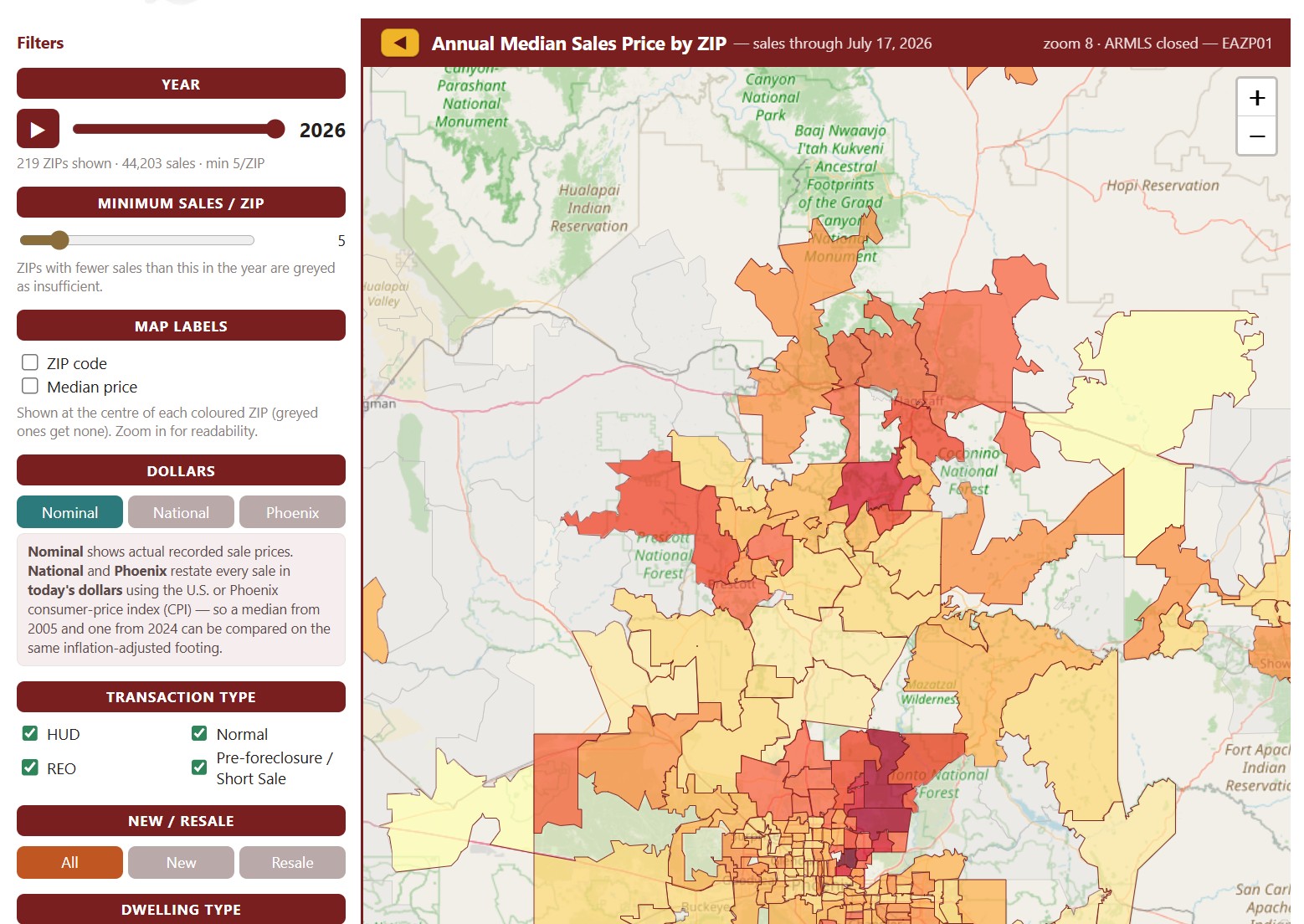
This map colors each ZIP code by the median sales price of the homes that closed through ARMLS in one calendar year, from under $200K to $3M and over. It opens on the current year, which covers the sales recorded so far; move the Year slider, or press play, to step through every year back to 2001.

ZIP codes with fewer sales than the Minimum Sales / ZIP setting (5 to start with) are grayed out as having too little data. Map Labels shows the ZIP code or its median price on the map; zoom in to read them. Dollars switches between actual sale prices and prices restated in today’s dollars using national or Phoenix inflation.

Narrow the sales counted with the Transaction Type and Dwelling Type boxes, the All / New / Resale buttons, and the price and square foot sliders.

Turnover by ZIP Code

About this chart

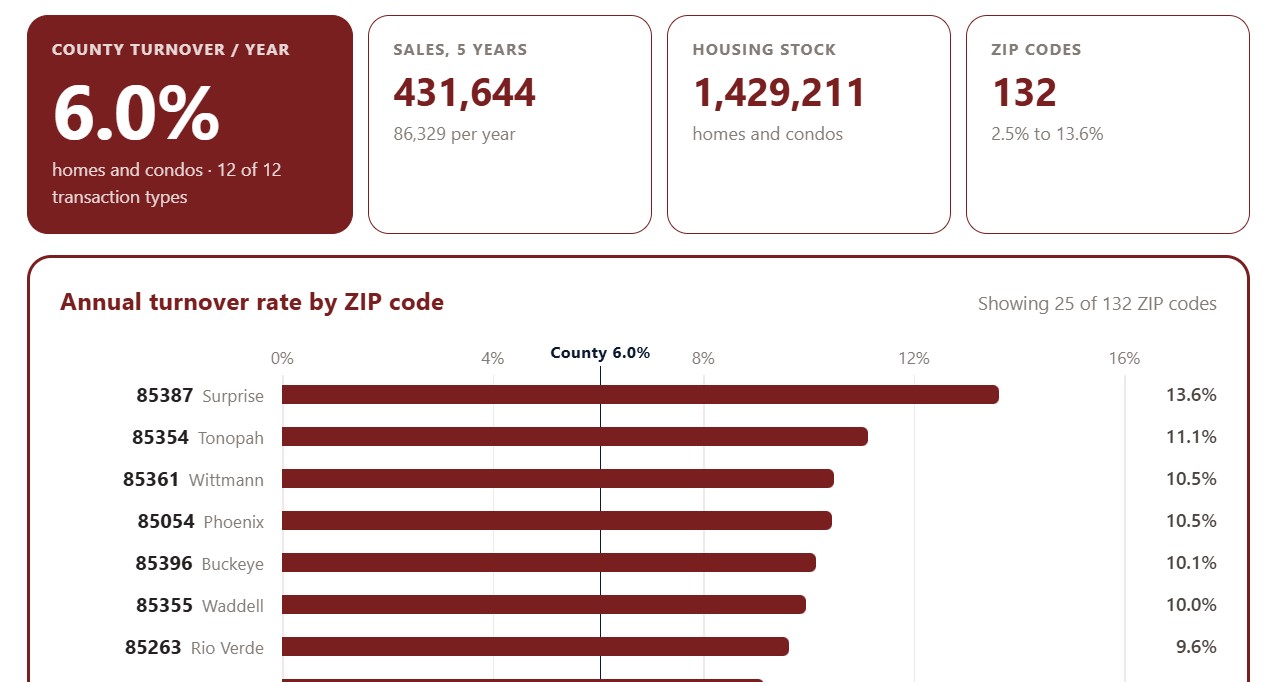
This chart ranks Maricopa County ZIP codes by turnover: the share of each ZIP code’s homes that change hands in a typical year, averaged over the last five years. High turnover marks an active market where homes come up for sale often; low turnover means owners tend to stay put.

It opens on the top 25 ZIP codes. Show switches to the top 50 or all ZIP codes, Sort ranks them by turnover, sales volume, housing stock, or ZIP code, and All, Homes, and Condos choose the property type. The transaction type boxes narrow the sales counted.

Chart and Table switch between the ranked bars and the same figures as a table.

Contract Ratio Monthly

About this chart

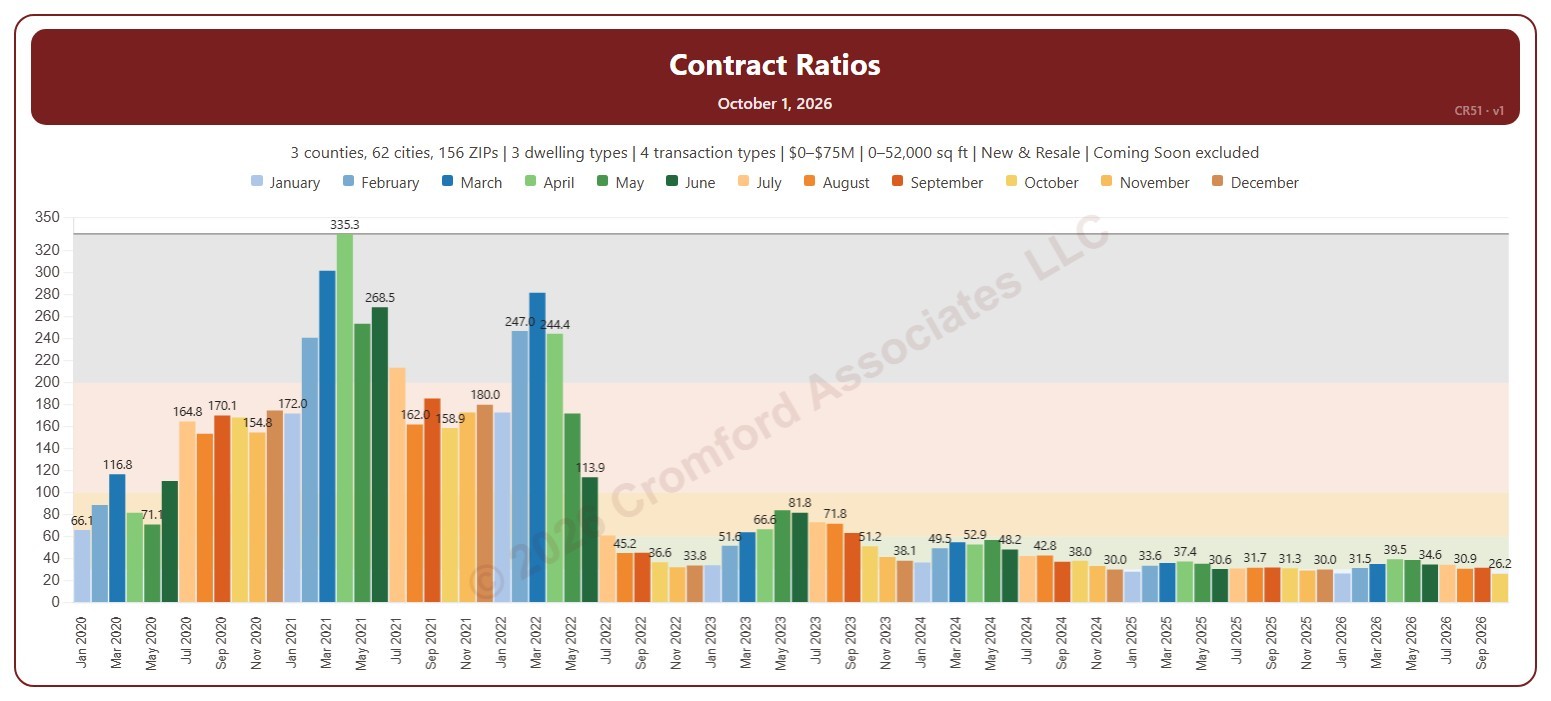
This chart shows the Contract Ratio for each month: the number of listings under contract (pending, plus UCB and CCBS) for every 100 active listings, measured on the first day of the month. Each bar is one month, colored by month. The shaded bands mark a Cool market (below 30), Warm (30 to 60), Hot (60 to 100), Frenzy! (100 to 200), and Insanity!! (above 200), and the line marks the highest month shown.

It opens on January 2020 to date. Drag the handles of the date slider under the chart to choose the months shown, as far back as April 2010. Click a month in the legend to hide or show it. A new month appears once its first-day figures are in.

It opens on the Greater Phoenix area: the counties, cities, and ZIP codes that make it up are ticked to start with. Tick or untick any of them to change the area, including counties beyond Greater Phoenix. Narrow it further with the Dwelling Type, Transaction Type, and New / Resale boxes and the list price and home size sliders. Tick Count Coming Soon as Active to add Coming Soon listings to the active count.

Hover over a bar to see the ratio and the numbers of listings under contract and active that day.

Quarterly Average Price per Square Foot

About this chart

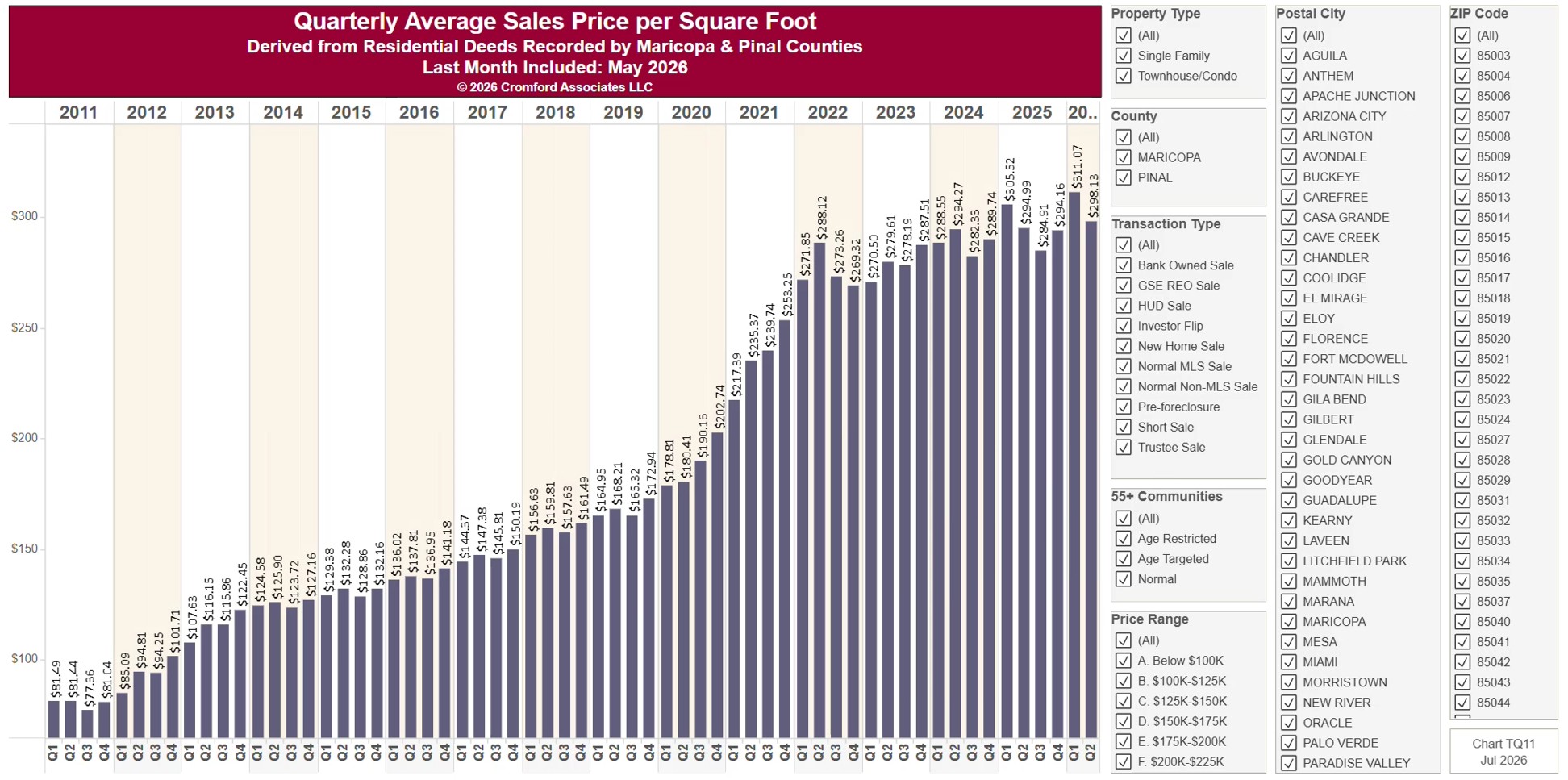
This chart shows the average price per square foot of homes sold, one bar per calendar quarter since 2011, from residential deeds recorded by Maricopa and Pinal Counties. Price per square foot lets you compare homes of different sizes. Because it is built from recorded deeds, it covers every recorded sale, not just homes listed on ARMLS: new homes, private sales, and investor deals are all included.

It opens on Maricopa and Pinal Counties with everything included. Narrow it with the County, City, and ZIP panels, the Transaction Type, Property Type, and 55+ Communities boxes, and the sale price and home size sliders. Untick years in the Year panel to drop them from the chart.

The newest quarter is usually only part of a quarter, because the records run to the end of last month. Hover over a bar to see the exact figure for that quarter.

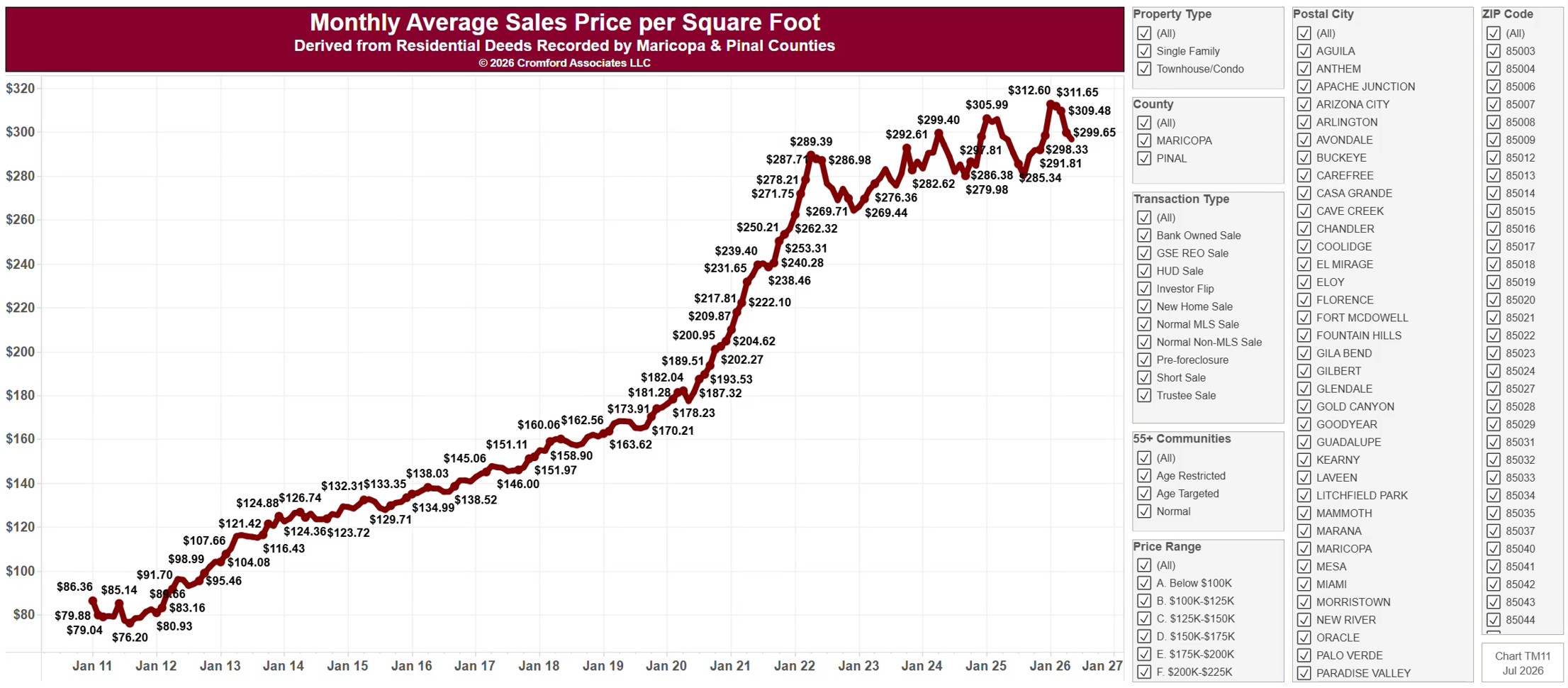
Monthly Average Sales Price per Square Foot

About this chart

This chart shows the average price per square foot of homes sold, as a line by calendar month since January 2011, from residential deeds recorded by Maricopa and Pinal Counties. Price per square foot lets you compare homes of different sizes. Because it is built from recorded deeds, it covers every recorded sale, not just homes listed on ARMLS: new homes, private sales, and investor deals are all included.

It opens on Maricopa and Pinal Counties with everything included. Narrow it with the County, City, and ZIP panels, the Transaction Type, Property Type, and 55+ Communities boxes, and the sale price and home size sliders. Untick years in the Year panel to drop them from the chart.

The records run to the end of last month and are updated monthly. Hover over the line to see the exact figure for that month.