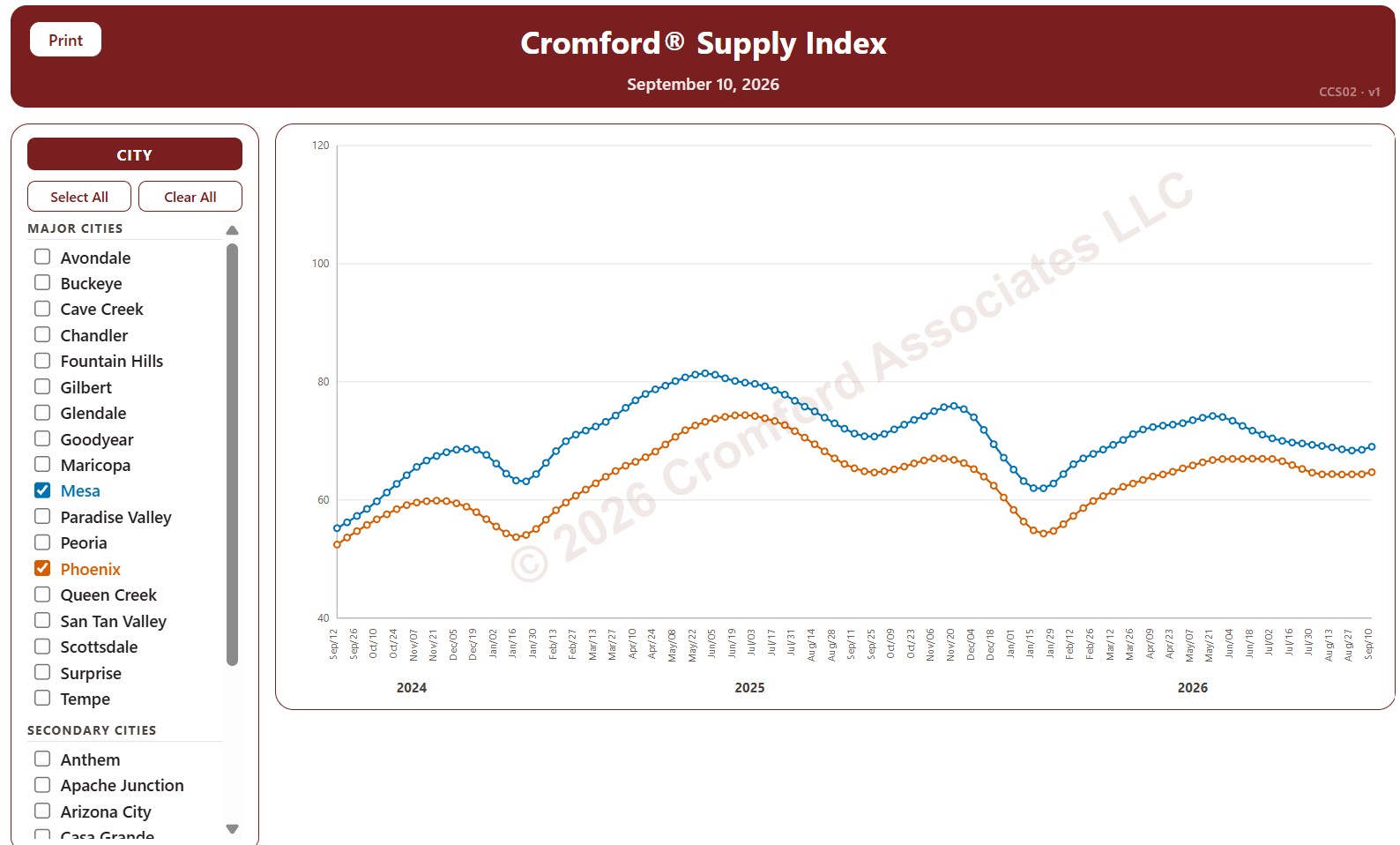
Cromford® Supply Index by City

About this chart

This chart tracks the Cromford® Supply Index for 34 cities in and around Greater Phoenix over the last 24 months, one point per week (each Thursday), for single-family detached resale homes listed on ARMLS. Above 100 means more supply than usual, below 100 less supply than usual, and 100 means supply is close to normal. Low supply favors sellers; high supply favors buyers.

The 18 major cities are drawn as solid lines and the 16 secondary cities as dashed lines. It opens on Mesa and Phoenix; use the city check boxes, or Select All and Clear All, to choose which cities are shown.

Hover over a line to see the exact figure for that week.
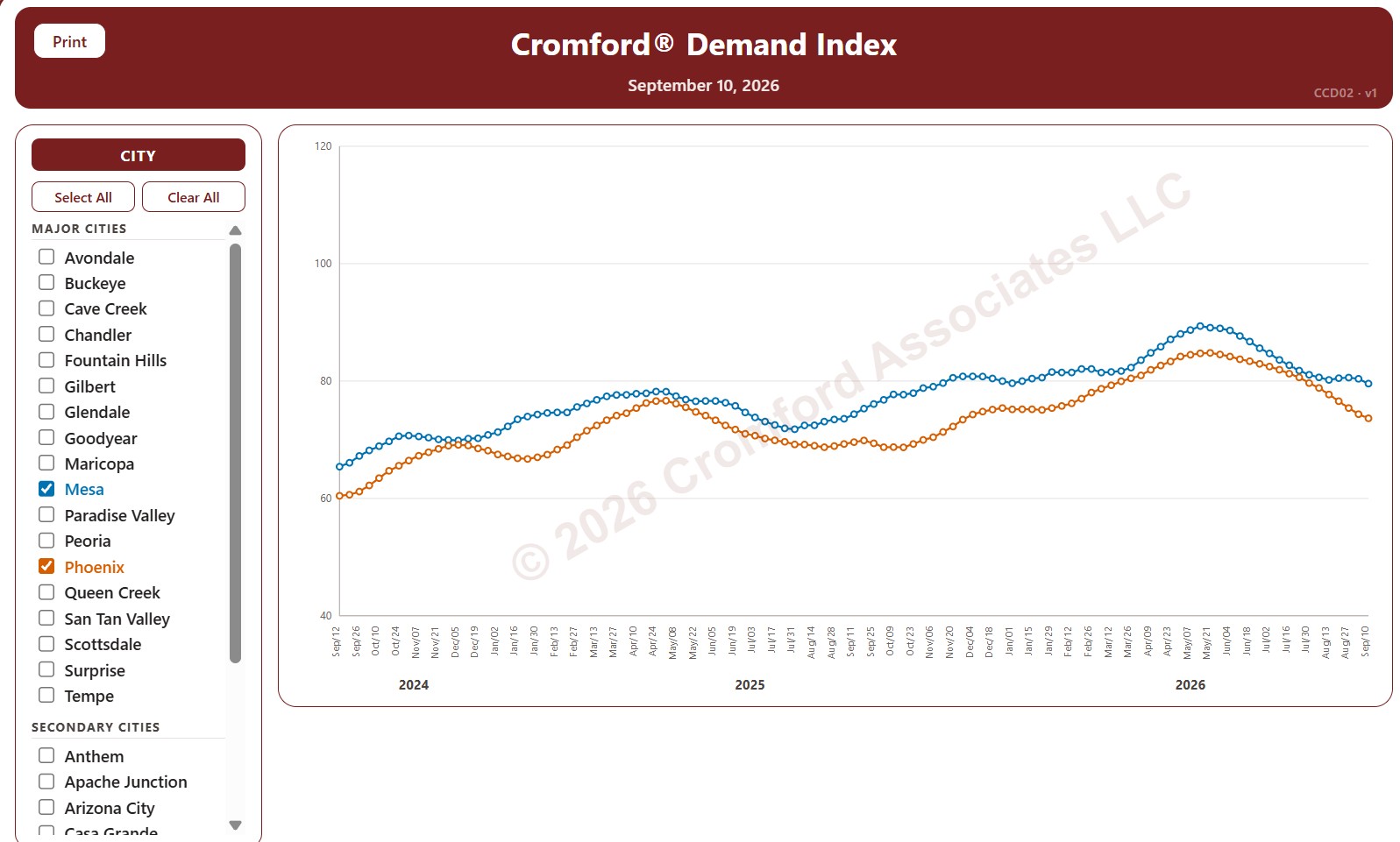
Cromford® Demand Index by City

About this chart

This chart tracks the Cromford® Demand Index for 34 cities in and around Greater Phoenix over the last 24 months, one point per week (each Thursday), for single-family detached resale homes listed on ARMLS. Above 100 means more demand than usual, below 100 less demand than usual, and 100 means demand is close to normal.

The 18 major cities are drawn as solid lines and the 16 secondary cities as dashed lines. It opens on Mesa and Phoenix; use the city check boxes, or Select All and Clear All, to choose which cities are shown.

Hover over a line to see the exact figure for that week.
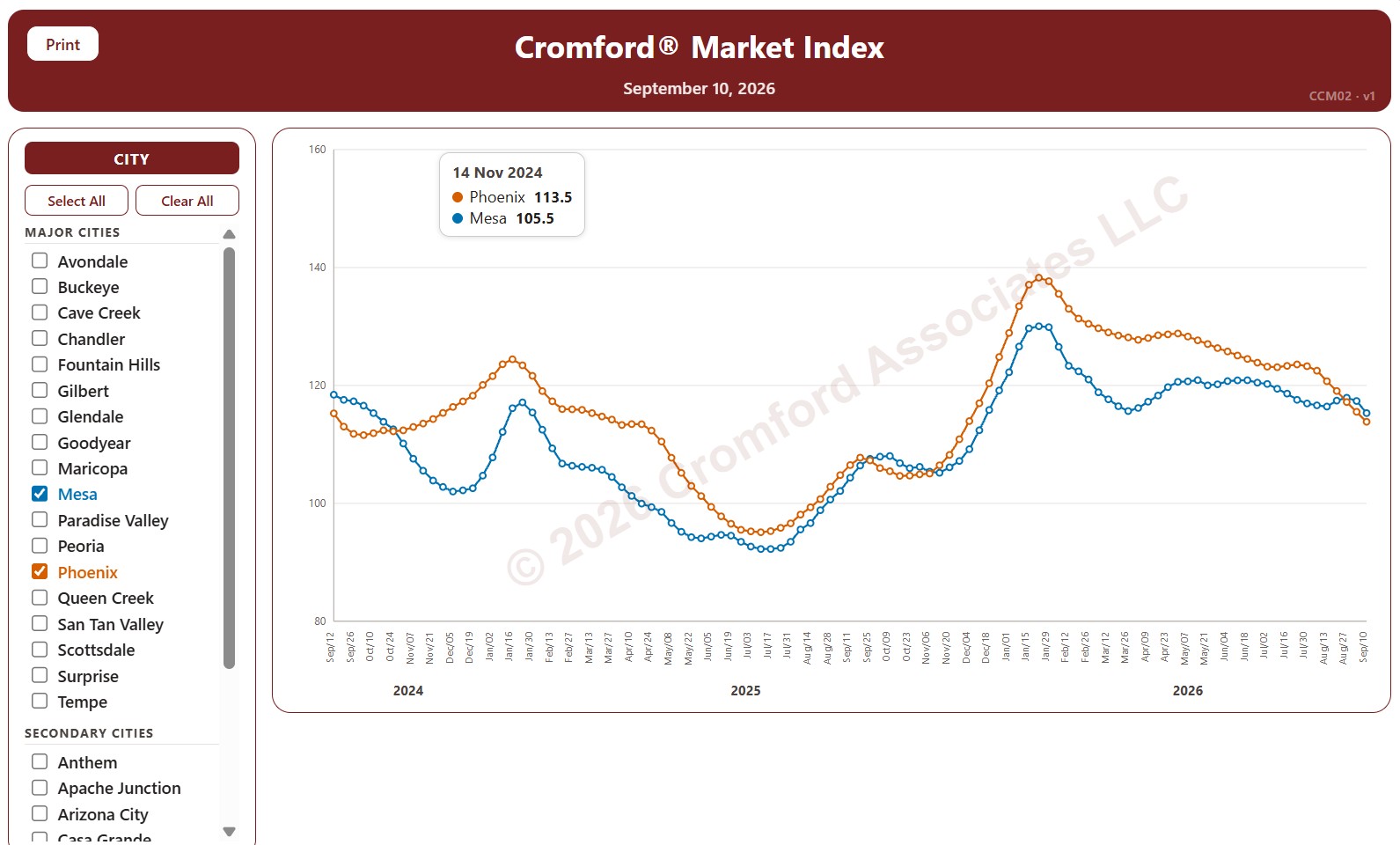
Cromford® Market Index by City

About this chart

This chart tracks the Cromford® Market Index for 34 cities in and around Greater Phoenix over the last 24 months, one point per week (each Thursday). It covers single-family detached resale homes listed on ARMLS. The 18 major cities are drawn as solid lines and the 16 secondary cities as dashed lines.

A reading above 110 means the city’s market favors sellers, below 90 it favors buyers, and between 90 and 110 the market is balanced. The index looks ahead, so the direction of a line shows which way the balance between buyers and sellers is moving.

Use the city check boxes, or Select All and Clear All, to choose which cities are shown. Hover over a line to see the exact reading for that week.

Market Dashboard

About this chart

This dashboard summarizes the current state of the residential market for all areas and types covered by ARMLS. It is measured daily and shows where the market stands today; for longer-term trends, use the individual charts in the Analysis section.

Use Select Type of Data to switch between 14 views: Sale Price / Sq Ft, Cromford® Index, Inventory, Active Listings, Under Contract, Expired Listings, Canceled Listings, List Price / Sq Ft, Closed Listings, Dollar Volume, Days on Market, Success Rate, Square Feet, and Sale Price $.

Each tile compares a recent figure with an earlier one and is colored to show whether the change is good for sellers, bad for sellers, or neither. The chart beneath the tiles shows the last 13 months, month by month. Hover over it to see each figure.

Contract Fall-Through Rate by City and ZIP Code

About this chart

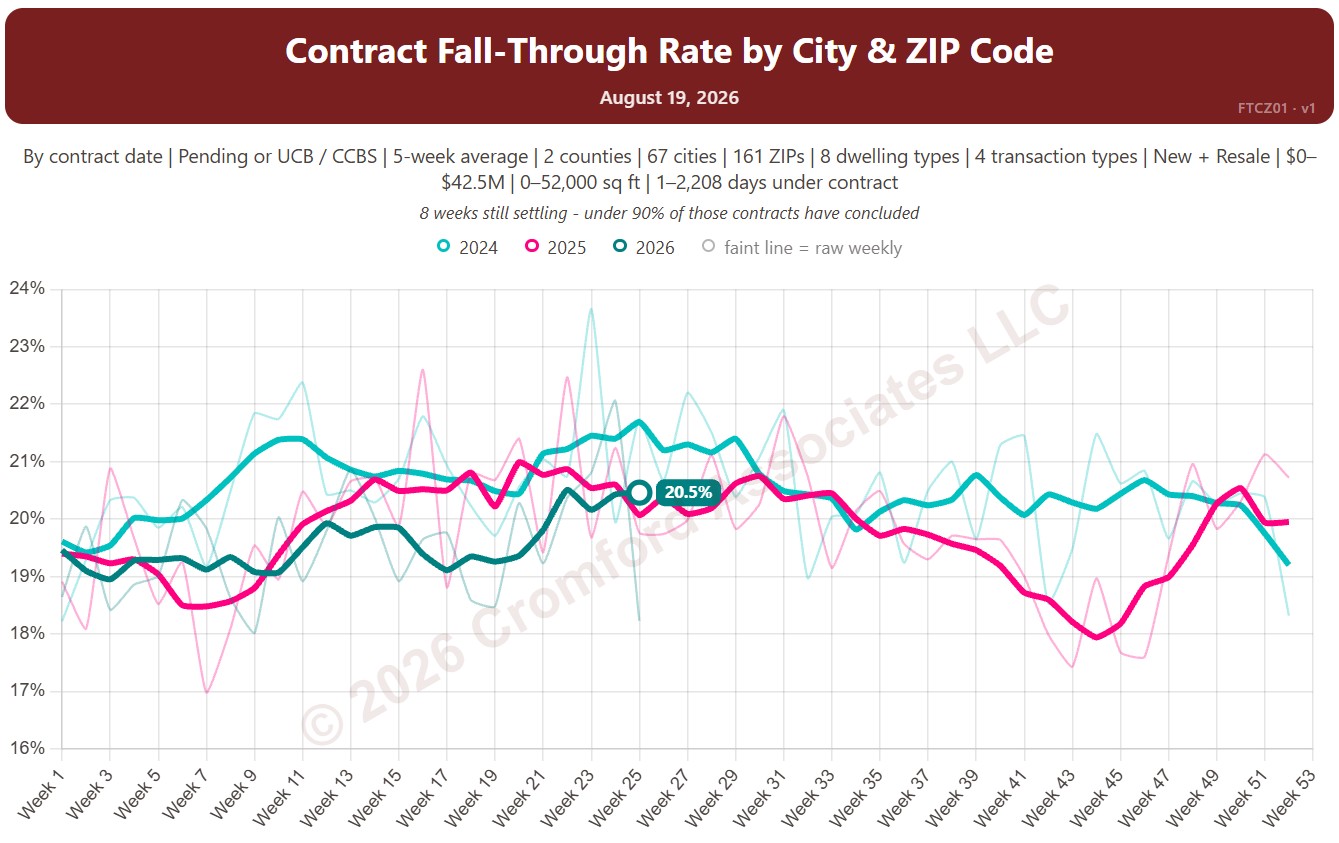
This chart shows the contract fall-through rate, measured every week: the share of accepted contracts that ended without the home closing, for example because financing or an inspection failed. The lines show a 5-week average to smooth out week-to-week noise.

By default contracts are counted by the date they were accepted and include Pending and UCB / CCBS contracts. Rate Basis switches to the date each contract ended, and Listing Status can limit it to Pending contracts only.

Each year has its own line, laid out by week of the year, so you can compare this year with earlier years at the same point in the season. It opens on the last three years; tick any year back to 2011 in the Year panel.

It opens on Maricopa and Pinal Counties with every city and ZIP code included. Use the County, City, and ZIP panels to focus on any area, from a whole county down to a single ZIP code. Narrow it with the Dwelling Type, Transaction Type, and New / Resale boxes and the list price, home size, and days under contract sliders.

Hover over a line to see the exact figure for that week.
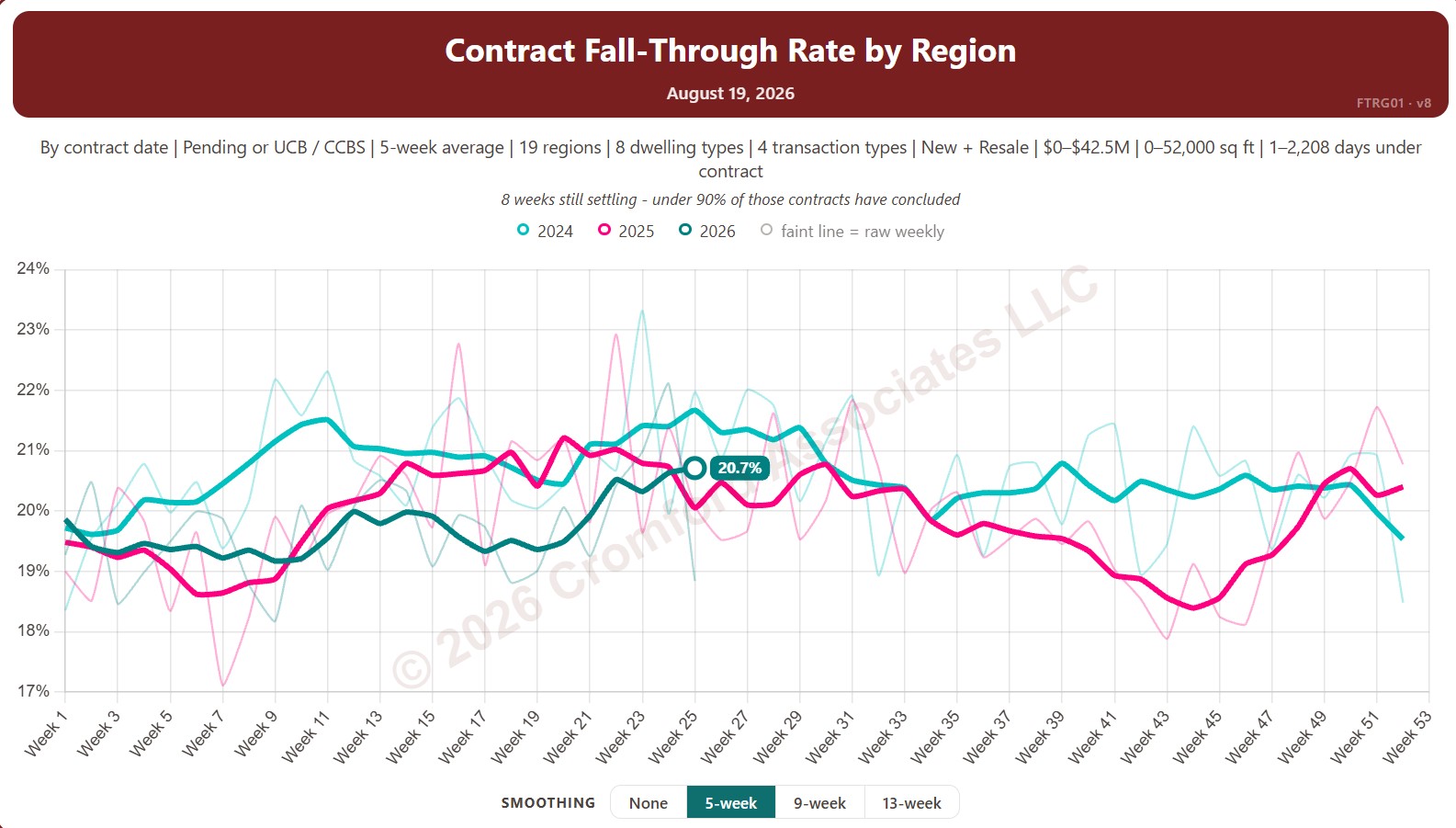
Contract Fall-Through Rate by Region

About this chart

This chart shows the contract fall-through rate, measured every week: the share of accepted contracts that ended without the home closing, for example because financing or an inspection failed. The lines show a 5-week average to smooth out week-to-week noise.

By default contracts are counted by the date they were accepted and include Pending and UCB / CCBS contracts. Rate Basis switches to the date each contract ended, and Listing Status can limit it to Pending contracts only.

Each year has its own line, laid out by week of the year, so you can compare this year with earlier years at the same point in the season. It opens on the last three years; tick any year back to 2011 in the Year panel.

It opens with every region included. Use the Region panel to focus on one region or compare a combination of them. Narrow it with the Dwelling Type, Transaction Type, and New / Resale boxes and the list price, home size, and days under contract sliders.

Hover over a line to see the exact figure for that week.
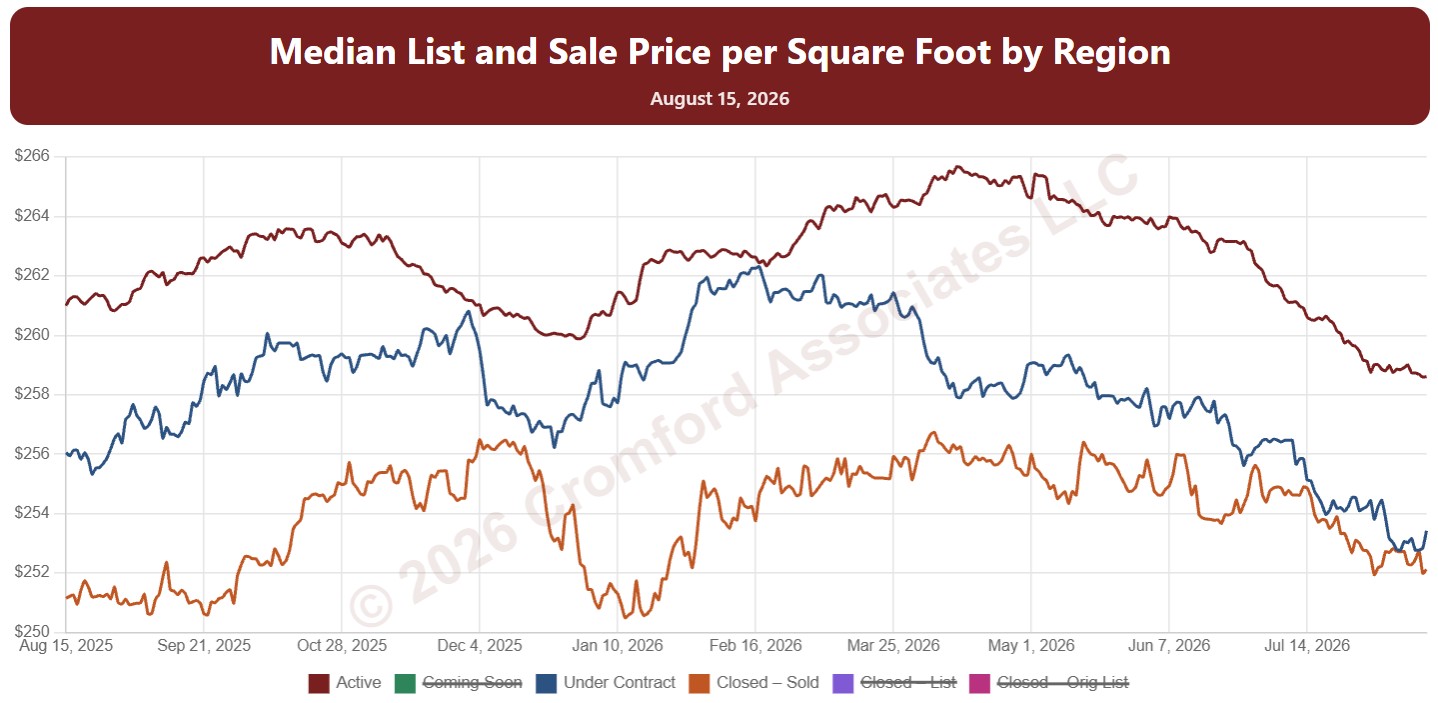
Median List Price per Square Foot by Region

About this chart

This chart shows median price per square foot every day over the last 12 months, with one line each for Active, Coming Soon, and Under Contract listings (their list prices) and three for homes that closed: the sale price, the final list price, and the original list price.

Reading the lines together shows the gap between what sellers ask and what buyers pay, and how much prices were cut along the way.

It opens with every region included. Use the Region panel to focus on one region or compare a combination of them. Narrow it with the Dwelling Type, Transaction Type, and New / Resale boxes and the list price, home size, and year built sliders.

Hover over the chart to see each figure for that day.

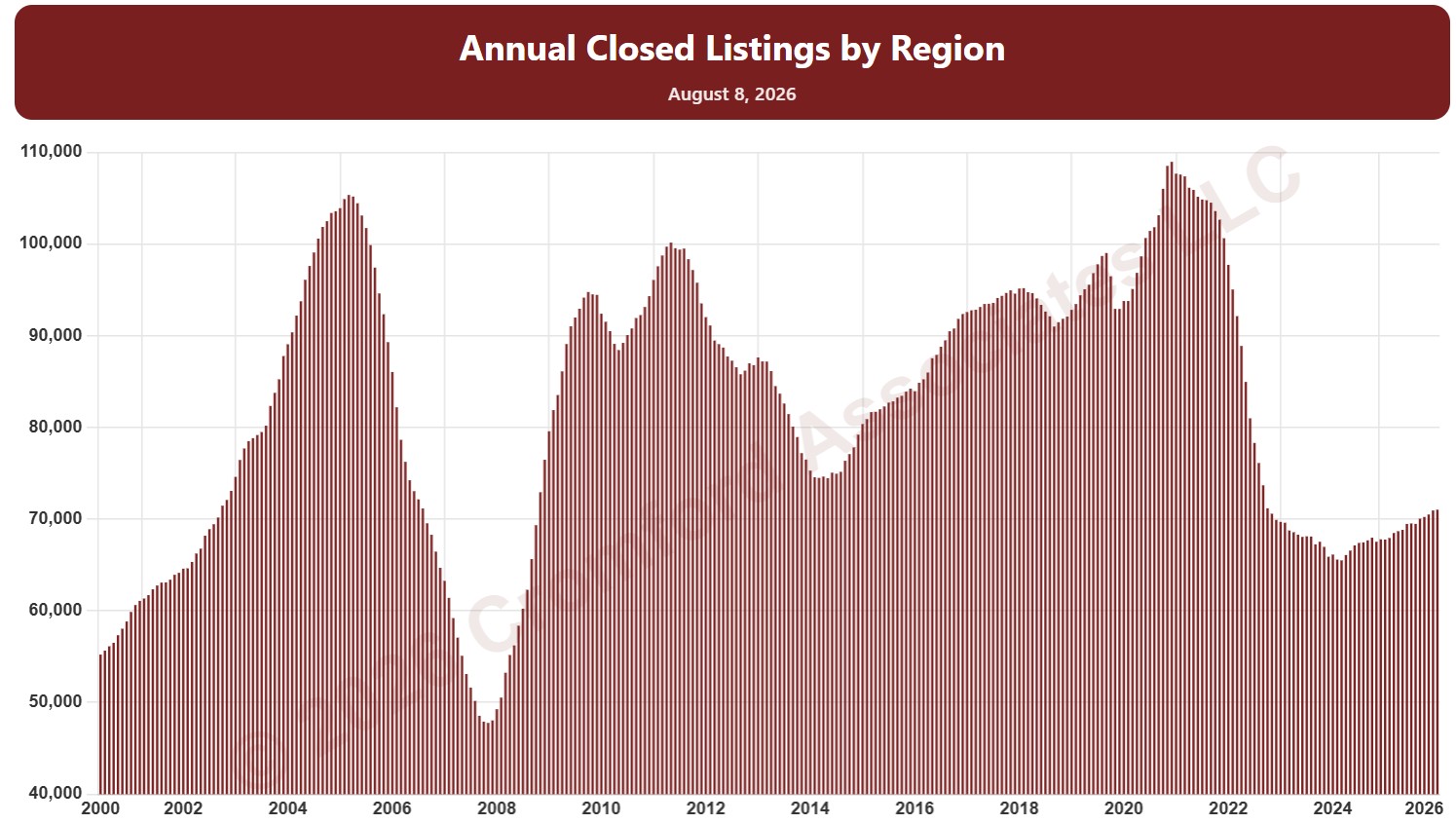
Annual Closed Listings by Region

About this chart

This chart counts the homes that closed through ARMLS over the last 12 months, measured on the 1st of every month, as one continuous series of bars back to 2000. It is the same measure as SARG11 laid out as a single timeline instead of one line per year.

It opens with every region included. Use the Region panel to focus on one region or compare a combination of them. Narrow it with the Dwelling Type, Transaction Type, and New / Resale boxes and the sales price, home size, and year built sliders. Use the date slider, or Full range, to choose the stretch of history shown.

Hover over a bar to see the exact figure for that month.

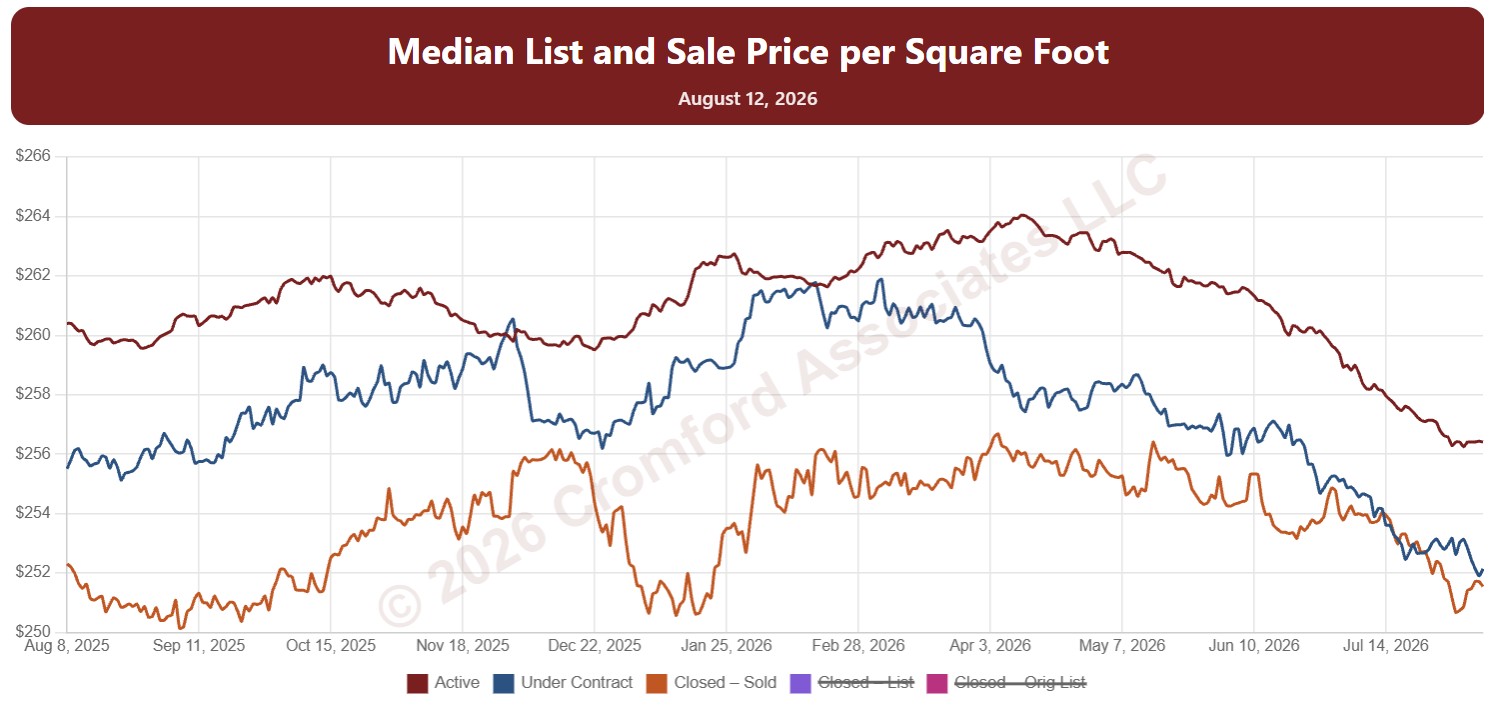
Median Price per Square Foot by City and ZIP Code

About this chart

This chart shows median price per square foot every day over the last 12 months, with one line each for Active, Coming Soon, and Under Contract listings (their list prices) and three for homes that closed: the sale price, the final list price, and the original list price.

Reading the lines together shows the gap between what sellers ask and what buyers pay, and how much prices were cut along the way.

It opens on Maricopa and Pinal Counties with every city and ZIP code included. Use the County, City, and ZIP panels to focus on any area, from a whole county down to a single ZIP code. Narrow it with the Dwelling Type, Transaction Type, and New / Resale boxes and the list price, home size, and year built sliders.

Hover over the chart to see each figure for that day.

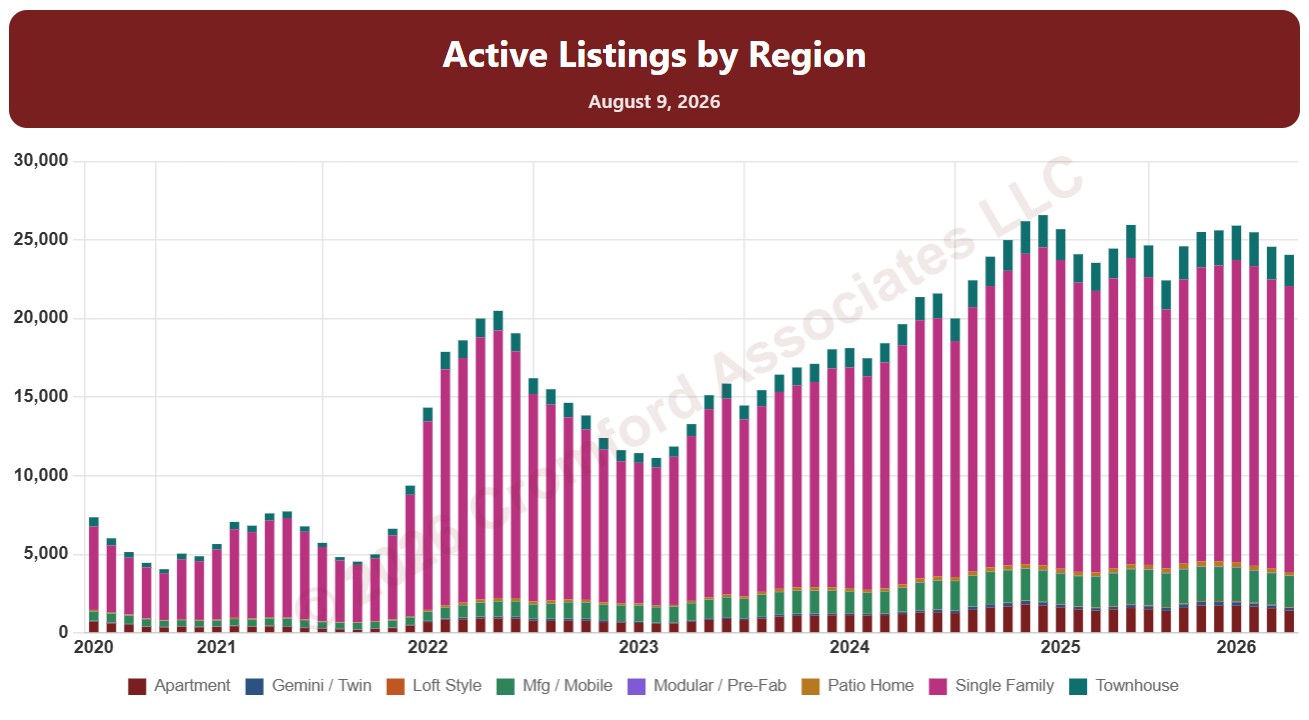
Active Listings by Region

About this chart

This chart counts the homes listed for sale on ARMLS on the 1st of every month since January 2011, as stacked bars.

By default it counts Active listings. Tick Coming Soon, UCB / CCBS (under contract but still accepting back-up offers), or Temp Off Market in the List Status panel to add them to the stack. A drop-down chooses what the bars are split by: list status, dwelling type, transaction type, or new / resale.

It opens with every region included. Use the Region panel to focus on one region or compare a combination of them. Narrow it with the Dwelling Type, List Status, Transaction Type, and New / Resale boxes and the list price, home size, year built, and days on market sliders. Use the date slider, or Full range, to choose the stretch of history shown.

Hover over a bar to see the counts for that month.